> ## Documentation Index
> Fetch the complete documentation index at: https://docs.honeyhive.ai/llms.txt
> Use this file to discover all available pages before exploring further.
# Authentication
> Authenticating your requests to the API
Authentication for HoneyHive's APIs is done by passing a bearer auth token that's generated when you first join the platform.
### Get your HoneyHive API Key
**Expected Time**: \< 1 minute
**Steps**:
* Click on the organization name in the top right corner of the screen
* Click `Copy API Key` from the dropdown
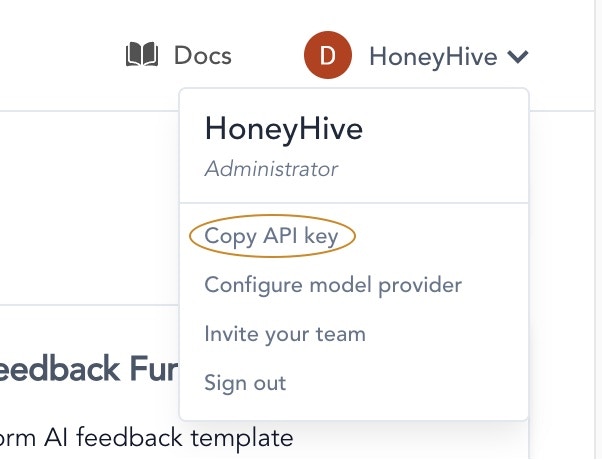 Now your HoneyHive API key is copied to clipboard, feel free to use it to authenticate with our APIs & SDKs.
### Provide Authentication header
You need to add the following header to your HTTPs requests
```jsx theme={null}
"Authorization": "Bearer " + HONEYHIVE_API_KEY
```
This will authenticate your requests to the API & tell us which organization to associate the request with.
## Related topics
- [Security](/v2/setup/security.md)
- [Environment Variables](/v2/sdk-reference/environment-variables.md)
- [Data Flow & Residency](/v2/setup/self-hosted/data-flow.md)
Now your HoneyHive API key is copied to clipboard, feel free to use it to authenticate with our APIs & SDKs.
### Provide Authentication header
You need to add the following header to your HTTPs requests
```jsx theme={null}
"Authorization": "Bearer " + HONEYHIVE_API_KEY
```
This will authenticate your requests to the API & tell us which organization to associate the request with.
## Related topics
- [Security](/v2/setup/security.md)
- [Environment Variables](/v2/sdk-reference/environment-variables.md)
- [Data Flow & Residency](/v2/setup/self-hosted/data-flow.md)