> ## Documentation Index
> Fetch the complete documentation index at: https://docs.honeyhive.ai/llms.txt
> Use this file to discover all available pages before exploring further.
# Product Updates
> New updates and improvements to our core platform and SDKs.
## Core Platform
### Experiments Dashboard
Visualize metric trends across all your experiments in a single unified view.
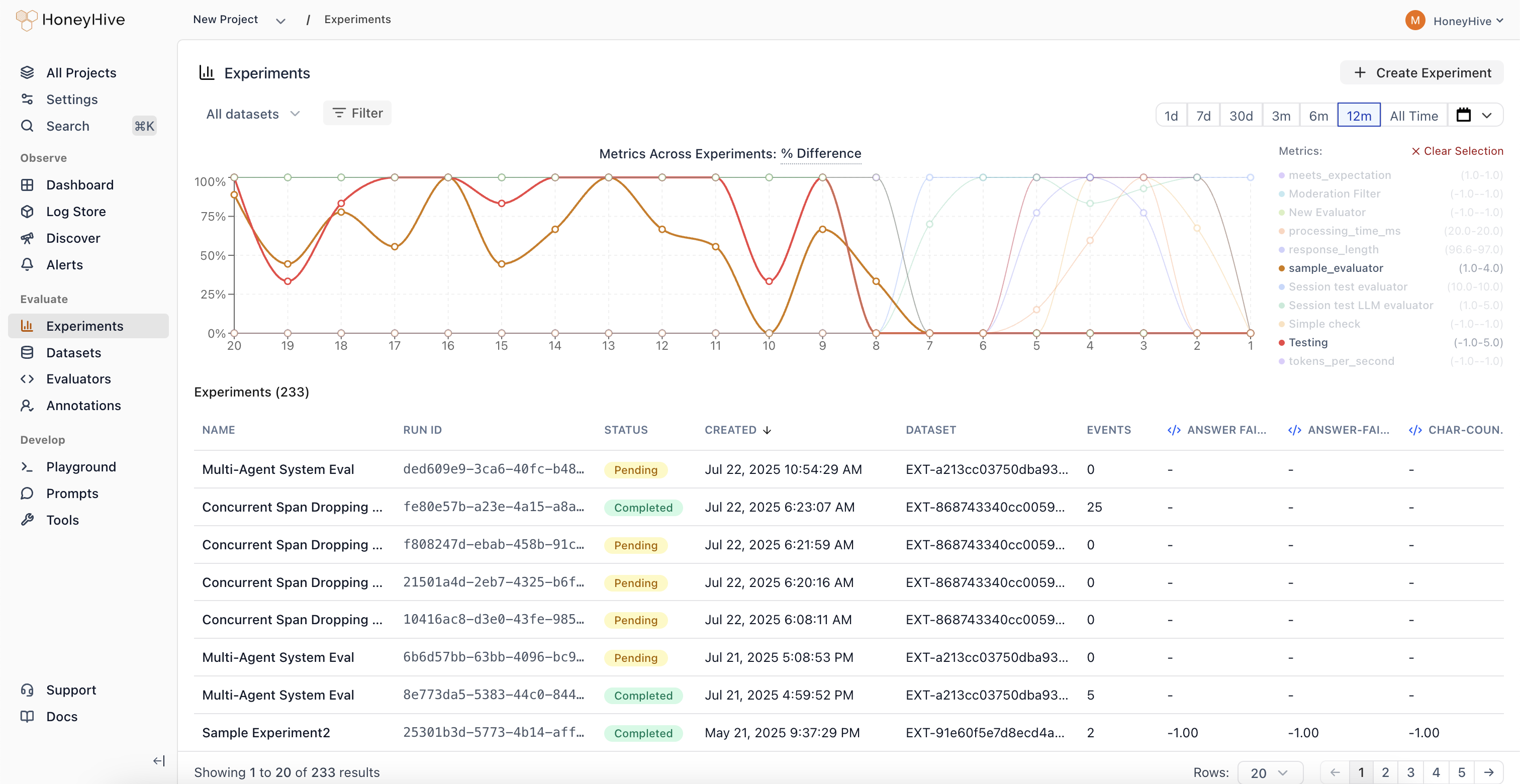 The new Experiments dashboard provides comprehensive visibility into how changes affect your AI application's quality over time:
View and compare metrics across 100+ experiments simultaneously. See results from experiments using different prompts, models, and retrieval parameters side-by-side.
Identify when changes negatively impact your application's quality metrics. Metric trends make it easy to spot regressions at a glance.
Track how sweeps across different configurations (prompts, models, retrieval parameters) impact performance over time.
Analyze experiment results without jumping between individual experiment pages. All your experiment data in one place for faster, data-driven decision making.
[Try it today →](https://app.us.honeyhive.ai/)
### Annotation Queues
Automated trace collection and streamlined human evaluation workflows.
The new Experiments dashboard provides comprehensive visibility into how changes affect your AI application's quality over time:
View and compare metrics across 100+ experiments simultaneously. See results from experiments using different prompts, models, and retrieval parameters side-by-side.
Identify when changes negatively impact your application's quality metrics. Metric trends make it easy to spot regressions at a glance.
Track how sweeps across different configurations (prompts, models, retrieval parameters) impact performance over time.
Analyze experiment results without jumping between individual experiment pages. All your experiment data in one place for faster, data-driven decision making.
[Try it today →](https://app.us.honeyhive.ai/)
### Annotation Queues
Automated trace collection and streamlined human evaluation workflows.
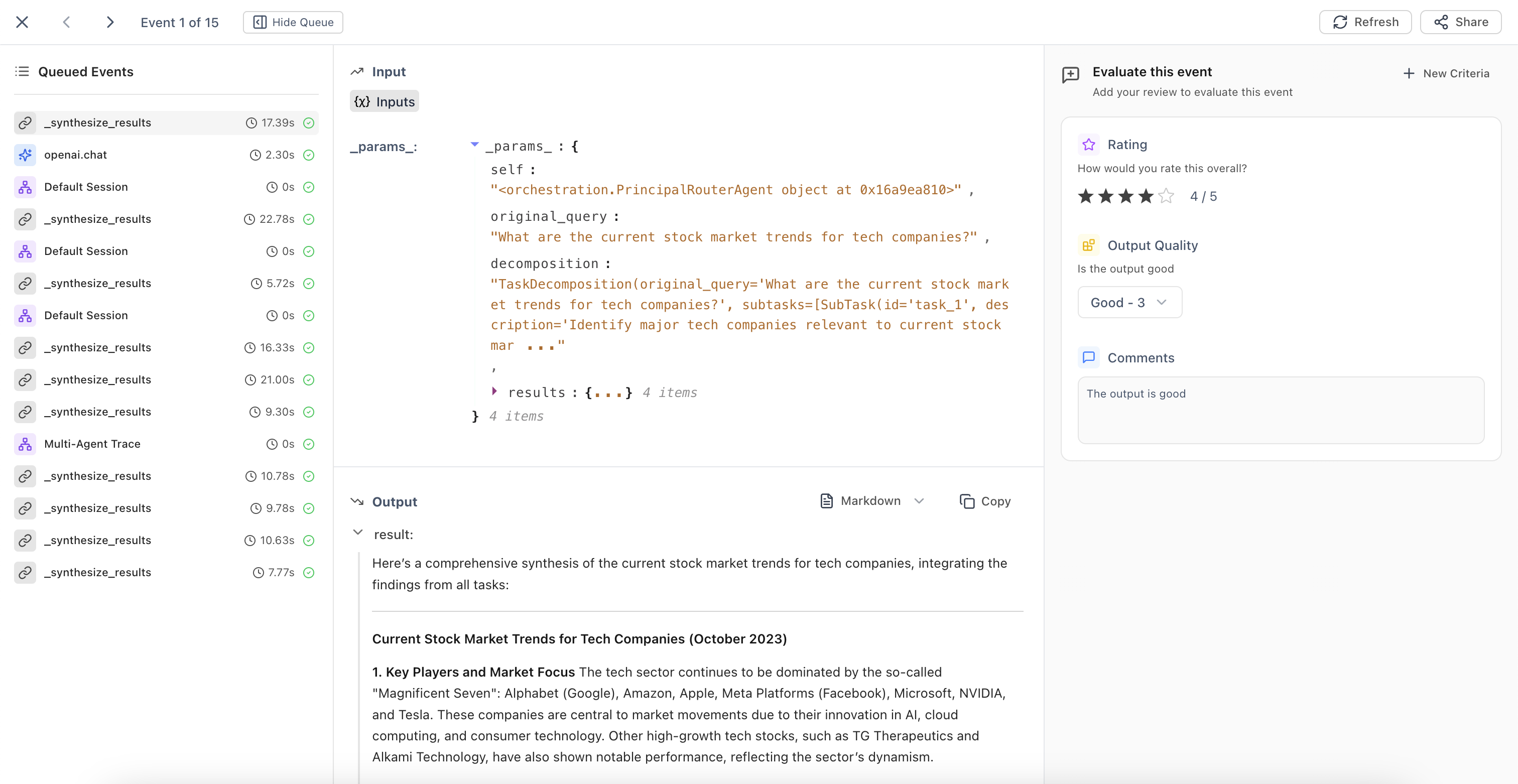 Configure filters to automatically add traces matching specific criteria to annotation queues. The system continuously runs in the background, identifying traces that need human review.
Domain experts can evaluate traces based on predefined criteria fields. Use ← → arrow keys for quick navigation between events during high-volume annotation tasks.
Build high-quality datasets and maintain consistent human oversight of your AI applications with organized evaluation workflows.
## Core Platform
### Improved Evaluators UX
Configure filters to automatically add traces matching specific criteria to annotation queues. The system continuously runs in the background, identifying traces that need human review.
Domain experts can evaluate traces based on predefined criteria fields. Use ← → arrow keys for quick navigation between events during high-volume annotation tasks.
Build high-quality datasets and maintain consistent human oversight of your AI applications with organized evaluation workflows.
## Core Platform
### Improved Evaluators UX
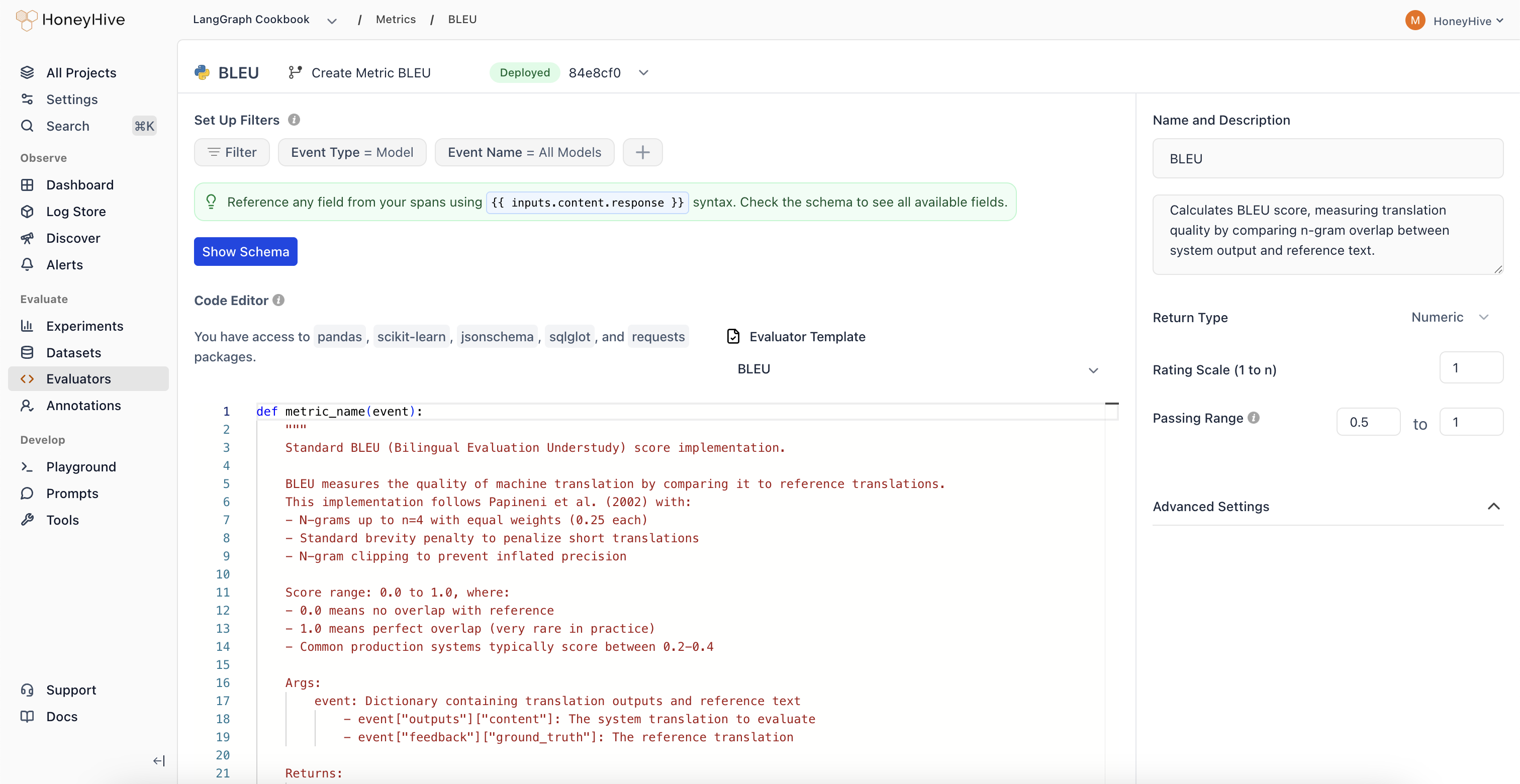 Redesigned evaluator creation interface that combines evaluator configuration and editor into a single unified view.
Configure evaluator parameters and edit evaluation logic in one place, eliminating the need to switch between multiple views. This streamlined workflow reduces context switching when creating and managing metrics.
## Core Platform
### New Evaluator Templates
Expanded evaluator templates library with 11 new pre-built templates for common evaluation patterns.
| Category | Evaluators |
| -------------------------- | ---------------------------------------------------------------------------------------------------------------- |
| **Agent Evaluation** | • Chain-of-Thought Faithfulness
Redesigned evaluator creation interface that combines evaluator configuration and editor into a single unified view.
Configure evaluator parameters and edit evaluation logic in one place, eliminating the need to switch between multiple views. This streamlined workflow reduces context switching when creating and managing metrics.
## Core Platform
### New Evaluator Templates
Expanded evaluator templates library with 11 new pre-built templates for common evaluation patterns.
| Category | Evaluators |
| -------------------------- | ---------------------------------------------------------------------------------------------------------------- |
| **Agent Evaluation** | • Chain-of-Thought Faithfulness
• Plan Coverage
• Trajectory Plan Faithfulness
• Failure Recovery |
| **Safety** | • Policy Compliance
• Harm Avoidance |
| **RAG** | • Context Coverage |
| **Text Evaluation** | • Tone Appropriateness |
| **Translation** | • Translation Fluency |
| **Code Generation** | • Compilation Success |
| **Classification Metrics** | • Precision/Recall/F1 Metrics |
Quick-start your evaluations with production-ready templates that follow best practices for various AI application use cases.
## Core Platform
### Improved Review Mode
Enhanced context indicators in Review Mode that clearly show which output type you're evaluating.
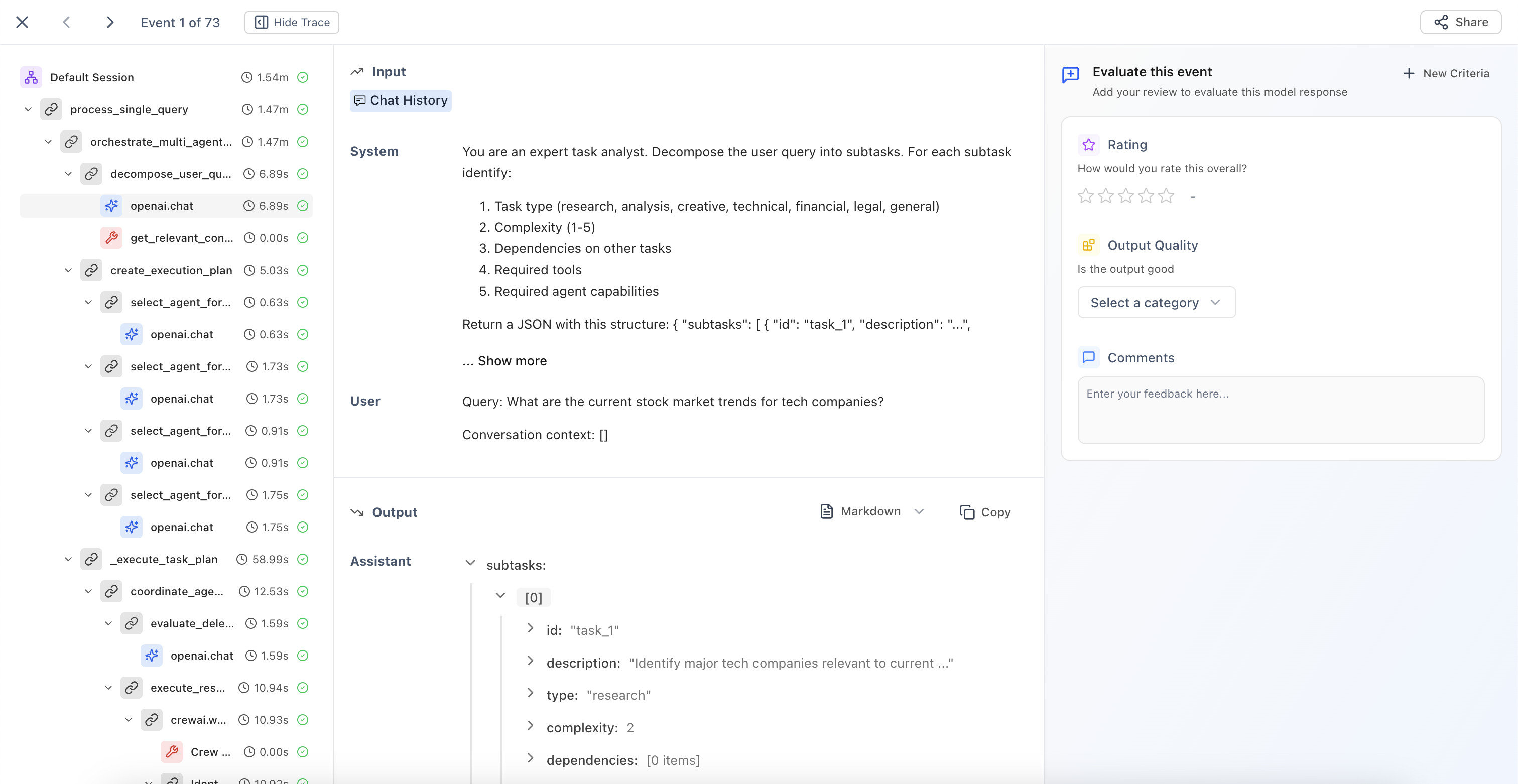 The UI now explicitly indicates whether you're providing reviews on:
Evaluate individual LLM responses with clear context about the model being reviewed.
Review end-to-end agent interactions and complete conversation flows.
Assess function and API call results with full execution context.
Analyze multi-step process results and complex execution paths.
This improved clarity helps domain experts provide more accurate and consistent feedback when working with complex multi-agent systems.
## Core Platform
### Categorical Evaluators
New evaluator type that enables classification-based human evaluation with custom scoring.
The UI now explicitly indicates whether you're providing reviews on:
Evaluate individual LLM responses with clear context about the model being reviewed.
Review end-to-end agent interactions and complete conversation flows.
Assess function and API call results with full execution context.
Analyze multi-step process results and complex execution paths.
This improved clarity helps domain experts provide more accurate and consistent feedback when working with complex multi-agent systems.
## Core Platform
### Categorical Evaluators
New evaluator type that enables classification-based human evaluation with custom scoring.
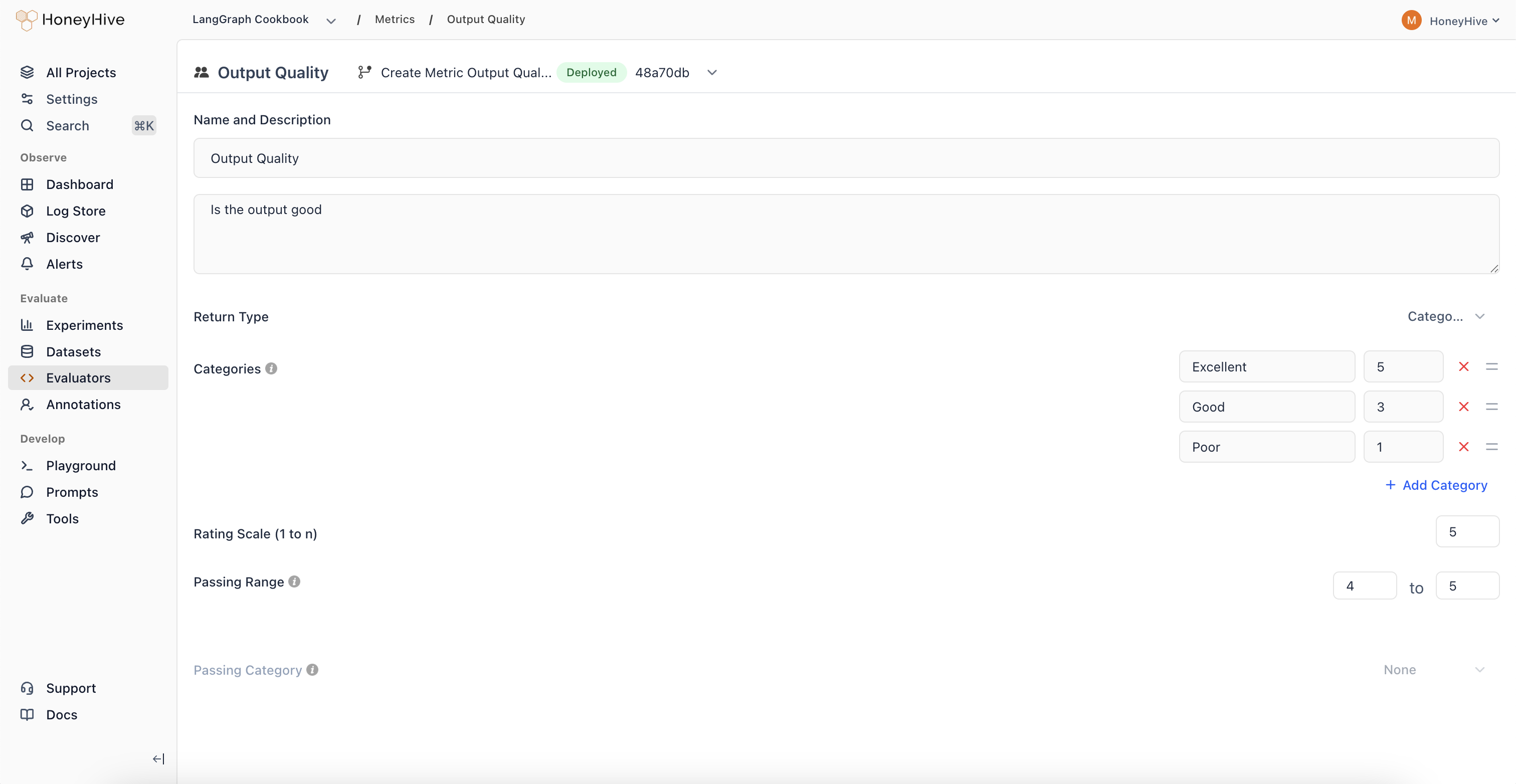 Define custom categorical labels and assign specific scores to each category.
Create binary classifications with associated scores for clear go/no-go decisions.
Track when outputs shift from high-scoring to low-scoring categories over time.
Define multiple categories representing different quality levels or response types.
Categorical evaluators provide more structured and interpretable evaluation results compared to purely numeric scores, making it easier to identify specific failure modes in your AI applications.
## Core Platform
### Thread View
New visualization mode that displays all LLM events and chat history in a unified, chronological timeline.
Define custom categorical labels and assign specific scores to each category.
Create binary classifications with associated scores for clear go/no-go decisions.
Track when outputs shift from high-scoring to low-scoring categories over time.
Define multiple categories representing different quality levels or response types.
Categorical evaluators provide more structured and interpretable evaluation results compared to purely numeric scores, making it easier to identify specific failure modes in your AI applications.
## Core Platform
### Thread View
New visualization mode that displays all LLM events and chat history in a unified, chronological timeline.
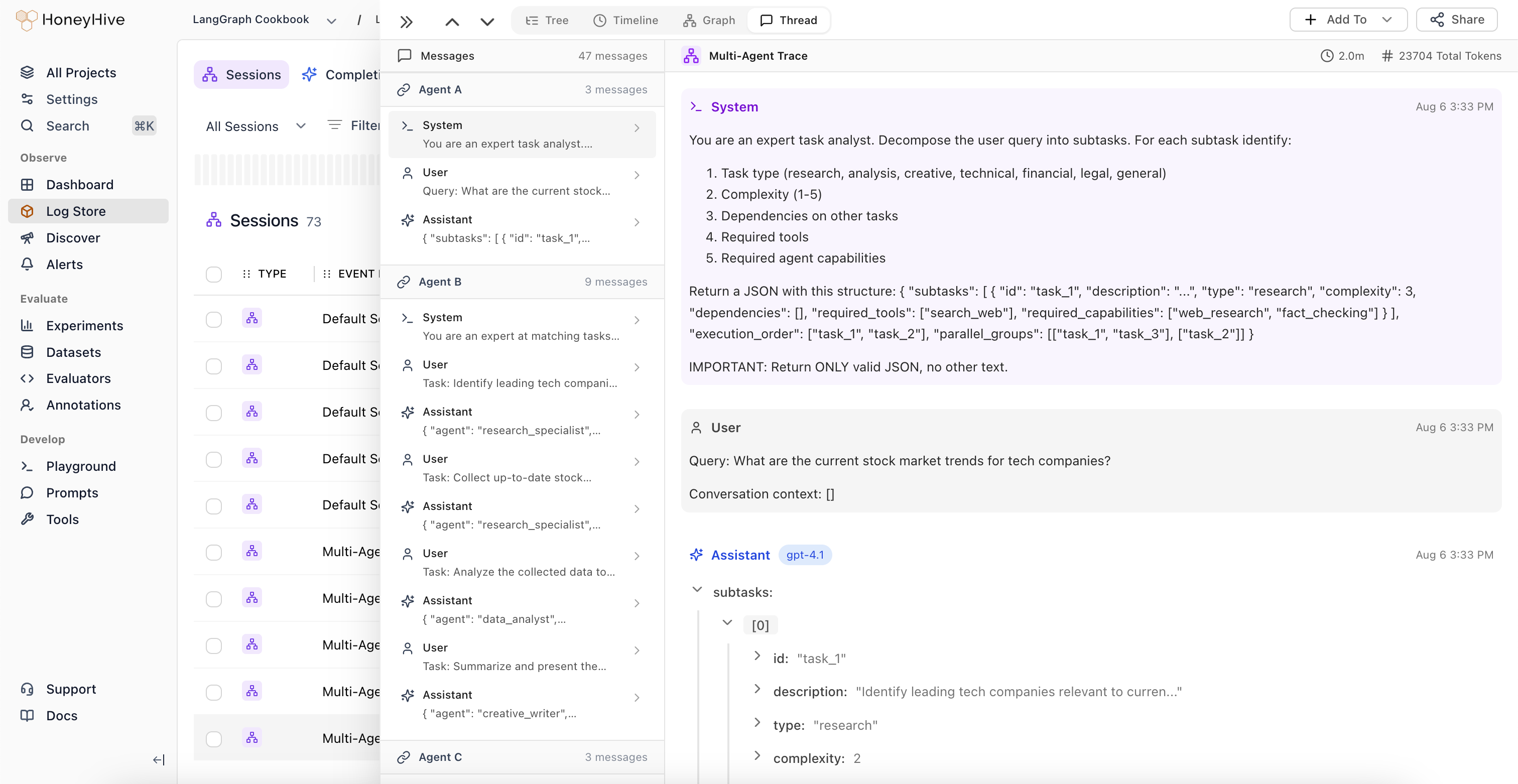 View all LLM events alongside complete chat history in a single interface. Understand the full context of multi-turn conversations without navigating through nested spans.
The system automatically identifies when control passes between different LLM workflows or agents, highlighting transition points in complex multi-agent systems.
Domain experts can provide feedback at the session level, which is automatically applied to the root span (session event) in the trace.
## Core Platform
### Improved Graph View
Major enhancements to Graph View with automatic node deduplication and new analytical features.
View all LLM events alongside complete chat history in a single interface. Understand the full context of multi-turn conversations without navigating through nested spans.
The system automatically identifies when control passes between different LLM workflows or agents, highlighting transition points in complex multi-agent systems.
Domain experts can provide feedback at the session level, which is automatically applied to the root span (session event) in the trace.
## Core Platform
### Improved Graph View
Major enhancements to Graph View with automatic node deduplication and new analytical features.
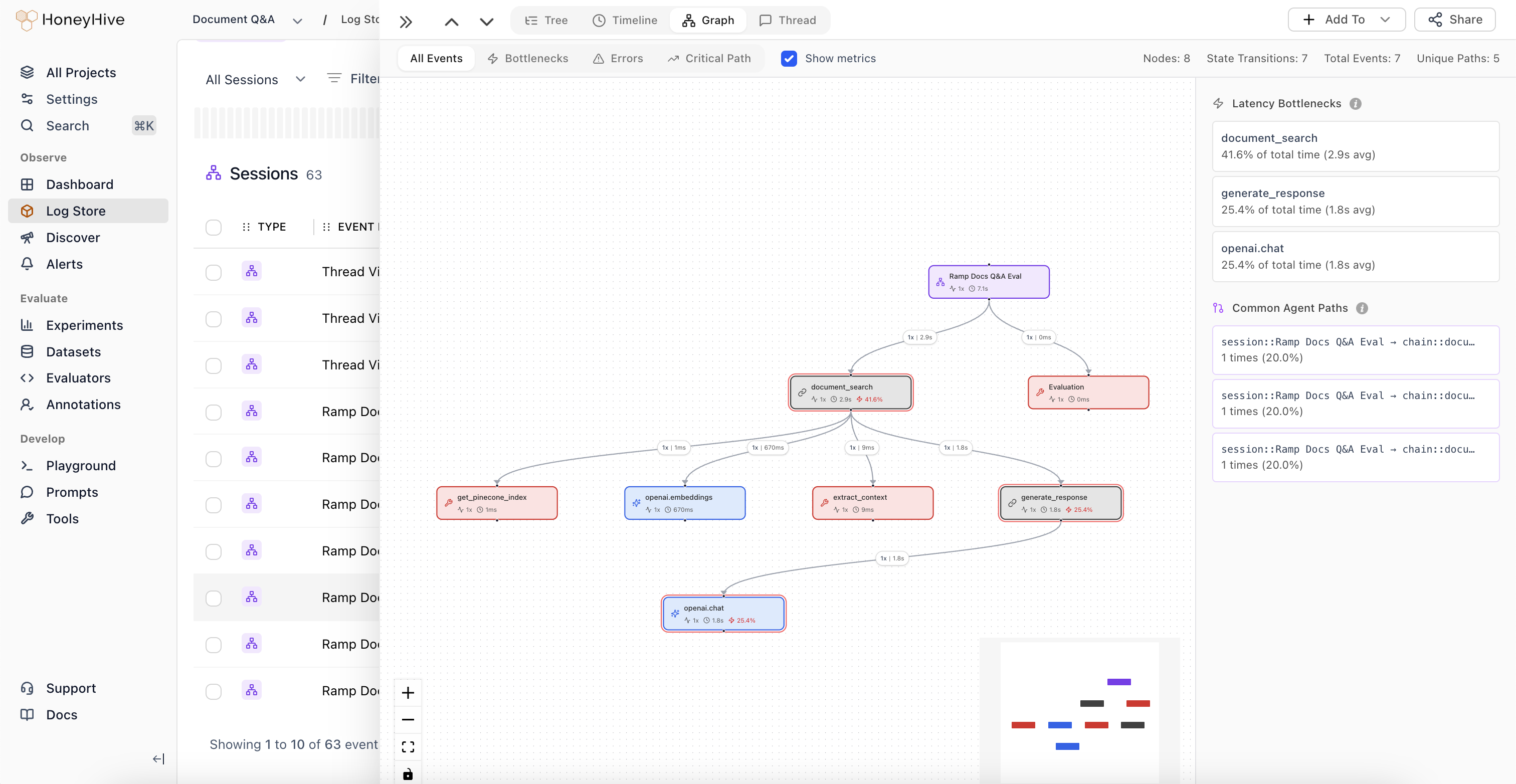 The graph now intelligently deduplicates nodes, simplifying visualization of complex agent trajectories.
View total number of nodes, state transitions, and structural complexity metrics for your agent workflows.
Edge thickness represents execution frequency, making common paths immediately visible.
Identify which nodes are causing performance issues in your agent workflows.
Visualize the most frequent paths through your agent's decision tree to understand typical execution patterns.
## Core Platform
### [Introducing Alerts](https://docs.honeyhive.ai/monitoring/alerts)
Monitor key metrics and get notified when behavior changes in your AI applications.
The graph now intelligently deduplicates nodes, simplifying visualization of complex agent trajectories.
View total number of nodes, state transitions, and structural complexity metrics for your agent workflows.
Edge thickness represents execution frequency, making common paths immediately visible.
Identify which nodes are causing performance issues in your agent workflows.
Visualize the most frequent paths through your agent's decision tree to understand typical execution patterns.
## Core Platform
### [Introducing Alerts](https://docs.honeyhive.ai/monitoring/alerts)
Monitor key metrics and get notified when behavior changes in your AI applications.
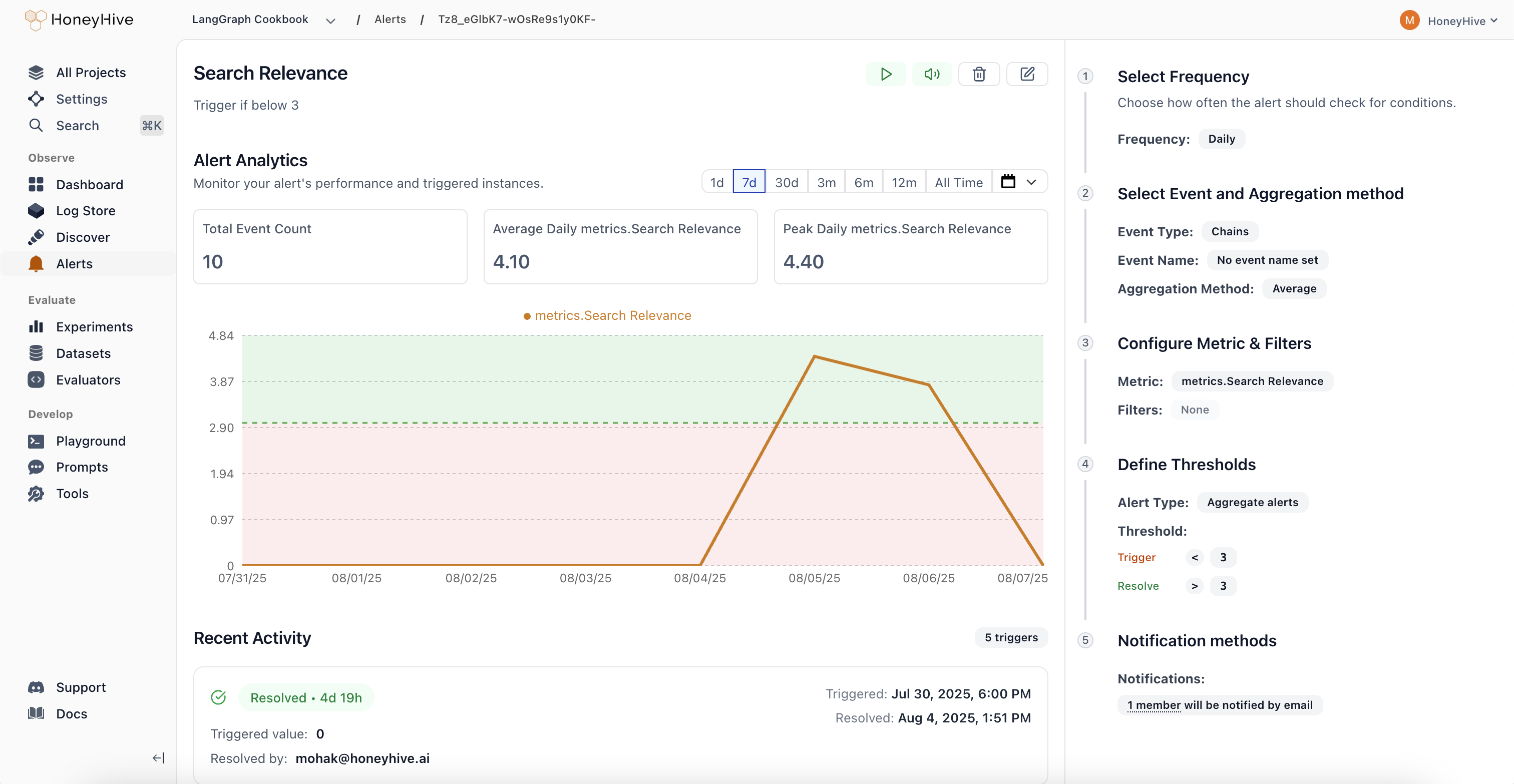 1. **Comprehensive Monitoring:**
Track performance metrics (latency, error rate), quality scores from evaluators, cost and usage patterns, plus any custom fields from your events or sessions. Get visibility into what matters most for your AI applications.
2. **Smart Alert Types:**
**Aggregate Alerts** trigger when metrics cross absolute thresholds, while **Drift Alerts** detect when current performance deviates from previous periods by a configurable percentage. Choose the right detection method for your use case.
3. **Flexible Scheduling:**
Configure alerts to run hourly, daily, weekly, or monthly based on your monitoring needs. Set custom evaluation windows to balance responsiveness with noise reduction.
4. **Streamlined Workflow:**
Real-time preview charts show exactly what your alert will monitor, guided configuration in the right panel walks you through setup, and a recent activity feed tracks alert history. Manage alert states (Active, Triggered, Resolved, Paused, Muted) directly from each alert's detail page.
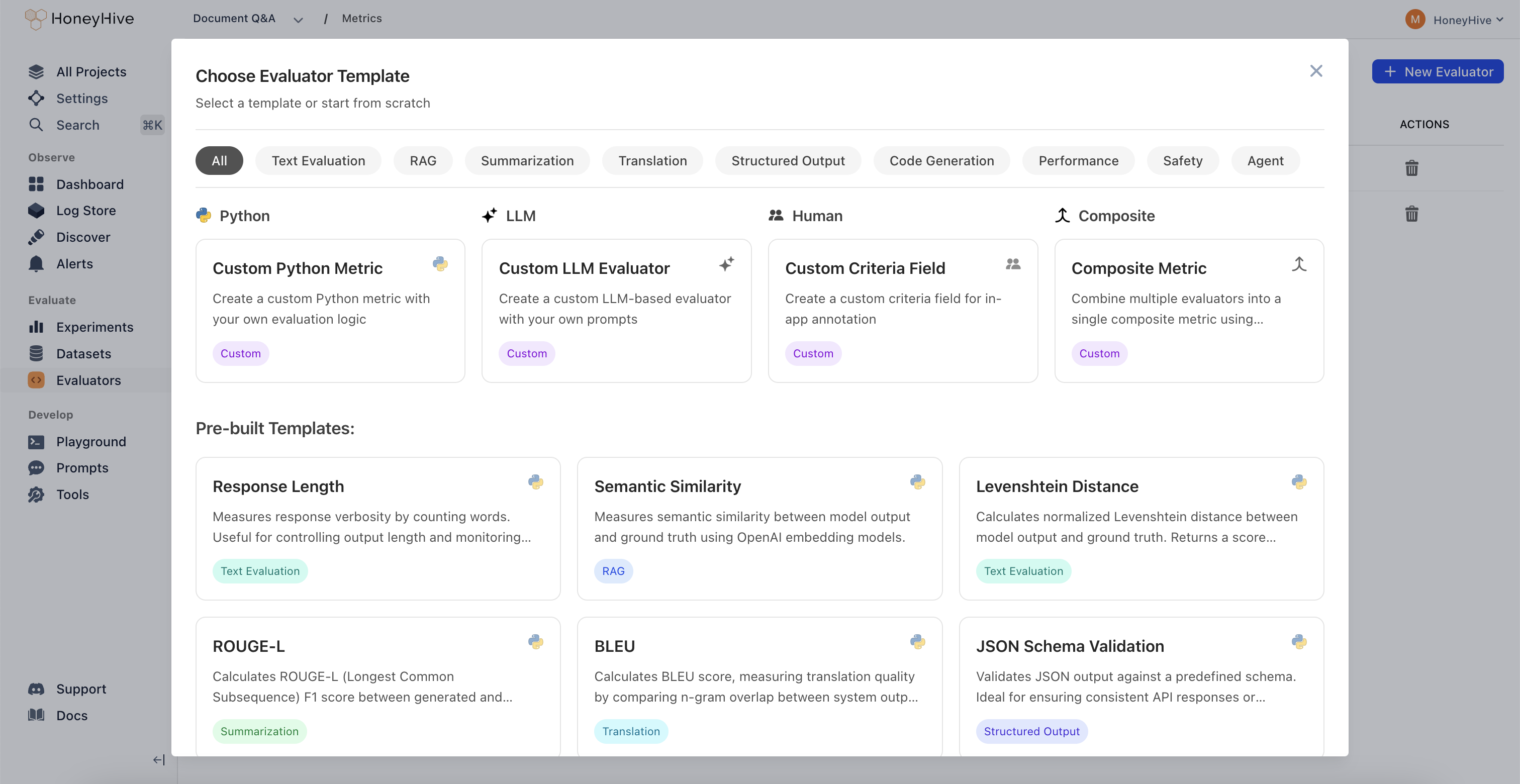
### Evaluator Templates Gallery
Quick-start your evaluations with pre-built templates organized by use case: Agent Trajectory, Tool Selection, RAG, Summarization, Translation, Structured Output, Code Generation, Performance, Safety, and Traditional NLP.
1. **Comprehensive Monitoring:**
Track performance metrics (latency, error rate), quality scores from evaluators, cost and usage patterns, plus any custom fields from your events or sessions. Get visibility into what matters most for your AI applications.
2. **Smart Alert Types:**
**Aggregate Alerts** trigger when metrics cross absolute thresholds, while **Drift Alerts** detect when current performance deviates from previous periods by a configurable percentage. Choose the right detection method for your use case.
3. **Flexible Scheduling:**
Configure alerts to run hourly, daily, weekly, or monthly based on your monitoring needs. Set custom evaluation windows to balance responsiveness with noise reduction.
4. **Streamlined Workflow:**
Real-time preview charts show exactly what your alert will monitor, guided configuration in the right panel walks you through setup, and a recent activity feed tracks alert history. Manage alert states (Active, Triggered, Resolved, Paused, Muted) directly from each alert's detail page.
### Evaluator Templates Gallery
Quick-start your evaluations with pre-built templates organized by use case: Agent Trajectory, Tool Selection, RAG, Summarization, Translation, Structured Output, Code Generation, Performance, Safety, and Traditional NLP.
 ## Core Platform
### New Trace Visualization Modes
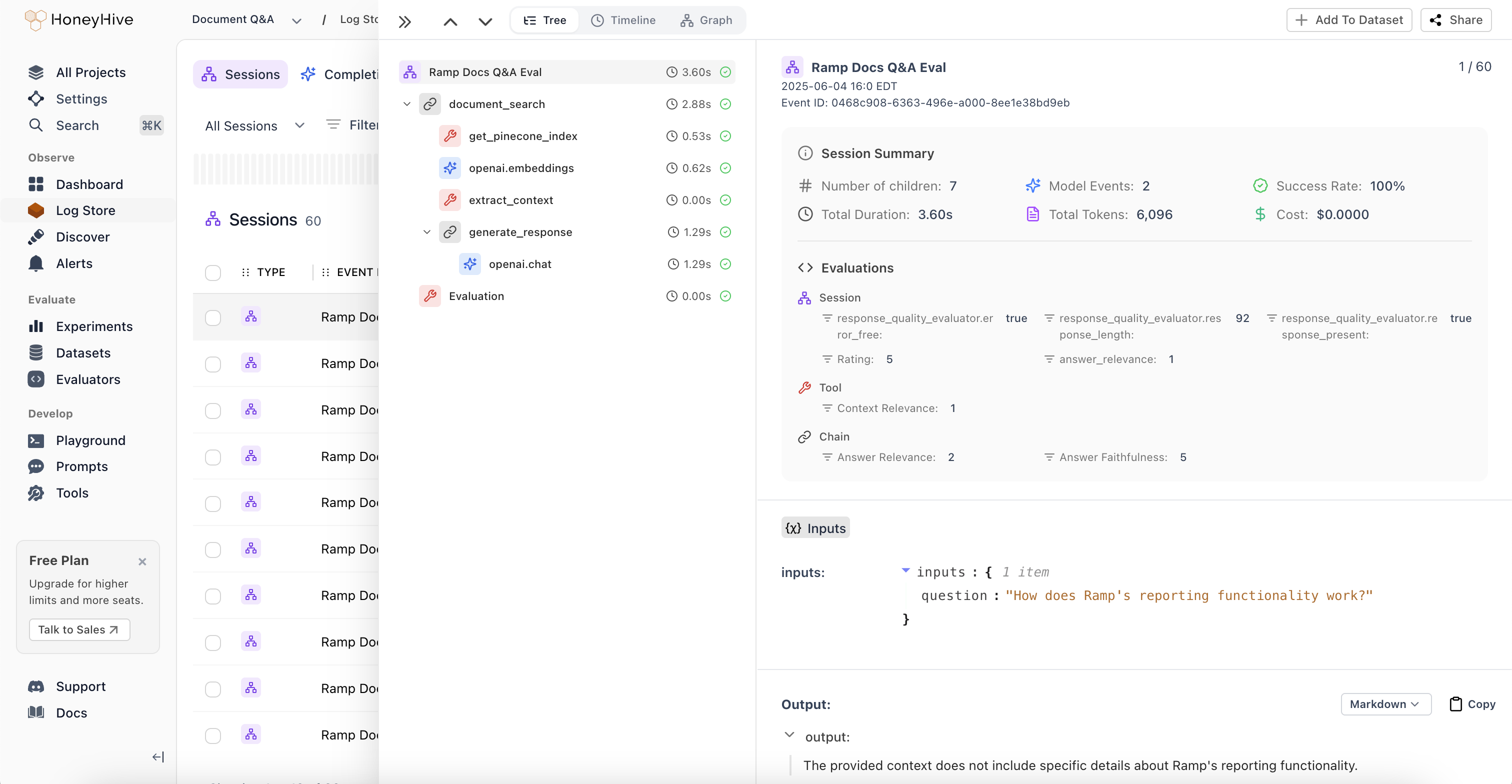
1. **Session Summaries and New Tree View:**
Unified view of metrics, evaluations, and feedback across all spans in an agent session. Get a comprehensive overview without jumping between individual spans to understand overall session performance.
## Core Platform
### New Trace Visualization Modes
1. **Session Summaries and New Tree View:**
Unified view of metrics, evaluations, and feedback across all spans in an agent session. Get a comprehensive overview without jumping between individual spans to understand overall session performance.
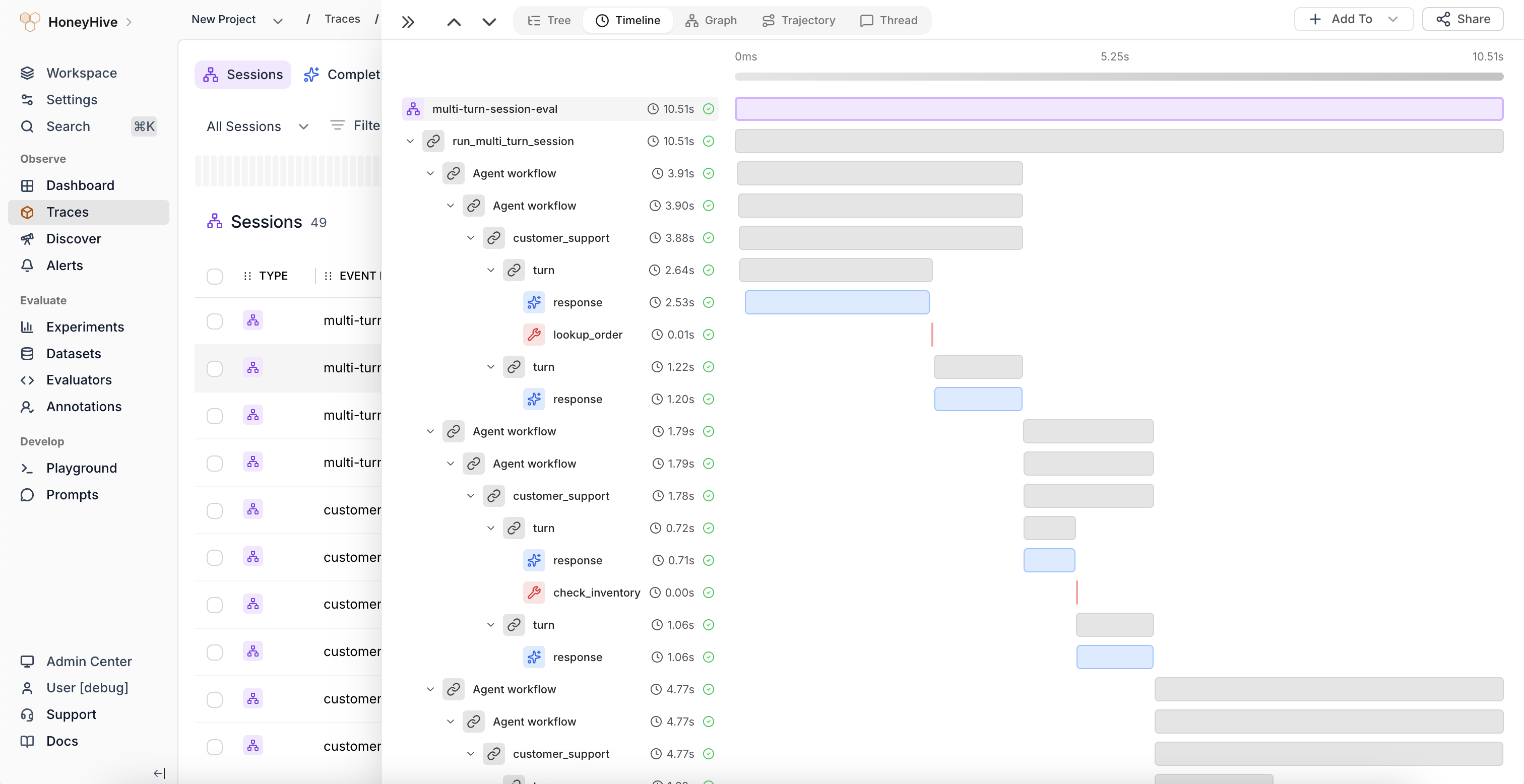
 2. **Timeline View:**
Flamegraph visualization that identifies latency bottlenecks and shows the relationship between sequential and parallel operations in your agent workflows. Perfect for performance optimization and understanding execution flow.
2. **Timeline View:**
Flamegraph visualization that identifies latency bottlenecks and shows the relationship between sequential and parallel operations in your agent workflows. Perfect for performance optimization and understanding execution flow.
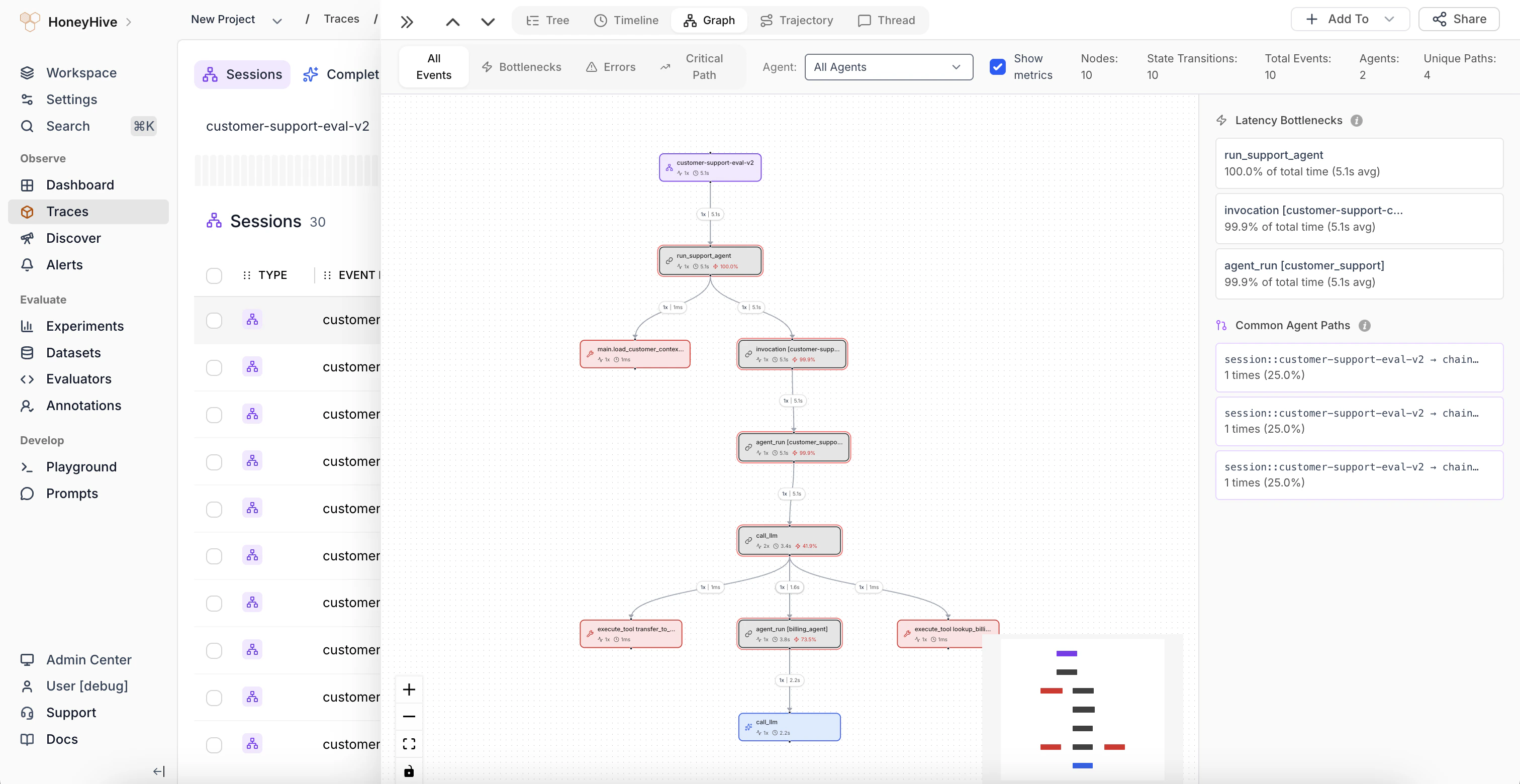
 3. **Graph View:**
Visual representation of complex execution paths and decision points through multi-agent workflows. Quickly understand how your agents interact and make decisions at a glance.
3. **Graph View:**
Visual representation of complex execution paths and decision points through multi-agent workflows. Quickly understand how your agents interact and make decisions at a glance.
 ### Improved Log Store Analytics
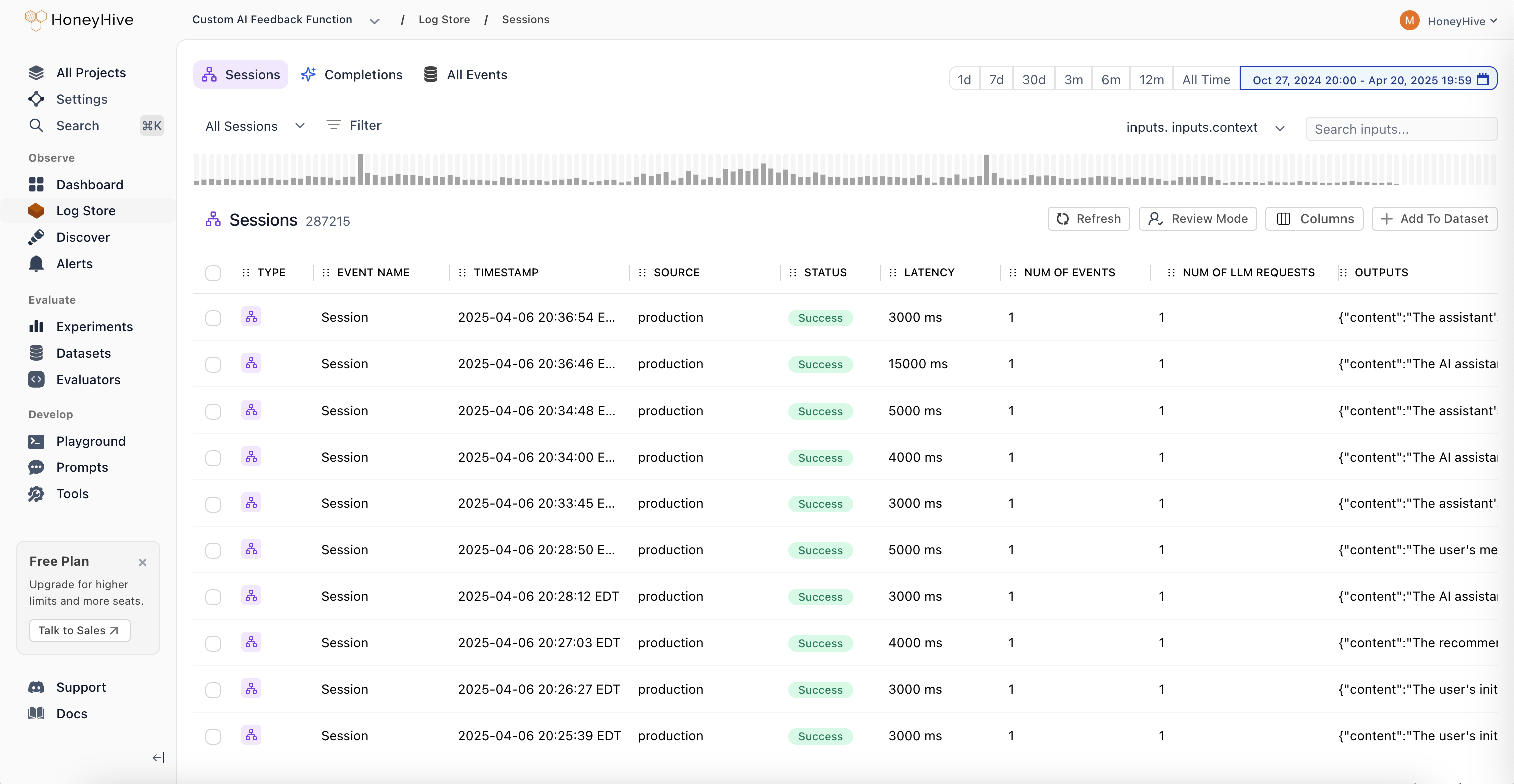
**Volume Charts:** New mini-charts display request volume patterns over time directly in the sessions table, providing instant visibility into traffic trends and activity levels without needing to drill into individual sessions.
### Improved Log Store Analytics
**Volume Charts:** New mini-charts display request volume patterns over time directly in the sessions table, providing instant visibility into traffic trends and activity levels without needing to drill into individual sessions.
 ## Core Platform
### Role-Based Access Control (RBAC)
## Core Platform
### Role-Based Access Control (RBAC)
 1. **Two-Tier Permission Structure:**
Granular permission management with organization and project-level controls. Organization Admins have full control across the entire organization, while Project Admins maintain complete control within specific projects. This creates clear boundaries between teams and prevents data leakage between business units.
2. **Enhanced API Key Security:**
Project-specific API key scoping ensures that teams can only access data within their designated projects. This provides better security isolation and compliance with industry regulations, especially critical for organizations in financial services, healthcare, and insurance.
3. **Flexible Team Management:**
Easy onboarding and role transitions with transparent permission hierarchy. Delegate administrative responsibilities without compromising security, and manage team member access as organizations evolve.
4. **Seamless Migration Process:**
Existing customers can migrate to RBAC with minimal disruption. All current users are automatically assigned Organization Admin roles, and project-specific API keys are available in Settings. Legacy API keys will remain functional until August 31st, 2025.
[Learn more about RBAC implementation](https://docs.honeyhive.ai/workspace/roles)
## Core Platform
* Added list of allowed characters for project names
## Python SDK (Logger)
### HoneyHive Logger (`honeyhive-logger`) released
* The logger sdk has
1. No external dependencies
2. A fully stateless design
* Optimized for
* Serverless environments
* Highly regulated environments with strict security requirements
## TypeScript SDK (Logger)
### HoneyHive Logger (`@honeyhive/logger`) released
* The logger sdk has
1. No external dependencies
2. A fully stateless design
* Optimized for
* Serverless environments
* Highly regulated environments with strict security requirements
## Python SDK - Version \[v0.2.49]
* Added type annotation to decorators and the evaluation harness
## Documentation
* Added documentation for Python/Typescript Loggers
* Updated gemini integration documentation to use latest sdk (Python and TypeScript)
## Core Platform
### Support for External Datasets in Experiments
You can now log experiments using external datasets with custom IDs for both datasets and datapoints. External dataset IDs will display with the “EXT-” prefix in the UI.
This feature provides greater flexibility for teams working with custom datasets while maintaining full integration with our experiment tracking.
```
{
"id": "", // Optional
"name": "", // Optional
"data": [
{
"id": "", // Optional
"inputs": { ... },
"ground_truths": { ... },
}
// Additional datapoints...
]
}
```
## Documentation
* Standardizes parameter names and clarified evaluation order in Experiments Quickstart and Python/TS SDK docs.
* Adds cookbook: [Inspirational Quotes Recommender with Qdrant and OpenAI](https://github.com/honeyhiveai/cookbook/tree/main/qdrant-discovery)
## Core Platform
* Bug fixes and improvements across various areas to enhance performance and stability.
## Documentation
* Adds [Evaluating External Logs](https://docs.honeyhive.ai/evaluation/external_logs) tutorial.
* Updates Python and TypeScript SDK's references and overall documentation to align with recent improvements and best practices.
## Core Platform
* Bug fixes for playground & evaluator version controls.
## Documentation
* Adds [Datasets Introduction Guide](https://docs.honeyhive.ai/datasets/introduction).
* Adds [Server-side Evaluator Templates List](https://docs.honeyhive.ai/evaluators/evaluator-templates) documentation.
* Adds [LangGraph](https://docs.honeyhive.ai/integrations/langgraph) Integration documentation.
## Core Platform
### Wide Mode
We've introduced a new **Wide Mode** option that allows users to hide the sidebar, providing:
* Expanded workspace area for a more immersive viewing experience
* Distraction-free environment when focusing on complex tasks
* Better content visibility on smaller screens and split-window setups
* Toggle controls accessible via the header menu for easy switching
1. **Two-Tier Permission Structure:**
Granular permission management with organization and project-level controls. Organization Admins have full control across the entire organization, while Project Admins maintain complete control within specific projects. This creates clear boundaries between teams and prevents data leakage between business units.
2. **Enhanced API Key Security:**
Project-specific API key scoping ensures that teams can only access data within their designated projects. This provides better security isolation and compliance with industry regulations, especially critical for organizations in financial services, healthcare, and insurance.
3. **Flexible Team Management:**
Easy onboarding and role transitions with transparent permission hierarchy. Delegate administrative responsibilities without compromising security, and manage team member access as organizations evolve.
4. **Seamless Migration Process:**
Existing customers can migrate to RBAC with minimal disruption. All current users are automatically assigned Organization Admin roles, and project-specific API keys are available in Settings. Legacy API keys will remain functional until August 31st, 2025.
[Learn more about RBAC implementation](https://docs.honeyhive.ai/workspace/roles)
## Core Platform
* Added list of allowed characters for project names
## Python SDK (Logger)
### HoneyHive Logger (`honeyhive-logger`) released
* The logger sdk has
1. No external dependencies
2. A fully stateless design
* Optimized for
* Serverless environments
* Highly regulated environments with strict security requirements
## TypeScript SDK (Logger)
### HoneyHive Logger (`@honeyhive/logger`) released
* The logger sdk has
1. No external dependencies
2. A fully stateless design
* Optimized for
* Serverless environments
* Highly regulated environments with strict security requirements
## Python SDK - Version \[v0.2.49]
* Added type annotation to decorators and the evaluation harness
## Documentation
* Added documentation for Python/Typescript Loggers
* Updated gemini integration documentation to use latest sdk (Python and TypeScript)
## Core Platform
### Support for External Datasets in Experiments
You can now log experiments using external datasets with custom IDs for both datasets and datapoints. External dataset IDs will display with the “EXT-” prefix in the UI.
This feature provides greater flexibility for teams working with custom datasets while maintaining full integration with our experiment tracking.
```
{
"id": "", // Optional
"name": "", // Optional
"data": [
{
"id": "", // Optional
"inputs": { ... },
"ground_truths": { ... },
}
// Additional datapoints...
]
}
```
## Documentation
* Standardizes parameter names and clarified evaluation order in Experiments Quickstart and Python/TS SDK docs.
* Adds cookbook: [Inspirational Quotes Recommender with Qdrant and OpenAI](https://github.com/honeyhiveai/cookbook/tree/main/qdrant-discovery)
## Core Platform
* Bug fixes and improvements across various areas to enhance performance and stability.
## Documentation
* Adds [Evaluating External Logs](https://docs.honeyhive.ai/evaluation/external_logs) tutorial.
* Updates Python and TypeScript SDK's references and overall documentation to align with recent improvements and best practices.
## Core Platform
* Bug fixes for playground & evaluator version controls.
## Documentation
* Adds [Datasets Introduction Guide](https://docs.honeyhive.ai/datasets/introduction).
* Adds [Server-side Evaluator Templates List](https://docs.honeyhive.ai/evaluators/evaluator-templates) documentation.
* Adds [LangGraph](https://docs.honeyhive.ai/integrations/langgraph) Integration documentation.
## Core Platform
### Wide Mode
We've introduced a new **Wide Mode** option that allows users to hide the sidebar, providing:
* Expanded workspace area for a more immersive viewing experience
* Distraction-free environment when focusing on complex tasks
* Better content visibility on smaller screens and split-window setups
* Toggle controls accessible via the header menu for easy switching
### Improved Experiments Layout
Our redesigned comparison interface improves result analysis with:
* Structured input visualization with collapsible sections
* Clear side-by-side metrics display for easier model comparison
* Improved performance statistics with visual rating indicators
Other updates:
* Bug fixes and stability improvements for filtering functionality.
* Added support for `exists` and `not exists` operators in filters.
* Frontend styling improvements to enhance the user interface.
* Bug fixes and stability enhancements for a smoother user experience.
## Documentation
* Improved documentation for async function handling.
* Added integration documentation for model providers:
* [Openai](https://docs.honeyhive.ai/integrations/openai)..
* [Azure OpenAI](https://docs.honeyhive.ai/integrations/azure_openai).
* [AWS Bedrock](https://docs.honeyhive.ai/integrations/aws_bedrock).
* Tutorial for [running experiments with multi-step LLM applications](https://docs.honeyhive.ai/evaluation/multi_step_evals) wit MongoDB and OpenAI.
* Adds [Streamlit Cookbook](https://github.com/honeyhiveai/cookbook/tree/main/streamlit-cookbook) for tracing model calls with collected user feedback on AI response.
## Core Platform
* Enhanced filter functionality: Added the ability to edit filters and improved schema discovery within filters.
* Fixed pagination issue for events table.
## Python SDK - Version \[v0.2.44]
* Improved error tracking for the tracer: Enhanced the capture of error messages for custom-decorated functions.
* Git context enrichment: Added support for capturing Git branch status in traces and experiments.
* Introduced the `disable_http_tracing` parameter during tracer initialization to disable HTTP event tracing.
* Fixed the `traceloop` version to 0.30.0 to resolve protobuf dependency conflicts.
## TypeScript SDK - Version \[v1.0.33]
* Improved error tracking for the tracer: Enhanced the capture of error messages for traced functions.
* Git context enrichment: Added support for capturing Git branch status in traces and experiments.
* Introduced the `disableHttpTracing` parameter during tracer initialization to disable HTTP event tracing.
## Documentation
* Standardized all JavaScript/TypeScript code examples to TypeScript across the documentation.
* Added troubleshooting guidance for SSL validation failures.
* Documented the `disable_http_tracing/disableHttpTracing` parameter in the SDK Reference.
* Removed references to `init_from_session_id` in favor of using `init` with the `session_id` parameter.
* Updated the [Observability Tutorial](/tutorials/observability-tutorial) Documentation/Cookbook to use `enrichSession` instead of `setFeedback/setMetadata`
* Integrations - added [CrewAI Integration](/integrations/crewai) documentation.
## Core Platform
### Introducing Review Mode
A new way for domain experts to annotate traces with human feedback.
With **Review Mode**, you can:
* Tag traces with annotations from your Human Evaluators definitions
* Apply your custom criteria right in the UI
* Add comments when something interesting pops up
This should make life easier when you're combing through traces and need to mark things for later. Perfect for when the whole team needs to analyze outputs together.
Check it out in `Experiments` and `Log Store` - look for the "Review Mode" button.
## Python SDK - Version \[v0.2.36]
* Reduced package size for AWS lambda usage
* Removed Langchain dependency. For using Langchain callbacks, install Langchain separately
* Add lambda, core, and eval poetry installation groups
## TypeScript SDK - Version \[v1.0.23]
* Reduced package size for AWS lambda usage
* Disabled CommonJS autotracing 3rd party packages: Anthropic, Bedrock, Pinecone, ChromaDB, Cohere, Langchain, LlamaIndex, OpenAI. Please use [custom tracing](/tracing/custom-spans) for instrumenting Typescript.
* Refactor custom tracer for better initialization syntax and using typescript
## Documentation
* Added [Schema Overview](/schema-overview) documentation to describe our schemas in detail including a list of reserved properties.
* Added [Client-side Evaluators](/evaluators/client_side) documentation to describe the use of client-side evaluators for both tracing and experiments
* Updated [Custom Spans](/tracing/custom-spans) documentation to add reference to tracing methods `traceModel`/`traceTool`/`traceChain` (TypeScript)
* Integrations - added [LanceDB Integration](/integrations/lancedb) documentation
* Integrations - added [Zilliz Integration](/integrations/zilliz) documentation