> ## Documentation Index
> Fetch the complete documentation index at: https://docs.honeyhive.ai/llms.txt
> Use this file to discover all available pages before exploring further.
# Introduction
> An overview of HoneyHive datasets and their role in the AI application lifecycle.
A dataset in HoneyHive is a structured collection of datapoints. Think of it as a table where each row represents a specific scenario, interaction, or piece of information relevant to your AI application.
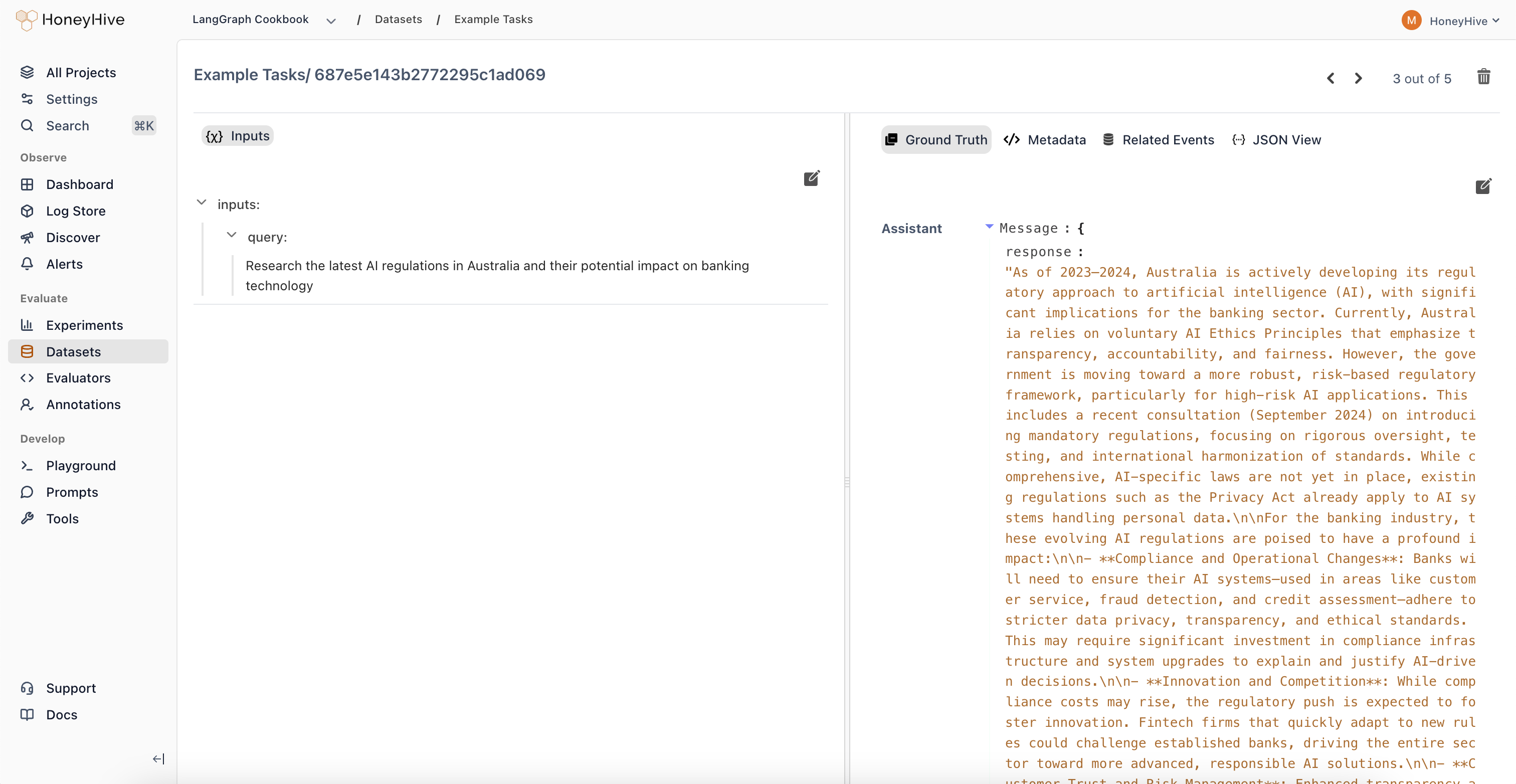 These datasets are fundamental building blocks used for various purposes throughout the AI development lifecycle, including:
* Running ad-hoc [experiments and evaluations](/evaluation/quickstart) to test prompts, models, or configurations.
* Setting up automated tests within your CI/CD pipeline to catch regressions.
* Creating curated sets for fine-tuning your language models.
### Why Use HoneyHive Datasets?
Managing datasets within HoneyHive offers several advantages:
* **Centralized Management & Collaboration:** Provides a single source of truth for your test cases and evaluation data, making it easier for teams, including domain experts (like linguists or analysts), to work together. Datasets are automatically synced between the UI and SDK, ensuring consistency.
* **Continuous Curation:** You can continuously refine and expand your datasets by filtering, labeling (manually or with AI assistance), and curating directly from your [production logs and traces](/datasets/dataset-curation), creating valuable proprietary datasets.
* **Seamless Integration:** Datasets integrate directly with HoneyHive's [evaluation framework](/evaluation/quickstart), CI/CD features, and can be easily [exported](/datasets/export) for use in other tools or for fine-tuning.
### Use Cases
* Evaluating specific failure modes or performance aspects of your LLM application.
* Tracking performance across different user segments or input types.
* A/B testing different prompts, models, or RAG configurations.
* Building high-quality datasets for fine-tuning models on specific domains or tasks.
* Establishing benchmark datasets for regression testing in CI/CD.
## Dataset Structure
### Datapoints and Fields
Each row in a HoneyHive dataset is called a **datapoint**. A datapoint is composed of multiple **fields**, which are essentially key-value pairs representing different aspects of that datapoint (e.g., `user_query`, `expected_response`, `customer_segment`).
### Field Groups
When creating or uploading a dataset, each field must be mapped into one of the following functional groups:
* **Input Fields:** These represent the data that will be fed into your application or function during an evaluation run. Examples include user prompts, query parameters, or document snippets for RAG.
* **Ground Truth Fields:** These contain the expected or ideal outputs or reference answers for a given input. They are used by evaluators to compare against the actual output of your application. Examples include reference summaries, known correct answers, or ideal classification labels.
* **Chat History Fields:** This group is specifically for conversational AI use cases. It holds the sequence of previous messages in a dialogue, providing context for the current turn being evaluated.
* **Metadata Fields:** Any field not explicitly mapped as Input, Ground Truth, or Chat History automatically falls into this category. Metadata fields store supplementary information that might be useful for analysis or filtering but isn't directly used as input or ground truth during evaluation (e.g., `source_log_id`, `timestamp`, `user_segment`).
## Creating Datasets
There are several ways to create datasets in HoneyHive:
* **From Production Traces:** Filter and select interesting interactions or edge cases directly from your logged production data within the HoneyHive UI to build targeted datasets. [Learn more](/datasets/dataset-curation).
* **Uploading Data via UI:** Upload structured files (JSON, JSONL, CSV) directly through the HoneyHive web interface. [Learn more](/datasets/import#upload-a-dataset-through-the-ui).
* **Uploading Data via SDK:** Programmatically create and upload datasets using the HoneyHive Python or TypeScript SDKs. [Learn more](/datasets/import#upload-a-dataset-through-the-sdk).
* **In-Code Datasets:** Define datasets directly within your evaluation script code (primarily for quick tests or simple use cases, discussed below).
## Using Datasets
### Primary Use: Experiments
Datasets are most commonly used when running [experiments](/evaluation/quickstart) to evaluate your AI application's performance. You can use either datasets managed within HoneyHive or define them directly in your code.
**Managed Datasets (Recommended)**
These are datasets created via the UI, SDK, or from traces, and reside within your HoneyHive project. They are identified by a unique `dataset_id`.
* **Pros:** Centralized, collaborative, reusable across experiments.
* **How to use:** Create the dataset beforehand (see the [Creating Datasets Section](./#creating-datasets)). Then, pass its `dataset_id` to the `evaluate` function.
```python Python theme={null}
from honeyhive import evaluate
# Assume function_to_evaluate and evaluators are defined elsewhere
if __name__ == "__main__":
evaluate(
function=function_to_evaluate,
hh_api_key='',
hh_project='',
name='Sample Experiment with Managed Dataset',
# Pass the ID of your HoneyHive-managed dataset
dataset_id='',
evaluators=[...],
server_url='' # Optional
)
```
```typescript TypeScript theme={null}
import { evaluate } from "honeyhive";
evaluate({
evaluationFunction: functionToEvaluate, // Direct reference since signature matches
hh_api_key: '',
hh_project: '',
name: 'Sample Experiment',
datasetId: '', // to be passed for json_list
evaluators: [sampleEvaluator], // Add evaluators to run at the end of each run
server_url: '' // Optional / Required for self-hosted or dedicated deployments
})
```
**In-Code Datasets**
These datasets are defined as Python lists of dictionaries (or TypeScript arrays of objects) directly within your evaluation script.
* **Pros:** Simple for quick tests, self-contained within code.
* **Cons:** Harder to share, manage, version, and reuse; not suitable for large datasets.
* **How to use:** Define the list, ensuring fields are nested under `inputs`, `ground_truths`, etc., and pass it via the `dataset` parameter to `evaluate`.
```python Python theme={null}
dataset = [
{
"inputs": {"prompt": "Translate 'hello' to French"},
"ground_truths": {"expected_translation": "Bonjour"}
},
{
"inputs": {"prompt": "Translate 'world' to French"},
"ground_truths": {"expected_translation": "Monde"}
}
# ... more datapoints
]
if __name__ == "__main__":
evaluate(
function=function_to_evaluate,
api_key='',
project='',
name='Sample Experiment with In-Code Dataset',
# Pass the list directly
dataset=dataset,
evaluators=[...],
server_url='' # Optional
)
```
```typescript TypeScript theme={null}
const dataset = [
{
"inputs": {
"product_type": "electric vehicles",
"region": "western europe"
},
"ground_truths": {
"response": "As of 2023, the electric vehicle (EV) ... ",
}
},
{
"inputs": {
"product_type": "gaming consoles",
"region": "north america"
},
"ground_truths": {
"response": "As of 2023, the gaming console market ... ",
}
}
]
evaluate({
evaluationFunction: functionToEvaluate, // Direct reference since signature matches
apiKey: '',
project: '',
name: 'Sample Experiment',
dataset: dataset, // to be passed for json_list
evaluators: [sampleEvaluator], // Add evaluators to run at the end of each run
serverUrl: '' // Optional / Required for self-hosted or dedicated deployments
})
```
Datasets always have an ID. In the example above, an ID is automatically generated (prefixed with `EXT-` followed by a hash of the content, e.g., `EXT-dc089d82c986a22921e0e773`).
**Support for External (Custom‑ID) In‑Code Datasets**
You can now log an in‑code dataset with your own IDs and names by adding optional `id` and `name` at the top level, and optional `id` on each datapoint.
These IDs will appear in the UI prefixed with `EXT-`, offering full integration with experiment tracking while preserving your existing naming conventions.
```python Python theme={null}
dataset = {
"id": "custom-ds-2025", # Optional custom dataset ID
"name": "My Translation Tests", # Optional human‑readable name
"data": [
{
"id": "tp-001", # Optional custom datapoint ID
"inputs": {"prompt": "Translate 'sun' to Spanish"},
"ground_truths": {"expected_translation": "Sol"}
},
{
"id": "tp-002",
"inputs": {"prompt": "Translate 'moon' to Spanish"},
"ground_truths": {"expected_translation": "Luna"}
}
]
}
if __name__ == "__main__":
evaluate(
function=function_to_evaluate,
api_key='',
project='',
name='Experiment with Custom‑ID In‑Code Dataset',
dataset=dataset,
evaluators=[...],
server_url=''
)
```
```typescript TypeScript theme={null}
const dataset = {
id: 'custom-ds-2025', // Optional custom dataset ID
name: 'My Translation Tests', // Optional human‑readable name
data: [
{
id: 'tp-001', // Optional custom datapoint ID
inputs: { prompt: "Translate 'sun' to Spanish" },
ground_truths: { expected_translation: 'Sol' }
},
{
id: 'tp-002',
inputs: { prompt: "Translate 'moon' to Spanish" },
ground_truths: { expected_translation: 'Luna' }
}
]
};
evaluate({
evaluationFunction: functionToEvaluate, // Direct reference since signature matches
apiKey: '',
project: '',
name: 'Experiment with Custom‑ID In‑Code Dataset',
dataset: dataset, // Pass the object directly
evaluators: [...],
serverUrl: '' // Optional
});
```
In this model, providing `id` and `name` is entirely optional—omit them to let HoneyHive generate `EXT-…` identifiers automatically.
Custom datapoint IDs help you trace individual rows in the UI or logs, while a custom dataset ID and name let you easily refer to that dataset across experiments.
When calling `evaluate`, provide either the `dataset_id` (for managed datasets) or the `dataset` parameter (for in-code datasets), but **never both**.
### Other Uses
While experiments are the primary application, HoneyHive datasets can also be:
* **Exported** for fine-tuning language models on your specific data.
* Used as benchmark sets in **CI/CD pipelines** to automate quality checks and prevent performance regressions.
## Exporting Datasets
You can easily export datasets managed in HoneyHive for use in external processes:
* **How:** Use the HoneyHive SDK to programmatically retrieve dataset contents. [See Export Guide](/datasets/export).
* **Why:** Export data for fine-tuning models, running evaluations in custom environments, archiving, or analysis with other tools.
These datasets are fundamental building blocks used for various purposes throughout the AI development lifecycle, including:
* Running ad-hoc [experiments and evaluations](/evaluation/quickstart) to test prompts, models, or configurations.
* Setting up automated tests within your CI/CD pipeline to catch regressions.
* Creating curated sets for fine-tuning your language models.
### Why Use HoneyHive Datasets?
Managing datasets within HoneyHive offers several advantages:
* **Centralized Management & Collaboration:** Provides a single source of truth for your test cases and evaluation data, making it easier for teams, including domain experts (like linguists or analysts), to work together. Datasets are automatically synced between the UI and SDK, ensuring consistency.
* **Continuous Curation:** You can continuously refine and expand your datasets by filtering, labeling (manually or with AI assistance), and curating directly from your [production logs and traces](/datasets/dataset-curation), creating valuable proprietary datasets.
* **Seamless Integration:** Datasets integrate directly with HoneyHive's [evaluation framework](/evaluation/quickstart), CI/CD features, and can be easily [exported](/datasets/export) for use in other tools or for fine-tuning.
### Use Cases
* Evaluating specific failure modes or performance aspects of your LLM application.
* Tracking performance across different user segments or input types.
* A/B testing different prompts, models, or RAG configurations.
* Building high-quality datasets for fine-tuning models on specific domains or tasks.
* Establishing benchmark datasets for regression testing in CI/CD.
## Dataset Structure
### Datapoints and Fields
Each row in a HoneyHive dataset is called a **datapoint**. A datapoint is composed of multiple **fields**, which are essentially key-value pairs representing different aspects of that datapoint (e.g., `user_query`, `expected_response`, `customer_segment`).
### Field Groups
When creating or uploading a dataset, each field must be mapped into one of the following functional groups:
* **Input Fields:** These represent the data that will be fed into your application or function during an evaluation run. Examples include user prompts, query parameters, or document snippets for RAG.
* **Ground Truth Fields:** These contain the expected or ideal outputs or reference answers for a given input. They are used by evaluators to compare against the actual output of your application. Examples include reference summaries, known correct answers, or ideal classification labels.
* **Chat History Fields:** This group is specifically for conversational AI use cases. It holds the sequence of previous messages in a dialogue, providing context for the current turn being evaluated.
* **Metadata Fields:** Any field not explicitly mapped as Input, Ground Truth, or Chat History automatically falls into this category. Metadata fields store supplementary information that might be useful for analysis or filtering but isn't directly used as input or ground truth during evaluation (e.g., `source_log_id`, `timestamp`, `user_segment`).
## Creating Datasets
There are several ways to create datasets in HoneyHive:
* **From Production Traces:** Filter and select interesting interactions or edge cases directly from your logged production data within the HoneyHive UI to build targeted datasets. [Learn more](/datasets/dataset-curation).
* **Uploading Data via UI:** Upload structured files (JSON, JSONL, CSV) directly through the HoneyHive web interface. [Learn more](/datasets/import#upload-a-dataset-through-the-ui).
* **Uploading Data via SDK:** Programmatically create and upload datasets using the HoneyHive Python or TypeScript SDKs. [Learn more](/datasets/import#upload-a-dataset-through-the-sdk).
* **In-Code Datasets:** Define datasets directly within your evaluation script code (primarily for quick tests or simple use cases, discussed below).
## Using Datasets
### Primary Use: Experiments
Datasets are most commonly used when running [experiments](/evaluation/quickstart) to evaluate your AI application's performance. You can use either datasets managed within HoneyHive or define them directly in your code.
**Managed Datasets (Recommended)**
These are datasets created via the UI, SDK, or from traces, and reside within your HoneyHive project. They are identified by a unique `dataset_id`.
* **Pros:** Centralized, collaborative, reusable across experiments.
* **How to use:** Create the dataset beforehand (see the [Creating Datasets Section](./#creating-datasets)). Then, pass its `dataset_id` to the `evaluate` function.
```python Python theme={null}
from honeyhive import evaluate
# Assume function_to_evaluate and evaluators are defined elsewhere
if __name__ == "__main__":
evaluate(
function=function_to_evaluate,
hh_api_key='',
hh_project='',
name='Sample Experiment with Managed Dataset',
# Pass the ID of your HoneyHive-managed dataset
dataset_id='',
evaluators=[...],
server_url='' # Optional
)
```
```typescript TypeScript theme={null}
import { evaluate } from "honeyhive";
evaluate({
evaluationFunction: functionToEvaluate, // Direct reference since signature matches
hh_api_key: '',
hh_project: '',
name: 'Sample Experiment',
datasetId: '', // to be passed for json_list
evaluators: [sampleEvaluator], // Add evaluators to run at the end of each run
server_url: '' // Optional / Required for self-hosted or dedicated deployments
})
```
**In-Code Datasets**
These datasets are defined as Python lists of dictionaries (or TypeScript arrays of objects) directly within your evaluation script.
* **Pros:** Simple for quick tests, self-contained within code.
* **Cons:** Harder to share, manage, version, and reuse; not suitable for large datasets.
* **How to use:** Define the list, ensuring fields are nested under `inputs`, `ground_truths`, etc., and pass it via the `dataset` parameter to `evaluate`.
```python Python theme={null}
dataset = [
{
"inputs": {"prompt": "Translate 'hello' to French"},
"ground_truths": {"expected_translation": "Bonjour"}
},
{
"inputs": {"prompt": "Translate 'world' to French"},
"ground_truths": {"expected_translation": "Monde"}
}
# ... more datapoints
]
if __name__ == "__main__":
evaluate(
function=function_to_evaluate,
api_key='',
project='',
name='Sample Experiment with In-Code Dataset',
# Pass the list directly
dataset=dataset,
evaluators=[...],
server_url='' # Optional
)
```
```typescript TypeScript theme={null}
const dataset = [
{
"inputs": {
"product_type": "electric vehicles",
"region": "western europe"
},
"ground_truths": {
"response": "As of 2023, the electric vehicle (EV) ... ",
}
},
{
"inputs": {
"product_type": "gaming consoles",
"region": "north america"
},
"ground_truths": {
"response": "As of 2023, the gaming console market ... ",
}
}
]
evaluate({
evaluationFunction: functionToEvaluate, // Direct reference since signature matches
apiKey: '',
project: '',
name: 'Sample Experiment',
dataset: dataset, // to be passed for json_list
evaluators: [sampleEvaluator], // Add evaluators to run at the end of each run
serverUrl: '' // Optional / Required for self-hosted or dedicated deployments
})
```
Datasets always have an ID. In the example above, an ID is automatically generated (prefixed with `EXT-` followed by a hash of the content, e.g., `EXT-dc089d82c986a22921e0e773`).
**Support for External (Custom‑ID) In‑Code Datasets**
You can now log an in‑code dataset with your own IDs and names by adding optional `id` and `name` at the top level, and optional `id` on each datapoint.
These IDs will appear in the UI prefixed with `EXT-`, offering full integration with experiment tracking while preserving your existing naming conventions.
```python Python theme={null}
dataset = {
"id": "custom-ds-2025", # Optional custom dataset ID
"name": "My Translation Tests", # Optional human‑readable name
"data": [
{
"id": "tp-001", # Optional custom datapoint ID
"inputs": {"prompt": "Translate 'sun' to Spanish"},
"ground_truths": {"expected_translation": "Sol"}
},
{
"id": "tp-002",
"inputs": {"prompt": "Translate 'moon' to Spanish"},
"ground_truths": {"expected_translation": "Luna"}
}
]
}
if __name__ == "__main__":
evaluate(
function=function_to_evaluate,
api_key='',
project='',
name='Experiment with Custom‑ID In‑Code Dataset',
dataset=dataset,
evaluators=[...],
server_url=''
)
```
```typescript TypeScript theme={null}
const dataset = {
id: 'custom-ds-2025', // Optional custom dataset ID
name: 'My Translation Tests', // Optional human‑readable name
data: [
{
id: 'tp-001', // Optional custom datapoint ID
inputs: { prompt: "Translate 'sun' to Spanish" },
ground_truths: { expected_translation: 'Sol' }
},
{
id: 'tp-002',
inputs: { prompt: "Translate 'moon' to Spanish" },
ground_truths: { expected_translation: 'Luna' }
}
]
};
evaluate({
evaluationFunction: functionToEvaluate, // Direct reference since signature matches
apiKey: '',
project: '',
name: 'Experiment with Custom‑ID In‑Code Dataset',
dataset: dataset, // Pass the object directly
evaluators: [...],
serverUrl: '' // Optional
});
```
In this model, providing `id` and `name` is entirely optional—omit them to let HoneyHive generate `EXT-…` identifiers automatically.
Custom datapoint IDs help you trace individual rows in the UI or logs, while a custom dataset ID and name let you easily refer to that dataset across experiments.
When calling `evaluate`, provide either the `dataset_id` (for managed datasets) or the `dataset` parameter (for in-code datasets), but **never both**.
### Other Uses
While experiments are the primary application, HoneyHive datasets can also be:
* **Exported** for fine-tuning language models on your specific data.
* Used as benchmark sets in **CI/CD pipelines** to automate quality checks and prevent performance regressions.
## Exporting Datasets
You can easily export datasets managed in HoneyHive for use in external processes:
* **How:** Use the HoneyHive SDK to programmatically retrieve dataset contents. [See Export Guide](/datasets/export).
* **Why:** Export data for fine-tuning models, running evaluations in custom environments, archiving, or analysis with other tools.