> ## Documentation Index
> Fetch the complete documentation index at: https://docs.honeyhive.ai/llms.txt
> Use this file to discover all available pages before exploring further.
# Evaluating External Logs
> Upload and evaluate existing logs from external sources like spreadsheets or databases.
This guide shows you how to leverage HoneyHive's evaluation capabilities even if your interaction logs already exist in external systems like Excel spreadsheets, CSV files, or database tables. The core idea is to load these external logs into a suitable format and then run HoneyHive evaluators on them.
This is particularly useful when you want to:
* Evaluate the quality of historical interactions.
* Benchmark different versions of prompts or models using past data.
* Apply new evaluation metrics to existing logs without rerunning the original generation process.
This guide assumes you are familiar with how experiments function in HoneyHive. If you need a refresher, please visit the [Experiment's Introduction](/evaluation/introduction) page.
## Overview
For this example, we will use a set of examples from the [CNN / DailyMail](https://huggingface.co/datasets/abisee/cnn_dailymail) dataset, to simulate a summarization task.
The dataset contains two key components:
* `article`: Contains the full text of news articles, which serves as our input
* `highlights`: Contains human-written bullet-point summaries of each article, which we'll use to simulate the expected output from our LLM summarization task
## Step-by-Step Implementation
## Full code example
Here's a minimal example assuming you've loaded your external data into a list format:
```python theme={null}
import pandas as pd
from honeyhive import evaluate, evaluator
from sklearn.feature_extraction.text import TfidfVectorizer
# this is just a demonstration. In a real process, you should convert your source dataset to match the format below
dataset = [
{
'inputs': {
'article': '(CNN)The Palestinian Authority officially became the 123rd member of the International Criminal Court on Wednesday, a step that gives the court jurisdiction over alleged crimes in Palestinian territories. The formal accession was marked with a ceremony at The Hague, in the Netherlands, where the court is based. The Palestinians signed the ICC\'s founding Rome Statute in January...',
},
'ground_truths': {
'highlights': 'Membership gives the ICC jurisdiction over alleged crimes committed in Palestinian territories since last June.\nIsrael and the United States opposed the move, which could open the door to war crimes investigations against Israelis.'
}
},
{
'inputs': {
'article': '(CNN)Never mind cats having nine lives. A stray pooch in Washington State has used up at least three of her own after being hit by a car, apparently whacked on the head with a hammer in a misguided mercy killing and then buried in a field -- only to survive. That\'s according to Washington State University, where the dog -- a friendly white-and-black bully breed mix now named Theia -- has been receiving care at the Veterinary Teaching Hospital...',
},
'ground_truths': {
'highlights': 'Theia, a bully breed mix, was apparently hit by a car, whacked with a hammer and buried in a field.\n"She\'s a true miracle dog and she deserves a good life," says Sara Mellado, who is looking for a home for Theia.'
}
}
]
def pass_through_logged_data(inputs, ground_truths):
return ground_truths["highlights"]
def extract_keywords(text, top_n=10):
# Use TfidfVectorizer to calculate TF-IDF scores
vectorizer = TfidfVectorizer(stop_words='english')
tfidf_matrix = vectorizer.fit_transform([text])
feature_names = vectorizer.get_feature_names_out()
tfidf_scores = tfidf_matrix.toarray()[0]
# Get top N keywords based on TF-IDF scores
keywords = sorted(
zip(feature_names, tfidf_scores),
key=lambda x: x[1],
reverse=True
)[:top_n]
return set([keyword for keyword, score in keywords])
@evaluator()
def compression_ratio(outputs, inputs, ground_truths):
return len(outputs)/len(inputs["article"])
@evaluator()
def keyword_overlap(outputs, inputs, ground_truths):
article_keywords = extract_keywords(inputs["article"])
highlights_keywords = extract_keywords(outputs)
return len(article_keywords.intersection(highlights_keywords))/len(article_keywords)
if __name__ == "__main__":
# Run experiment
evaluate(
function = pass_through_logged_data, # Function to be evaluated
hh_api_key = HH_API_KEY,
hh_project = HH_PROJECT,
name = 'External Logs',
dataset = dataset, # to be passed for json_list
evaluators=[compression_ratio, keyword_overlap], # to compute client-side metrics on each run
)
```
**Note:** This script requires the `scikit-learn` library for keyword extraction. Install it using `pip install scikit-learn`.
## Creating the Dataset
To evaluate your model's performance, you'll need to transform your external log data into a structured format that the evaluation framework can process. The framework expects a Python list of dictionaries, where each dictionary represents a single interaction containing:
* Request inputs
* Generated outputs
* Ground truth information (if available)
For instance, if your logs are stored in a CSV file, you can load them into a Pandas DataFrame and convert the data using df.to\_dict('records').
Each dictionary represents a single logged interaction. Then, you use the `evaluate` function with your dataset and defined evaluators.
For the purposes of our example, we'll assume our data has already been transformed into this required format:
```python Python theme={null}
dataset = [
{
'inputs': {
'article': '(CNN)The Palestinian Authority officially became the 123rd member of the International Criminal Court on Wednesday, a step that gives the court jurisdiction over alleged crimes in Palestinian territories. The formal accession was marked with a ceremony at The Hague, in the Netherlands, where the court is based. The Palestinians signed the ICC\'s founding Rome Statute in January...',
},
'ground_truths': {
'highlights': 'Membership gives the ICC jurisdiction over alleged crimes committed in Palestinian territories since last June.\nIsrael and the United States opposed the move, which could open the door to war crimes investigations against Israelis.'
}
},
{
'inputs': {
'article': '(CNN)Never mind cats having nine lives. A stray pooch in Washington State has used up at least three of her own after being hit by a car, apparently whacked on the head with a hammer in a misguided mercy killing and then buried in a field -- only to survive. That\'s according to Washington State University, where the dog -- a friendly white-and-black bully breed mix now named Theia -- has been receiving care at the Veterinary Teaching Hospital...',
},
'ground_truths': {
'highlights': 'Theia, a bully breed mix, was apparently hit by a car, whacked with a hammer and buried in a field.\n"She\'s a true miracle dog and she deserves a good life," says Sara Mellado, who is looking for a home for Theia.'
}
}
]
```
This guide demonstrates defining the dataset directly within the script. Alternatively, you can upload your dataset (in JSON, JSONL, or CSV format) to the HoneyHive platform and then pass its `dataset_id` when running the experiment.
For instructions on uploading and managing datasets within HoneyHive, please refer to the [Upload Dataset](/datasets/import) page.
## Defining the Evaluators
To assess the quality of our summarizations, we'll implement two key evaluators: compression ratio and keyword overlap. These metrics help us understand both the length efficiency and content preservation of our summaries.
### Compression ratio
The compression ratio evaluator measures how concise our summary is compared to the original article:
```python Python theme={null}
@evaluator()
def compression_ratio(outputs, inputs, ground_truths):
return len(outputs)/len(inputs["article"])
```
This simple metric returns a value between 0 and 1, where lower values indicate more aggressive summarization. For example, a ratio of 0.25 means our summary is one-quarter the length of the original article.
### Keyword overlap
The keyword overlap evaluator assesses how well our summary preserves the main topics and key information from the original text:
```python Python theme={null}
def extract_keywords(text, top_n=10):
# Use TfidfVectorizer to calculate TF-IDF scores
vectorizer = TfidfVectorizer(stop_words='english')
tfidf_matrix = vectorizer.fit_transform([text])
feature_names = vectorizer.get_feature_names_out()
tfidf_scores = tfidf_matrix.toarray()[0]
# Get top N keywords based on TF-IDF scores
keywords = sorted(
zip(feature_names, tfidf_scores),
key=lambda x: x[1],
reverse=True
)[:top_n]
return set([keyword for keyword, score in keywords])
@evaluator()
def keyword_overlap(outputs, inputs, ground_truths):
article_keywords = extract_keywords(inputs["article"])
highlights_keywords = extract_keywords(outputs)
return len(article_keywords.intersection(highlights_keywords))/len(article_keywords)
```
This evaluator works in two steps:
First, it extracts the top 10 keywords from both the original article and the generated summary using TF-IDF (Term Frequency-Inverse Document Frequency) scoring.
Then, it calculates the overlap ratio between these keyword sets, returning a score between 0 and 1. A higher score indicates better preservation of key concepts from the original article.
## The evaluated function
The evaluated function is traditionally the function that will generate an output based on the input, like an LLM, whose outputs we want to evalute.
In this case, we alreavy have our outputs in our logs, so we can define a simple pass-through function to use the `highglights` column as our output:
```python Python theme={null}
def pass_through_logged_data(inputs, ground_truths):
return ground_truths["highlights"]
```
## Running the Experiment
Finally, we can run the experiment by passing our dataset, function and evaluators to the evaluation harness:
```python Python theme={null}
if __name__ == "__main__":
# Run experiment
evaluate(
function = pass_through_logged_data, # Function to be evaluated
hh_api_key = HH_API_KEY,
hh_project = HH_PROJECT,
name = 'External Logs',
dataset = dataset, # to be passed for json_list
evaluators=[compression_ratio, keyword_overlap], # to compute client-side metrics on each run
)
```
## Overview
This section demonstrates how to evaluate pre-existing logs using the HoneyHive TypeScript SDK. Similar to the Python example, the process involves structuring your external log data (like request inputs, generated outputs, and ground truth) into a format the SDK understands, defining a pass-through function, and creating client-side evaluators.
## Full code example
Here's a minimal TypeScript example:
```typescript theme={null}
// For TF-IDF calculation in keyword_overlap, you'll need the 'natural' library.
// Run: npm install natural @types/natural
import { evaluate } from "honeyhive";
import { TfIdf } from 'natural';
// Define the dataset
const dataset = [
{
"inputs": {
"article": `(CNN)The Palestinian Authority officially became the 123rd member of the International Criminal Court on Wednesday, a step that gives the court jurisdiction over alleged crimes in Palestinian territories. The formal accession was marked with a ceremony at The Hague, in the Netherlands, where the court is based. The Palestinians signed the ICC's founding Rome Statute in January...`,
},
"ground_truths": {
"highlights": `Membership gives the ICC jurisdiction over alleged crimes committed in Palestinian territories since last June.
Israel and the United States opposed the move, which could open the door to war crimes investigations against Israelis.`
}
},
{
"inputs": {
"article": `(CNN)Never mind cats having nine lives. A stray pooch in Washington State has used up at least three of her own after being hit by a car, apparently whacked on the head with a hammer in a misguided mercy killing and then buried in a field -- only to survive. That's according to Washington State University, where the dog -- a friendly white-and-black bully breed mix now named Theia -- has been receiving care at the Veterinary Teaching Hospital...`,
},
"ground_truths": {
"highlights": `Theia, a bully breed mix, was apparently hit by a car, whacked with a hammer and buried in a field.
"She's a true miracle dog and she deserves a good life," says Sara Mellado, who is looking for a home for Theia.`
}
}
];
async function passThroughLoggedData(inputs: Record, ground_truths: Record): Promise {
return ground_truths["highlights"];
}
function extractKeywords(text: string, top_n: number = 10): Set {
const tfidf = new TfIdf();
tfidf.addDocument(text.toLowerCase());
const terms: { term: string; tfidf: number }[] = [];
tfidf.listTerms(0).forEach(item => {
terms.push(item);
});
terms.sort((a, b) => b.tfidf - a.tfidf);
const topKeywords = terms.slice(0, top_n).map(item => item.term);
return new Set(topKeywords);
}
// Define Evaluators
function compressionRatio(output: any, input: Record, ground_truths: Record): Record {
if (typeof output !== 'string' || !input || typeof input["article"] !== 'string' || input["article"].length === 0) {
return { compression_ratio: NaN };
}
const ratio = output.length / input["article"].length;
return { compression_ratio: ratio };
}
function keywordOverlap(output: any, input: Record, ground_truths: Record): Record {
if (typeof output !== 'string' || !input || typeof input["article"] !== 'string') {
console.warn("Invalid input for keywordOverlap evaluator.");
return { keyword_overlap: NaN };
}
const articleKeywords = extractKeywords(input["article"]);
const highlightsKeywords = extractKeywords(output);
if (articleKeywords.size === 0) {
return { keyword_overlap: 0 };
}
const intersection = new Set([...articleKeywords].filter(keyword => highlightsKeywords.has(keyword)));
const overlap = intersection.size / articleKeywords.size;
return { keyword_overlap: overlap };
}
// Main function to run the evaluation
async function main() {
if (!process.env.HH_API_KEY) {
throw new Error("HH_API_KEY environment variable is not set.");
}
if (!process.env.HH_PROJECT) {
throw new Error("HH_PROJECT environment variable is not set.");
}
console.log("Starting evaluation...");
const result = await evaluate({
function: passThroughLoggedData, // Function to be evaluated
apiKey: process.env.HH_API_KEY,
project: process.env.HH_PROJECT,
name: 'External Logs TS', // Experiment name
dataset: dataset,
evaluators: [compressionRatio, keywordOverlap], // Client-side evaluators
serverUrl: process.env.HH_API_URL // Optional: specify server URL if needed
});
console.log("Evaluation finished.");
console.log("Result:", result);
}
```
**Note:** This script requires the `natural` library for keyword extraction. Install it using `npm install natural @types/natural` or `yarn add natural @types/natural`.
## Creating the Dataset
To evaluate your model's performance, you'll need to transform your external log data into a structured format that the evaluation framework can process. The framework expects a Python list of dictionaries, where each dictionary represents a single interaction containing:
* Request inputs
* Generated outputs
* Ground truth information (if available)
For example, if your logs are stored in a CSV file, you can parse the data using a library like csv-parser or papaparse to convert it into an array of objects.
Each object represents a single logged interaction. Then, you use the `evaluate` function with your dataset and defined evaluators.
For the purposes of our example, we'll assume our data has already been transformed into this required format:
```typescript TypeScript theme={null}
const dataset = [
{
'inputs': {
'article': '(CNN)The Palestinian Authority officially became the 123rd member of the International Criminal Court on Wednesday, a step that gives the court jurisdiction over alleged crimes in Palestinian territories. The formal accession was marked with a ceremony at The Hague, in the Netherlands, where the court is based. The Palestinians signed the ICC\'s founding Rome Statute in January...',
},
'ground_truths': {
'highlights': 'Membership gives the ICC jurisdiction over alleged crimes committed in Palestinian territories since last June.\nIsrael and the United States opposed the move, which could open the door to war crimes investigations against Israelis.'
}
},
{
'inputs': {
'article': '(CNN)Never mind cats having nine lives. A stray pooch in Washington State has used up at least three of her own after being hit by a car, apparently whacked on the head with a hammer in a misguided mercy killing and then buried in a field -- only to survive. That\'s according to Washington State University, where the dog -- a friendly white-and-black bully breed mix now named Theia -- has been receiving care at the Veterinary Teaching Hospital...',
},
'ground_truths': {
'highlights': 'Theia, a bully breed mix, was apparently hit by a car, whacked with a hammer and buried in a field.\n"She\'s a true miracle dog and she deserves a good life," says Sara Mellado, who is looking for a home for Theia.'
}
}
]
```
This guide demonstrates defining the dataset directly within the script. Alternatively, you can upload your dataset (in JSON, JSONL, or CSV format) to the HoneyHive platform and then pass its `dataset_id` when running the experiment.
For instructions on uploading and managing datasets within HoneyHive, please refer to the [Upload Dataset](/datasets/import) page.
## Defining the Evaluators
To assess the quality of our summarizations, we'll implement two key evaluators: compression ratio and keyword overlap. These metrics help us understand both the length efficiency and content preservation of our summaries.
### Compression ratio
The compression ratio evaluator measures how concise our summary is compared to the original article:
```typescript TypeScript theme={null}
function compressionRatio(output: any, input: Record, ground_truths: Record): Record {
if (typeof output !== 'string' || !input || typeof input["article"] !== 'string' || input["article"].length === 0) {
return { compression_ratio: NaN };
}
const ratio = output.length / input["article"].length;
return { compression_ratio: ratio };
}
```
This simple metric returns a value between 0 and 1, where lower values indicate more aggressive summarization. For example, a ratio of 0.25 means our summary is one-quarter the length of the original article.
### Keyword overlap
The keyword overlap evaluator assesses how well our summary preserves the main topics and key information from the original text:
```typescript TypeScript theme={null}
function extractKeywords(text: string, top_n: number = 10): Set {
const tfidf = new TfIdf();
tfidf.addDocument(text.toLowerCase());
const terms: { term: string; tfidf: number }[] = [];
tfidf.listTerms(0).forEach(item => {
terms.push(item);
});
terms.sort((a, b) => b.tfidf - a.tfidf);
const topKeywords = terms.slice(0, top_n).map(item => item.term);
return new Set(topKeywords);
}
function keywordOverlap(output: any, input: Record, ground_truths: Record): Record {
if (typeof output !== 'string' || !input || typeof input["article"] !== 'string') {
console.warn("Invalid input for keywordOverlap evaluator.");
return { keyword_overlap: NaN };
}
const articleKeywords = extractKeywords(input["article"]);
const highlightsKeywords = extractKeywords(output);
if (articleKeywords.size === 0) {
return { keyword_overlap: 0 };
}
const intersection = new Set([...articleKeywords].filter(keyword => highlightsKeywords.has(keyword)));
const overlap = intersection.size / articleKeywords.size;
return { keyword_overlap: overlap };
```
This evaluator works in two steps:
First, it extracts the top 10 keywords from both the original article and the generated summary using TF-IDF (Term Frequency-Inverse Document Frequency) scoring.
Then, it calculates the overlap ratio between these keyword sets, returning a score between 0 and 1. A higher score indicates better preservation of key concepts from the original article.
## The evaluated function
The evaluated function is traditionally the function that will generate an output based on the input, like an LLM, whose outputs we want to evalute.
In this case, we alreavy have our outputs in our logs, so we can define a simple pass-through function to use the `highglights` column as our output:
```typescript TypeScript theme={null}
async function passThroughLoggedData(inputs: Record, ground_truths: Record): Promise {
return ground_truths["highlights"];
}
```
## Running the Experiment
Finally, we can run the experiment by passing our dataset, function and evaluators to the evaluation harness:
```typescript TypeScript theme={null}
async function main() {
const result = await evaluate({
function: passThroughLoggedData, // Function to be evaluated
apiKey: process.env.HH_API_KEY,
project: process.env.HH_PROJECT,
name: 'External Logs TS', // Experiment name
dataset: dataset,
evaluators: [compressionRatio, keywordOverlap], // Client-side evaluators
serverUrl: process.env.HH_API_URL // Optional: specify server URL if needed
});
}
```
## Dashboard View
Once the script runs, HoneyHive ingests each log entry as a trace, along with the computed client-side evaluator metrics. Navigate to your project in the HoneyHive dashboard to view the results. You can analyze distributions, filter by metadata, and compare metrics across your dataset.
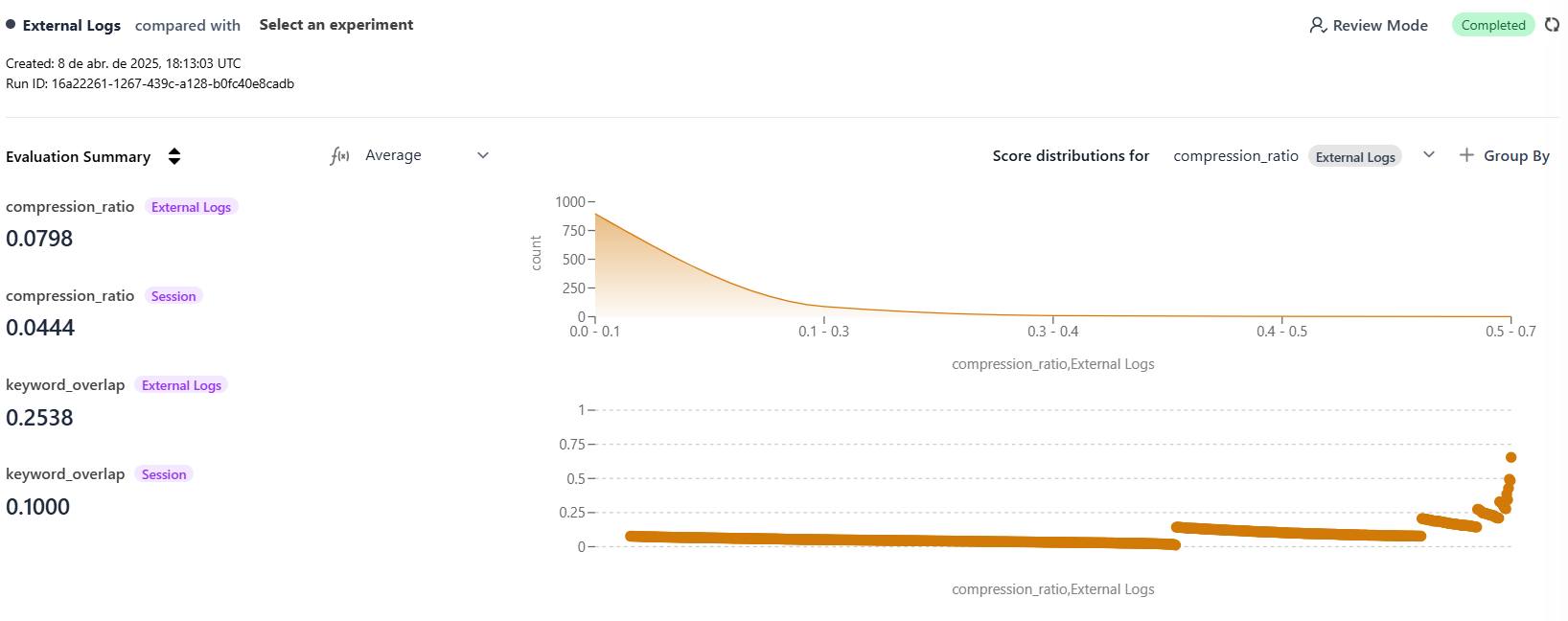 *Image: Example evaluation view in HoneyHive.*
## Conclusion
By mapping your existing external logs to the HoneyHive `evaluate` function's expected format, you can apply powerful client-side and server-side evaluations without rerunning the original AI/LLM calls. This provides a flexible way to assess performance, track quality over time, and gain insights from historical data.
### Next Steps
Deep dive into HoneyHive's evaluation framework, including custom evaluators.
Learn about configuring evaluators that run asynchronously on HoneyHive's infrastructure.
Explore how HoneyHive helps manage datasets for evaluations and experiments.
*Image: Example evaluation view in HoneyHive.*
## Conclusion
By mapping your existing external logs to the HoneyHive `evaluate` function's expected format, you can apply powerful client-side and server-side evaluations without rerunning the original AI/LLM calls. This provides a flexible way to assess performance, track quality over time, and gain insights from historical data.
### Next Steps
Deep dive into HoneyHive's evaluation framework, including custom evaluators.
Learn about configuring evaluators that run asynchronously on HoneyHive's infrastructure.
Explore how HoneyHive helps manage datasets for evaluations and experiments.