> ## Documentation Index
> Fetch the complete documentation index at: https://docs.honeyhive.ai/llms.txt
> Use this file to discover all available pages before exploring further.
# Human Annotation
> Technical documentation for creating custom human evaluator fields in HoneyHive
Human annotation allows for manual review and evaluation of AI outputs by human reviewers.
## Creating a Human Evaluator
1. Navigate to the [**Evaluators**](https://app.us.honeyhive.ai/metrics) tab in the HoneyHive console.
2. Click `Add Evaluator` and select `Human Evaluator`.
 ## Evaluation Criteria
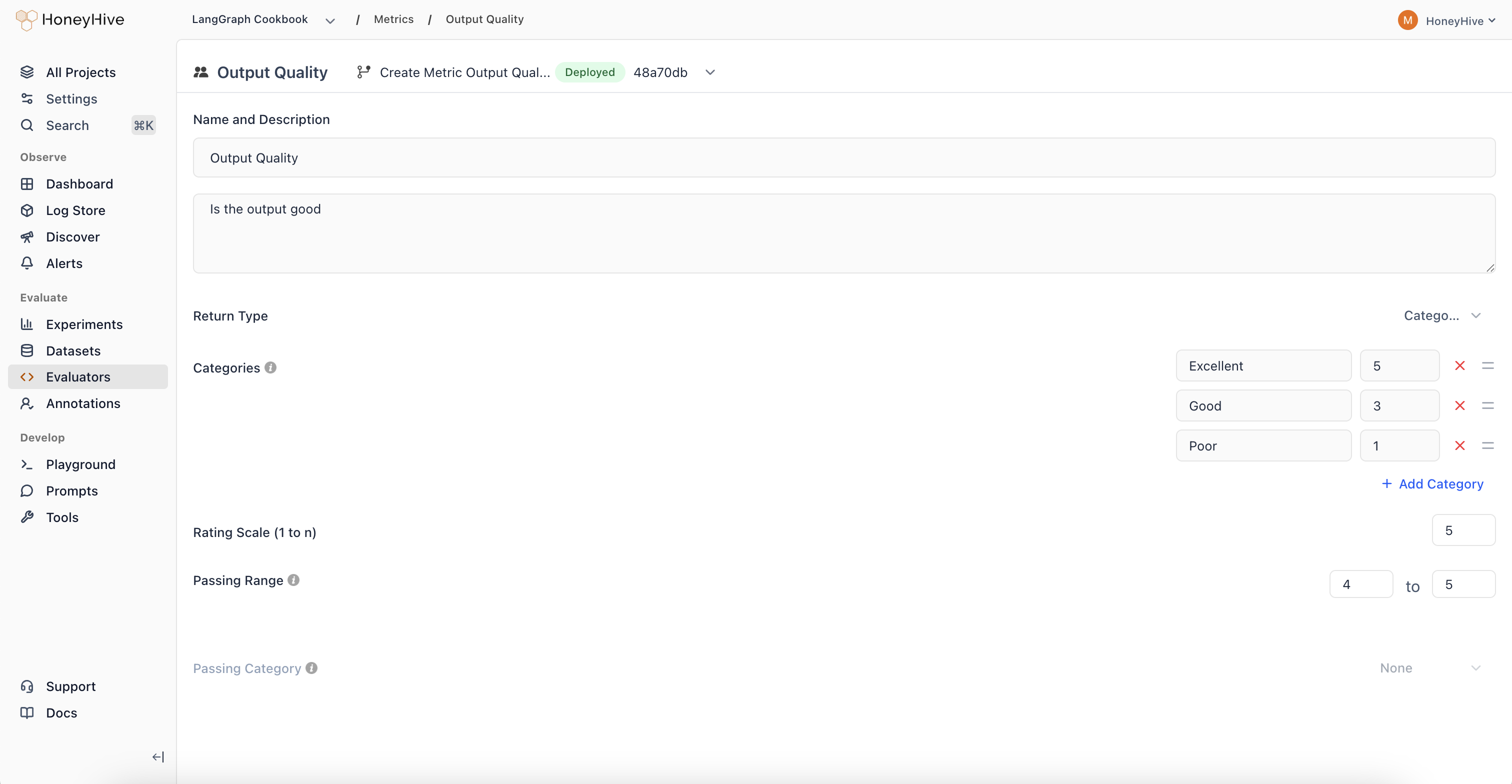
Define clear evaluation criteria for annotators in the `Description` field:
```markdown theme={null}
1. Relevance: Is the response directly related to the prompt without unnecessary details?
2. Clarity: Is the message clear and easily understandable?
3. Word Economy: Are unnecessary words, phrases, or sentences eliminated?
4. Precision: Does the response use precise language without being vague?
5. Elimination of Filler: Are redundant or filler words removed?
6. Logical Flow: Does the response follow a logical sequence without unnecessary jumps?
7. Brevity vs. Completeness: Is the response concise while still covering all necessary points?
8. Consistency: Does the response maintain consistent conciseness throughout?
9. Engagement: Does the response keep the reader's interest despite its brevity?
10. Overall Impact: Does the response effectively convey the message concisely?
```
## Configuration
### Return Type
Options:
1. `Numeric`: For ratings on a scale
2. `Binary`: For yes/no evaluations
3. `Notes`: For free-form text feedback
4. `Categorical`: For categorization tasks
### Rating Scale
For `numeric` return type and, in some cases, `categorical` return type (i.e where numerical labels are defined), specify the scale (e.g., 1-5).
### Passing Range
Define the range of scores considered acceptable.
## In-App Annotation
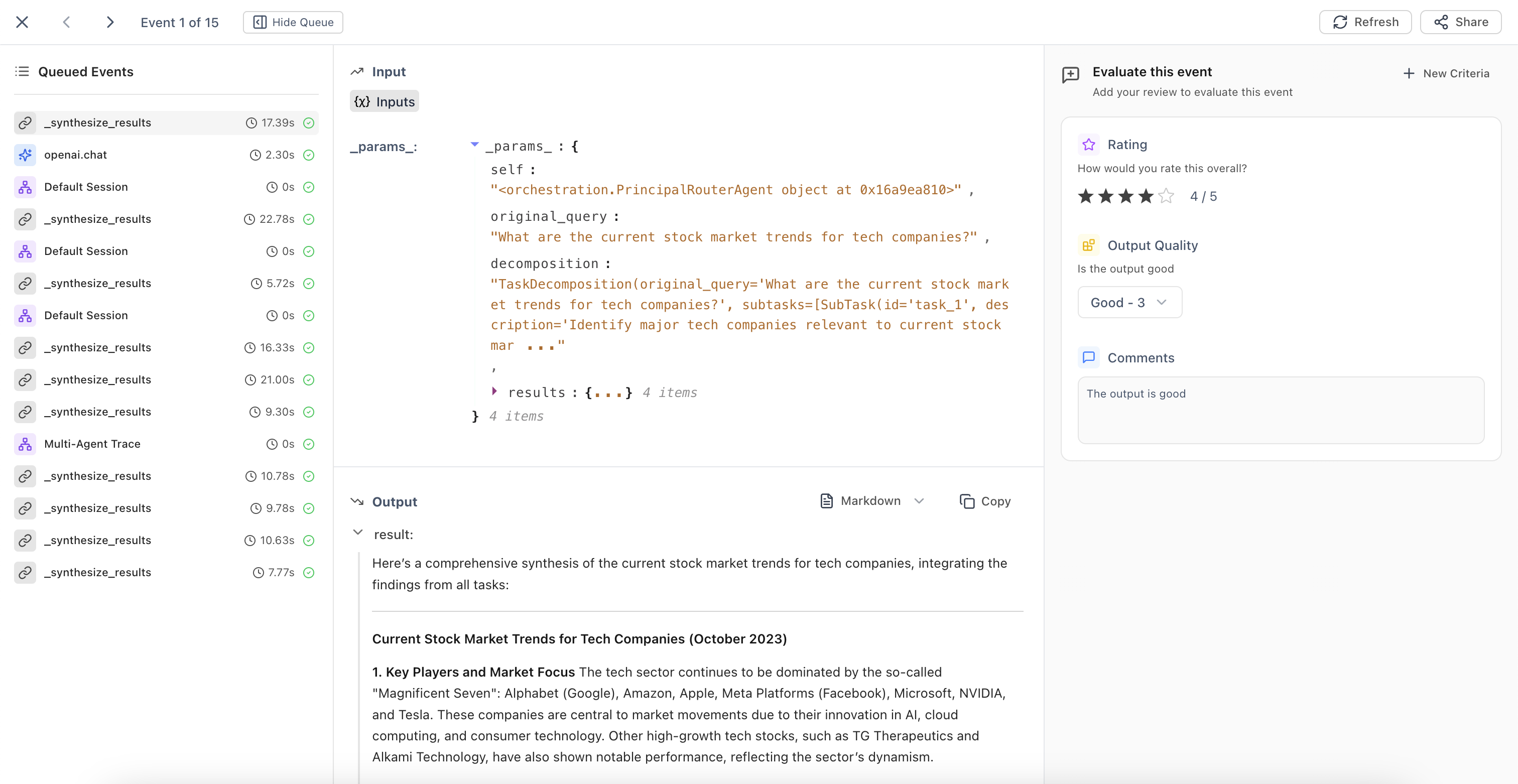
Once created, human evaluators are available throughout the UI - in traces, `Review Mode` or `Annotation Queues`. You can invite domain experts to annotate traces in any project.
## Evaluation Criteria
Define clear evaluation criteria for annotators in the `Description` field:
```markdown theme={null}
1. Relevance: Is the response directly related to the prompt without unnecessary details?
2. Clarity: Is the message clear and easily understandable?
3. Word Economy: Are unnecessary words, phrases, or sentences eliminated?
4. Precision: Does the response use precise language without being vague?
5. Elimination of Filler: Are redundant or filler words removed?
6. Logical Flow: Does the response follow a logical sequence without unnecessary jumps?
7. Brevity vs. Completeness: Is the response concise while still covering all necessary points?
8. Consistency: Does the response maintain consistent conciseness throughout?
9. Engagement: Does the response keep the reader's interest despite its brevity?
10. Overall Impact: Does the response effectively convey the message concisely?
```
## Configuration
### Return Type
Options:
1. `Numeric`: For ratings on a scale
2. `Binary`: For yes/no evaluations
3. `Notes`: For free-form text feedback
4. `Categorical`: For categorization tasks
### Rating Scale
For `numeric` return type and, in some cases, `categorical` return type (i.e where numerical labels are defined), specify the scale (e.g., 1-5).
### Passing Range
Define the range of scores considered acceptable.
## In-App Annotation
Once created, human evaluators are available throughout the UI - in traces, `Review Mode` or `Annotation Queues`. You can invite domain experts to annotate traces in any project.