> ## Documentation Index
> Fetch the complete documentation index at: https://docs.honeyhive.ai/llms.txt
> Use this file to discover all available pages before exploring further.
# LangGraph
> This guide explains how to integrate HoneyHive with LangChain for Python implementations.
> View the complete cookbook example on GitHub: [honeyhiveai/cookbook/langgraph-cookbook](https://github.com/honeyhiveai/cookbook/tree/main/langgraph-cookbook)
This guide demonstrates how to build a sophisticated code generation system using LangGraph and HoneyHive tracing. The system combines Retrieval Augmented Generation (RAG) with self-correction capabilities to generate reliable code solutions. HoneyHive's tracing capabilities provide comprehensive visibility into the entire process, making debugging and optimization easier than ever.
## Overview
The system consists of several key components:
* Documentation loading and processing (traced with HoneyHive)
* LLM setup with structured output (monitored for performance)
* A LangGraph workflow for code generation and validation (with detailed tracing)
* HoneyHive tracing for monitoring and debugging (real-time insights)
## Prerequisites
Before running this code, ensure you have the following:
* Python 3.x
* Required API keys:
* HoneyHive API key (for comprehensive tracing)
* OpenAI API key
* Anthropic API key
* Required packages:
```bash theme={null}
pip install langchain langchain-community langgraph beautifulsoup4 honeyhive langchain-openai langchain-anthropic
```
## Code Implementation
### Environment Setup and Imports
```python theme={null}
import getpass
import os
import sys
from bs4 import BeautifulSoup as Soup
from langchain_community.document_loaders.recursive_url_loader import RecursiveUrlLoader
from langchain_core.prompts import ChatPromptTemplate
from langchain_openai import ChatOpenAI
from langchain_anthropic import ChatAnthropic
from pydantic import BaseModel, Field
from typing import List
from typing_extensions import TypedDict, Annotated
from langgraph.graph import END, StateGraph, START
from honeyhive import HoneyHiveTracer, trace
# Set up environment variables
# Delete the below if it is already set in the environment
os.environ["HONEYHIVE_API_KEY"] = "your honeyhive api key"
os.environ["HONEYHIVE_PROJECT"] = "your honeyhive project"
os.environ["HONEYHIVE_SOURCE"] = "your honeyhive source"
os.environ["OPENAI_API_KEY"] = "your openai api key"
os.environ["ANTHROPIC_API_KEY"] = "your anthropic api key"
```
### HoneyHive Tracing Setup
HoneyHive's tracing setup provides comprehensive monitoring capabilities:
```python theme={null}
# Initialize HoneyHive tracer with detailed configuration
HoneyHiveTracer.init(
api_key=os.environ.get("HONEYHIVE_API_KEY", "your honeyhive api key"),
project=os.environ.get("HONEYHIVE_PROJECT", "your honeyhive project"),
source="development",
session_name="LangGraph Code Generation"
)
```
With this setup, you get:
* Real-time monitoring of all traced functions
* Detailed performance metrics
* Error tracking and debugging
* Session-based analytics
* Custom metadata support
### Documentation Loading
The system uses RecursiveUrlLoader with HoneyHive tracing to monitor documentation loading:
```python theme={null}
@trace
def load_documentation(url):
"""Load documentation from a URL"""
print("---LOADING DOCUMENTATION---")
loader = RecursiveUrlLoader(
url=url, max_depth=20, extractor=lambda x: Soup(x, "html.parser").text
)
docs = loader.load()
# Sort and concatenate documentation
d_sorted = sorted(docs, key=lambda x: x.metadata["source"])
d_reversed = list(reversed(d_sorted))
concatenated_content = "\n\n\n --- \n\n\n".join(
[doc.page_content for doc in d_reversed]
)
print("---DOCUMENTATION LOADED---")
return concatenated_content
```
HoneyHive tracing here provides:
* Loading time metrics
* Document count tracking
* Error handling for failed loads
* Memory usage monitoring
* URL accessibility tracking
### Data Model
The system uses Pydantic with HoneyHive tracing for structured output validation:
```python theme={null}
class code(BaseModel):
"""Schema for code solutions to questions about HoneyHive."""
prefix: str = Field(description="Description of the problem and approach")
imports: str = Field(description="Code block import statements")
code: str = Field(description="Code block not including import statements")
```
HoneyHive helps track:
* Model validation success rates
* Field completion rates
* Schema compliance
* Data quality metrics
### LLM Setup
The system uses Claude with HoneyHive tracing for comprehensive LLM monitoring:
```python theme={null}
code_gen_prompt_claude = ChatPromptTemplate.from_messages([
(
"system",
""" You are a coding assistant with expertise in HoneyHive. \n
Here is the LCEL documentation: \n ------- \n {context} \n ------- \n Answer the user question based on the \n
above provided documentation. Ensure any code you provide can be executed with all required imports and variables \n
defined. Structure your answer: 1) a prefix describing the code solution, 2) the imports, 3) the functioning code block. \n
Invoke the code tool to structure the output correctly. \n Here is the user question:""",
),
("placeholder", "{messages}"),
])
@trace
def setup_llm():
"""Set up the LLM with structured output"""
expt_llm_claude = "claude-3-7-sonnet-latest"
llm_claude = ChatAnthropic(
model=expt_llm_claude,
default_headers={"anthropic-beta": "tools-2024-04-04"},
)
structured_llm_claude = llm_claude.with_structured_output(code, include_raw=True)
return structured_llm_claude
llm = setup_llm()
```
HoneyHive provides:
* LLM response time tracking
* Token usage monitoring
* Error rate tracking
* Model performance analytics
* Cost tracking per request
### Documentation Loading and Chain Setup
First, load the documentation and set up the code generation chain:
```python theme={null}
# Load HoneyHive documentation
documentation = load_documentation("https://docs.honeyhive.ai/introduction/quickstart")
# Helper function for Claude output processing
@trace
def parse_output(solution):
"""Parse the structured output from Claude"""
if "parsed" in solution:
return solution["parsed"]
return solution
# Set up the code generation chain
code_gen_chain = code_gen_prompt_claude | llm | parse_output
```
### LangGraph Implementation
The system uses LangGraph with HoneyHive tracing for workflow monitoring:
1. State Definition:
```python theme={null}
class GraphState(TypedDict):
"""
Represents the state of our graph.
Attributes:
error : Binary flag for control flow to indicate whether test error was tripped
messages : With user question, error messages, reasoning
generation : str with code solution
iterations : Number of tries
"""
error: str
messages: List
generation: str
iterations: int
```
2. Graph Nodes with HoneyHive tracing:
**Generate Node:**
```python theme={null}
@trace
def generate(state: GraphState):
"""
Generate a code solution
Args:
state (dict): The current graph state
Returns:
state (dict): New key added to state, generation
"""
print("---GENERATING CODE SOLUTION---")
messages = state["messages"]
# Generate the code solution
generation = code_gen_chain.invoke(
{"messages": messages, "context": documentation}
)
print("---CODE SOLUTION GENERATED---")
return {"generation": generation, "iterations": state["iterations"] + 1}
```
**Code Check Node:**
```python theme={null}
@trace
def code_check(state: GraphState):
"""
Verify that the code solution works by:
1. Checking that imports don't error
2. Checking that code execution doesn't error
Args:
state (dict): The current graph state with the code solution
Returns:
state (dict): State with updated error flag and messages
"""
print("---CHECKING CODE SOLUTION---")
generation = state["generation"]
# Extract imports and code
imports = generation.imports
code_block = generation.code
# Check imports
error_msg = None
try:
print("---CHECKING IMPORTS---")
exec(imports)
print("Imports OK!")
except Exception as e:
error_msg = f"Import error: {str(e)}"
print(f"Import error: {e}")
# If imports okay, check code execution
if not error_msg:
try:
print("---CHECKING CODE EXECUTION---")
# Only syntax check (don't execute the code for safety)
compile(code_block, "", "exec")
print("Code syntax OK!")
except Exception as e:
error_msg = f"Code execution error: {str(e)}"
print(f"Code execution error: {e}")
# Update state based on checks
has_error = error_msg is not None
if has_error:
messages = state["messages"] + [
(
"assistant",
f"There was an error with the code: {error_msg}. Let me fix it.",
)
]
return {"error": "yes", "messages": messages}
else:
return {"error": "no"}
```
**Reflect Node:**
```python theme={null}
@trace
def reflect(state: GraphState):
"""
Reflect on the code solution and improve it
Args:
state (dict): The current graph state
Returns:
state (dict): State with updated messages for reflection
"""
print("---REFLECTING ON SOLUTION---")
# Add a reflection step to messages for the next iteration
messages = state["messages"] + [
(
"assistant",
"Let me review the code once more to make sure it's correct and follows best practices."
)
]
return {"messages": messages}
```
**Decision Node:**
```python theme={null}
@trace
def decide_to_finish(state: GraphState):
"""
Decide whether to finish or try again
Args:
state (dict): The current graph state
Returns:
str: "reflect", "finish", or "generate"
"""
error = state["error"]
iterations = state["iterations"]
max_iterations = 3
# If there's an error and we haven't reached max iterations, generate again
if error == "yes" and iterations < max_iterations:
print(f"---ERROR DETECTED, REGENERATING (Iteration {iterations}/{max_iterations})---")
return "generate"
# If no error but want to reflect before finishing (optional)
# Change flag to "reflect" to enable this branch
flag = "do not reflect" # Change to "reflect" to enable reflection
if error == "no" and flag == "reflect":
print("---NO ERROR, REFLECTING BEFORE FINISHING---")
return "reflect"
# Otherwise, finish
print("---FINISHING---")
return "finish"
```
3. Graph Construction with comprehensive tracing:
```python theme={null}
@trace
def build_graph():
"""Build the LangGraph for code generation"""
# Create a graph
graph_builder = StateGraph(GraphState)
# Add nodes
graph_builder.add_node("generate", generate)
graph_builder.add_node("code_check", code_check)
graph_builder.add_node("reflect", reflect)
# Add edges
graph_builder.add_edge(START, "generate")
graph_builder.add_edge("generate", "code_check")
# Add conditional edges
graph_builder.add_conditional_edges(
"code_check",
decide_to_finish,
{
"generate": "generate",
"reflect": "reflect",
"finish": END,
},
)
graph_builder.add_edge("reflect", "generate")
# Compile the graph
return graph_builder.compile()
# Create the graph
graph = build_graph()
```
### Main Execution Function
The main function to run the graph with a question:
```python theme={null}
# Function to run the graph with a question
@trace
def solve_coding_question(question):
"""Run the graph to solve a coding question"""
# Initialize the state
state = {
"error": "no",
"messages": [("human", question)],
"generation": None,
"iterations": 0,
}
# Execute the graph
result = graph.invoke(state)
# Return the generated code solution
return result["generation"]
```
HoneyHive tracing provides:
* Node execution time tracking
* Edge traversal monitoring
* State transition tracking
* Error propagation analysis
* Performance bottlenecks identification
## Usage
To use the code generation system with HoneyHive monitoring:
```python theme={null}
# Example usage
if __name__ == "__main__":
question = "How can I use HoneyHive tracing with LangGraph?"
solution = solve_coding_question(question)
print("\n=== FINAL SOLUTION ===")
print(f"\n{solution.prefix}\n")
print(f"IMPORTS:\n{solution.imports}\n")
print(f"CODE:\n{solution.code}")
# This will end the current session in HoneyHive
# For a new session, call HoneyHiveTracer.init() again
```
## Key Features
1. **RAG Integration**: HoneyHive traces document retrieval and processing
2. **Self-Correction**: Monitors validation and improvement cycles
3. **Structured Output**: Tracks schema compliance and data quality
4. **HoneyHive Tracing**: Provides comprehensive monitoring and debugging
5. **Maximum Iterations**: Tracks iteration counts and success rates
## Best Practices
1. Always set up proper environment variables before running
2. Monitor the HoneyHive dashboard for:
* Performance metrics
* Error rates
* Cost analysis
* Usage patterns
3. Adjust the max\_depth parameter in RecursiveUrlLoader based on your needs
4. Customize the reflection step based on your specific use case
5. Implement proper error handling for production use
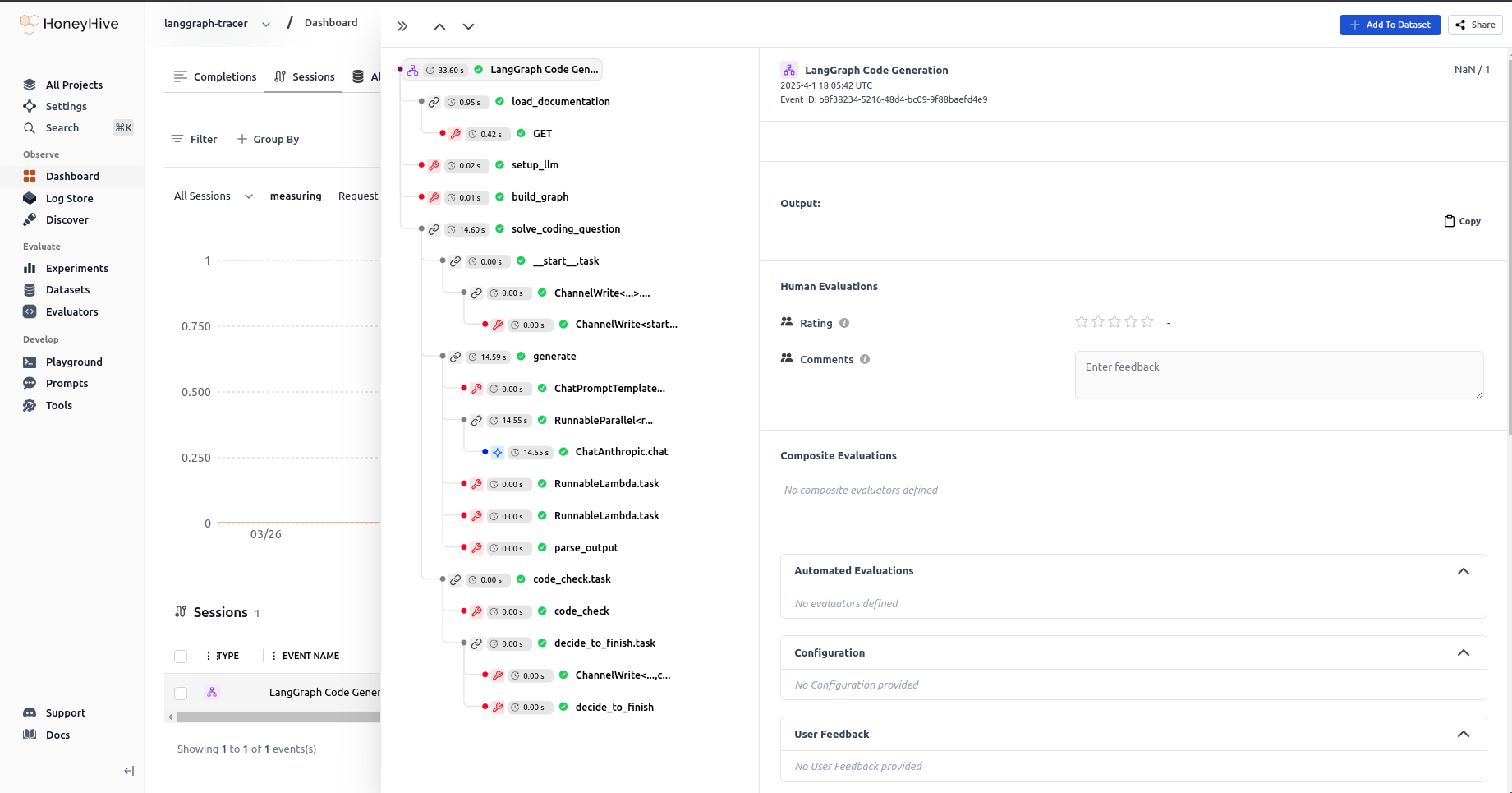
## HoneyHive Dashboard Insights
The HoneyHive dashboard provides valuable insights:
1. **Performance Metrics**:
* Response times
* Throughput
* Resource usage
2. **Error Tracking**:
* Error rates
* Stack traces
* Error patterns
3. **Cost Analysis**:
* API usage costs
* Resource consumption
* Cost optimization opportunities
4. **Usage Patterns**:
* Peak usage times
* Common operations
* User behavior
 ## Conclusion
This implementation provides a robust foundation for code generation with self-correction capabilities. The combination of LangGraph and HoneyHive tracing ensures reliable and monitored code generation processes. HoneyHive's comprehensive tracing capabilities make it easier to:
* Debug issues
* Optimize performance
* Track costs
* Monitor quality
* Scale the system
## Conclusion
This implementation provides a robust foundation for code generation with self-correction capabilities. The combination of LangGraph and HoneyHive tracing ensures reliable and monitored code generation processes. HoneyHive's comprehensive tracing capabilities make it easier to:
* Debug issues
* Optimize performance
* Track costs
* Monitor quality
* Scale the system