> ## Documentation Index
> Fetch the complete documentation index at: https://docs.honeyhive.ai/llms.txt
> Use this file to discover all available pages before exploring further.
# NVIDIA NeMo
> Learn how to integrate NVIDIA NeMo Models with HoneyHive
export const integrationType_1 = "NVIDIA NeMo"
export const integrationType_0 = "NVIDIA NeMo"
NVIDIA NeMo offers a suite of leading-edge NVIDIA-built and open-source generative AI models, meticulously fine-tuned for exceptional performance and efficiency. With the ability to deploy these models using NVIDIA NIM™ microservices and customize them through NeMo, developers can swiftly prototype and scale their AI applications.
With HoneyHive, you can trace all your {integrationType_0} operations using a single line of code. Find a list of all supported integrations [here](/introduction/troubleshooting#latest-package-versions-tested).
## HoneyHive Setup
Follow the [HoneyHive Installation Guide](/integrations/integration-prereqs) to get your API key and initialize the tracer.
## NeMo Setup
Go to the [NeMo Playground](https://build.nvidia.com/meta/llama-3_1-405b-instruct?api_key=true) to get your NVIDIA API key.
## Example
Here is an example of how to trace your {integrationType_1} code in HoneyHive.
```python Python theme={null}
# NVIDIA uses OpenAI client to interact with their API
from openai import OpenAI
from honeyhive import HoneyHiveTracer
# place the code below at the beginning of your application execution
HoneyHiveTracer.init(
api_key="MY_HONEYHIVE_API_KEY", # paste your API key here
project="MY_HONEYHIVE_PROJECT_NAME", # paste your project name here
)
client = OpenAI(
base_url="https://integrate.api.nvidia.com/v1",
api_key="MY_NVIDIA_API_KEY",
)
completion = client.chat.completions.create(
model="nvidia/mistral-nemo-minitron-8b-8k-instruct",
messages=[
{
"role": "user",
"content": "Write a limerick about the wonders of GPU computing.",
}
],
stream=True,
)
for chunk in completion:
if chunk.choices[0].delta.content is not None:
print(chunk.choices[0].delta.content, end="")
```
```tsx TypeScript theme={null}
import OpenAI from 'openai';
import { HoneyHiveTracer } from 'honeyhive';
const tracer = await HoneyHiveTracer.init({
apiKey: 'MY_HONEYHIVE_API_KEY',
project: 'MY_HONEYHIVE_PROJECT_NAME',
sessionName: 'test',
});
const openai = new OpenAI({
apiKey: "MY_NVIDIA_API_KEY",
baseURL: 'https://integrate.api.nvidia.com/v1',
})
async function main(input: string): Promise {
const completion = await openai.chat.completions.create({
model: "nvidia/mistral-nemo-minitron-8b-8k-instruct",
messages: [{ role: "user" as const, content: input }],
temperature: 0.2,
top_p: 0.7,
max_tokens: 1024,
stream: true
});
let ret = '';
let content: string;
for await (const chunk of completion) {
content = chunk.choices[0]?.delta?.content ?? '\n';
process.stdout.write(content);
ret += content;
}
return ret;
}
const tracedMain = tracer.traceFunction()(main);
await tracedMain("Write a limerick about the wonders of GPU computing.");
```
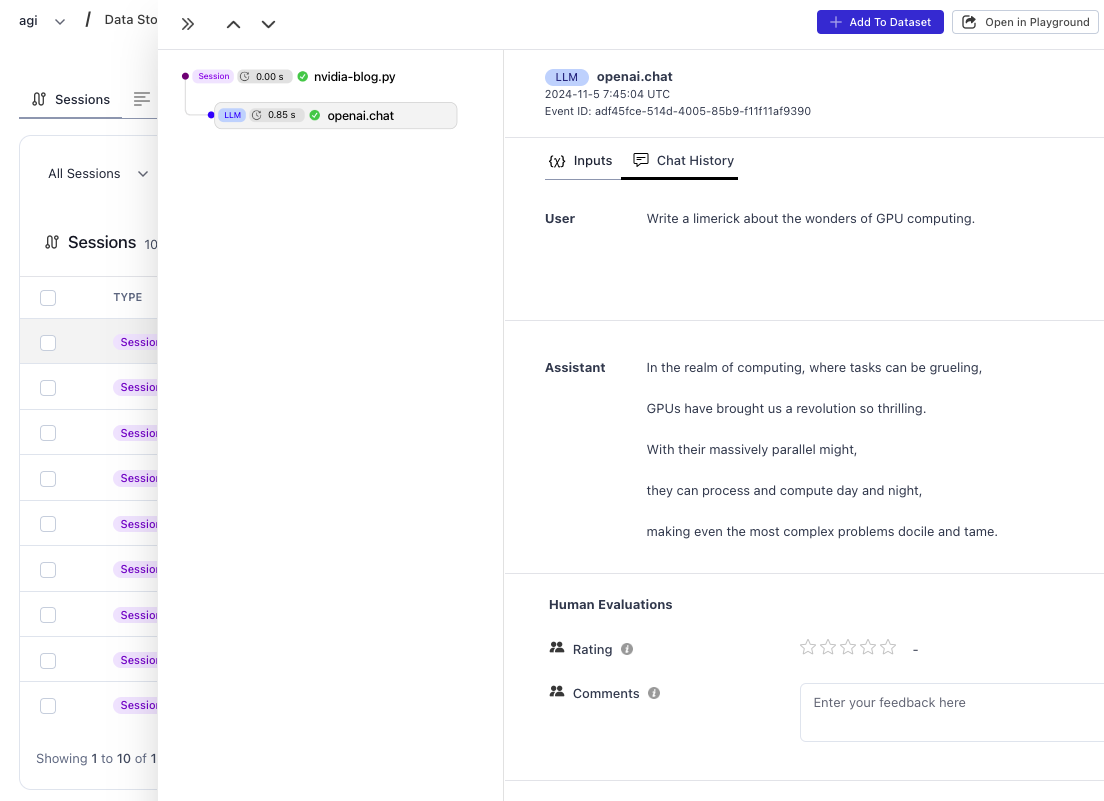
## View your Traces
Once you run your code, you can view your execution trace in the HoneyHive UI by clicking the `Log Store` tab on the left sidebar.