> ## Documentation Index
> Fetch the complete documentation index at: https://docs.honeyhive.ai/llms.txt
> Use this file to discover all available pages before exploring further.
# Quickstart
> Get started with tracing in HoneyHive
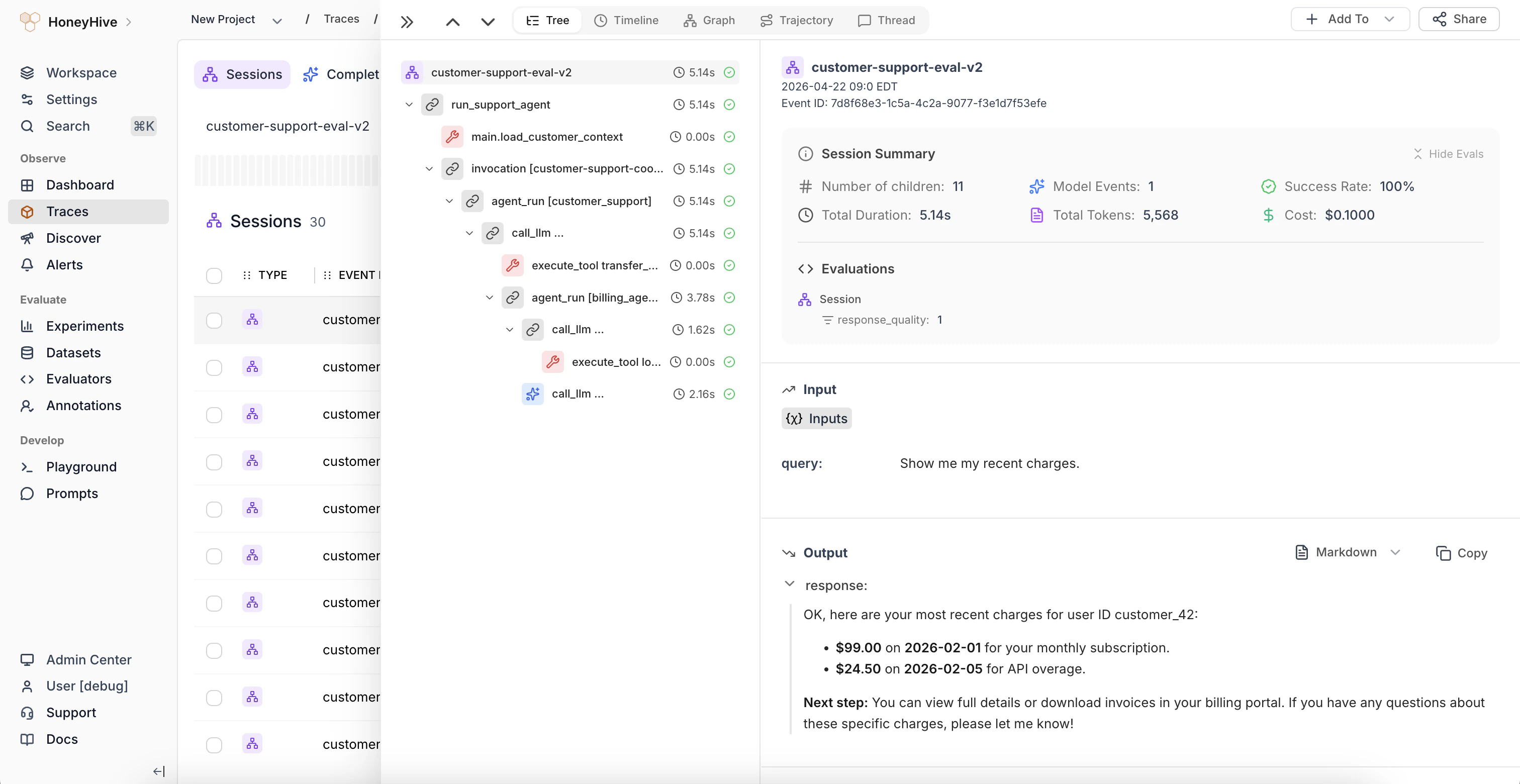
With HoneyHive, we allow users to get visibility into their AI applications by tracing:
1. Model inference calls as `model` events
2. External API calls (like retrieval) as `tool` events
3. Collections of workflow steps as `chain` events
4. An entire trace of requests as a `session`, which includes back-and-forth user turns
### Logging a Trace
We use OpenTelemetry to automatically instrument your AI application. You can find the full list of supported packages [here](/introduction/troubleshooting#latest-package-versions-tested).
**Prerequisites**
* You have already created a project in HoneyHive, as explained [here](/workspace/projects).
* You have an API key for your project, as explained [here](/sdk-reference/authentication).
**Expected Time**: 5 minutes
To install our SDKs, run the following commands in the shell.
```shell Python theme={null}
pip install honeyhive
```
```shell TypeScript theme={null}
npm install honeyhive
```
```shell Python(logger sdk) theme={null}
pip install honeyhive-logger
```
```shell TypeScript(logger sdk) theme={null}
npm install @honeyhive/logger
```
Initializing the `HoneyHiveTracer` marks the beginning of your `session` and allows you to begin tracing your program.
To initialize, pass the following parameters:
* `api_key`: Get your API key from [HoneyHive Account Settings](https://app.us.honeyhive.ai/settings/account).
* `project`: Create a project from [HoneyHive Projects](https://app.us.honeyhive.ai/projects).
* *(optional)* `source`: An environment variable for the trace, e.g. "prod", "dev", etc. Defaults to "dev".
* *(optional)* `session_name`: A custom name for your agent session. Defaults to the main module name.
If you are using a [self-hosted](/setup/self-hosted) or [dedicated](/setup/dedicated) deployment, you also need to pass:
* `server_url`: The private HoneyHive endpoint found in the Settings page in the HoneyHive app.
```python Python theme={null}
from honeyhive import HoneyHiveTracer
# Add this code at the beginning of your AI pipeline code
HoneyHiveTracer.init(
api_key=MY_HONEYHIVE_API_KEY,
project=MY_HONEYHIVE_PROJECT_NAME,
source=MY_SOURCE, # Optional
session_name=MY_SESSION_NAME, # Optional
server_url=MY_HONEYHIVE_SERVER_URL # Optional / Required for self-hosted or dedicated deployments
)
# Your LLM and vector database calls will now be automatically instrumented
# Run HoneyHiveTracer.init() again to end the current session and start a new one
```
```tsx TypeScript theme={null}
import { HoneyHiveTracer } from "honeyhive";
// Add this code at the beginning of your AI pipeline code
const tracer = await HoneyHiveTracer.init({
apiKey: MY_HONEYHIVE_API_KEY,
project: MY_HONEYHIVE_PROJECT_NAME,
source: MY_SOURCE, // Optional
sessionName: MY_SESSION_NAME, // Optional
serverUrl: MY_HONEYHIVE_SERVER_URL // Optional / Required for self-hosted or dedicated deployments
});
// Make sure to await the trace call when using async functions
await tracer.trace(async () => {
// Your AI pipeline code here
// Note: Auto-instrumentation is only supported for CommonJS implementations
// Note: For ESModules implementations, please refer to Step 3 below
// Your async AI pipeline code here
const result = await someAsyncFunction();
// ... more async code ...
});
// Instantiate a new tracer object with HoneyHiveTracer.init() to trace a new session
```
```python LangChain theme={null}
from honeyhive.utils.langchain_tracer import HoneyHiveLangChainTracer
honeyhive_tracer = HoneyHiveLangChainTracer(
api_key=MY_HONEYHIVE_API_KEY,
project=MY_HONEYHIVE_PROJECT_NAME,
name=MY_SESSION_NAME,
source=MY_SOURCE, # e.g. "prod", "dev", etc.
metadata=MY_METADATA, # optional field
base_url=MY_HONEYHIVE_SERVER_URL # optional / required for self-hosted or dedicated deployments
)
# Your LangChain code goes here
# When invoking your LangChain agent, chain, tool, or retriever, add the tracer to the callbacks
agent_result = agent(
"Which city is closest to London as the crow flies, Berlin or Munich?",
callbacks=[honeyhive_tracer], # Add the tracer to the callbacks
)
# The agent execution will now be traced and logged to HoneyHive
```
```js LangChain JS theme={null}
import { HoneyHiveLangChainTracer } from "honeyhive";
async function main() {
const config = {
apiKey: MY_HONEYHIVE_API_KEY, // Your HoneyHive API key for authentication
project: MY_HONEYHIVE_PROJECT_NAME, // The name of your HoneyHive project
source: "dev", // The source of the trace, e.g., "dev", "prod", etc.
sessionName: "Langchain JS Quickstart", // A name for this tracing session
baseUrl: MY_HONEYHIVE_SERVER_URL // optional / required for self-hosted or dedicated deployments
});
// Create a new LangChain tracer instance
const tracer = new HoneyHiveLangChainTracer(config);
// Start a new tracing session
await tracer.startNewSession();
// Your LangChain JS code goes here
// When invoking your LangChain agent, chain, tool, or retriever, add the tracer to the callbacks
await agentExecutor.invoke(
{ input: "What is task decomposition?" },
{ callbacks: [tracer] } // Add the tracer to the callbacks
);
// The agent execution will now be traced and logged to HoneyHive
}
main().catch(console.error);
```
```python LlamaIndex theme={null}
from honeyhive import HoneyHiveTracer
# add this code at the start of your LlamaIndex script
HoneyHiveTracer.init(
api_key=MY_HONEYHIVE_API_KEY,
project=MY_HONEYHIVE_PROJECT_NAME,
server_url=MY_HONEYHIVE_SERVER_URL # optional / required for self-hosted or dedicated deployments
)
# Your LlamaIndex session will now be automatically instrumented
# Run HoneyHiveTracer.init() again to end the current session and start a new one
```
```python Logger(Python) theme={null}
# The honeyhive-logger package provides a lightweight, stateless,
# dependency-free way to send session and event data to HoneyHive.
from honeyhive_logger import start
session_id = start(
api_key=MY_HONEYHIVE_API_KEY,
project=MY_HONEYHIVE_PROJECT_NAME,
session_name="v1",
)
```
```typescript Logger(TypeScript) theme={null}
// The honeyhive/logger package provides a lightweight, stateless,
// dependency-free way to send session and event data to HoneyHive.
const {start} = require('@honeyhive/logger');
const sessionId = await start({
apiKey: MY_HONEYHIVE_API_KEY,
project: MY_HONEYHIVE_PROJECT_NAME
});
```
The above initialization will auto-capture all interactions with [our supported providers](/introduction/troubleshooting#latest-package-versions-tested).
To capture anything else, you can trace *any function* in your code and see its inputs, outputs, errors, duration, etc. by decorating it as follows.
The following method isn't compatible with the LangChain callback handlers.
```python Python theme={null}
from honeyhive import trace
@trace
def my_function(param1, param2):
# Code here
return result
```
```python Python (async) theme={null}
from honeyhive import atrace
@atrace
async def my_function(param1, param2):
# Code here
return await async_result
```
```TypeScript TypeScript (sync / async) theme={null}
// wrap your function with tracer.traceFunction() {}
// keep the traced function's name the same
const myFunction = tracer.traceFunction()(
async function myFunction(query) {
// some code
return result;
}
);
const result = await myFunction("test");
```
```python Logger(Python) theme={null}
# The honeyhive_logger package provides a lightweight, stateless,
# dependency-free way to send session and event data to HoneyHive.
from honeyhive_logger import log
def my_function(param1, param2):
# Code here
return result
result = my_function(param1, param2)
# For maximum insights, learn more about sending data
# in the schema overview documentation at https://docs.honeyhive.ai/schema-overview
log(
api_key=MY_HONEYHIVE_API_KEY,
project=MY_HONEYHIVE_PROJECT_NAME,
session_id = session_id, # obtained from start(),
event_name="my_func",
event_type="tool",
inputs = {
"param1": param1,
"param2": param2
},
outputs = {
"result": result
}
)
```
```typescript Logger(TypeScript) theme={null}
// The honeyhive/logger package provides a lightweight, stateless,
// dependency-free way to send session and event data to HoneyHive.
const {log} = require('@honeyhive/logger');
async function myFunction(query: string) {
// some code
return result;
}
const result = await myFunction(query);
// For maximum insights, learn more about sending data
// in the schema overview documentation at https://docs.honeyhive.ai/schema-overview
const eventId = await log({
sessionId: sessionId, // obtained from start()
eventName: "my-func",
eventType: "tool",
inputs: {
query: query
},
outputs: {
result: result
}
});
```
### View the trace
Now that you have successfully traced your session, you can review it in the platform. Navigate to [Log Store](https://app.us.honeyhive.ai/datastore/sessions) and click to view any trace.
 ###
### Learn more
An end-to-end tutorial for tracing a complex RAG application with the tracer.
Learn how to troubleshoot common issues with our tracers.
How to add feedback, metrics, metadata, and more to traces.
Learn how HoneyHive's core data model works.
###
### Learn more
An end-to-end tutorial for tracing a complex RAG application with the tracer.
Learn how to troubleshoot common issues with our tracers.
How to add feedback, metrics, metadata, and more to traces.
Learn how HoneyHive's core data model works.