> ## Documentation Index
> Fetch the complete documentation index at: https://docs.honeyhive.ai/llms.txt
> Use this file to discover all available pages before exploring further.
# Manual Evaluation
> Logging your application execution to HoneyHive without using the tracers
This method is designed for users who:
* Want to evaluate their data without our Python/TS utilities.
* Need to customize the dataset ingestion process.
* Want more control over how evaluation sessions are tracked.
You can directly use our APIs to track your evaluation runs and sessions, enabling flexibility in how you set up and execute evaluations.
Where possible, we recommend using HoneyHive datasets to simplify ingestion, improve linking and reduce the overhead of manual data management.
## Prerequisites
Before beginning, ensure the following:
* You have setup the manual instrumentation, as explained [here](/sdk-reference/manual-instrumentation).
## Evaluation Setup
You have two options for running evaluations: with HoneyHive-provided datasets or using external datasets. Both approaches share common steps, but the specifics differ slightly.
***
### Evaluating with External Datasets
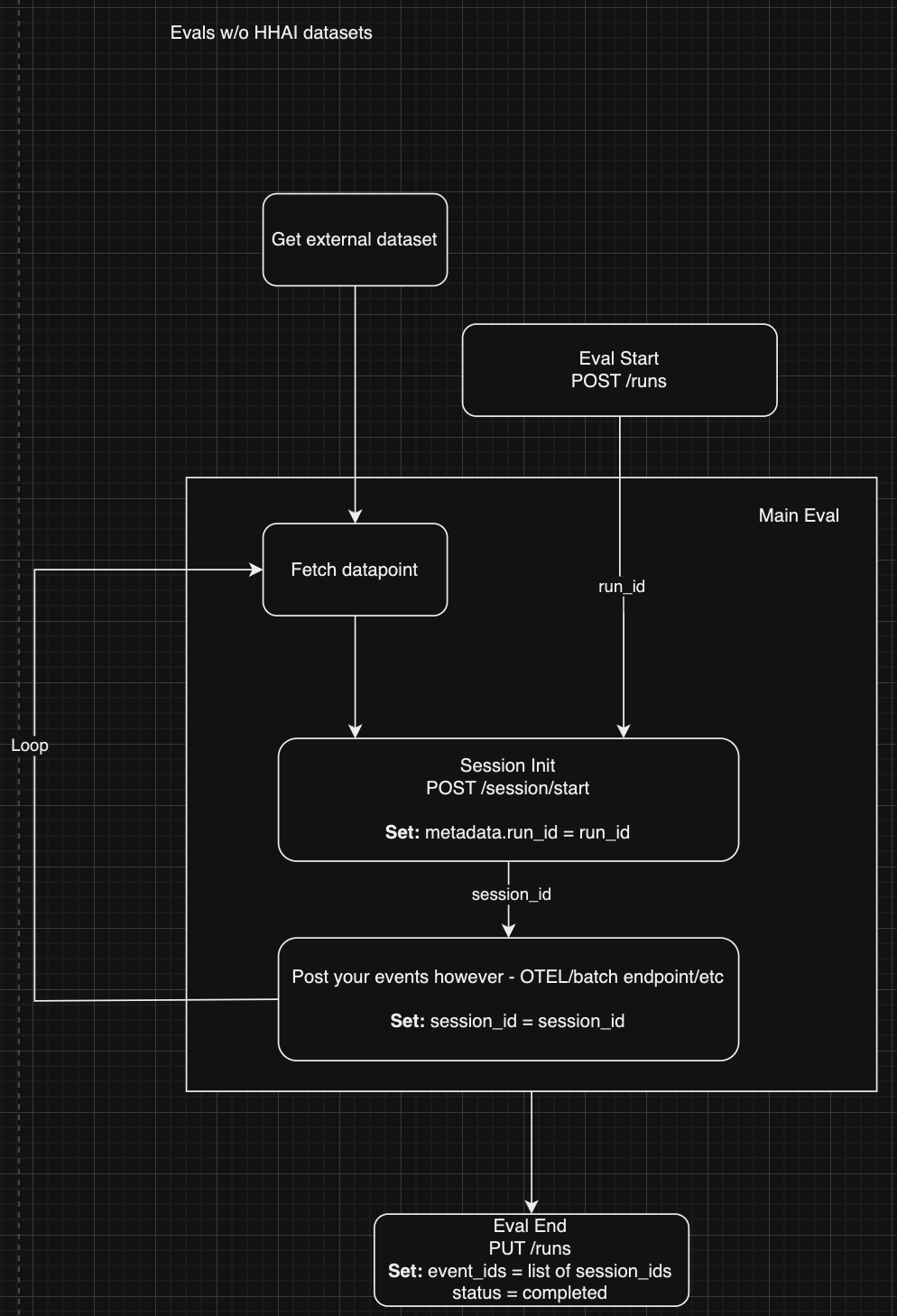 For evaluations using external datasets, follow these steps:
1. **Start the Evaluation Run**
* `POST /runs`: Initiate the evaluation run using external datasets. [Full API reference link here.](/api-reference/runs/create-a-new-evaluation-run)
**Payload:**\
No dataset ID is required in this case, as you will manually handle dataset ingestion.
2. **Fetch the Data**
* Manually retrieve data points from your external dataset.
3. **Session Initialization**
* `POST /session/start`: Start a new session for the evaluation run. [Full API reference link here.](/api-reference/session/start-a-new-session)\
Set the following fields:
* `metadata.run_id = run_id` (use the ID from the evaluation run)
4. **Log Your Events**
* Post your evaluation events using your preferred method (e.g., OpenTelemetry, batch endpoints, etc.). Detailed docs for that are [avaliable here](/sdk-reference/manual-instrumentation).
Set the following:
* `session_id = session_id` (use the ID from the session start)
* Make sure to pass any client side metrics on the relevant event to make later analysis more granular.
5. **End the Evaluation**
* `PUT /runs`: Mark the evaluation as completed. [Full API reference link here.](/api-reference/runs/update-an-evaluation-run)\
Set the following:
* `event_ids`: Provide a list of session IDs.
* `status = completed`
***
### Evaluating with HoneyHive Datasets
For evaluations using external datasets, follow these steps:
1. **Start the Evaluation Run**
* `POST /runs`: Initiate the evaluation run using external datasets. [Full API reference link here.](/api-reference/runs/create-a-new-evaluation-run)
**Payload:**\
No dataset ID is required in this case, as you will manually handle dataset ingestion.
2. **Fetch the Data**
* Manually retrieve data points from your external dataset.
3. **Session Initialization**
* `POST /session/start`: Start a new session for the evaluation run. [Full API reference link here.](/api-reference/session/start-a-new-session)\
Set the following fields:
* `metadata.run_id = run_id` (use the ID from the evaluation run)
4. **Log Your Events**
* Post your evaluation events using your preferred method (e.g., OpenTelemetry, batch endpoints, etc.). Detailed docs for that are [avaliable here](/sdk-reference/manual-instrumentation).
Set the following:
* `session_id = session_id` (use the ID from the session start)
* Make sure to pass any client side metrics on the relevant event to make later analysis more granular.
5. **End the Evaluation**
* `PUT /runs`: Mark the evaluation as completed. [Full API reference link here.](/api-reference/runs/update-an-evaluation-run)\
Set the following:
* `event_ids`: Provide a list of session IDs.
* `status = completed`
***
### Evaluating with HoneyHive Datasets
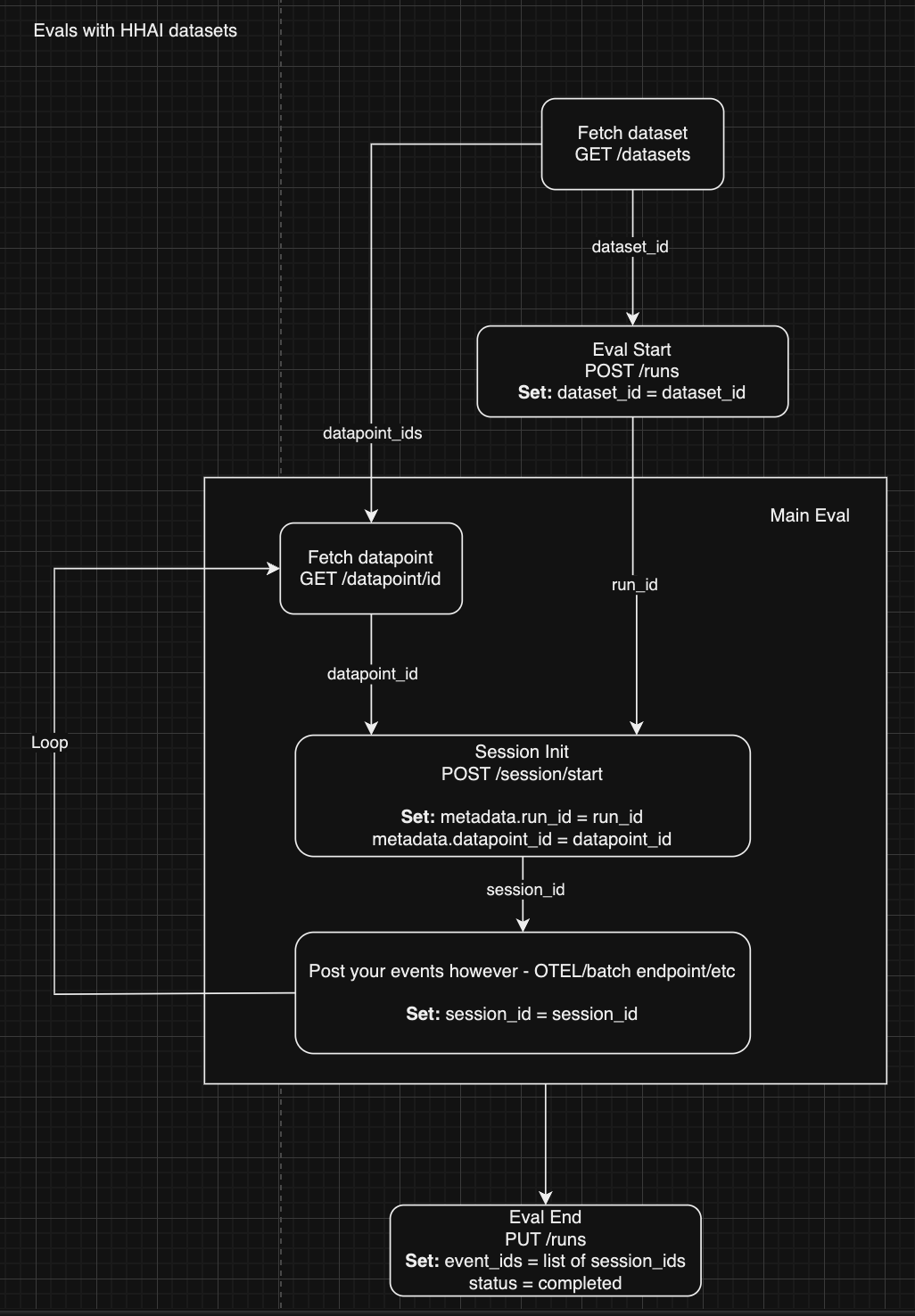 For evaluations using datasets provided by HoneyHive, the process is simpler:
1. **Fetch the Dataset**
* `GET /datasets`: Fetch the dataset you want to evaluate. This will provide the `dataset_id`. [Full API reference link here.](/api-reference/datasets/get-datasets)
2. **Start the Evaluation Run**
* `POST /runs`: Initiate the evaluation run. [Full API reference link here.](/api-reference/runs/create-a-new-evaluation-run)\
Set the following fields:
* `dataset_id = dataset_id`
3. **Fetch the Data Points**
* `GET /datapoint/{id}`: Retrieve the specific data points to be used for evaluation. [Full API reference link here.](/api-reference/datapoints/retrieve-a-specific-datapoint)
4. **Session Initialization**
* `POST /session/start`: Start a new session for the evaluation run. [Full API reference link here.](/api-reference/session/start-a-new-session)\
Set the following fields:
* `metadata.run_id = run_id`
* `metadata.datapoint_id = datapoint_id`
5. **Log Your Events**
* Post your evaluation events using your preferred method (e.g., OpenTelemetry, batch endpoints, etc.). Detailed docs for that are [avaliable here](/sdk-reference/manual-instrumentation).
Set the following:
* `session_id = session_id`
* Make sure to pass any client side metrics on the relevant event to make later analysis more granular.
6. **End the Evaluation**
* `PUT /runs`: Mark the evaluation as completed. [Full API reference link here.](/api-reference/runs/update-an-evaluation-run)\
Set the following:
* `event_ids`: Provide a list of session IDs.
* `status = completed`
***
## Conclusion
Manual evaluation instrumentation allows for flexibility in how you handle your datasets and evaluation sessions. Whether using external datasets or those provided by HoneyHive, the key steps remain the same: initiating the run, starting sessions, logging events, and finalizing the evaluation.
If you have any questions or need help, reach out to our support team for assistance with logging your evaluation data to HoneyHive.
For evaluations using datasets provided by HoneyHive, the process is simpler:
1. **Fetch the Dataset**
* `GET /datasets`: Fetch the dataset you want to evaluate. This will provide the `dataset_id`. [Full API reference link here.](/api-reference/datasets/get-datasets)
2. **Start the Evaluation Run**
* `POST /runs`: Initiate the evaluation run. [Full API reference link here.](/api-reference/runs/create-a-new-evaluation-run)\
Set the following fields:
* `dataset_id = dataset_id`
3. **Fetch the Data Points**
* `GET /datapoint/{id}`: Retrieve the specific data points to be used for evaluation. [Full API reference link here.](/api-reference/datapoints/retrieve-a-specific-datapoint)
4. **Session Initialization**
* `POST /session/start`: Start a new session for the evaluation run. [Full API reference link here.](/api-reference/session/start-a-new-session)\
Set the following fields:
* `metadata.run_id = run_id`
* `metadata.datapoint_id = datapoint_id`
5. **Log Your Events**
* Post your evaluation events using your preferred method (e.g., OpenTelemetry, batch endpoints, etc.). Detailed docs for that are [avaliable here](/sdk-reference/manual-instrumentation).
Set the following:
* `session_id = session_id`
* Make sure to pass any client side metrics on the relevant event to make later analysis more granular.
6. **End the Evaluation**
* `PUT /runs`: Mark the evaluation as completed. [Full API reference link here.](/api-reference/runs/update-an-evaluation-run)\
Set the following:
* `event_ids`: Provide a list of session IDs.
* `status = completed`
***
## Conclusion
Manual evaluation instrumentation allows for flexibility in how you handle your datasets and evaluation sessions. Whether using external datasets or those provided by HoneyHive, the key steps remain the same: initiating the run, starting sessions, logging events, and finalizing the evaluation.
If you have any questions or need help, reach out to our support team for assistance with logging your evaluation data to HoneyHive.