> ## Documentation Index
> Fetch the complete documentation index at: https://docs.honeyhive.ai/llms.txt
> Use this file to discover all available pages before exploring further.
# Curate from Traces
> Build HoneyHive datasets from production traces and sessions. Filter logged events in the UI or SDK, add ground truth, and curate regression sets.
Build evaluation datasets directly from your production logs. This approach lets you create targeted test cases from real user interactions, edge cases, and interesting scenarios your application has encountered.
## Why Curate from Traces?
| Use Case | Example |
| ------------------------ | ---------------------------------------------------- |
| **Regression testing** | Capture successful interactions as golden test cases |
| **Edge case coverage** | Find and preserve unusual inputs that caused issues |
| **Domain-specific data** | Build datasets from real customer queries |
| **Fine-tuning** | Curate high-quality examples for model training |
***
## Curate Sessions
Add complete user interactions (sessions) to your dataset.
Go to **Traces** → **Sessions** and apply filters to find relevant sessions. Common filters:
* Date range for recent production data
* Evaluator scores (e.g., low relevance scores)
* User feedback (thumbs down)
* Metadata fields (environment, user segment)
Check the sessions you want to add to your dataset. You can select multiple sessions at once.
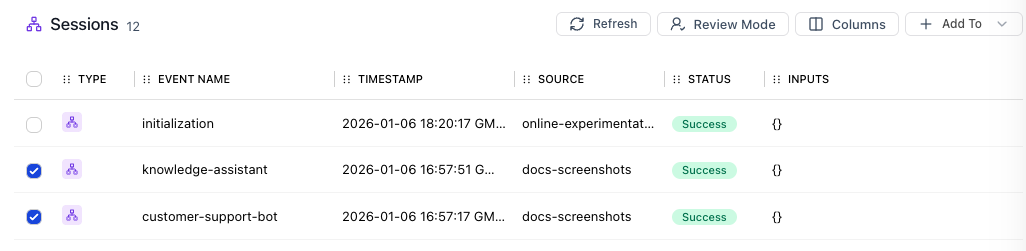 Click **Add to Dataset** and choose an existing dataset or create a new one. The session's inputs and outputs are automatically mapped to datapoint fields.
***
## Curate Model Events
Add specific LLM calls (model events) rather than full sessions. Useful when your pipeline has multiple LLM calls and you want to evaluate a specific one.
Navigate to **Traces** → **Completions** to see all model events across sessions.
Filter by model name, token usage, latency, or evaluator scores to find relevant completions.
Select the model events you want and click **Add to Dataset**. The model's input prompt and output response are mapped to datapoint fields.
***
## Curate Specific Spans
Add any span in your trace (tool calls, chain steps, etc.) to a dataset.
Click on a session to open the detail view showing the full span tree.
Click **Add to Dataset** and choose an existing dataset or create a new one. The session's inputs and outputs are automatically mapped to datapoint fields.
***
## Curate Model Events
Add specific LLM calls (model events) rather than full sessions. Useful when your pipeline has multiple LLM calls and you want to evaluate a specific one.
Navigate to **Traces** → **Completions** to see all model events across sessions.
Filter by model name, token usage, latency, or evaluator scores to find relevant completions.
Select the model events you want and click **Add to Dataset**. The model's input prompt and output response are mapped to datapoint fields.
***
## Curate Specific Spans
Add any span in your trace (tool calls, chain steps, etc.) to a dataset.
Click on a session to open the detail view showing the full span tree.
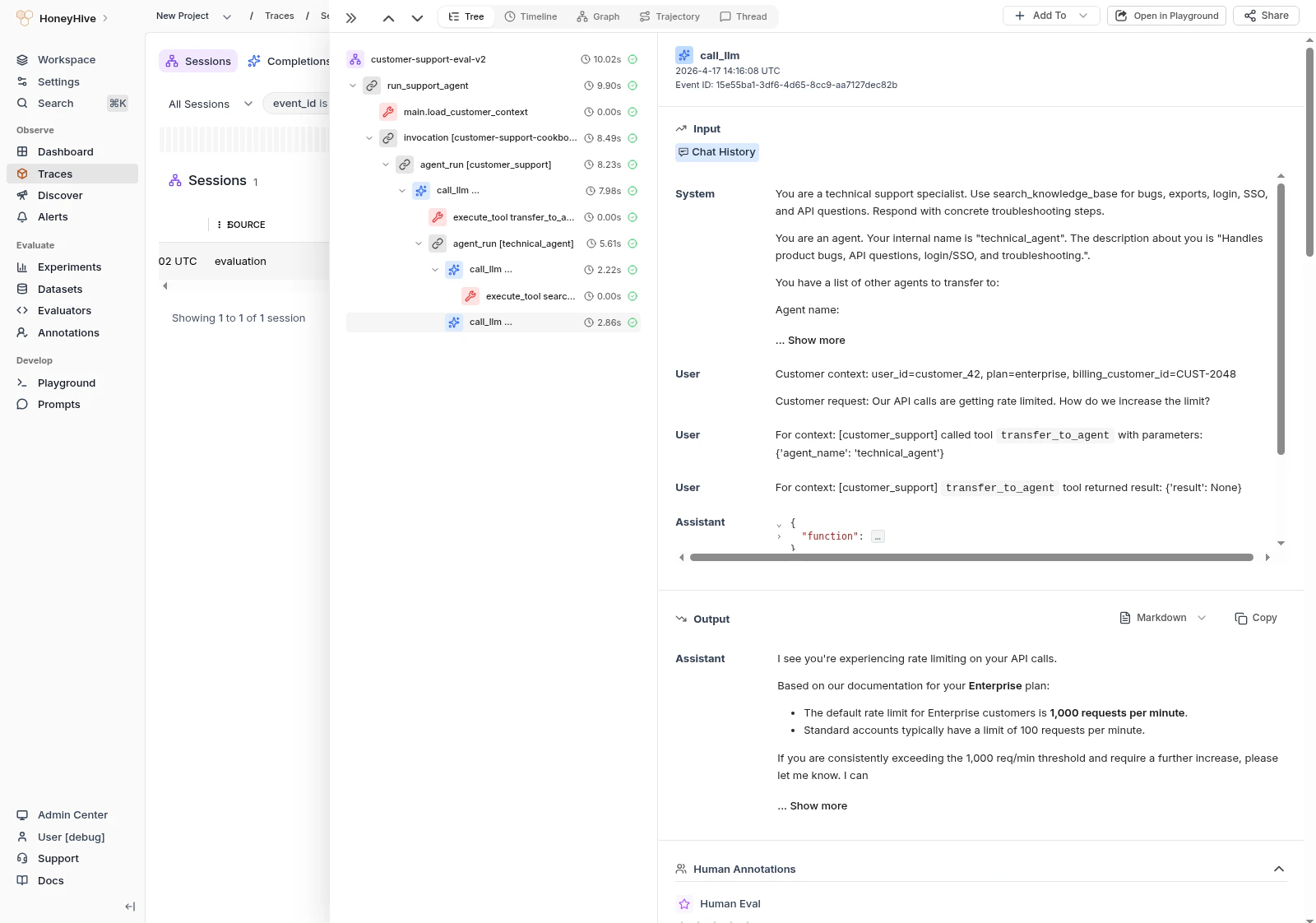 Click on the specific span you want to curate (e.g., a retrieval step, tool call, or chain).
Click **+ Add To** → **Add to Dataset** from the top action bar, or right-click the span for the context menu option.
***
Each curated datapoint includes a `linked_event` field - a reference back to the original trace. Use this to investigate context when a test case fails.
***
## Best Practices
| Do | Don't |
| --------------------------------------------------- | --------------------------------------- |
| Filter by evaluator scores to find quality examples | Add traces without reviewing them first |
| Include diverse edge cases, not just happy paths | Curate only successful interactions |
| Review curated data periodically for relevance | Let datasets grow unbounded |
| Use descriptive dataset names with dates | Use generic names like "test-data" |
***
## Next Steps
Evaluate your application using curated datasets
Import datasets from external files
Click on the specific span you want to curate (e.g., a retrieval step, tool call, or chain).
Click **+ Add To** → **Add to Dataset** from the top action bar, or right-click the span for the context menu option.
***
Each curated datapoint includes a `linked_event` field - a reference back to the original trace. Use this to investigate context when a test case fails.
***
## Best Practices
| Do | Don't |
| --------------------------------------------------- | --------------------------------------- |
| Filter by evaluator scores to find quality examples | Add traces without reviewing them first |
| Include diverse edge cases, not just happy paths | Curate only successful interactions |
| Review curated data periodically for relevance | Let datasets grow unbounded |
| Use descriptive dataset names with dates | Use generic names like "test-data" |
***
## Next Steps
Evaluate your application using curated datasets
Import datasets from external files