> ## Documentation Index
> Fetch the complete documentation index at: https://docs.honeyhive.ai/llms.txt
> Use this file to discover all available pages before exploring further.
# Introduction
> Overview of HoneyHive evaluators for measuring AI output quality offline and online. Learn evaluator types, when to use each, and how they fit your workflow.
Evaluators are tests that measure the quality of inputs and outputs for your AI application or specific steps within it.
They serve as a crucial component for validating whether your models meet performance criteria and align with domain expertise.
Whether you're fine-tuning prompts, comparing different generative models, or monitoring production systems, evaluators help maintain high standards through systematic testing and measurement.
## Key characteristics of HoneyHive evaluators
HoneyHive provides a flexible and comprehensive evaluation framework that can be adapted to various needs and scenarios:
### Development Stages
* **Offline Evaluation**: Used during development and testing phases, including CI/CD pipelines and debugging sessions. You build test suites of curated scenarios (with or without ground truths) and run them via [`evaluate()`](/v2/evaluation/concepts). Evaluators can be client-side (run in your code) or server-side (run on HoneyHive after trace ingestion).
* **Online Evaluation**: Evaluators that run automatically on ingested traces to continuously monitor quality. When you enable a server-side evaluator and configure [event filters](/v2/evaluators/llm#event-filters), it runs on all matching traces — both production and experiment — without any code changes.
For an example of an offline evaluation with client-side evaluators, see [how to run an experiment here](/v2/introduction/experiments-quickstart).
### Implementation Methods
Evaluators can be implemented using three primary methods:
* **Python Code Evaluators**: Custom functions that programmatically assess outputs based on specific criteria, such as format validation, content checks, or metric calculations.
* **LLM-Assisted Evaluators**: Leverage language models to perform qualitative assessments, such as checking for coherence, relevance, or alignment with requirements.
* **Domain Expert (Human) Evaluators**: Enable subject matter experts to provide direct feedback and assessments through the HoneyHive platform.
Python and LLM evaluators can run **client-side** (as functions passed to `evaluate()`, scored in your own code) or **server-side** (configured in HoneyHive). For experiments, the client-side path needs no server setup - see [Client-Side Evaluators](/v2/evaluators/client_side). Human evaluators are server-side only.
Not sure where to start? Browse the [Evaluator Templates](/v2/evaluators/evaluator-templates) gallery for ready-made Python, LLM, and [multi-turn conversation](/v2/evaluators/evaluator-templates#conversation-evaluator-templates) evaluators you can copy and adapt.
### Execution Environment
Evaluators can be run either locally (client-side) or remotely (server-side), each with its own set of advantages and use cases.
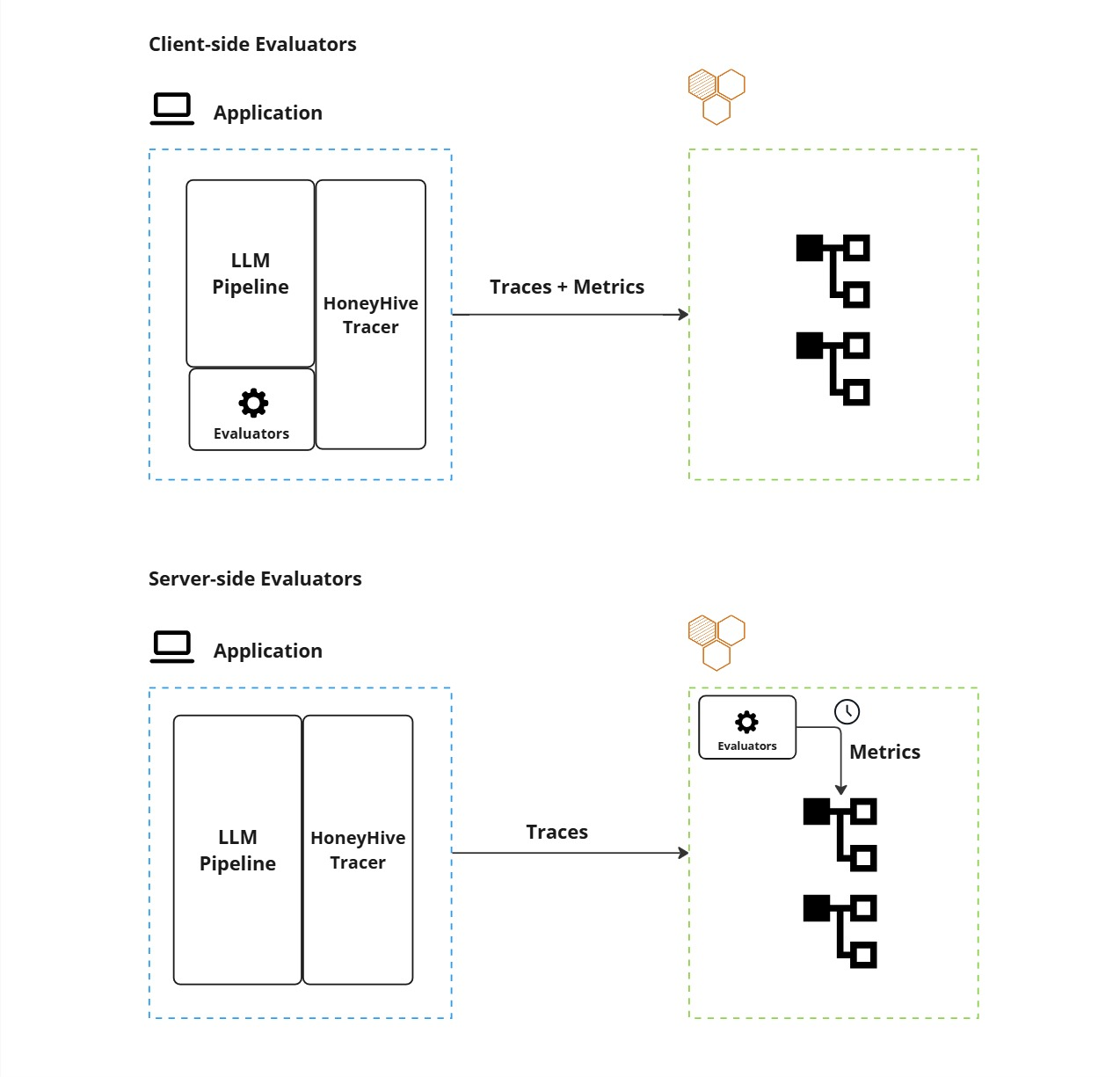 * **Client-Side Execution**: Evaluators run locally within your application environment, providing immediate feedback and integration with your existing infrastructure.
* Pros:
* Quick validations and guardrails
* Offline experiments and CI/CD pipelines
* Real-time format checks and PII detection
* Cons:
* Limited by local resources and lack centralized management.
See [Client-side Evaluators](/v2/evaluators/client_side) for how to use client-side evaluators in both tracing and experiments scenarios.
* **Server-Side Execution**: Evaluators operate remotely on HoneyHive's infrastructure.
* Pros:
* Asynchronous processing for resource-intensive tasks
* Centralized management and versioning
* Better scalability for large datasets
* Support for human evaluations and post-ingestion analysis
* Cons:
* Higher latency since results aren't immediately available.
If you want to know more about how to set up server-side Python, LLM, or Human-based evaluators, please refer to the [Python evaluator](/v2/evaluators/python), [LLM Evaluator](/v2/evaluators/llm), [Human Annotation](/v2/evaluators/human) pages.
### Evaluation Scope
HoneyHive provides flexible granularity in evaluation, allowing you to:
* Assess entire end-to-end pipelines
* Evaluate individual steps within your application flow
* Monitor specific components such as model calls, tool usage, or chain execution
* Track and evaluate sessions that group multiple operations together
For example, in a RAG pipeline you can evaluate the overall response quality at the session level, while also measuring retrieval relevance and generation accuracy at individual step levels.
For code examples showing how to add metrics at different scopes, see [Client-Side Evaluators](/v2/evaluators/client_side) and [Custom Metrics](/v2/tracing/client-side-evals).
* **Client-Side Execution**: Evaluators run locally within your application environment, providing immediate feedback and integration with your existing infrastructure.
* Pros:
* Quick validations and guardrails
* Offline experiments and CI/CD pipelines
* Real-time format checks and PII detection
* Cons:
* Limited by local resources and lack centralized management.
See [Client-side Evaluators](/v2/evaluators/client_side) for how to use client-side evaluators in both tracing and experiments scenarios.
* **Server-Side Execution**: Evaluators operate remotely on HoneyHive's infrastructure.
* Pros:
* Asynchronous processing for resource-intensive tasks
* Centralized management and versioning
* Better scalability for large datasets
* Support for human evaluations and post-ingestion analysis
* Cons:
* Higher latency since results aren't immediately available.
If you want to know more about how to set up server-side Python, LLM, or Human-based evaluators, please refer to the [Python evaluator](/v2/evaluators/python), [LLM Evaluator](/v2/evaluators/llm), [Human Annotation](/v2/evaluators/human) pages.
### Evaluation Scope
HoneyHive provides flexible granularity in evaluation, allowing you to:
* Assess entire end-to-end pipelines
* Evaluate individual steps within your application flow
* Monitor specific components such as model calls, tool usage, or chain execution
* Track and evaluate sessions that group multiple operations together
For example, in a RAG pipeline you can evaluate the overall response quality at the session level, while also measuring retrieval relevance and generation accuracy at individual step levels.
For code examples showing how to add metrics at different scopes, see [Client-Side Evaluators](/v2/evaluators/client_side) and [Custom Metrics](/v2/tracing/client-side-evals).