> ## Documentation Index
> Fetch the complete documentation index at: https://docs.honeyhive.ai/llms.txt
> Use this file to discover all available pages before exploring further.
# Python Evaluators
> Create custom server-side Python evaluators in HoneyHive to score AI outputs with your own logic. Write deterministic checks and return structured metrics.
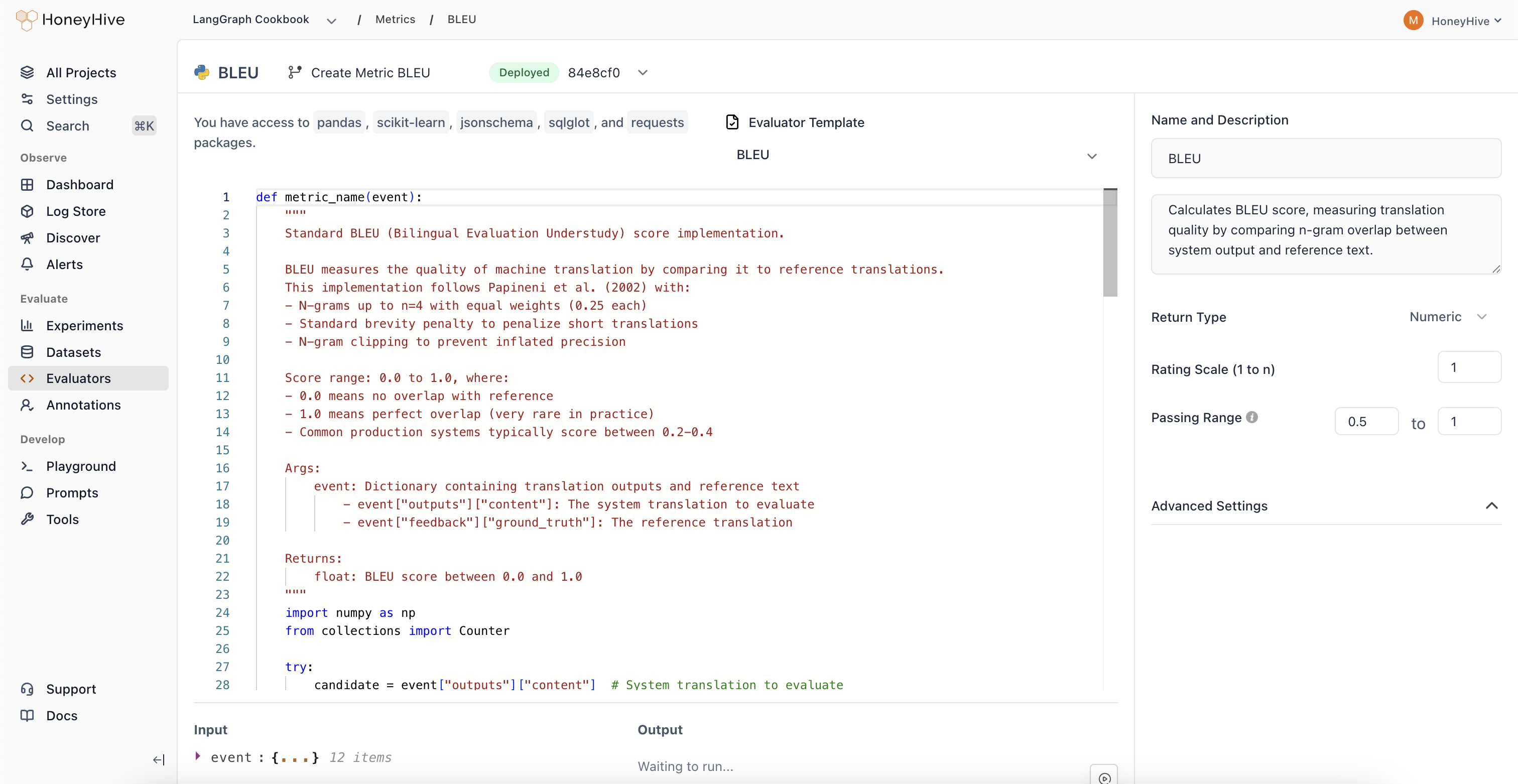
Python evaluators let you write custom evaluation logic that runs on HoneyHive's infrastructure. Use them for format validation, metric calculations, or any programmatic assessment of your AI outputs.
## Creating a Python Evaluator
1. Navigate to the [**Evaluators**](https://app.us.honeyhive.ai/metrics) tab in the HoneyHive console.
2. Click `Add Evaluator` and select `Python Evaluator`.
 ## Event Schema
Python evaluators operate on an `event` object representing a span in your traces. The following fields are available as top-level variables in your evaluator code:
| Variable | Description |
| ----------------- | -------------------------------------------------------------------------------------------------- |
| `event` | The full event object (dict with all fields below) |
| `inputs` | Input data for the event |
| `outputs` | Output data from the event |
| `feedback` | User feedback and ground truth |
| `metadata` | Additional event metadata |
| `metrics` | Scores from other evaluators that have already run on this event (e.g. `metrics.get("relevance")`) |
| `config` | Configuration used for this event (model, hyperparameters, template) |
| `event_type` | Type: `model`, `tool`, `chain`, or `session` |
| `event_name` | Name of the specific event |
| `event_id` | Unique identifier for this event |
| `session_id` | Session this event belongs to |
| `project_id` | Project this event belongs to |
| `source` | Source of the event |
| `start_time` | Event start timestamp (Unix ms) |
| `end_time` | Event end timestamp (Unix ms) |
| `duration` | Event duration in milliseconds |
| `error` | Error message string if the event failed, otherwise `None` |
| `user_properties` | Custom user properties attached to the event |
Click **Show Schema** in the evaluator console to see the actual shape of your events.
## Evaluator Function
Define your evaluation logic in a Python function. The function must take no arguments and access event data through the top-level variables:
```python theme={null}
def check_unwanted_phrases():
unwanted_phrases = ["As an AI language model", "I'm sorry, but I can't"]
model_completion = outputs["content"]
return not any(phrase.lower() in model_completion.lower() for phrase in unwanted_phrases)
```
You can also assign directly to `result`:
```python theme={null}
result = len(outputs["content"].split()) > 10
```
If you assign to `result`, that value is used directly. Otherwise, HoneyHive calls the first callable it finds in your code. If you define helper functions, put them before your main evaluator function so the main one is found first.
Looking for ready-made examples? Check out our [Python Evaluator Templates](/v2/evaluators/evaluator-templates).
## Available Packages
The following packages are available for import in your evaluator code:
| Package | Use Case |
| ---------------------------------------------- | ------------------------------------------------------------ |
| `json` | JSON parsing and serialization |
| `re` | Regular expressions |
| `math`, `statistics` | Numerical computations |
| `collections` | Specialized data structures |
| `datetime` | Date/time handling |
| `string`, `itertools`, `functools`, `operator` | Standard library utilities |
| `pandas` | DataFrames and data manipulation (in-memory only) |
| `numpy` | Numerical arrays and math |
| `sklearn` | Machine learning utilities (e.g. cosine similarity, metrics) |
| `jsonschema` | JSON schema validation |
| `sqlglot` | SQL parsing and validation |
## Sandbox Restrictions
Python evaluators run in a sandboxed environment with these limits:
* **Code size**: 4KB maximum
* **`range()` limit**: `range()` is capped at 999 elements. For larger iterations, iterate over a list directly (e.g. `outputs["content"].split()`) which has no iteration limit.
* **No file I/O**: `open()` in write mode and package-level I/O functions (e.g. `pd.read_csv`, `np.load`) are blocked
* **No network access**: HTTP requests and remote data fetching (e.g. `sklearn.datasets.fetch_*`) are not available
* **Import restrictions**: Only the [packages listed above](#available-packages) can be imported
## Configuration
### Event Filters
Filter which events this evaluator runs on using event type, event name, and additional property filters. See [Event Filters](/v2/evaluators/llm#event-filters) for the full list of supported filter options and operators.
### Return Type
* `Boolean`: For true/false evaluations
* `Numeric`: For scores or ratings (configure the scale, e.g., 1-5)
* `String`: For categorical outputs
### Passing Range
Define pass/fail criteria for your evaluator. Useful for CI builds and detecting failed test cases.
### Advanced Settings
Expand to configure:
* **Requires Ground Truth**: Enable if your evaluator needs `feedback.ground_truth`
Click **Create** to save your evaluator.
## Production Settings
After creating an evaluator, you can enable it for production traces from the Evaluators table:
* **Enabled**: Toggle to run this evaluator on all traces that match your event filters
* **Sampling %**: When enabled, set a sampling percentage to control costs. The default is **10%** (one in ten matching events)
## Using with Experiments
When enabled, server-side evaluators automatically run on all traces that match your event filters, including experiment traces. When you run `evaluate()`, they score the results without any additional code. You can also score experiments with [client-side evaluator functions](/v2/evaluators/client_side) that run in your own code.
```python theme={null}
from honeyhive import evaluate
# Server-side evaluators run automatically on matching events
result = evaluate(
function=my_function,
dataset=my_dataset,
name="my-experiment"
)
# No need to pass evaluators - enabled server-side evaluators are applied automatically
```
## Troubleshooting
| Symptom | Cause | Fix |
| ------------------------------------------------------ | ------------------------------------ | ------------------------------------------------------------------------------------------------------------------------------------------------------- |
| `ImportError: Import of module 'X' is not allowed` | Module not in the allowed list | Use only [available packages](#available-packages) |
| `PermissionError: file and network I/O is not allowed` | Attempted file write or network call | Use in-memory operations only (e.g. `df.to_dict()` instead of `df.to_csv("file.csv")`) |
| `Metric execution timed out` | Code exceeded the execution timeout | Optimize your logic or reduce data processing |
| `Code snippet exceeds maximum size` | Code over 4KB | Simplify your evaluator or extract helper logic |
| `No function was defined and no 'result' was assigned` | Missing return value | Either define a function or assign to `result` |
| `SyntaxError` | Code has Python syntax errors | Check your code in a local Python environment first |
| Evaluator auto-disabled | 100+ failures within 1 hour | Fix the underlying error, then re-enable from the Evaluators table. See [auto-disable details](/v2/monitoring/onlineevals#evaluator-was-auto-disabled). |
Get started with experiments
Learn how experiments and evaluators work together
Check evaluators into your repo and apply them with the CLI
## Event Schema
Python evaluators operate on an `event` object representing a span in your traces. The following fields are available as top-level variables in your evaluator code:
| Variable | Description |
| ----------------- | -------------------------------------------------------------------------------------------------- |
| `event` | The full event object (dict with all fields below) |
| `inputs` | Input data for the event |
| `outputs` | Output data from the event |
| `feedback` | User feedback and ground truth |
| `metadata` | Additional event metadata |
| `metrics` | Scores from other evaluators that have already run on this event (e.g. `metrics.get("relevance")`) |
| `config` | Configuration used for this event (model, hyperparameters, template) |
| `event_type` | Type: `model`, `tool`, `chain`, or `session` |
| `event_name` | Name of the specific event |
| `event_id` | Unique identifier for this event |
| `session_id` | Session this event belongs to |
| `project_id` | Project this event belongs to |
| `source` | Source of the event |
| `start_time` | Event start timestamp (Unix ms) |
| `end_time` | Event end timestamp (Unix ms) |
| `duration` | Event duration in milliseconds |
| `error` | Error message string if the event failed, otherwise `None` |
| `user_properties` | Custom user properties attached to the event |
Click **Show Schema** in the evaluator console to see the actual shape of your events.
## Evaluator Function
Define your evaluation logic in a Python function. The function must take no arguments and access event data through the top-level variables:
```python theme={null}
def check_unwanted_phrases():
unwanted_phrases = ["As an AI language model", "I'm sorry, but I can't"]
model_completion = outputs["content"]
return not any(phrase.lower() in model_completion.lower() for phrase in unwanted_phrases)
```
You can also assign directly to `result`:
```python theme={null}
result = len(outputs["content"].split()) > 10
```
If you assign to `result`, that value is used directly. Otherwise, HoneyHive calls the first callable it finds in your code. If you define helper functions, put them before your main evaluator function so the main one is found first.
Looking for ready-made examples? Check out our [Python Evaluator Templates](/v2/evaluators/evaluator-templates).
## Available Packages
The following packages are available for import in your evaluator code:
| Package | Use Case |
| ---------------------------------------------- | ------------------------------------------------------------ |
| `json` | JSON parsing and serialization |
| `re` | Regular expressions |
| `math`, `statistics` | Numerical computations |
| `collections` | Specialized data structures |
| `datetime` | Date/time handling |
| `string`, `itertools`, `functools`, `operator` | Standard library utilities |
| `pandas` | DataFrames and data manipulation (in-memory only) |
| `numpy` | Numerical arrays and math |
| `sklearn` | Machine learning utilities (e.g. cosine similarity, metrics) |
| `jsonschema` | JSON schema validation |
| `sqlglot` | SQL parsing and validation |
## Sandbox Restrictions
Python evaluators run in a sandboxed environment with these limits:
* **Code size**: 4KB maximum
* **`range()` limit**: `range()` is capped at 999 elements. For larger iterations, iterate over a list directly (e.g. `outputs["content"].split()`) which has no iteration limit.
* **No file I/O**: `open()` in write mode and package-level I/O functions (e.g. `pd.read_csv`, `np.load`) are blocked
* **No network access**: HTTP requests and remote data fetching (e.g. `sklearn.datasets.fetch_*`) are not available
* **Import restrictions**: Only the [packages listed above](#available-packages) can be imported
## Configuration
### Event Filters
Filter which events this evaluator runs on using event type, event name, and additional property filters. See [Event Filters](/v2/evaluators/llm#event-filters) for the full list of supported filter options and operators.
### Return Type
* `Boolean`: For true/false evaluations
* `Numeric`: For scores or ratings (configure the scale, e.g., 1-5)
* `String`: For categorical outputs
### Passing Range
Define pass/fail criteria for your evaluator. Useful for CI builds and detecting failed test cases.
### Advanced Settings
Expand to configure:
* **Requires Ground Truth**: Enable if your evaluator needs `feedback.ground_truth`
Click **Create** to save your evaluator.
## Production Settings
After creating an evaluator, you can enable it for production traces from the Evaluators table:
* **Enabled**: Toggle to run this evaluator on all traces that match your event filters
* **Sampling %**: When enabled, set a sampling percentage to control costs. The default is **10%** (one in ten matching events)
## Using with Experiments
When enabled, server-side evaluators automatically run on all traces that match your event filters, including experiment traces. When you run `evaluate()`, they score the results without any additional code. You can also score experiments with [client-side evaluator functions](/v2/evaluators/client_side) that run in your own code.
```python theme={null}
from honeyhive import evaluate
# Server-side evaluators run automatically on matching events
result = evaluate(
function=my_function,
dataset=my_dataset,
name="my-experiment"
)
# No need to pass evaluators - enabled server-side evaluators are applied automatically
```
## Troubleshooting
| Symptom | Cause | Fix |
| ------------------------------------------------------ | ------------------------------------ | ------------------------------------------------------------------------------------------------------------------------------------------------------- |
| `ImportError: Import of module 'X' is not allowed` | Module not in the allowed list | Use only [available packages](#available-packages) |
| `PermissionError: file and network I/O is not allowed` | Attempted file write or network call | Use in-memory operations only (e.g. `df.to_dict()` instead of `df.to_csv("file.csv")`) |
| `Metric execution timed out` | Code exceeded the execution timeout | Optimize your logic or reduce data processing |
| `Code snippet exceeds maximum size` | Code over 4KB | Simplify your evaluator or extract helper logic |
| `No function was defined and no 'result' was assigned` | Missing return value | Either define a function or assign to `result` |
| `SyntaxError` | Code has Python syntax errors | Check your code in a local Python environment first |
| Evaluator auto-disabled | 100+ failures within 1 hour | Fix the underlying error, then re-enable from the Evaluators table. See [auto-disable details](/v2/monitoring/onlineevals#evaluator-was-auto-disabled). |
Get started with experiments
Learn how experiments and evaluators work together
Check evaluators into your repo and apply them with the CLI