> ## Documentation Index
> Fetch the complete documentation index at: https://docs.honeyhive.ai/llms.txt
> Use this file to discover all available pages before exploring further.
# How to integrate HoneyHive with Claude Code
> Integrate HoneyHive with Claude Code to export session traces for observability and evaluation. Send Claude Code runs to HoneyHive to debug agent quality.
The Claude Code daemon captures Claude Code activity via [hooks](https://docs.anthropic.com/en/docs/claude-code/hooks) and exports structured events to HoneyHive. It runs as a local background process that automatically instruments your Claude Code sessions with no code changes required.
 ## Quick Start
```bash theme={null}
pip install honeyhive-daemon
# In your project repo
honeyhive-daemon init
# Creates .honeyhive/config.json and .honeyhive/config.local.json
export HH_API_KEY=
export HH_API_URL= # if not using default
honeyhive-daemon run
```
Project scope is resolved from your API key - no project name needed on `init` or `run`.
The daemon stores local state in `~/.honeyhive/daemon/` and installs Claude hooks in `~/.claude/settings.json`.
### Running in the background
```bash theme={null}
honeyhive-daemon run &
```
To stop the daemon:
```bash theme={null}
honeyhive-daemon stop
```
`stop` sends `SIGTERM` to the running daemon via its PID file (`~/.honeyhive/daemon/daemon.pid`). Only one instance can run at a time - attempting to start a second prints an error and exits.
## How it works
* Installs Claude Code hooks automatically at the user level
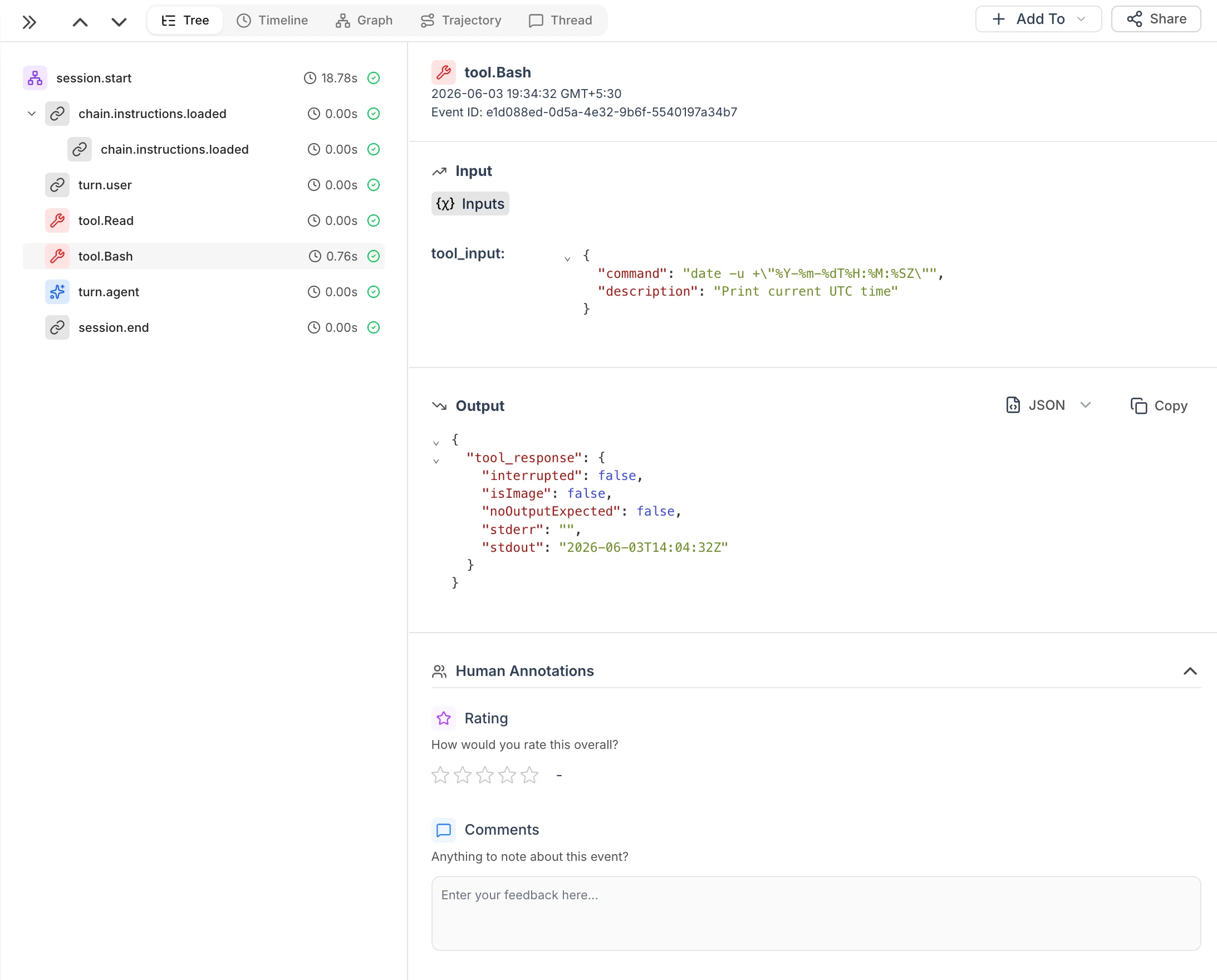
* Merges pre-hook and post-hook data into single tool events with accurate duration
* Uses real tool names for event names (e.g. `tool.Bash`, `tool.Edit`, `tool.Grep`)
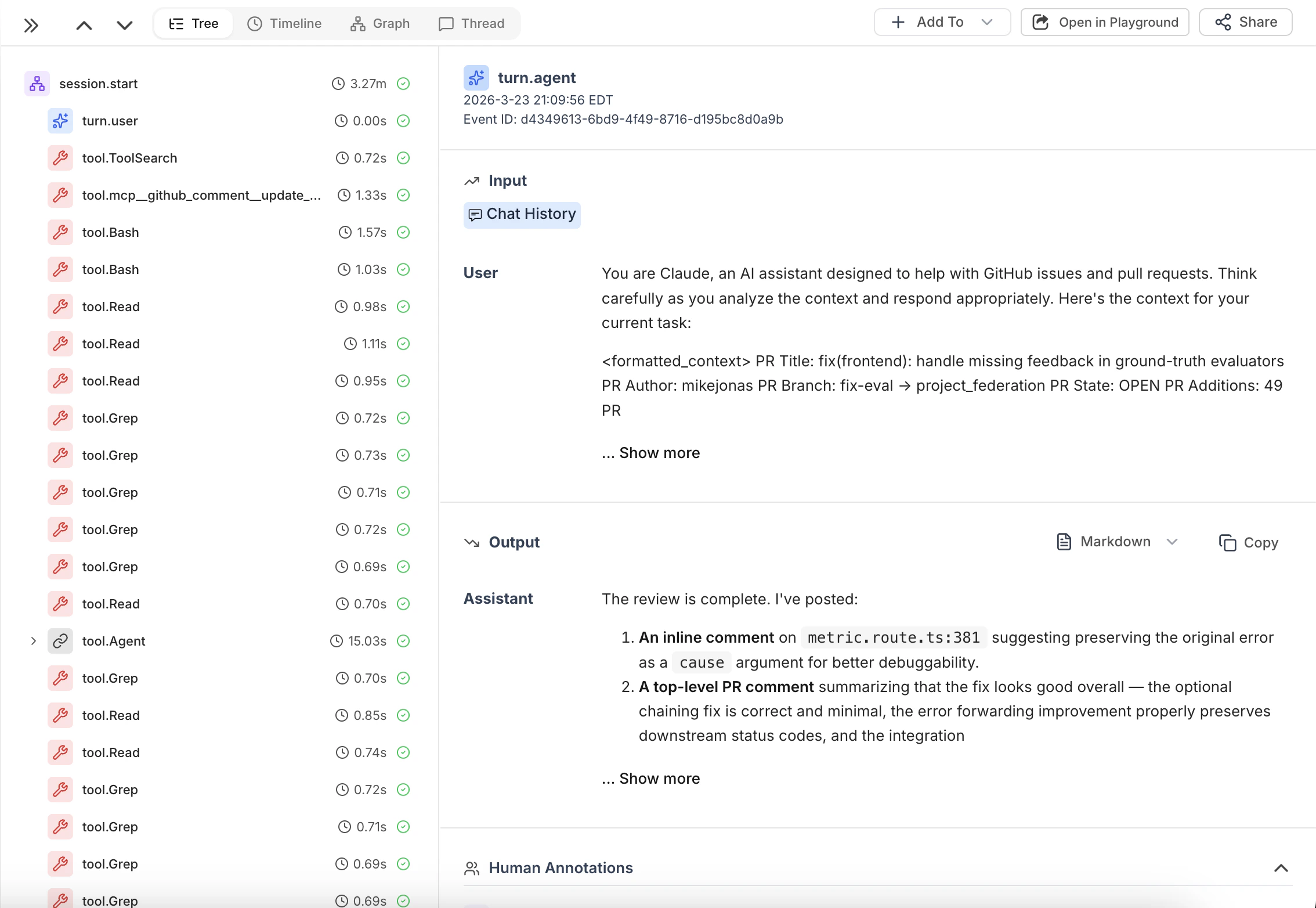
* Emits turn events (`turn.user` as `chain`, `turn.agent` as `model`) with `chat_history`
* Enriches tool events with thinking/reasoning context from the session transcript
* Uploads session artifacts via background loop (every 5s) to avoid hook timeouts
* Optionally emits lightweight `chain.commit_link` events on post-commit
* Retries failed exports every 5s via resilient event spooling
## Quick Start
```bash theme={null}
pip install honeyhive-daemon
# In your project repo
honeyhive-daemon init
# Creates .honeyhive/config.json and .honeyhive/config.local.json
export HH_API_KEY=
export HH_API_URL= # if not using default
honeyhive-daemon run
```
Project scope is resolved from your API key - no project name needed on `init` or `run`.
The daemon stores local state in `~/.honeyhive/daemon/` and installs Claude hooks in `~/.claude/settings.json`.
### Running in the background
```bash theme={null}
honeyhive-daemon run &
```
To stop the daemon:
```bash theme={null}
honeyhive-daemon stop
```
`stop` sends `SIGTERM` to the running daemon via its PID file (`~/.honeyhive/daemon/daemon.pid`). Only one instance can run at a time - attempting to start a second prints an error and exits.
## How it works
* Installs Claude Code hooks automatically at the user level
* Merges pre-hook and post-hook data into single tool events with accurate duration
* Uses real tool names for event names (e.g. `tool.Bash`, `tool.Edit`, `tool.Grep`)
* Emits turn events (`turn.user` as `chain`, `turn.agent` as `model`) with `chat_history`
* Enriches tool events with thinking/reasoning context from the session transcript
* Uploads session artifacts via background loop (every 5s) to avoid hook timeouts
* Optionally emits lightweight `chain.commit_link` events on post-commit
* Retries failed exports every 5s via resilient event spooling
 ***
## What Gets Traced
The daemon automatically captures all Claude Code activity:
* **Session lifecycle** - Session start and end events as the root trace container
* **User and agent turns** - Each user prompt and assistant response with full chat history
* **Tool executions** - Built-in tool calls (`Bash`, `Edit`, `Read`, `Grep`, etc.) with arguments, results, and duration
* **Reasoning context** - Thinking/reasoning blocks attached to the tool events they precede
* **Git commits** - Commit metadata when `--repo` is configured
* **Session artifacts** - Full conversation view and trajectory transcript on session end
No code changes required. See the Events table below for the full schema.
***
## Events
Each Claude Code session produces a tree of events in HoneyHive:
| Event name | Type | Description |
| --------------------------- | ------- | ----------------------------------------------------------------------------------------------------------------------------------------------------------------------------------------- |
| `session.start` | session | Root event. All other events are children of this. |
| `turn.user` | chain | User prompt. `inputs.chat_history` is prior context; `outputs.content` is this message. |
| `turn.agent` | model | Assistant response. `inputs.chat_history` is prior context; `outputs.content` is this message. |
| `tool.{ToolName}` | tool | Tool use (e.g. `tool.Bash`, `tool.Edit`, `tool.Read`, `tool.Grep`). Pre and post hooks are merged into a single event with `start_time`/`end_time` duration. |
| `chain.instructions.loaded` | chain | `CLAUDE.md` or `.claude/rules/*.md` loaded into context. `outputs.content` is read from disk at ingest; metadata has `file.path`, `instructions.memory_type`, `instructions.load_reason`. |
| `session.end` | chain | Marks session completion. |
| `chain.commit_link` | chain | Git commit metadata (requires `--repo`). |
Tool events include `inputs.thinking` when a reasoning block precedes the tool call in the transcript. Pre-hook events that never receive a matching post-hook are exported as orphans after 60s.
***
## Session Artifacts
When a session ends (or goes idle), the daemon pushes two views of the conversation:
`session.start` receives `outputs.chat_history` containing the user-facing conversation: the back-and-forth of user messages and assistant responses. This is what you'd see in the chat UI. Useful for reviewing what was said and evaluating response quality.
`session.end` receives `outputs.artifact` containing the full session transcript: tool calls, reasoning/thinking blocks, and internal processing steps. This is the "behind the scenes" view of how the agent worked through the task.
This split lets you look at the same session from two angles: the conversation-level view for understanding the user experience, and the trajectory-level view for debugging agent behavior.
***
## State Directory
All daemon state lives under `~/.honeyhive/daemon/` (override with `HH_DAEMON_HOME`):
| File | Purpose |
| --------------------------- | ------------------------------------------------------------- |
| `state/config.json` | Persisted daemon configuration |
| `state/sessions.json` | Session index (transcript paths, timestamps, artifact status) |
| `state/pending_tools.json` | Buffered pre-hook tool events awaiting their post-hook |
| `state/chat_histories.json` | Accumulated chat history per session for turn events |
| `spool/events.jsonl` | Retry queue for failed exports |
| `daemon.log` | Timestamped daemon log |
| `daemon.pid` | Process ID file |
***
## CLI Reference
| Command | Description |
| ---------------------------- | -------------------------------------------------------------------------------------------------------------- |
| `honeyhive-daemon init` | Scaffold `.honeyhive/` in the current repo. Sets up per-project config; project is resolved from your API key. |
| `honeyhive-daemon run` | Start the daemon, install hooks, and flush queued events. |
| `honeyhive-daemon stop` | Stop the running daemon. |
| `honeyhive-daemon status` | Show config, pending spool event count, and failure reasons. |
| `honeyhive-daemon doctor` | Check that hooks and config are correctly installed. |
| `honeyhive-daemon analyze` | Query HoneyHive traces for recurring error patterns (default: last 24h). |
| `honeyhive-daemon add-to-ci` | Generate a GitHub Actions workflow that runs `analyze` on a schedule and opens PRs for recurring patterns. |
### `run` options
| Flag | Env var | Description |
| ------------- | ------------ | --------------------------------------------------------------------- |
| `--key` | `HH_API_KEY` | HoneyHive API key (deprecated - use `init` instead). |
| `--url` | `HH_API_URL` | HoneyHive base URL (default: `https://api.dp1.us.prod.honeyhive.ai`). |
| `--repo PATH` | | Git repo to attach commit events to. |
| `--ci` | | Enable CI mode. |
***
## Troubleshooting
If events aren't showing up in HoneyHive, work through these checks in order:
Check `~/.honeyhive/daemon/daemon.pid` and verify the process is alive:
```bash theme={null}
ps -p $(cat ~/.honeyhive/daemon/daemon.pid)
```
Look for `spooled` (export failures) or missing `received claude hook` entries:
```bash theme={null}
tail -100 ~/.honeyhive/daemon/daemon.log
```
Confirm API key and base URL are correct:
```bash theme={null}
honeyhive-daemon status
```
Run the built-in diagnostic or inspect the hooks file directly:
```bash theme={null}
honeyhive-daemon doctor
# or
cat ~/.claude/settings.json
```
If events are piling up, check the `spool_reason` field for error details:
```bash theme={null}
wc -l ~/.honeyhive/daemon/spool/events.jsonl
```
Ensure `honeyhive-daemon` is on `PATH` in the shell context Claude Code uses. Virtualenv installations may not be visible to hooks:
```bash theme={null}
which honeyhive-daemon
```
***
## What Gets Traced
The daemon automatically captures all Claude Code activity:
* **Session lifecycle** - Session start and end events as the root trace container
* **User and agent turns** - Each user prompt and assistant response with full chat history
* **Tool executions** - Built-in tool calls (`Bash`, `Edit`, `Read`, `Grep`, etc.) with arguments, results, and duration
* **Reasoning context** - Thinking/reasoning blocks attached to the tool events they precede
* **Git commits** - Commit metadata when `--repo` is configured
* **Session artifacts** - Full conversation view and trajectory transcript on session end
No code changes required. See the Events table below for the full schema.
***
## Events
Each Claude Code session produces a tree of events in HoneyHive:
| Event name | Type | Description |
| --------------------------- | ------- | ----------------------------------------------------------------------------------------------------------------------------------------------------------------------------------------- |
| `session.start` | session | Root event. All other events are children of this. |
| `turn.user` | chain | User prompt. `inputs.chat_history` is prior context; `outputs.content` is this message. |
| `turn.agent` | model | Assistant response. `inputs.chat_history` is prior context; `outputs.content` is this message. |
| `tool.{ToolName}` | tool | Tool use (e.g. `tool.Bash`, `tool.Edit`, `tool.Read`, `tool.Grep`). Pre and post hooks are merged into a single event with `start_time`/`end_time` duration. |
| `chain.instructions.loaded` | chain | `CLAUDE.md` or `.claude/rules/*.md` loaded into context. `outputs.content` is read from disk at ingest; metadata has `file.path`, `instructions.memory_type`, `instructions.load_reason`. |
| `session.end` | chain | Marks session completion. |
| `chain.commit_link` | chain | Git commit metadata (requires `--repo`). |
Tool events include `inputs.thinking` when a reasoning block precedes the tool call in the transcript. Pre-hook events that never receive a matching post-hook are exported as orphans after 60s.
***
## Session Artifacts
When a session ends (or goes idle), the daemon pushes two views of the conversation:
`session.start` receives `outputs.chat_history` containing the user-facing conversation: the back-and-forth of user messages and assistant responses. This is what you'd see in the chat UI. Useful for reviewing what was said and evaluating response quality.
`session.end` receives `outputs.artifact` containing the full session transcript: tool calls, reasoning/thinking blocks, and internal processing steps. This is the "behind the scenes" view of how the agent worked through the task.
This split lets you look at the same session from two angles: the conversation-level view for understanding the user experience, and the trajectory-level view for debugging agent behavior.
***
## State Directory
All daemon state lives under `~/.honeyhive/daemon/` (override with `HH_DAEMON_HOME`):
| File | Purpose |
| --------------------------- | ------------------------------------------------------------- |
| `state/config.json` | Persisted daemon configuration |
| `state/sessions.json` | Session index (transcript paths, timestamps, artifact status) |
| `state/pending_tools.json` | Buffered pre-hook tool events awaiting their post-hook |
| `state/chat_histories.json` | Accumulated chat history per session for turn events |
| `spool/events.jsonl` | Retry queue for failed exports |
| `daemon.log` | Timestamped daemon log |
| `daemon.pid` | Process ID file |
***
## CLI Reference
| Command | Description |
| ---------------------------- | -------------------------------------------------------------------------------------------------------------- |
| `honeyhive-daemon init` | Scaffold `.honeyhive/` in the current repo. Sets up per-project config; project is resolved from your API key. |
| `honeyhive-daemon run` | Start the daemon, install hooks, and flush queued events. |
| `honeyhive-daemon stop` | Stop the running daemon. |
| `honeyhive-daemon status` | Show config, pending spool event count, and failure reasons. |
| `honeyhive-daemon doctor` | Check that hooks and config are correctly installed. |
| `honeyhive-daemon analyze` | Query HoneyHive traces for recurring error patterns (default: last 24h). |
| `honeyhive-daemon add-to-ci` | Generate a GitHub Actions workflow that runs `analyze` on a schedule and opens PRs for recurring patterns. |
### `run` options
| Flag | Env var | Description |
| ------------- | ------------ | --------------------------------------------------------------------- |
| `--key` | `HH_API_KEY` | HoneyHive API key (deprecated - use `init` instead). |
| `--url` | `HH_API_URL` | HoneyHive base URL (default: `https://api.dp1.us.prod.honeyhive.ai`). |
| `--repo PATH` | | Git repo to attach commit events to. |
| `--ci` | | Enable CI mode. |
***
## Troubleshooting
If events aren't showing up in HoneyHive, work through these checks in order:
Check `~/.honeyhive/daemon/daemon.pid` and verify the process is alive:
```bash theme={null}
ps -p $(cat ~/.honeyhive/daemon/daemon.pid)
```
Look for `spooled` (export failures) or missing `received claude hook` entries:
```bash theme={null}
tail -100 ~/.honeyhive/daemon/daemon.log
```
Confirm API key and base URL are correct:
```bash theme={null}
honeyhive-daemon status
```
Run the built-in diagnostic or inspect the hooks file directly:
```bash theme={null}
honeyhive-daemon doctor
# or
cat ~/.claude/settings.json
```
If events are piling up, check the `spool_reason` field for error details:
```bash theme={null}
wc -l ~/.honeyhive/daemon/spool/events.jsonl
```
Ensure `honeyhive-daemon` is on `PATH` in the shell context Claude Code uses. Virtualenv installations may not be visible to hooks:
```bash theme={null}
which honeyhive-daemon
```