> ## Documentation Index
> Fetch the complete documentation index at: https://docs.honeyhive.ai/llms.txt
> Use this file to discover all available pages before exploring further.
# How to integrate HoneyHive with OpenAI Codex CLI
> Send OpenAI Codex CLI's native OpenTelemetry traces to HoneyHive with a config.toml change. No code, sidecar, or collector required.
OpenAI Codex CLI ships a built-in OpenTelemetry trace exporter. Point it at HoneyHive's OTLP endpoint in `~/.codex/config.toml` and every `codex` run exports spans directly to your project. No SDK, daemon, or collector is involved. Verified against Codex CLI `0.156.1`.
 ## Quick Start
Get an [ingestion API key](/v2/workspace/api-keys#ingestion-keys) from [**Settings → Project → API Keys**](https://app.us.honeyhive.ai/settings/project/keys), then add an `[otel]` table to `~/.codex/config.toml`:
```toml theme={null}
[otel]
environment = "dev"
exporter = "none"
metrics_exporter = "none"
trace_exporter = { otlp-http = {
endpoint = "https://api.dp1.us.prod.honeyhive.ai/opentelemetry/v1/traces",
protocol = "binary",
headers = { "Authorization" = "Bearer " }
}}
```
Run Codex as usual:
```bash theme={null}
codex exec "print hello from a python script and run it"
```
Spans are batched and flushed when the run exits. They appear in HoneyHive under the project that owns the ingestion key within a few seconds. Project scope is resolved from the key, so no project name is needed.
Replace `api.dp1.us.prod.honeyhive.ai` with your data plane host if you are not on US production.
Codex exports its full internal span tree, so volume is high: one short `codex exec` run produced roughly 780 events, most of them runtime plumbing. The `[otel]` table has no span filtering or sampling option. Consider this before enabling it on a shared or high-traffic setup.
Codex reads `[otel]` header values literally and does not expand environment variables in them, so the ingestion key is stored in plaintext in `config.toml`. Keep `~/.codex/config.toml` out of version control.
### Configuration reference
| Key | Value | Notes |
| ------------------ | --------------------------------------------------- | -------------------------------------------------------------------------------------------------------- |
| `trace_exporter` | `{ otlp-http = { ... } }` | HoneyHive ingests OTLP traces over HTTP only. Do not use `otlp-grpc`. |
| `endpoint` | `https:///opentelemetry/v1/traces` | Use the full path. Codex does not append `/v1/traces`. |
| `protocol` | `"binary"` | Binary protobuf (`application/x-protobuf`). HoneyHive also accepts OTLP/JSON, but binary is recommended. |
| `headers` | `{ "Authorization" = "Bearer " }` | Ingestion key selects the target project. |
| `exporter` | `"none"` | Codex's OTLP **log** exporter. HoneyHive has no `/v1/logs` endpoint, so leave it off. |
| `metrics_exporter` | `"none"` | HoneyHive has no `/v1/metrics` endpoint. |
| `environment` | any string | Exported as the `env` resource attribute. |
See OpenAI's [observability and telemetry](https://learn.chatgpt.com/docs/config-file/config-advanced#observability-and-telemetry) reference for every `[otel]` option.
## How it works
* Codex's trace exporter is wired to its internal Rust `tracing` spans, so HoneyHive receives the runtime's own span tree rather than a curated agent transcript
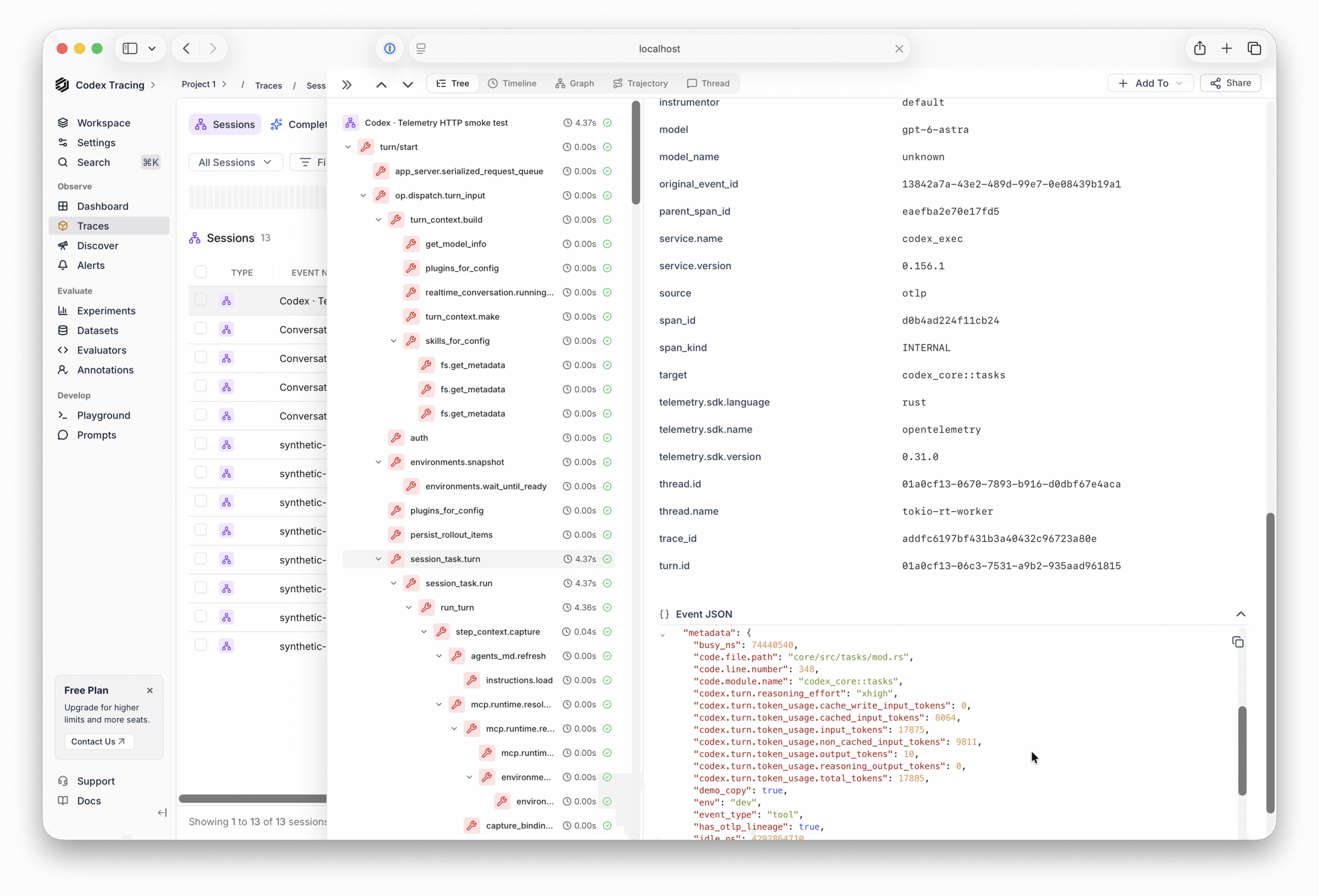
* Each span becomes one HoneyHive event with `event_type: tool`; a single short `codex exec` run produced 780 events across roughly 20 trace IDs
* `metadata.trace_id` and `parent_id` preserve the span hierarchy, so the tree view under `turn/start` is intact
* Token usage arrives as `gen_ai.usage.*` attributes on `handle_responses` spans and as `codex.turn.token_usage.*` on `session_task.turn` spans
* Resource attributes (`service.name = codex_exec`, `service.version`, `env`) land in `metadata` on every event
* Prompt and completion text is emitted by Codex as OTLP **log** records, not spans, so it is not part of the trace export
***
## What Gets Traced
* **Run and turn lifecycle** - `codex.exec` marks the invocation, `turn/start` is the root of each turn's tree, with `session_task.turn`, `run_turn`, and `run_sampling_request` beneath it
* **Model requests** - `handle_responses` spans (one per Responses API stream) with input, output, cached, and reasoning token counts, the model name, and reasoning effort
* **Tool executions** - `exec_command`, `unified_exec.exec_command`, and `code_mode.handler.execute` spans with `tool_name`, `call_id`, and `outcome`
* **Runtime internals** - `fs.get_metadata`, `append_items`, `persist_rollout_items`, `auth`, and similar plumbing spans that make up most of the volume
* **Durations** - `duration` (ms) on every event, plus `busy_ns` and `idle_ns`
Codex sets none of the attributes HoneyHive uses to group events into a session, so each event gets its own `session_id` and a run is not shown as one session. Support for OTLP `/v1/logs` and `/v1/metrics` is planned for an upcoming release. Logs will add Codex's `codex.user_prompt`, `codex.sse_event`, and `codex.tool_result` records, which carry prompt and completion content and per-response token counts; metrics will add Codex's request and token counters.
***
## Events
Representative events from one `codex exec` run. All are `event_type: tool`.
| Event name | Description | Useful metadata |
| ------------------------------------------------------------------ | ---------------------------------------------------------------------- | --------------------------------------------------------------------------------------------------------------------------------------------------------------- |
| `codex.exec` | Marks the `codex exec` invocation. One per run, no children. | `turn.id`, `service.version`, `env` |
| `turn/start` | Root of the per-turn span tree. Most of a run's spans descend from it. | `turn.id`, `rpc.method`, `app_server.client_name` |
| `session_loop` | Long-lived loop that owns the thread. Separate root. | `thread_id` |
| `session_task.turn` | One agent turn, under `turn/start`. | `model`, `codex.turn.reasoning_effort`, `codex.turn.token_usage.*`, `turn.id` |
| `handle_responses` | One Responses API stream, under `run_turn`. | `gen_ai.usage.input_tokens`, `gen_ai.usage.output_tokens`, `gen_ai.usage.cache_read.input_tokens`, `codex.usage.total_tokens`, `codex.request.reasoning_effort` |
| `handle_tool_call_with_source` | A tool call requested by the model. Parent of the `exec*` spans below. | timing only |
| `exec_command`, `unified_exec.exec_command` | Shell command executed by the agent. | `tool_name`, `call_id`, `aborted` |
| `code_mode.handler.execute` | Tool handler dispatch. | `call_id`, `outcome`, `conversation.id`, `turn_id` |
| `fs.get_metadata`, `append_items`, `persist_rollout_items`, `auth` | Runtime plumbing. | `code.file.path`, `busy_ns`, `idle_ns` |
Every event also carries `metadata.trace_id`, `metadata.span_id`, `metadata.parent_span_id`, `metadata.service.name = codex_exec`, and `metadata.instrumentor`.
***
## Verify the integration
Run a short task, then open the project's **Traces** view in the HoneyHive UI and filter on `event_name` = `codex.exec`:
```bash theme={null}
codex exec "create hello.py that prints hello, then run it"
```
Or query with the [HoneyHive CLI](/v2/cli-reference/getting-started). Reading events back needs a **project** API key (`HH_PROJECT_API_KEY`), not the ingestion key configured above. See [API keys](/v2/workspace/api-keys).
```bash theme={null}
honeyhive events search \
--filters '[{"field":"event_name","operator":"is","value":"codex.exec"}]' \
--limit 20
```
One `codex.exec` event per run confirms export. Filter on `metadata.service.name` = `codex_exec` to see every Codex event, on `event_name` = `turn/start` to find the root of each turn's tree, or on `metadata.conversation.id` to narrow to one Codex thread.
***
## Troubleshooting
If events aren't showing up in HoneyHive, work through these checks in order:
Codex sends to the URL exactly as written. Confirm `endpoint` ends in `/opentelemetry/v1/traces`.
The key must be inside `headers` as `"Authorization" = "Bearer "`. Confirm it is an ingestion key for the intended project and that the host matches that project's region.
The exporter flushes on process exit. A non-interactive `codex exec "..."` run ends cleanly and flushes every span; an interactive session that is still open has not flushed yet.
Point `endpoint` at a plain HTTP listener on `http://127.0.0.1:/opentelemetry/v1/traces` and capture the `application/x-protobuf` requests. Self-signed HTTPS listeners were not accepted by Codex in our testing; this does not affect remote HTTPS endpoints with valid certificates.
HoneyHive received an OTLP request with no spans. This is not a Codex issue, and it confirms the endpoint and key are reachable.
Expected with the trace exporter alone, not a misconfiguration. See [What Gets Traced](#what-gets-traced). `metadata.trace_id` groups one span tree; a run spans roughly 20 trace IDs and no single attribute is present on every span of a run, so filter on `event_name` = `turn/start` to find each turn's tree.
## Related topics
- [How to integrate HoneyHive with Portkey](/v2/integrations/portkey.md)
- [How to trace Azure OpenAI with HoneyHive](/v2/integrations/azure_openai.md)
- [How to trace OpenAI with HoneyHive](/v2/integrations/openai.md)
## Quick Start
Get an [ingestion API key](/v2/workspace/api-keys#ingestion-keys) from [**Settings → Project → API Keys**](https://app.us.honeyhive.ai/settings/project/keys), then add an `[otel]` table to `~/.codex/config.toml`:
```toml theme={null}
[otel]
environment = "dev"
exporter = "none"
metrics_exporter = "none"
trace_exporter = { otlp-http = {
endpoint = "https://api.dp1.us.prod.honeyhive.ai/opentelemetry/v1/traces",
protocol = "binary",
headers = { "Authorization" = "Bearer " }
}}
```
Run Codex as usual:
```bash theme={null}
codex exec "print hello from a python script and run it"
```
Spans are batched and flushed when the run exits. They appear in HoneyHive under the project that owns the ingestion key within a few seconds. Project scope is resolved from the key, so no project name is needed.
Replace `api.dp1.us.prod.honeyhive.ai` with your data plane host if you are not on US production.
Codex exports its full internal span tree, so volume is high: one short `codex exec` run produced roughly 780 events, most of them runtime plumbing. The `[otel]` table has no span filtering or sampling option. Consider this before enabling it on a shared or high-traffic setup.
Codex reads `[otel]` header values literally and does not expand environment variables in them, so the ingestion key is stored in plaintext in `config.toml`. Keep `~/.codex/config.toml` out of version control.
### Configuration reference
| Key | Value | Notes |
| ------------------ | --------------------------------------------------- | -------------------------------------------------------------------------------------------------------- |
| `trace_exporter` | `{ otlp-http = { ... } }` | HoneyHive ingests OTLP traces over HTTP only. Do not use `otlp-grpc`. |
| `endpoint` | `https:///opentelemetry/v1/traces` | Use the full path. Codex does not append `/v1/traces`. |
| `protocol` | `"binary"` | Binary protobuf (`application/x-protobuf`). HoneyHive also accepts OTLP/JSON, but binary is recommended. |
| `headers` | `{ "Authorization" = "Bearer " }` | Ingestion key selects the target project. |
| `exporter` | `"none"` | Codex's OTLP **log** exporter. HoneyHive has no `/v1/logs` endpoint, so leave it off. |
| `metrics_exporter` | `"none"` | HoneyHive has no `/v1/metrics` endpoint. |
| `environment` | any string | Exported as the `env` resource attribute. |
See OpenAI's [observability and telemetry](https://learn.chatgpt.com/docs/config-file/config-advanced#observability-and-telemetry) reference for every `[otel]` option.
## How it works
* Codex's trace exporter is wired to its internal Rust `tracing` spans, so HoneyHive receives the runtime's own span tree rather than a curated agent transcript
* Each span becomes one HoneyHive event with `event_type: tool`; a single short `codex exec` run produced 780 events across roughly 20 trace IDs
* `metadata.trace_id` and `parent_id` preserve the span hierarchy, so the tree view under `turn/start` is intact
* Token usage arrives as `gen_ai.usage.*` attributes on `handle_responses` spans and as `codex.turn.token_usage.*` on `session_task.turn` spans
* Resource attributes (`service.name = codex_exec`, `service.version`, `env`) land in `metadata` on every event
* Prompt and completion text is emitted by Codex as OTLP **log** records, not spans, so it is not part of the trace export
***
## What Gets Traced
* **Run and turn lifecycle** - `codex.exec` marks the invocation, `turn/start` is the root of each turn's tree, with `session_task.turn`, `run_turn`, and `run_sampling_request` beneath it
* **Model requests** - `handle_responses` spans (one per Responses API stream) with input, output, cached, and reasoning token counts, the model name, and reasoning effort
* **Tool executions** - `exec_command`, `unified_exec.exec_command`, and `code_mode.handler.execute` spans with `tool_name`, `call_id`, and `outcome`
* **Runtime internals** - `fs.get_metadata`, `append_items`, `persist_rollout_items`, `auth`, and similar plumbing spans that make up most of the volume
* **Durations** - `duration` (ms) on every event, plus `busy_ns` and `idle_ns`
Codex sets none of the attributes HoneyHive uses to group events into a session, so each event gets its own `session_id` and a run is not shown as one session. Support for OTLP `/v1/logs` and `/v1/metrics` is planned for an upcoming release. Logs will add Codex's `codex.user_prompt`, `codex.sse_event`, and `codex.tool_result` records, which carry prompt and completion content and per-response token counts; metrics will add Codex's request and token counters.
***
## Events
Representative events from one `codex exec` run. All are `event_type: tool`.
| Event name | Description | Useful metadata |
| ------------------------------------------------------------------ | ---------------------------------------------------------------------- | --------------------------------------------------------------------------------------------------------------------------------------------------------------- |
| `codex.exec` | Marks the `codex exec` invocation. One per run, no children. | `turn.id`, `service.version`, `env` |
| `turn/start` | Root of the per-turn span tree. Most of a run's spans descend from it. | `turn.id`, `rpc.method`, `app_server.client_name` |
| `session_loop` | Long-lived loop that owns the thread. Separate root. | `thread_id` |
| `session_task.turn` | One agent turn, under `turn/start`. | `model`, `codex.turn.reasoning_effort`, `codex.turn.token_usage.*`, `turn.id` |
| `handle_responses` | One Responses API stream, under `run_turn`. | `gen_ai.usage.input_tokens`, `gen_ai.usage.output_tokens`, `gen_ai.usage.cache_read.input_tokens`, `codex.usage.total_tokens`, `codex.request.reasoning_effort` |
| `handle_tool_call_with_source` | A tool call requested by the model. Parent of the `exec*` spans below. | timing only |
| `exec_command`, `unified_exec.exec_command` | Shell command executed by the agent. | `tool_name`, `call_id`, `aborted` |
| `code_mode.handler.execute` | Tool handler dispatch. | `call_id`, `outcome`, `conversation.id`, `turn_id` |
| `fs.get_metadata`, `append_items`, `persist_rollout_items`, `auth` | Runtime plumbing. | `code.file.path`, `busy_ns`, `idle_ns` |
Every event also carries `metadata.trace_id`, `metadata.span_id`, `metadata.parent_span_id`, `metadata.service.name = codex_exec`, and `metadata.instrumentor`.
***
## Verify the integration
Run a short task, then open the project's **Traces** view in the HoneyHive UI and filter on `event_name` = `codex.exec`:
```bash theme={null}
codex exec "create hello.py that prints hello, then run it"
```
Or query with the [HoneyHive CLI](/v2/cli-reference/getting-started). Reading events back needs a **project** API key (`HH_PROJECT_API_KEY`), not the ingestion key configured above. See [API keys](/v2/workspace/api-keys).
```bash theme={null}
honeyhive events search \
--filters '[{"field":"event_name","operator":"is","value":"codex.exec"}]' \
--limit 20
```
One `codex.exec` event per run confirms export. Filter on `metadata.service.name` = `codex_exec` to see every Codex event, on `event_name` = `turn/start` to find the root of each turn's tree, or on `metadata.conversation.id` to narrow to one Codex thread.
***
## Troubleshooting
If events aren't showing up in HoneyHive, work through these checks in order:
Codex sends to the URL exactly as written. Confirm `endpoint` ends in `/opentelemetry/v1/traces`.
The key must be inside `headers` as `"Authorization" = "Bearer "`. Confirm it is an ingestion key for the intended project and that the host matches that project's region.
The exporter flushes on process exit. A non-interactive `codex exec "..."` run ends cleanly and flushes every span; an interactive session that is still open has not flushed yet.
Point `endpoint` at a plain HTTP listener on `http://127.0.0.1:/opentelemetry/v1/traces` and capture the `application/x-protobuf` requests. Self-signed HTTPS listeners were not accepted by Codex in our testing; this does not affect remote HTTPS endpoints with valid certificates.
HoneyHive received an OTLP request with no spans. This is not a Codex issue, and it confirms the endpoint and key are reachable.
Expected with the trace exporter alone, not a misconfiguration. See [What Gets Traced](#what-gets-traced). `metadata.trace_id` groups one span tree; a run spans roughly 20 trace IDs and no single attribute is present on every span of a run, so filter on `event_name` = `turn/start` to find each turn's tree.
## Related topics
- [How to integrate HoneyHive with Portkey](/v2/integrations/portkey.md)
- [How to trace Azure OpenAI with HoneyHive](/v2/integrations/azure_openai.md)
- [How to trace OpenAI with HoneyHive](/v2/integrations/openai.md)