> ## Documentation Index
> Fetch the complete documentation index at: https://docs.honeyhive.ai/llms.txt
> Use this file to discover all available pages before exploring further.
# How to trace Cursor SDK with HoneyHive
> Trace Cursor SDK agent runs, tool calls, and model requests with HoneyHive. Instrument Cursor SDK sessions to capture agent execution and debugging context.
The [Cursor SDK](https://cursor.com/docs/sdk/typescript) is Cursor's TypeScript SDK for running coding agents programmatically. Use the [`cursor-sdk-honeyhive` cookbook](https://github.com/honeyhiveai/cookbook/tree/main/cursor-sdk-honeyhive) to trace Cursor agent runs in HoneyHive. We plan to add first-class support through an instrumentor package soon.
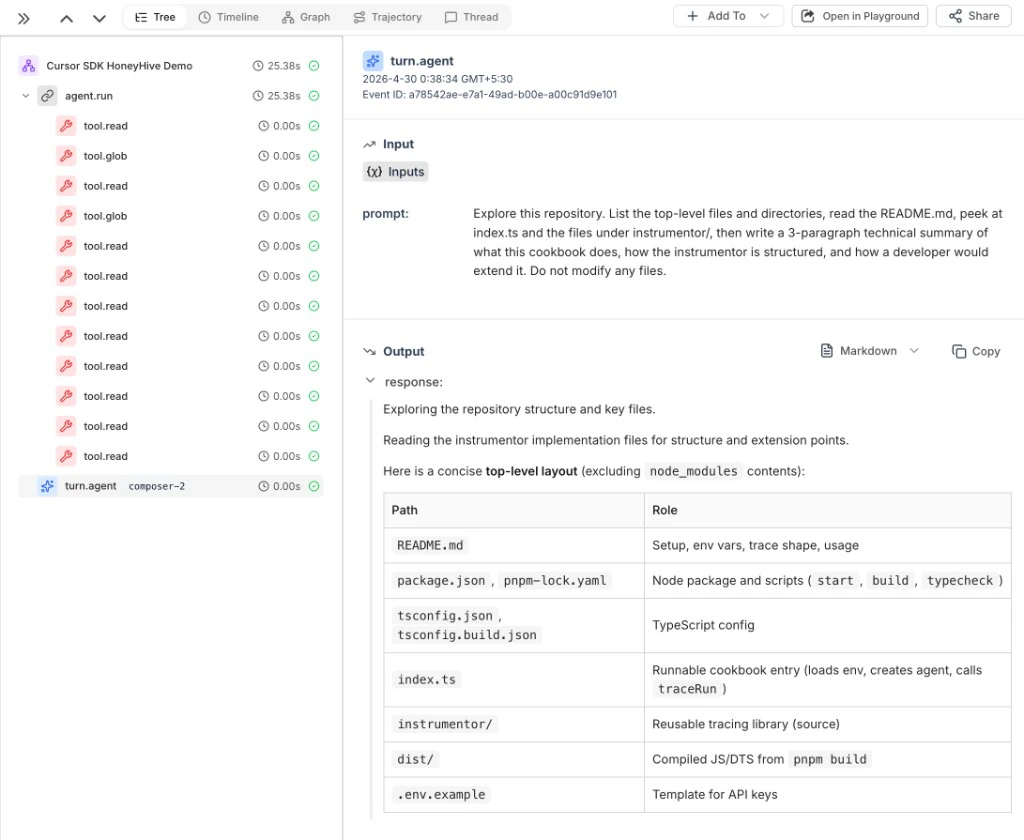
One Cursor run becomes one HoneyHive session with the agent run, tool calls, and final assistant response.
Cursor's TypeScript SDK is currently in public beta. Treat this cookbook workflow as experimental until package support is available.
 ## Quick Start
Cursor SDK tracing is currently available as a cookbook example while first-class package support is in progress. Clone the cookbook to try the workflow, then vendor the helper into your Cursor SDK project if you want to use it today.
You need Node.js 20+, pnpm, a Cursor API key, and a HoneyHive API key.
```bash theme={null}
git clone https://github.com/honeyhiveai/cookbook.git
cd cookbook/cursor-sdk-honeyhive
pnpm install
cp .env.example .env
```
Set credentials in `.env`:
```bash theme={null}
CURSOR_API_KEY=your_cursor_api_key
HH_API_KEY=your_honeyhive_api_key
```
Run the example:
```bash theme={null}
pnpm start
```
After the run finishes, open the [HoneyHive Log Store](/v2/tracing/ui-flows) to inspect the trace.
## Add Tracing
Wrap any Cursor `Agent` with `traceRun`:
```typescript theme={null}
import { Agent } from '@cursor/sdk';
import { HoneyHiveCursorInstrumentor } from './instrumentor/index.js';
const instrumentor = new HoneyHiveCursorInstrumentor({
apiKey: process.env.HH_API_KEY,
project: 'My Cursor Project',
});
const agent = await Agent.create({
apiKey: process.env.CURSOR_API_KEY,
model: { id: 'composer-2' },
local: { cwd: process.cwd() },
});
const result = await instrumentor.traceRun({
agent,
message: 'Run the test suite and fix any failing tests',
});
console.log(result.honeyhiveSessionId);
```
Use `HH_PROJECT`, `HH_SOURCE`, and `HH_API_URL` to customize the project label, source label, or API endpoint. Set `HH_API_URL` for self-hosted or dedicated HoneyHive deployments.
## What Gets Traced
Each Cursor run appears in HoneyHive as:
| Event | Type | Notes |
| --------------- | ------- | ---------------------------------------------------------------------------------------------------- |
| `session.start` | session | Top-level container for the Cursor run. |
| `agent.run` | chain | Cursor SDK invocation with the prompt, result, model, Git metadata, token usage, and step summaries. |
| `tool.` | tool | One event per Cursor tool call, such as `tool.read`, `tool.glob`, or `tool.shell`. |
| `turn.agent` | model | Final assistant response with chat history and token usage metadata. |
The cookbook redacts common secret fields, truncates large payloads, and stores only the workspace folder name instead of the full local path.
***
## Related
Full runnable Cursor SDK tracing example
Add user IDs and custom metadata to Cursor SDK traces
Create spans for business logic around agent calls
Get started with HoneyHive tracing
***
## Resources
* [Cursor TypeScript SDK docs](https://cursor.com/docs/sdk/typescript)
* [Cursor APIs overview](https://cursor.com/docs/api)
* [`@cursor/sdk` on npm](https://www.npmjs.com/package/@cursor/sdk)
* [`@honeyhive/api-client` on npm](https://www.npmjs.com/package/@honeyhive/api-client)
## Quick Start
Cursor SDK tracing is currently available as a cookbook example while first-class package support is in progress. Clone the cookbook to try the workflow, then vendor the helper into your Cursor SDK project if you want to use it today.
You need Node.js 20+, pnpm, a Cursor API key, and a HoneyHive API key.
```bash theme={null}
git clone https://github.com/honeyhiveai/cookbook.git
cd cookbook/cursor-sdk-honeyhive
pnpm install
cp .env.example .env
```
Set credentials in `.env`:
```bash theme={null}
CURSOR_API_KEY=your_cursor_api_key
HH_API_KEY=your_honeyhive_api_key
```
Run the example:
```bash theme={null}
pnpm start
```
After the run finishes, open the [HoneyHive Log Store](/v2/tracing/ui-flows) to inspect the trace.
## Add Tracing
Wrap any Cursor `Agent` with `traceRun`:
```typescript theme={null}
import { Agent } from '@cursor/sdk';
import { HoneyHiveCursorInstrumentor } from './instrumentor/index.js';
const instrumentor = new HoneyHiveCursorInstrumentor({
apiKey: process.env.HH_API_KEY,
project: 'My Cursor Project',
});
const agent = await Agent.create({
apiKey: process.env.CURSOR_API_KEY,
model: { id: 'composer-2' },
local: { cwd: process.cwd() },
});
const result = await instrumentor.traceRun({
agent,
message: 'Run the test suite and fix any failing tests',
});
console.log(result.honeyhiveSessionId);
```
Use `HH_PROJECT`, `HH_SOURCE`, and `HH_API_URL` to customize the project label, source label, or API endpoint. Set `HH_API_URL` for self-hosted or dedicated HoneyHive deployments.
## What Gets Traced
Each Cursor run appears in HoneyHive as:
| Event | Type | Notes |
| --------------- | ------- | ---------------------------------------------------------------------------------------------------- |
| `session.start` | session | Top-level container for the Cursor run. |
| `agent.run` | chain | Cursor SDK invocation with the prompt, result, model, Git metadata, token usage, and step summaries. |
| `tool.` | tool | One event per Cursor tool call, such as `tool.read`, `tool.glob`, or `tool.shell`. |
| `turn.agent` | model | Final assistant response with chat history and token usage metadata. |
The cookbook redacts common secret fields, truncates large payloads, and stores only the workspace folder name instead of the full local path.
***
## Related
Full runnable Cursor SDK tracing example
Add user IDs and custom metadata to Cursor SDK traces
Create spans for business logic around agent calls
Get started with HoneyHive tracing
***
## Resources
* [Cursor TypeScript SDK docs](https://cursor.com/docs/sdk/typescript)
* [Cursor APIs overview](https://cursor.com/docs/api)
* [`@cursor/sdk` on npm](https://www.npmjs.com/package/@cursor/sdk)
* [`@honeyhive/api-client` on npm](https://www.npmjs.com/package/@honeyhive/api-client)