> ## Documentation Index
> Fetch the complete documentation index at: https://docs.honeyhive.ai/llms.txt
> Use this file to discover all available pages before exploring further.
# How to integrate HoneyHive with Google ADK
> Integrate HoneyHive with Google ADK to trace agent runs, tool calls, and model requests. Add four lines of setup with the OpenInference Google ADK instrumentor.
To integrate HoneyHive with Google ADK, install `honeyhive[openinference-google-adk]`, call `HoneyHiveTracer.init()`, run `GoogleADKInstrumentor().instrument(tracer_provider=tracer.provider)`, and use your existing ADK code unchanged. See the [tracing quickstart](/v2/introduction/tracing-quickstart) and [tracer initialization](/v2/tracing/tracer-initialization) guides for setup details.
[Google Agent Development Kit (ADK)](https://google.github.io/adk-docs/) is an open-source, code-first framework for building and deploying AI agents. ADK is model-agnostic and supports multi-agent orchestration, tools, and flexible deployment options. HoneyHive integrates with ADK via the OpenInference instrumentor, automatically capturing agent runs, tool calls, and LLM interactions.
## How do I integrate HoneyHive with Google ADK?
**Add HoneyHive tracing in just 4 lines of code.** Add this to your existing ADK app and all agent runs, tool calls, and model calls are automatically traced.
To see where to initialize the tracer for your environment, including AWS Lambda and long-running servers, see [Tracer Initialization](/v2/tracing/tracer-initialization).
Last tested with `google-adk 1.28.1` (April 2026).
```bash theme={null}
pip install "honeyhive[openinference-google-adk]"
# Or install separately
pip install honeyhive openinference-instrumentation-google-adk google-adk
```
```python theme={null}
import os
from honeyhive import HoneyHiveTracer
from openinference.instrumentation.google_adk import GoogleADKInstrumentor
tracer = HoneyHiveTracer.init(api_key=os.getenv("HH_API_KEY"))
GoogleADKInstrumentor().instrument(tracer_provider=tracer.provider)
# Your existing ADK code works unchanged
```
## What Gets Traced
The instrumentor automatically captures:
* **Agent runs** - Every agent invocation with inputs and outputs
* **LLM calls** - Model requests, responses, and token usage
* **Tool calls** - Each tool execution with arguments and results
No manual instrumentation required.
***
## Example: Single Agent
```python theme={null}
import asyncio
from honeyhive import HoneyHiveTracer
from openinference.instrumentation.google_adk import GoogleADKInstrumentor
from google.adk.agents import Agent
from google.adk.runners import InMemoryRunner
from google.genai.types import Content, Part
tracer = HoneyHiveTracer.init(api_key=os.getenv("HH_API_KEY"))
GoogleADKInstrumentor().instrument(tracer_provider=tracer.provider)
def get_weather(city: str) -> dict:
return {"report": f"Weather in {city}: 20°C, clear"}
agent = Agent(
name="weather_agent",
model="gemini-2.0-flash",
description="Answers weather questions.",
instruction="Use get_weather to answer weather questions.",
tools=[get_weather],
)
async def main():
runner = InMemoryRunner(agent=agent, app_name="app")
session_id = tracer.session_id # Use HoneyHive session ID
await runner.session_service.create_session(app_name="app", user_id="user", session_id=session_id)
msg = Content(role="user", parts=[Part(text="What's the weather in Tokyo?")])
async for event in runner.run_async(user_id="user", session_id=session_id, new_message=msg):
if event.is_final_response():
print(event.content.parts[0].text)
asyncio.run(main())
```
***
## Example: Multi-Agent System
```python theme={null}
import asyncio
from honeyhive import HoneyHiveTracer
from openinference.instrumentation.google_adk import GoogleADKInstrumentor
from google.adk.agents import Agent
from google.adk.runners import InMemoryRunner
from google.genai.types import Content, Part
tracer = HoneyHiveTracer.init(api_key=os.getenv("HH_API_KEY"))
GoogleADKInstrumentor().instrument(tracer_provider=tracer.provider)
def lookup_order(order_id: str) -> dict:
return {"status": "shipped", "tracking": "1Z999AA1012345"}
def run_diagnostic(issue_type: str) -> dict:
return {"problem": "Bluetooth conflict", "solution": "Reset and re-pair"}
order_agent = Agent(
name="order_support",
model="gemini-2.0-flash",
description="Handles order inquiries.",
instruction="Help with orders. Use lookup_order for status.",
tools=[lookup_order],
)
tech_agent = Agent(
name="tech_support",
model="gemini-2.0-flash",
description="Handles technical issues.",
instruction="Help with tech problems. Use run_diagnostic.",
tools=[run_diagnostic],
)
coordinator = Agent(
name="coordinator",
model="gemini-2.0-flash",
description="Routes to specialists.",
instruction="Route order questions to order_support, tech issues to tech_support.",
sub_agents=[order_agent, tech_agent],
)
async def main():
runner = InMemoryRunner(agent=coordinator, app_name="support")
session_id = tracer.session_id # Use HoneyHive session ID
await runner.session_service.create_session(app_name="support", user_id="customer", session_id=session_id)
for msg_text in ["Where is my order ORD-001?", "My headphones won't connect"]:
msg = Content(role="user", parts=[Part(text=msg_text)])
async for event in runner.run_async(user_id="customer", session_id=session_id, new_message=msg):
if event.is_final_response():
print(event.content.parts[0].text)
asyncio.run(main())
```
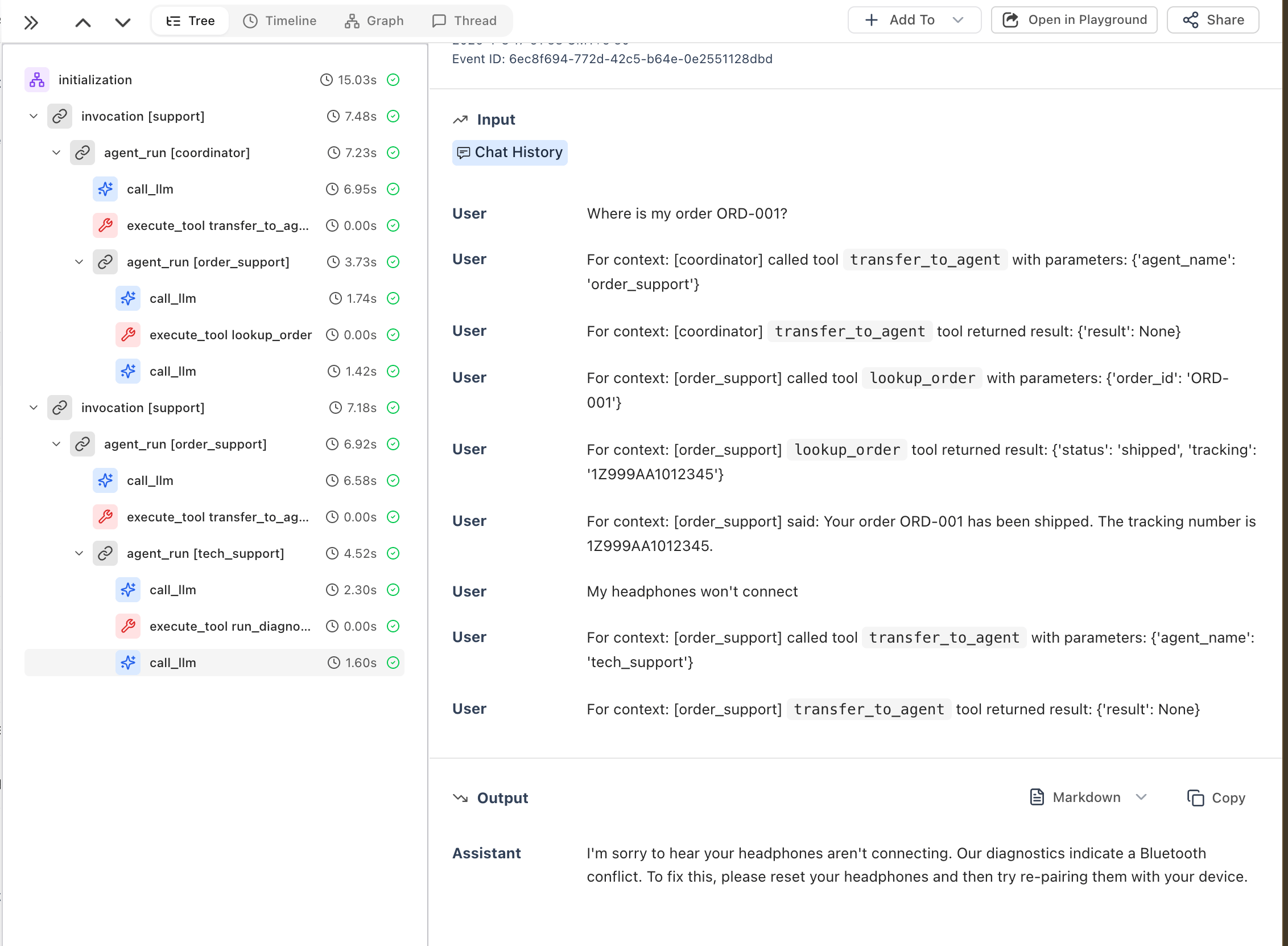
In HoneyHive, you'll see the full trace hierarchy including coordinator routing, sub-agent delegation, and tool executions:
 ***
## Troubleshooting
### Traces not appearing
1. **Check environment variables** - Ensure `HH_API_KEY` is set
2. **Pass the tracer provider** - The instrumentor must receive `tracer_provider=tracer.provider`:
```python theme={null}
from honeyhive import HoneyHiveTracer
from openinference.instrumentation.google_adk import GoogleADKInstrumentor
tracer = HoneyHiveTracer.init(api_key=os.getenv("HH_API_KEY"))
# ✅ Correct - pass tracer_provider
GoogleADKInstrumentor().instrument(tracer_provider=tracer.provider)
# ❌ Wrong - missing tracer_provider
GoogleADKInstrumentor().instrument()
```
3. **Initialize before creating agents** - Call `instrument()` before instantiating ADK agents
***
## Related
Add user IDs and custom metadata to ADK traces
Create spans for business logic around agent calls
Trace agents across service boundaries
***
## Resources
* [Google ADK Documentation](https://google.github.io/adk-docs/)
***
## Troubleshooting
### Traces not appearing
1. **Check environment variables** - Ensure `HH_API_KEY` is set
2. **Pass the tracer provider** - The instrumentor must receive `tracer_provider=tracer.provider`:
```python theme={null}
from honeyhive import HoneyHiveTracer
from openinference.instrumentation.google_adk import GoogleADKInstrumentor
tracer = HoneyHiveTracer.init(api_key=os.getenv("HH_API_KEY"))
# ✅ Correct - pass tracer_provider
GoogleADKInstrumentor().instrument(tracer_provider=tracer.provider)
# ❌ Wrong - missing tracer_provider
GoogleADKInstrumentor().instrument()
```
3. **Initialize before creating agents** - Call `instrument()` before instantiating ADK agents
***
## Related
Add user IDs and custom metadata to ADK traces
Create spans for business logic around agent calls
Trace agents across service boundaries
***
## Resources
* [Google ADK Documentation](https://google.github.io/adk-docs/)