> ## Documentation Index
> Fetch the complete documentation index at: https://docs.honeyhive.ai/llms.txt
> Use this file to discover all available pages before exploring further.
# n8n
> Export n8n AI Agent workflow observability to HoneyHive with the execution-history shipper
[n8n](https://n8n.io/) is a workflow automation platform for connecting apps, APIs, and AI steps. n8n's main AI workflow path uses the **AI Agent** node with connected chat model, memory, and tool sub-nodes.
The [HoneyHive n8n shipper](https://github.com/honeyhiveai/n8n-honeyhive-shipper) exports those workflow executions from n8n's Postgres execution history to HoneyHive. This gives you HoneyHive traces for AI Agent runs, model calls, tool calls, node inputs, node outputs, and workflow metadata without adding HTTP Request nodes after every step.
The shipper works only with **self-hosted n8n** because it reads n8n's execution database. For n8n Cloud, see [Other options](#other-options).
## How n8n AI Agent runs map to HoneyHive
n8n's current AI Agent node runs as a **Tools Agent**. In n8n's own quickstart, you build an AI chat workflow with:
```mermaid theme={null}
flowchart LR
CT[Chat Trigger] --> AG[AI Agent]
LM[OpenAI Chat Model] -. ai_languageModel .-> AG
MEM[Simple Memory] -. ai_memory .-> AG
TOOL[Calculator or app tool] -. ai_tool .-> AG
```
The shipper reads the persisted `runData` for each completed execution and maps it to HoneyHive events:
| n8n execution data | HoneyHive event |
| ----------------------------------------------------------------- | --------------- |
| Workflow execution root | `chain` |
| `AI Agent` node | `chain` |
| Chat model sub-node, such as `OpenAI Chat Model` | `model` |
| Memory sub-node, such as `Simple Memory` | `chain` |
| Tool sub-node, such as `Calculator`, `HTTP Request`, or app tools | `tool` |
| Standard n8n nodes, such as `Set` or `Code` | `chain` |
For current AI Agent workflows, n8n stores chat model calls as `ai_languageModel` sub-runs, memory calls as `ai_memory` sub-runs, and tool calls as `ai_tool` sub-runs. The shipper preserves that hierarchy, so model, memory, and tool spans appear under the AI Agent span in HoneyHive.
## Prerequisites
* Self-hosted n8n with PostgreSQL execution storage
* Read access to n8n's Postgres database
* A HoneyHive project and API key from [**Settings > Project > API Keys**](https://app.us.honeyhive.ai/settings/project/keys)
## Install the shipper
Clone the shipper and install it with `uv`:
```bash theme={null}
git clone https://github.com/honeyhiveai/n8n-honeyhive-shipper
cd n8n-honeyhive-shipper
uv sync
```
## Configure
Set the required environment variables:
```bash theme={null}
export HONEYHIVE_API_KEY=
export HONEYHIVE_API_URL=
export PG_DSN=postgresql://user:password@postgres-host:5432/n8n
# Match your n8n install. Default Docker + Postgres uses unprefixed tables:
export DB_TABLE_PREFIX=
# Some installs prefix tables, for example:
# export DB_TABLE_PREFIX=n8n_
```
`HONEYHIVE_API_URL` is your HoneyHive data plane API base URL, for example `https://api.dp1.us.prod.honeyhive.ai`. The shipper appends `/opentelemetry/v1/traces` automatically.
You can also omit `PG_DSN` and use n8n-style Postgres variables:
```bash theme={null}
export DB_POSTGRESDB_HOST=postgres-host
export DB_POSTGRESDB_PORT=5432
export DB_POSTGRESDB_DATABASE=n8n
export DB_POSTGRESDB_USER=n8n
export DB_POSTGRESDB_PASSWORD=
export DB_TABLE_PREFIX=
```
Useful optional settings:
| Variable | Default | Purpose |
| ----------------------------- | -------------------------------- | ------------------------------------------------------------ |
| `DRY_RUN` | `true` | Map executions without exporting to HoneyHive |
| `CHECKPOINT_FILE` | `.shipper_checkpoint` | Stores the last processed execution ID |
| `FILTER_AI_ONLY` | `false` | Export AI-related spans plus required context |
| `FILTER_WORKFLOW_IDS` | none | Comma-separated workflow ID allowlist |
| `TRUNCATE_FIELD_LEN` | `0` | Truncate large input/output strings. `0` disables truncation |
| `OTEL_EXPORTER_OTLP_ENDPOINT` | derived from `HONEYHIVE_API_URL` | Full OTLP traces URL override |
## Run
Start with a dry run:
```bash theme={null}
uv run n8n-honeyhive-shipper shipper --dry-run --limit 5 --debug
```
Export a small batch:
```bash theme={null}
uv run n8n-honeyhive-shipper shipper --no-dry-run --limit 1
```
Then run incrementally on a schedule:
```bash theme={null}
uv run n8n-honeyhive-shipper shipper --no-dry-run
```
The shipper updates `CHECKPOINT_FILE` after successful non-dry-run exports, so later runs resume from the last processed execution ID.
## Example workflow: AI Agent with a tool
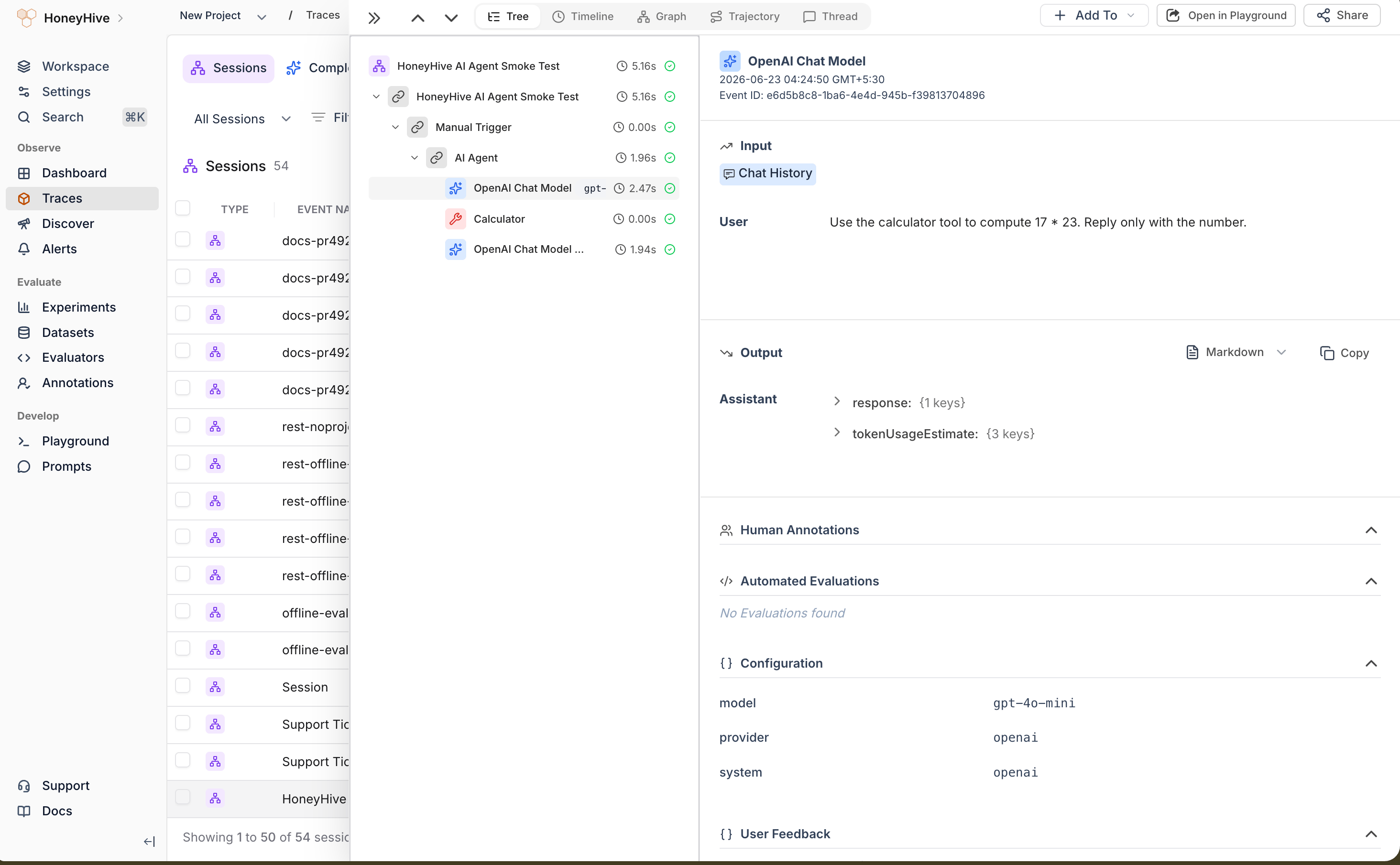
In a local self-hosted n8n test, the prompt `Use the calculator tool to compute 17 * 23` produced:
* `AI Agent` output: `391`
* `Calculator` tool input: `17 * 23`
* Two `OpenAI Chat Model` sub-runs: one for the tool call and one for the final answer
* One HoneyHive session with 6 spans under the session root: workflow root, trigger, AI Agent, Calculator tool, and two model calls
## Verify in HoneyHive
Execute the workflow from the n8n UI or workflow execute API. Confirm the execution is stored in n8n's Postgres database.
Start with a dry run, then export a small batch with `--no-dry-run`.
In [**Traces**](https://app.us.honeyhive.ai/traces/sessions), search for the workflow name or a node name from the execution.
Shipper spans include `service.name = n8n-honeyhive-shipper` and n8n metadata such as `n8n.metadata.n8n.execution.id` and `n8n.workflow.id`. HoneyHive may store the session under its own session ID, so use the n8n execution ID as metadata when cross-checking against n8n's database. AI Agent workflows should show the `AI Agent` span with model and tool spans beneath it.
 ## Where n8n stores `runData`
On self-hosted n8n, finished executions are persisted in the database:
| Table | Key columns | Contents |
| ------------------ | -------------------------------------------------------------- | --------------------------------------------- |
| `execution_entity` | `id`, `workflowId`, `status`, `startedAt`, `stoppedAt`, `mode` | Execution metadata |
| `execution_data` | `executionId`, `workflowData`, `data` | Static workflow snapshot plus runtime payload |
The `data` column holds `resultData.runData`: a map of node name to execution runs. Each run includes `startTime`, `executionTime`, `executionStatus`, and per-item JSON under channels such as `main`, `ai_languageModel`, `ai_memory`, or `ai_tool`. The `data` value may be flatted pointer-compressed JSON, while `workflowData` is usually plain JSON.
## Operational notes
| Concern | Detail |
| --------------------- | ------------------------------------------------------------------------------------------------------------------------ |
| **Latency** | Near-real-time poll or backfill batch. Export is not inline with workflow execution |
| **Re-export** | A checkpoint file tracks processed executions. Keep the checkpoint on durable storage to avoid duplicate exports |
| **Queue mode** | Workers write to the same execution tables. Run the shipper after executions are persisted |
| **AI Agent variants** | Current AI Agent nodes run as Tools Agents. Older Conversational Agent functionality was removed by n8n in February 2025 |
The shipper reads execution `runData`, which may include PII, API responses, or resolved values from workflow nodes. Use a read-only DB role, restrict workflow scope with `FILTER_WORKFLOW_IDS` when possible, and review redaction requirements before exporting production data.
## Troubleshooting
| Symptom | Fix |
| ------------------------------------------ | ----------------------------------------------------------------------------------------------------------------------------------------------------------------------------- |
| No shipper-exported spans in HoneyHive | Confirm `HONEYHIVE_API_KEY`, `HONEYHIVE_API_URL`, and `PG_DSN` point to the expected HoneyHive project and n8n database. Run a dry run first, then export with `--no-dry-run` |
| Shipper missing executions | Confirm the shipper points at the same Postgres DSN as the n8n instance that ran the workflow. Check `DB_TABLE_PREFIX`, workflow filters, and `.shipper_checkpoint` |
| AI Agent spans have no model/tool children | Confirm the workflow uses connected AI sub-nodes such as `ai_languageModel` and `ai_tool`, and that the execution completed before the shipper ran |
| Flatted parse errors | `execution_data.data` is often pointer-compressed. Use a flatted decoder, not plain `JSON.parse` |
## Other options
* **n8n Cloud:** The shipper requires database access, so it does not work with n8n Cloud. For Cloud workflows, log a small number of summary events with the [HoneyHive Events API](/v2/api-reference-autogen/events/create-a-new-event), or instrument the application that triggers n8n.
## Related
Full REST logging guide for sessions, model events, and batches
Automatic OTLP trace export from an AI gateway
Sessions, event types, and trace hierarchy
Add metadata, user properties, and feedback
## Resources
* [HoneyHive n8n shipper](https://github.com/honeyhiveai/n8n-honeyhive-shipper)
* [n8n AI Agent node documentation](https://docs.n8n.io/integrations/builtin/cluster-nodes/root-nodes/n8n-nodes-langchain.agent/)
* [n8n AI workflow quickstart](https://docs.n8n.io/advanced-ai/intro-tutorial/)
* [HoneyHive Events API reference](/v2/api-reference-autogen/events/create-a-new-event)
## Where n8n stores `runData`
On self-hosted n8n, finished executions are persisted in the database:
| Table | Key columns | Contents |
| ------------------ | -------------------------------------------------------------- | --------------------------------------------- |
| `execution_entity` | `id`, `workflowId`, `status`, `startedAt`, `stoppedAt`, `mode` | Execution metadata |
| `execution_data` | `executionId`, `workflowData`, `data` | Static workflow snapshot plus runtime payload |
The `data` column holds `resultData.runData`: a map of node name to execution runs. Each run includes `startTime`, `executionTime`, `executionStatus`, and per-item JSON under channels such as `main`, `ai_languageModel`, `ai_memory`, or `ai_tool`. The `data` value may be flatted pointer-compressed JSON, while `workflowData` is usually plain JSON.
## Operational notes
| Concern | Detail |
| --------------------- | ------------------------------------------------------------------------------------------------------------------------ |
| **Latency** | Near-real-time poll or backfill batch. Export is not inline with workflow execution |
| **Re-export** | A checkpoint file tracks processed executions. Keep the checkpoint on durable storage to avoid duplicate exports |
| **Queue mode** | Workers write to the same execution tables. Run the shipper after executions are persisted |
| **AI Agent variants** | Current AI Agent nodes run as Tools Agents. Older Conversational Agent functionality was removed by n8n in February 2025 |
The shipper reads execution `runData`, which may include PII, API responses, or resolved values from workflow nodes. Use a read-only DB role, restrict workflow scope with `FILTER_WORKFLOW_IDS` when possible, and review redaction requirements before exporting production data.
## Troubleshooting
| Symptom | Fix |
| ------------------------------------------ | ----------------------------------------------------------------------------------------------------------------------------------------------------------------------------- |
| No shipper-exported spans in HoneyHive | Confirm `HONEYHIVE_API_KEY`, `HONEYHIVE_API_URL`, and `PG_DSN` point to the expected HoneyHive project and n8n database. Run a dry run first, then export with `--no-dry-run` |
| Shipper missing executions | Confirm the shipper points at the same Postgres DSN as the n8n instance that ran the workflow. Check `DB_TABLE_PREFIX`, workflow filters, and `.shipper_checkpoint` |
| AI Agent spans have no model/tool children | Confirm the workflow uses connected AI sub-nodes such as `ai_languageModel` and `ai_tool`, and that the execution completed before the shipper ran |
| Flatted parse errors | `execution_data.data` is often pointer-compressed. Use a flatted decoder, not plain `JSON.parse` |
## Other options
* **n8n Cloud:** The shipper requires database access, so it does not work with n8n Cloud. For Cloud workflows, log a small number of summary events with the [HoneyHive Events API](/v2/api-reference-autogen/events/create-a-new-event), or instrument the application that triggers n8n.
## Related
Full REST logging guide for sessions, model events, and batches
Automatic OTLP trace export from an AI gateway
Sessions, event types, and trace hierarchy
Add metadata, user properties, and feedback
## Resources
* [HoneyHive n8n shipper](https://github.com/honeyhiveai/n8n-honeyhive-shipper)
* [n8n AI Agent node documentation](https://docs.n8n.io/integrations/builtin/cluster-nodes/root-nodes/n8n-nodes-langchain.agent/)
* [n8n AI workflow quickstart](https://docs.n8n.io/advanced-ai/intro-tutorial/)
* [HoneyHive Events API reference](/v2/api-reference-autogen/events/create-a-new-event)