> ## Documentation Index
> Fetch the complete documentation index at: https://docs.honeyhive.ai/llms.txt
> Use this file to discover all available pages before exploring further.
# How to integrate HoneyHive with Salesforce Agentforce
> HoneyHive integration for Salesforce Agentforce. Poll Session Trace OTel API spans and forward OTLP traces for LLM calls, tools, and agent sessions.
[Salesforce Agentforce](https://www.salesforce.com/agentforce/) does not push OpenTelemetry to an external endpoint. The beta [Session Trace OTel API](https://developer.salesforce.com/docs/ai/agentforce/guide/otel-api.html) returns one agent session as OTLP JSON. A poller fetches that payload and POSTs it to HoneyHive. You don't need a HoneyHive SDK in the agent.
Start with the [`salesforce-agentforce-cookbook`](https://github.com/honeyhiveai/cookbook/tree/main/salesforce-agentforce-cookbook) poller. This page walks through Salesforce setup and what you will see in HoneyHive.
The Session Trace OTel API is in beta. The cookbook includes a poller you can run as written.
## Prerequisites
* Salesforce org with Agentforce and [Data 360](https://help.salesforce.com/s/articleView?id=sf.c360_a_data_cloud.htm) (Developer Edition works)
* **Agentforce Session Tracing** and **Audit and Feedback** enabled
* An [External Client App (ECA)](https://help.salesforce.com/s/articleView?id=sf.external_client_apps.htm) for OAuth
* Python 3.10+ with `uv` or `pip` to install `requirements.txt` (`python-dotenv`, `requests`)
* A HoneyHive project API key from [**Settings > Project > API Keys**](https://app.us.honeyhive.ai/settings/project/keys)
## How it works
```mermaid theme={null}
flowchart LR
AF[Agentforce session] --> ST[Session Tracing in Data 360]
ST --> API[Session Trace OTel API]
API --> POL[Poller]
POL --> HH[HoneyHive OTLP endpoint]
```
1. Agentforce writes turns, LLM calls, and actions into Data 360.
2. The poller discovers recent session IDs and fetches each session from Salesforce's Session Trace OTel API.
3. It stamps public session attributes, rewrites Salesforce I/O onto GenAI JSON strings, then POSTs the OTLP JSON to HoneyHive.
4. Run it once, or keep it looping on a schedule.
**Beta limits**
* One session ID per request
* Salesforce documents sessions started within the last **72 hours** only
* **Data 360** required
* [Connect REST API rate limits](https://developer.salesforce.com/docs/atlas.en-us.chatterapi.meta/chatterapi/connect_resources_rate_limits.htm) apply
## Enable tracing in Salesforce
Turn on **Data 360** from **Setup > Data Cloud Setup Home** and wait until it shows as live.
Open **Setup > Einstein Audit, Analytics, and Monitoring Setup**. Confirm a dataspace is selected (often `default`). Without this, the OTel API returns `No selected dataspace for Einstein Audit`.
Turn on:
* **Agentforce Session Tracing** (data model provisioning can take about 10 minutes; see [Export Agentforce Session Tracing Data](https://developer.salesforce.com/docs/ai/agentforce/guide/otel-api.html))
* **Audit and Feedback** (Salesforce may take a few hours before data appears; see [Set Up Einstein Generative AI Audit and Feedback](https://help.salesforce.com/s/articleView?id=sf.generative_ai_audit_feedback_setup.htm))
* **Agent Platform Tracing** if listed
In **Data Cloud > Data Streams**, make sure the Agentforce streams are **Active**: `AiAgentSession`, `AiAgentInteraction`, `AiAgentInteractionMessage`, and `AiAgentInteractionStep`. Run a refresh on each. Until you do, session rows can exist in Data 360 while the OTel API still returns `404` for those sessions.
**Activate** (publish) the agent. Draft-only preview sessions often do not show up in Session Tracing.
Agentforce must also be enabled in the org. See [Get Started with Agentforce](https://developer.salesforce.com/docs/ai/agentforce/guide/get-started.html).
## Create an External Client App
In **Setup > External Client Apps** (or App Manager):
For client credentials, select **Manage user data via APIs (`api`)**. Using only **Full access (`full`)** can fail with `invalid_grant: no valid scopes defined`.
Enable **Client Credentials Flow** and set **Run As** to a user with Data Cloud access and Einstein Audit read access (**Setup > Einstein Audit, Analytics, and Monitoring Setup**, the same screen as [Enable tracing in Salesforce](#enable-tracing-in-salesforce) step 2). These are separate permissions: a user with only Data Cloud access passes discovery and then fails every OTel fetch with `403 INSUFFICIENT_ACCESS`.
Copy the consumer key and secret into env vars. Do not commit them. Viewing consumer details may require email verification. Copy the My Domain login host (`https://.my.salesforce.com`) into `SALESFORCE_INSTANCE_URL`, not the Lightning host or an Experience Cloud domain.
See Salesforce [OAuth 2.0 auth](https://help.salesforce.com/s/articleView?id=sf.remoteaccess_oauth.htm) and the OTel API [auth notes](https://developer.salesforce.com/docs/ai/agentforce/guide/otel-api.html).
## Run the poller
Clone the cookbook, install `requirements.txt`, copy `poller.env.example` to `poller.env`, and fill in your HoneyHive key, data plane URL, My Domain host, and External Client App credentials. The script loads `poller.env` from this directory.
Have at least one finished conversation with the activated agent, then:
```bash theme={null}
git clone https://github.com/honeyhiveai/cookbook.git
cd cookbook/salesforce-agentforce-cookbook
uv venv
source .venv/bin/activate
uv pip install -r requirements.txt
cp poller.env.example poller.env
python3 poll_agentforce.py
```
## What HoneyHive receives
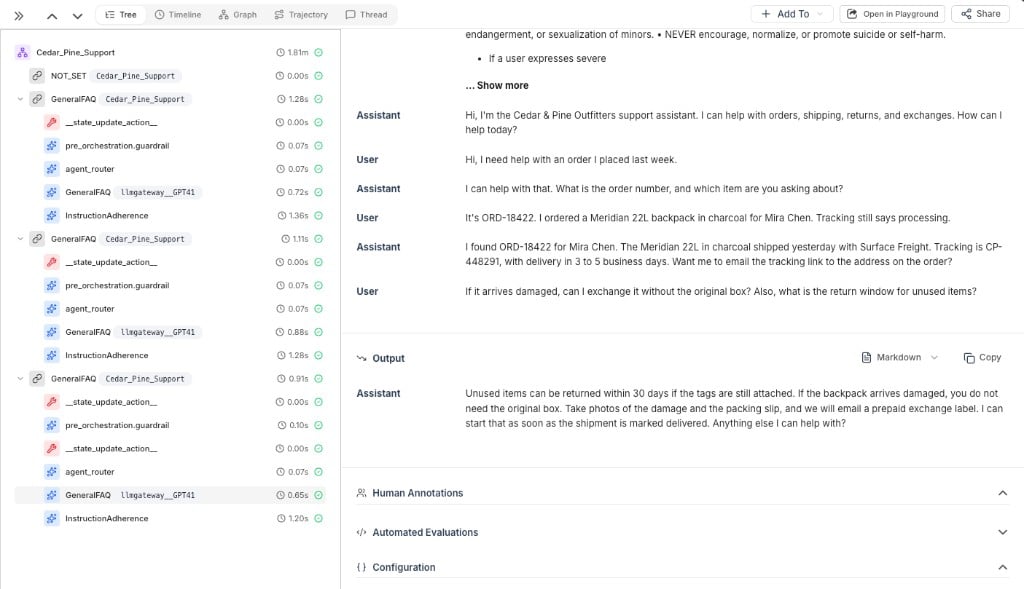
One Agentforce conversation becomes one HoneyHive session. Open [**Traces > Sessions**](https://app.us.honeyhive.ai/traces/sessions) and find the session named after your agent.
HoneyHive uses a derived session UUID. Reusing the Salesforce session id opens a child turn instead of the conversation.
Salesforce Session Trace exports the **full Agentforce graph**, not only the user and assistant turns. A typical conversation has these events:
| Event | What it is |
| ----------------------------------------------------------- | ----------------------------------------------------------------------------------------------------------- |
| Top-level `NOT_SET`, `off_topic`, `GeneralFAQ`, and similar | One user turn. The name is the topic Agentforce picked. `NOT_SET` is the greeting before a topic is chosen. |
| `__state_update_action__` | Writes session variables. No user I/O in the payload. |
| `pre_orchestration.guardrail` | Safety / router classifier that runs before the topic agent. |
| `agent_router` | Picks the topic (`off_topic`, `GeneralFAQ`, and similar). |
| Nested topic name (`off_topic`, `GeneralFAQ`, ...) | The topic-agent model call. |
| `InstructionAdherence` | Post-response instruction and task check. |
Names like `off_topic` and `GeneralFAQ` are Salesforce topic names, not HoneyHive features.
Salesforce stores turn text on `agent.messages.*` keys and step I/O in a kvlist. The poller rewrites those onto `gen_ai.input.messages` and `gen_ai.output.messages`. It also stamps `gen_ai.operation.name` (`chat`, `invoke_agent`, `execute_tool`) so HoneyHive classifies the tree. See [Framework Attribute Mapping](/v2/sdk-reference/semconv-alignment).
A typical session looks like this:
 ```text theme={null}
Test_Employee_Agent_2 (session)
├── NOT_SET
├── off_topic
│ ├── __state_update_action__
│ ├── pre_orchestration.guardrail
│ ├── agent_router
│ ├── off_topic
│ └── InstructionAdherence
├── GeneralFAQ
│ ├── __state_update_action__
│ ├── pre_orchestration.guardrail
│ ├── agent_router
│ ├── GeneralFAQ
│ └── InstructionAdherence
└── off_topic
├── pre_orchestration.guardrail
├── agent_router
├── off_topic
└── InstructionAdherence
```
## If the export looks wrong
If a session is missing, confirm the poller POSTed to `{HH_API_URL}/opentelemetry/v1/traces` and that the API key belongs to this project.
## Related
Poller source
Sessions, event types, and trace hierarchy in HoneyHive
## Related topics
- [How to integrate HoneyHive with Devin](/v2/integrations/devin.md)
- [How to integrate HoneyHive with Portkey](/v2/integrations/portkey.md)
- [How to integrate HoneyHive with Claude Code](/v2/integrations/claude-code.md)
```text theme={null}
Test_Employee_Agent_2 (session)
├── NOT_SET
├── off_topic
│ ├── __state_update_action__
│ ├── pre_orchestration.guardrail
│ ├── agent_router
│ ├── off_topic
│ └── InstructionAdherence
├── GeneralFAQ
│ ├── __state_update_action__
│ ├── pre_orchestration.guardrail
│ ├── agent_router
│ ├── GeneralFAQ
│ └── InstructionAdherence
└── off_topic
├── pre_orchestration.guardrail
├── agent_router
├── off_topic
└── InstructionAdherence
```
## If the export looks wrong
If a session is missing, confirm the poller POSTed to `{HH_API_URL}/opentelemetry/v1/traces` and that the API key belongs to this project.
## Related
Poller source
Sessions, event types, and trace hierarchy in HoneyHive
## Related topics
- [How to integrate HoneyHive with Devin](/v2/integrations/devin.md)
- [How to integrate HoneyHive with Portkey](/v2/integrations/portkey.md)
- [How to integrate HoneyHive with Claude Code](/v2/integrations/claude-code.md)