> ## Documentation Index
> Fetch the complete documentation index at: https://docs.honeyhive.ai/llms.txt
> Use this file to discover all available pages before exploring further.
# How to trace TypeSafe with HoneyHive
> HoneyHive integration for TypeSafe Jev System One. Trace Choice, Score, and Noul questions, structured answers, token usage, and model details.
This page shows you how to trace [TypeSafe](https://docs.typesafe.ai/) Jev System One calls in HoneyHive.
[Jev](https://docs.typesafe.ai/introduction) is TypeSafe's flagship model and the first System One model. You send state plus typed questions and get structured answers your code can use directly. There is no text generation or parsing. HoneyHive records each `system_one` call as a model event.
## Quick start
### Install the packages
```bash theme={null}
pip install honeyhive typesafe-sdk openinference-instrumentation-typesafe
```
### Configure your API keys
```bash theme={null}
export HH_INGESTION_API_KEY="your-honeyhive-ingestion-key"
export TYPESAFE_API_KEY="your-typesafe-api-key"
```
Create a TypeSafe API key in the [TypeSafe console](https://console.typesafe.ai/settings/keys).
### Instrument TypeSafe
Add these lines before your first `system_one` call:
```python theme={null}
from honeyhive import HoneyHiveTracer
from openinference.instrumentation.typesafe import TypeSafeAIInstrumentor
tracer = HoneyHiveTracer.init()
TypeSafeAIInstrumentor().instrument(tracer_provider=tracer.provider)
```
`HoneyHiveTracer.init()` reads `HH_INGESTION_API_KEY` from your environment.
Instrument once, then keep using your existing `TypeSafeClient` or `AsyncTypeSafeClient`. No decorators are required.
To see where to initialize the tracer for your environment, including AWS Lambda and long-running servers, see [Tracer Initialization](/v2/tracing/tracer-initialization).
Last tested with `honeyhive 1.6.0`, `typesafe-sdk 0.7.0`, and `openinference-instrumentation-typesafe 0.1.1` in September 2026. This integration requires `typesafe-sdk >= 0.6.0`.
## What you see in HoneyHive
TypeSafe evaluates every question in a request in parallel against the same state. Your code can then branch, sort, and route on the answers.
| Question type | Goal | Returns |
| ------------- | ---------------------------- | ------------------------------------------- |
| `Choice` | Choose an option from a list | `choice`, `probabilities`, and `confidence` |
| `Score` | Score the state on a rubric | `score`, `probabilities`, and `confidence` |
| `Noul` | Is this statement true? | `noul` from 0 to 1 |
Each `system_one` call creates a HoneyHive model event containing:
* The request JSON, including `state`, `model`, and `questions`
* The typed answers
* Prompt and completion token usage
* The requested and resolved model names
A System One call is not a chat completion. HoneyHive stores its request and answers as JSON on the model event, not as chat-style messages.
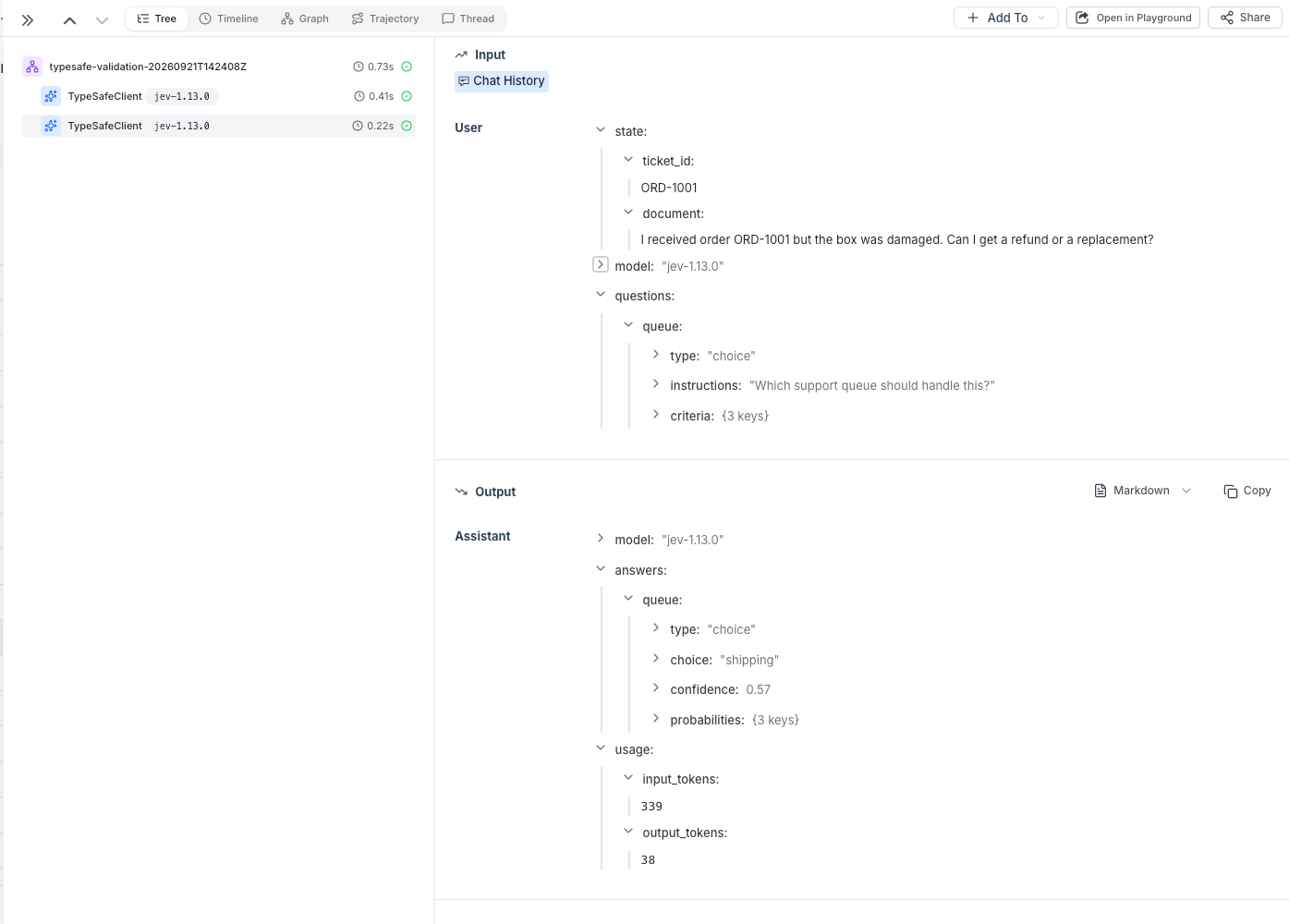 ## Example: Route support tickets
This example asks three questions about a delayed order, then routes another ticket to a support queue.
It pins `jev-1.13.0` because `jev-latest` moves when TypeSafe releases a new version, which can change scores and confidence values.
```python theme={null}
from honeyhive import HoneyHiveTracer
from openinference.instrumentation.typesafe import TypeSafeAIInstrumentor
from typesafe_sdk import Choice, Noul, Score, TypeSafeClient
tracer = HoneyHiveTracer.init()
TypeSafeAIInstrumentor().instrument(tracer_provider=tracer.provider)
with TypeSafeClient(model="jev-1.13.0") as client:
delayed_order = client.system_one(
state={
"ticket_id": "ORD-1003",
"document": (
"Order ORD-1003 was supposed to arrive last week and is "
"still marked delayed. I need it today for an event."
),
},
questions={
"shipping": Noul(
instructions="Is this ticket about a shipment delay?",
),
"tone": Choice(
instructions="What is the customer's tone?",
criteria={"calm": None, "frustrated": None, "angry": None},
),
"urgency": Score(
instructions="How urgent is this ticket?",
criteria=["can wait", "this week", "today"],
),
},
)
print(delayed_order.model)
print(delayed_order.nouls["shipping"].noul)
print(delayed_order.choices["tone"].choice, delayed_order.choices["tone"].confidence)
print(delayed_order.scores["urgency"].score, delayed_order.scores["urgency"].confidence)
refund_request = client.system_one(
state={
"ticket_id": "ORD-1001",
"document": (
"I received order ORD-1001 but the box was damaged. "
"Can I get a refund or a replacement?"
),
},
questions={
"queue": Choice(
instructions="Which support queue should handle this?",
criteria={"billing": None, "shipping": None, "product": None},
),
},
)
print(refund_request.choices["queue"].choice, refund_request.choices["queue"].confidence)
tracer.force_flush()
```
## Troubleshooting
### Check both API keys
Set both `HH_INGESTION_API_KEY` and `TYPESAFE_API_KEY` in the environment where your script runs.
### Pass the HoneyHive tracer provider
The instrumentor must receive `tracer.provider`:
```python theme={null}
from honeyhive import HoneyHiveTracer
from openinference.instrumentation.typesafe import TypeSafeAIInstrumentor
tracer = HoneyHiveTracer.init()
TypeSafeAIInstrumentor().instrument(tracer_provider=tracer.provider)
```
Calling `instrument()` without `tracer_provider=tracer.provider` does not connect TypeSafe events to the HoneyHive tracer.
### Instrument before the first call
The instrumentor wraps `TypeSafeClient.system_one` and `AsyncTypeSafeClient.system_one` at the class level. Clients created before `instrument()` are still traced, but any `system_one` calls made before instrumentation are missed.
### Flush short-lived scripts
A short-lived script can exit before its events finish exporting. Use `force_flush()` before exit:
```python theme={null}
from honeyhive import HoneyHiveTracer
from openinference.instrumentation.typesafe import TypeSafeAIInstrumentor
from typesafe_sdk import Noul, TypeSafeClient
tracer = HoneyHiveTracer.init()
TypeSafeAIInstrumentor().instrument(tracer_provider=tracer.provider)
try:
with TypeSafeClient(model="jev-1.13.0") as client:
client.system_one(
state={"document": "Order ORD-1003 is delayed."},
questions={
"shipping": Noul(
instructions="Is this ticket about a shipment delay?",
),
},
)
finally:
tracer.force_flush()
```
### Check your TypeSafe SDK version
Use `typesafe-sdk >= 0.6.0`. The instrumentor does not wrap older SDK versions.
## Related
Add user IDs and custom metadata to TypeSafe traces
Create spans for business logic around System One calls
Trace calls across service boundaries
## Resources
* [TypeSafe introduction](https://docs.typesafe.ai/introduction)
* [TypeSafe primitives](https://docs.typesafe.ai/primitives)
* [TypeSafe Python SDK](https://docs.typesafe.ai/sdk/python/)
* [OpenInference TypeSafe instrumentor](https://github.com/Arize-ai/openinference/tree/main/python/instrumentation/openinference-instrumentation-typesafe)
* [TypeSafe API keys](https://console.typesafe.ai/settings/keys)
## Related topics
- [How to trace Pydantic AI with HoneyHive](/v2/integrations/pydantic-ai.md)
- [How to trace Anthropic with HoneyHive](/v2/integrations/anthropic.md)
- [How to trace AWS Bedrock with HoneyHive](/v2/integrations/aws_bedrock.md)
## Example: Route support tickets
This example asks three questions about a delayed order, then routes another ticket to a support queue.
It pins `jev-1.13.0` because `jev-latest` moves when TypeSafe releases a new version, which can change scores and confidence values.
```python theme={null}
from honeyhive import HoneyHiveTracer
from openinference.instrumentation.typesafe import TypeSafeAIInstrumentor
from typesafe_sdk import Choice, Noul, Score, TypeSafeClient
tracer = HoneyHiveTracer.init()
TypeSafeAIInstrumentor().instrument(tracer_provider=tracer.provider)
with TypeSafeClient(model="jev-1.13.0") as client:
delayed_order = client.system_one(
state={
"ticket_id": "ORD-1003",
"document": (
"Order ORD-1003 was supposed to arrive last week and is "
"still marked delayed. I need it today for an event."
),
},
questions={
"shipping": Noul(
instructions="Is this ticket about a shipment delay?",
),
"tone": Choice(
instructions="What is the customer's tone?",
criteria={"calm": None, "frustrated": None, "angry": None},
),
"urgency": Score(
instructions="How urgent is this ticket?",
criteria=["can wait", "this week", "today"],
),
},
)
print(delayed_order.model)
print(delayed_order.nouls["shipping"].noul)
print(delayed_order.choices["tone"].choice, delayed_order.choices["tone"].confidence)
print(delayed_order.scores["urgency"].score, delayed_order.scores["urgency"].confidence)
refund_request = client.system_one(
state={
"ticket_id": "ORD-1001",
"document": (
"I received order ORD-1001 but the box was damaged. "
"Can I get a refund or a replacement?"
),
},
questions={
"queue": Choice(
instructions="Which support queue should handle this?",
criteria={"billing": None, "shipping": None, "product": None},
),
},
)
print(refund_request.choices["queue"].choice, refund_request.choices["queue"].confidence)
tracer.force_flush()
```
## Troubleshooting
### Check both API keys
Set both `HH_INGESTION_API_KEY` and `TYPESAFE_API_KEY` in the environment where your script runs.
### Pass the HoneyHive tracer provider
The instrumentor must receive `tracer.provider`:
```python theme={null}
from honeyhive import HoneyHiveTracer
from openinference.instrumentation.typesafe import TypeSafeAIInstrumentor
tracer = HoneyHiveTracer.init()
TypeSafeAIInstrumentor().instrument(tracer_provider=tracer.provider)
```
Calling `instrument()` without `tracer_provider=tracer.provider` does not connect TypeSafe events to the HoneyHive tracer.
### Instrument before the first call
The instrumentor wraps `TypeSafeClient.system_one` and `AsyncTypeSafeClient.system_one` at the class level. Clients created before `instrument()` are still traced, but any `system_one` calls made before instrumentation are missed.
### Flush short-lived scripts
A short-lived script can exit before its events finish exporting. Use `force_flush()` before exit:
```python theme={null}
from honeyhive import HoneyHiveTracer
from openinference.instrumentation.typesafe import TypeSafeAIInstrumentor
from typesafe_sdk import Noul, TypeSafeClient
tracer = HoneyHiveTracer.init()
TypeSafeAIInstrumentor().instrument(tracer_provider=tracer.provider)
try:
with TypeSafeClient(model="jev-1.13.0") as client:
client.system_one(
state={"document": "Order ORD-1003 is delayed."},
questions={
"shipping": Noul(
instructions="Is this ticket about a shipment delay?",
),
},
)
finally:
tracer.force_flush()
```
### Check your TypeSafe SDK version
Use `typesafe-sdk >= 0.6.0`. The instrumentor does not wrap older SDK versions.
## Related
Add user IDs and custom metadata to TypeSafe traces
Create spans for business logic around System One calls
Trace calls across service boundaries
## Resources
* [TypeSafe introduction](https://docs.typesafe.ai/introduction)
* [TypeSafe primitives](https://docs.typesafe.ai/primitives)
* [TypeSafe Python SDK](https://docs.typesafe.ai/sdk/python/)
* [OpenInference TypeSafe instrumentor](https://github.com/Arize-ai/openinference/tree/main/python/instrumentation/openinference-instrumentation-typesafe)
* [TypeSafe API keys](https://console.typesafe.ai/settings/keys)
## Related topics
- [How to trace Pydantic AI with HoneyHive](/v2/integrations/pydantic-ai.md)
- [How to trace Anthropic with HoneyHive](/v2/integrations/anthropic.md)
- [How to trace AWS Bedrock with HoneyHive](/v2/integrations/aws_bedrock.md)