> ## Documentation Index
> Fetch the complete documentation index at: https://docs.honeyhive.ai/llms.txt
> Use this file to discover all available pages before exploring further.
# Session Aggregations
> Understand reserved HoneyHive session metadata fields that the platform automatically aggregates from child spans, including cost, tokens, and duration totals.
HoneyHive automatically aggregates metrics from child spans to the session level. These fields are **reserved** and will be overwritten if you set them manually.
## Reserved Session Fields
| Field | Description |
| ---------------------------- | ------------------------------------------------------------- |
| `metadata.num_events` | Total events in the session |
| `metadata.num_model_events` | Number of model (LLM) events |
| `metadata.has_feedback` | Whether any event has feedback |
| `metadata.cost` | Total LLM cost (from provider pricing) |
| `metadata.total_tokens` | Total tokens (prompt + completion) |
| `metadata.prompt_tokens` | Input tokens |
| `metadata.completion_tokens` | Output tokens |
| `start_time` | Earliest `start_time` of any event |
| `end_time` | Latest `end_time` of any event |
| `duration` | Calculated from `end_time - start_time` (unless manually set) |
### Token and cost tracking
HoneyHive automatically rolls up token counts and cost from every `model` event in a session.
| Session Field | Aggregation |
| ---------------------------- | ------------------------------------------------------------------------- |
| `metadata.total_tokens` | Sum of `prompt_tokens + completion_tokens` across all model events |
| `metadata.prompt_tokens` | Sum of input tokens across all model events |
| `metadata.completion_tokens` | Sum of output tokens across all model events |
| `metadata.cost` | Sum of per-call cost, calculated from provider pricing for the model used |
Token counts are extracted from the LLM provider's response (e.g. OpenAI's `usage` field). Cost is calculated server-side using up-to-date pricing tables for each model. If a session contains multiple LLM calls (e.g. a chain or agent loop), all calls are summed at the session level.
You can use these fields to filter, alert, and chart in the HoneyHive dashboard - for example, flagging sessions where `cost > 0.10` or `total_tokens > 10000`.
## Duration Calculation
Duration is calculated as `max(end_time) - min(start_time)` across all events in the session. This works for both synchronous and asynchronous execution:
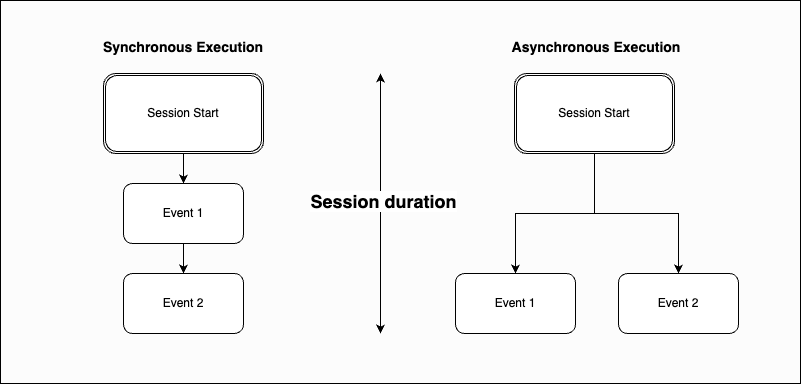 * **Synchronous:** Events chain sequentially (Session Start → Event 1 → Event 2)
* **Asynchronous:** Events branch in parallel from Session Start
If you manually set `duration` on the session, that value is preserved.
## Related
Set up alerts based on session metrics
Visualize session metrics over time
* **Synchronous:** Events chain sequentially (Session Start → Event 1 → Event 2)
* **Asynchronous:** Events branch in parallel from Session Start
If you manually set `duration` on the session, that value is preserved.
## Related
Set up alerts based on session metrics
Visualize session metrics over time