> ## Documentation Index
> Fetch the complete documentation index at: https://docs.honeyhive.ai/llms.txt
> Use this file to discover all available pages before exploring further.
# Tracing via API
> Log AI application events to HoneyHive via the REST API when you cannot use the Python SDK, for custom runtimes or language-specific integrations.
This method is designed for customers who:
* Want more fine-grained control over input/output features that are logged
* Are using a different run time language than Python
* Already have tracing setup and don't want to use our tracers
* Have package conflicts with our SDKs
* Run workflows in [n8n Cloud](/v2/integrations/n8n), where the execution-history shipper isn't available (self-hosted n8n can use the shipper instead)
You can use our APIs directly to log your application data to HoneyHive.
Our logging APIs have been simplified to have minimal required properties and self-explanatory field names to make it easier for you to use the APIs.
If you have **OpenTelemetry** or **OpenTracing** configured for your application, contact us to get the OpenTelemetry exporter for HoneyHive.
We highly recommend Python users to use our custom tracers. Event nesting is immensely easier via that approach.
### Prerequisites
All of the following strategies assume:
* You have already created a project in HoneyHive, as explained [here](/v2/workspace/projects).
* You have an API key for your project, as explained in the [tracing quickstart](/v2/introduction/tracing-quickstart).
* You have basic familiarity with our [data model](/v2/tracing/introduction).
## Logging Strategies
For different application types and needs, we have relevant logging strategies.
We have created specialized APIs to simplify LLM data ingestion. In the case of open-ended calls to external tools, we have a more generic event logging API.
The ideal roadmap for logging your data to HoneyHive is:
1. Sync LLM ingestion
2. Sync LLM + Tool ingestion
3. Async LLM + Tool ingestion
4. Async LLM + Tool batching
## LLM Data Ingestion
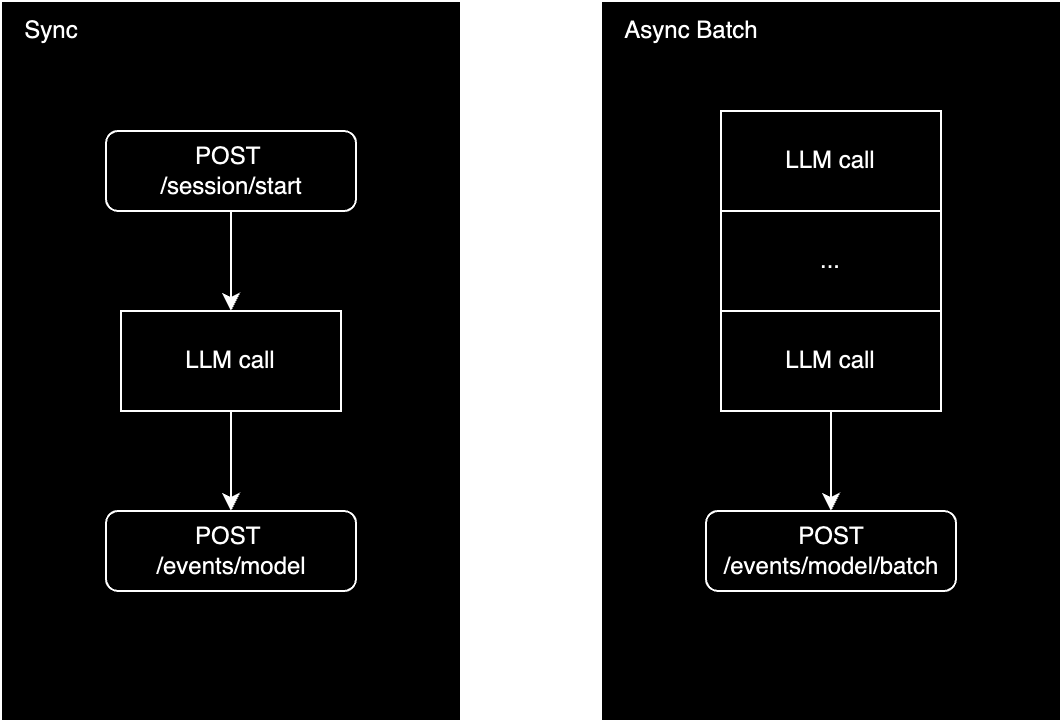
If you'd like to track solely the LLM invocations, we provide two ways to manually ingest the logs depending on your run time requirements.
 ### Sync
We normally recommend starting with a synchronous ingestion strategy to logging because it is the easiest to setup.
Once your application traffic starts to scale, it's recommended to switch to an asynchronous ingestion strategy.
1. `POST /session/start`
You start the HoneyHive session when your application execution begins.
If you use `uuidv4` representation as your app's session ID, feel free to use it as the session ID to make data engineering simpler later.
The API reference for [POST /session/start](/v2/api-reference-autogen/sessions/start-a-new-session) describes the properties you can track for a session.
2. `POST /events/model`
At the end of every LLM call, log the model data to HoneyHive.
The API reference for [POST /events/model](/v2/api-reference-autogen/events/create-a-new-model-event-deprecated) captures all the relevant inputs, outputs, tokens, duration data you'll need.
### Async
In an asynchronous ingestion strategy, you wait till the user interaction is completed before logging the data to HoneyHive.
You can either send each session's data right after it completes or collect a larger batch (100-1000) of sessions and flush them regularly.
If you already log the session data to a database somewhere, you can use the async batch strategy to import that data into HoneyHive.
The model events batch endpoint automatically separates each LLM call into its own session.
1. `POST /events/model/batch`
The API reference for [POST /events/model/batch](/api-reference/events/create-a-batch-of-model-events) accepts an array of model events and logs them in a single API call.
In the case you'd like to explicitly group LLM calls together into their own sessions, you can follow the instructions below for async batching for tool calling ingestion.
## External Tool Data Ingestion
If you'd like to track external tool calls (like vector DBs, function calls, etc) along side the LLM invocations, we follow a similar idea as the above LLM ingestion distinction.
We highly recommend reading [Tracing Introduction](/v2/tracing/introduction) to understand the data you need to log and how to structure it.
### Sync
We normally recommend starting with a synchronous ingestion strategy to logging because it is the easiest to setup.
Once your application traffic starts to scale, it's recommended to switch to an asynchronous ingestion strategy.
1. `POST /session/start`
You start the HoneyHive session when your application execution begins.
If you use `uuidv4` representation as your app's session ID, feel free to use it as the session ID to make data engineering simpler later.
The API reference for [POST /session/start](/v2/api-reference-autogen/sessions/start-a-new-session) describes the properties you can track for a session.
2. `POST /events/model`
At the end of every LLM call, log the model data to HoneyHive.
The API reference for [POST /events/model](/v2/api-reference-autogen/events/create-a-new-model-event-deprecated) captures all the relevant inputs, outputs, tokens, duration data you'll need.
### Async
In an asynchronous ingestion strategy, you wait till the user interaction is completed before logging the data to HoneyHive.
You can either send each session's data right after it completes or collect a larger batch (100-1000) of sessions and flush them regularly.
If you already log the session data to a database somewhere, you can use the async batch strategy to import that data into HoneyHive.
The model events batch endpoint automatically separates each LLM call into its own session.
1. `POST /events/model/batch`
The API reference for [POST /events/model/batch](/api-reference/events/create-a-batch-of-model-events) accepts an array of model events and logs them in a single API call.
In the case you'd like to explicitly group LLM calls together into their own sessions, you can follow the instructions below for async batching for tool calling ingestion.
## External Tool Data Ingestion
If you'd like to track external tool calls (like vector DBs, function calls, etc) along side the LLM invocations, we follow a similar idea as the above LLM ingestion distinction.
We highly recommend reading [Tracing Introduction](/v2/tracing/introduction) to understand the data you need to log and how to structure it.
 ### Sync
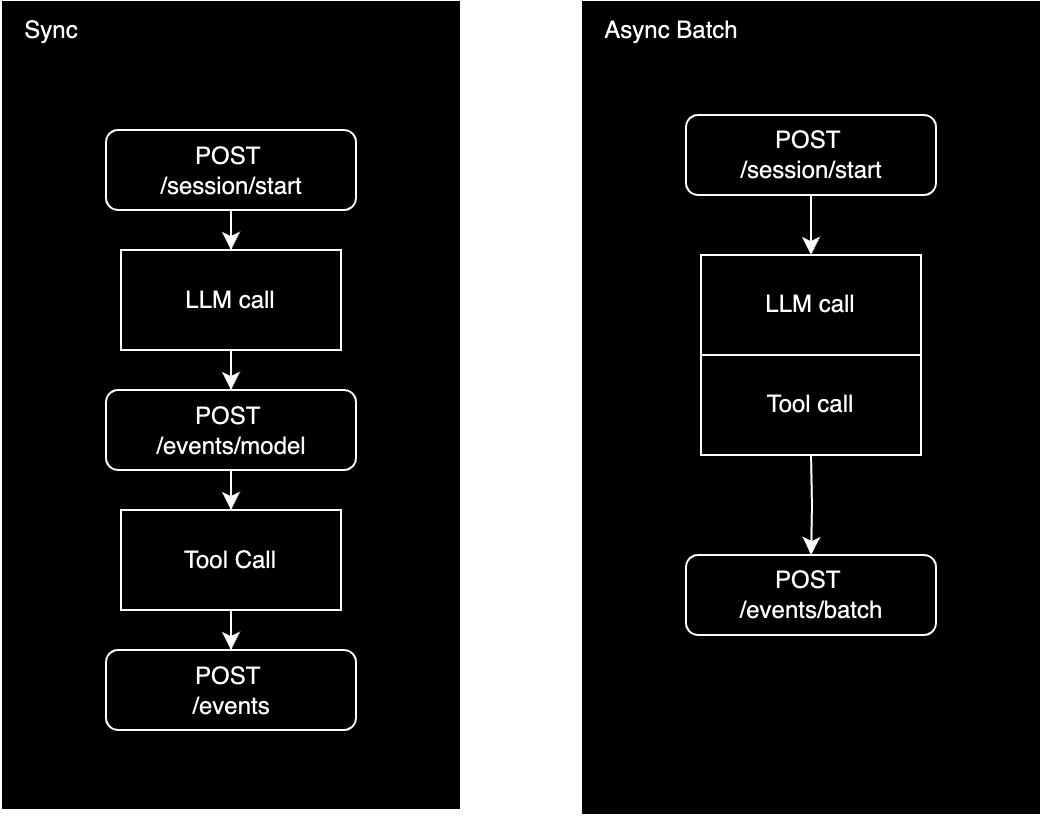
The synchronous ingestion strategy for tool calls is similar to the LLM ingestion strategy.
1. `POST /session/start`
You start a session tracking the relevant session properties you need.
Keep the `session_id` that's returned to link the future events to the same session.
2. `POST /events`
After each LLM or tool invocation, you call our [POST /events](/v2/api-reference-autogen/events/create-a-new-event) endpoint with the relevant event data.
This strategy is recommended for low traffic applications.
### Async
The asynchronous ingestion strategy for tool calls is again similar to the LLM ingestion strategy with the key difference of using our `POST /events` instead of `POST /events/model`.
You can either send each session's data right after it completes or collect a larger batch (100-1000) of sessions and flush them regularly.
1. `POST /events/batch`
The API reference for [POST /events/batch](/v2/api-reference-autogen/events/create-a-batch-of-events) accepts an array of events and logs them in a single API call.
The endpoint accepts a boolean property `is_single_session`.
1. If set to `true`, the events in the batch will be grouped into a single session.
2. If set to `false`, HoneyHive only refers to the `session_id` on the event to decide which session the event belongs to.
The default value is set to `false` so each event becomes its own session (or grouped into the session according to its `session_id`).
If you want to group events into chain events, refer to [Tracing Introduction](/v2/tracing/introduction#events) for details on event types including chains.
## Next Steps
To run experiments via the API, see [Experiments via API](/v2/evaluation/via-api).
### Sync
The synchronous ingestion strategy for tool calls is similar to the LLM ingestion strategy.
1. `POST /session/start`
You start a session tracking the relevant session properties you need.
Keep the `session_id` that's returned to link the future events to the same session.
2. `POST /events`
After each LLM or tool invocation, you call our [POST /events](/v2/api-reference-autogen/events/create-a-new-event) endpoint with the relevant event data.
This strategy is recommended for low traffic applications.
### Async
The asynchronous ingestion strategy for tool calls is again similar to the LLM ingestion strategy with the key difference of using our `POST /events` instead of `POST /events/model`.
You can either send each session's data right after it completes or collect a larger batch (100-1000) of sessions and flush them regularly.
1. `POST /events/batch`
The API reference for [POST /events/batch](/v2/api-reference-autogen/events/create-a-batch-of-events) accepts an array of events and logs them in a single API call.
The endpoint accepts a boolean property `is_single_session`.
1. If set to `true`, the events in the batch will be grouped into a single session.
2. If set to `false`, HoneyHive only refers to the `session_id` on the event to decide which session the event belongs to.
The default value is set to `false` so each event becomes its own session (or grouped into the session according to its `session_id`).
If you want to group events into chain events, refer to [Tracing Introduction](/v2/tracing/introduction#events) for details on event types including chains.
## Next Steps
To run experiments via the API, see [Experiments via API](/v2/evaluation/via-api).