> ## Documentation Index
> Fetch the complete documentation index at: https://docs.honeyhive.ai/llms.txt
> Use this file to discover all available pages before exploring further.
# Enrich Your Traces
> Enrich HoneyHive traces with user IDs, session metadata, and custom attributes. Make production spans easier to filter, debug, and evaluate with context.
You have traces in HoneyHive, but they're missing context about which user made each request or what feature was being used. Let's fix that.
**What you'll learn:**
* Add session-level context (environment, app version)
* Add metadata directly to LLM spans
* Add metadata to parent spans for complex pipelines
**Time:** 5 minutes
***
## Setup with Session Context
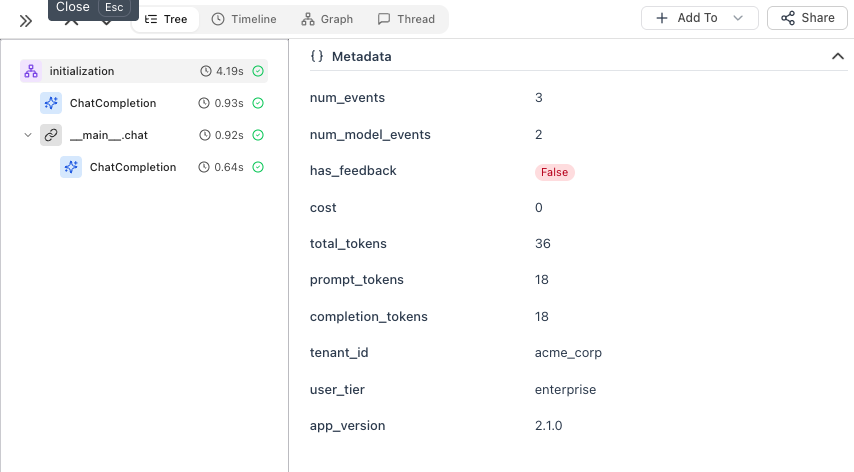
First, initialize the tracer and set session-level context that applies to ALL traces:
```python theme={null}
from honeyhive import HoneyHiveTracer
from openinference.instrumentation.openai import OpenAIInstrumentor
import openai
tracer = HoneyHiveTracer.init(api_key="your-key")
OpenAIInstrumentor().instrument(tracer_provider=tracer.provider)
# Session context - set once, applies to all traces
tracer.enrich_session({
"tenant_id": "acme_corp",
"user_tier": "enterprise",
"app_version": "2.1.0"
})
client = openai.OpenAI()
```
 ***
## Option 1: Enrich LLM Spans Directly
The simplest way to add per-call metadata - use `using_attributes` from OpenInference:
```python theme={null}
from openinference.instrumentation import using_attributes
with using_attributes(
session_id="session_123",
user_id="user_oi_123",
metadata={"feature": "chat_support", "custom_key": "custom_value"},
tags=["tutorial", "test"]
):
response = client.chat.completions.create(
model="gpt-4o-mini",
messages=[{"role": "user", "content": "Hello!"}]
)
print(response.choices[0].message.content)
```
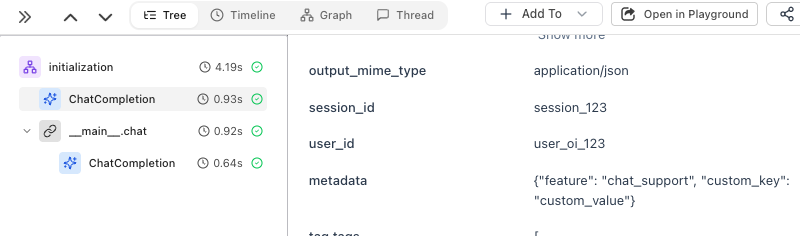
The metadata is attached directly to the ChatCompletion span:
***
## Option 1: Enrich LLM Spans Directly
The simplest way to add per-call metadata - use `using_attributes` from OpenInference:
```python theme={null}
from openinference.instrumentation import using_attributes
with using_attributes(
session_id="session_123",
user_id="user_oi_123",
metadata={"feature": "chat_support", "custom_key": "custom_value"},
tags=["tutorial", "test"]
):
response = client.chat.completions.create(
model="gpt-4o-mini",
messages=[{"role": "user", "content": "Hello!"}]
)
print(response.choices[0].message.content)
```
The metadata is attached directly to the ChatCompletion span:
 ***
## Option 2: Create a Parent Span
When you have multiple steps (retrieval, processing, LLM calls), use `@trace` to create a parent span that groups them:
```python theme={null}
from honeyhive import enrich_span, trace
@trace
def answer_question(question: str, user_id: str) -> str:
enrich_span({
"user_id": user_id,
"feature": "qa_pipeline"
})
# Step 1: Retrieve relevant context
context = retrieve_documents(question)
# Step 2: Generate answer with context
response = client.chat.completions.create(
model="gpt-4o-mini",
messages=[
{"role": "system", "content": f"Context: {context}"},
{"role": "user", "content": question}
]
)
# Step 3: Log the answer
answer = response.choices[0].message.content
save_to_history(user_id, question, answer)
return answer
result = answer_question("What's our refund policy?", user_id="user_123")
```
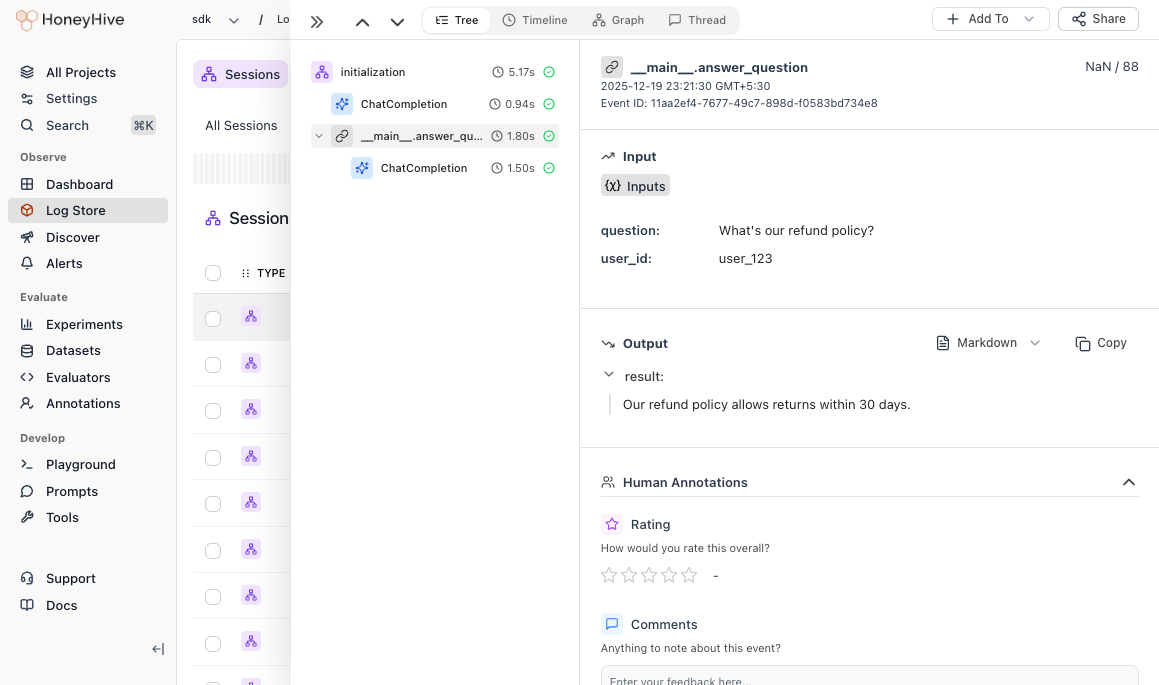
The parent span groups all steps together, so you can see the full pipeline duration and trace through each step:
***
## Option 2: Create a Parent Span
When you have multiple steps (retrieval, processing, LLM calls), use `@trace` to create a parent span that groups them:
```python theme={null}
from honeyhive import enrich_span, trace
@trace
def answer_question(question: str, user_id: str) -> str:
enrich_span({
"user_id": user_id,
"feature": "qa_pipeline"
})
# Step 1: Retrieve relevant context
context = retrieve_documents(question)
# Step 2: Generate answer with context
response = client.chat.completions.create(
model="gpt-4o-mini",
messages=[
{"role": "system", "content": f"Context: {context}"},
{"role": "user", "content": question}
]
)
# Step 3: Log the answer
answer = response.choices[0].message.content
save_to_history(user_id, question, answer)
return answer
result = answer_question("What's our refund policy?", user_id="user_123")
```
The parent span groups all steps together, so you can see the full pipeline duration and trace through each step:
 ***
## When to Use Which
| Use Case | Pattern |
| -------------------------------- | --------------------------- |
| Tenant, user tier, app version | `enrich_session()` |
| User ID, feature for LLM calls | `using_attributes` |
| Pipeline with multiple LLM calls | `@trace` on the entry point |
***
## Best Practices
**DO:** Add user IDs, feature names, environment. Use descriptive keys (`user_id` not `uid`).
**DON'T:** Include passwords, API keys, or PII. Keep fields under 1KB.
***
## What's Next?
Set up datasets and run evaluations
Detailed guide for advanced enrichment patterns
***
## When to Use Which
| Use Case | Pattern |
| -------------------------------- | --------------------------- |
| Tenant, user tier, app version | `enrich_session()` |
| User ID, feature for LLM calls | `using_attributes` |
| Pipeline with multiple LLM calls | `@trace` on the entry point |
***
## Best Practices
**DO:** Add user IDs, feature names, environment. Use descriptive keys (`user_id` not `uid`).
**DON'T:** Include passwords, API keys, or PII. Keep fields under 1KB.
***
## What's Next?
Set up datasets and run evaluations
Detailed guide for advanced enrichment patterns