

April 6th, 2026
Core Platform
Usage Dashboard
A new Usage page in Organization Settings gives you visibility into your event consumption. View monthly and quarterly event counts, enrichment metrics (events with computed evaluator scores), cumulative QTD/YTD totals, and export reports as JSON or CSV. The detail view for each period includes an event type breakdown and a printable report.Requires theorg.analytics.query permission.Learn more about usage reportingSearchable Evaluator Dropdown in Traces
The evaluator metric dropdown in the trace side view now supports search and keyboard navigation, making it faster to find specific metrics when you have many configured.Python SDK
Session Reuse Without Init-Time API Call
- New
skip_backend_session_creationflag onHoneyHiveTracer.init(). When initializing a tracer with an existingsession_id, set this toTrueto skip the synchronous backend session creation call during init.
TypeScript SDK
Introductory Documentation
- The
@honeyhive/api-clientTypeScript SDK now has a dedicated reference page with installation, authentication, and quick-start examples.
March 31st, 2026
Core Platform
Jump from Alerts to Discover
When an alert triggers, you can now navigate directly to the Discover page with the alert’s filters, metric, and aggregation pre-applied. Instead of manually recreating the query to investigate what caused a trigger, one click takes you straight to the relevant data.Learn more about alertsVisual Tool Configuration in Traces
Tool definitions in the trace side view now render as collapsible, labeled pills instead of raw JSON. The display supports OpenAI, Anthropic, Google Gemini, and AWS Bedrock tool formats, making it much easier to inspect tool configurations at a glance when debugging across providers.Improvements
- The intent identification evaluator template now includes an Intent Taxonomy section where you can define your application-specific intents for more precise classification.
- Playground and Prompts have new URLs.
/studio/playgroundis now/playgroundand/studio/libraryis now/prompts. Old URLs redirect automatically. - Settings and Admin Center tabs have been reorganized, and “API Keys” has been renamed to “Admin Keys” in the Settings sidebar.
- Browser tab titles now display descriptive names for Admin Center sub-pages.
- “Metrics” references in page titles have been updated to “Evaluators” to match current terminology.
- Self-hosted (federated) Docker images are now available for ARM64 architecture in addition to AMD64.
Fixes
- Fixed 500 errors on the schema and events endpoints when field names contained special characters like
/,[, or]. These now return proper validation errors. - Fixed inconsistent event type values between the events list and session detail endpoints.
- Fixed non-chat data incorrectly rendering as chat messages, and a layout overflow in the trace side view tool call display.
March 25th, 2026
Core Platform
Traces (formerly Log Store)
The “Log Store” section has been renamed to Traces across the platform to better reflect its purpose: viewing and analyzing your application traces. All routes have changed from/datastore/* to /traces/*.Action Required
- Log Store routes renamed to Traces. All
/datastore/*URLs now point to/traces/*. Update any bookmarks, saved links, or integrations that reference the old paths.
Improvements
- Filter values in the events table now lazy-load for faster initial page loads with large datasets.
Fixes
- Fixed alerts not firing when configured with “All Tools” as the event filter.
- Fixed alerts returning incorrect results for session-level aggregate fields like cost, duration, and tokens.
- Fixed the evaluator “Enabled” toggle resetting the evaluator’s description and filter configuration.
- Fixed a crash when rendering empty or malformed code blocks in trace views.
- Fixed shared deep links ignoring the date range in the URL, which caused “No events found” for older events.
- Fixed model name sometimes showing as “unknown” on agent and chain spans.
Security
- Security patches applied for third-party dependencies (including CVE-2026-32887).
March 18th, 2026
Core Platform
Action Required
- Navigation routes renamed. Navigation routes in the dashboard now match their page names for consistency. Previously bookmarked URLs will need to be updated.
Improvements
- The trace detail view now shows additional metadata, including session-level metrics and evaluator scores, inline for quicker inspection.
- Tool call input JSON in the trace view now auto-expands up to two levels and renders faster with syntax highlighting for easier inspection.
Fixes
- Fixed incorrect token counts and durations displayed in the session side view.
- Fixed event data being lost during partial event updates via the ingestion API.
- Fixed parent-child hierarchy inconsistencies in session traces and exported event data.
- Fixed agent names incorrectly propagating to parent spans when processing ADK chain events.
- Fixed the Registered Data Planes list overflowing when many data planes are configured; it now scrolls properly.
- Fixed log pagination not resetting when switching between projects.
- Fixed self-invite on the members page triggering an unnecessary session reauthorization.
- Resolved connection stability issues that could require service restarts in some deployments.
Security
- Custom metrics API error responses now sanitize internal details to prevent information leakage.
March 17th, 2026
Python SDK
v1.0.0rc20
- New
span_name_filtersparameter onHoneyHiveTracer.init()to include or exclude spans by name prefix, filtering out noisy framework internals - Spans now export asynchronously in batches via a background thread by default, improving tracing performance. Use
disable_batch=Trueto preserve synchronous export for Lambda/serverless environments.
March 6th, 2026
Python SDK
v1.0.0rc19
- Export operations (
export(),export_async(),get_by_session_id()) no longer time out on large result sets. The default read timeout is now 5 minutes instead of 5 seconds. - New
HH_EXPORT_TIMEOUT_SECONDSenvironment variable to override the default export timeout for extremely large exports or constrained network environments
March 2nd, 2026
Core Platform
Alerts on Self-Hosted Deployments
Alerting is now available for self-hosted HoneyHive deployments. Set up aggregate and drift alerts to monitor key metrics across your AI applications, just like on the cloud offering. Email delivery for alert notifications is coming soon.Learn more about alertsCustom Experiment Run IDs
You can now pass your ownrun_id when creating experiment runs via the API. This makes it easier to link HoneyHive experiments to your internal CI pipelines, test suites, or tracking systems.Provider Secrets Management
A new settings page lets you manage LLM provider keys per workspace. Configure your OpenAI, Anthropic, and other provider credentials directly from Settings > Workspace, with encryption at rest.Learn more about provider keysAction Required
- Datasets PUT endpoint now replaces datapoints.
PUT /datasetsnow replaces the datapoint list instead of merging, aligning with expected PUT behavior. UsePOST /datasets/{dataset_id}/datapointsto append datapoints, or send the full list with PUT. /commitAPI route deprecated. Use/metric_versioninstead. The/commitroute will be removed in a future release.
Improvements
- Dashboard chart controls now respect your role permissions, so you only see actions you’re authorized to perform.
- A session expiry warning now appears before your session times out, giving you a chance to save your work.
- Duplicate dataset names are now rejected with a clear validation error.
- Datapoints now include a content hash for automatic deduplication.
- Users in multi-dataplane deployments can now select which data plane to use when creating a workspace.
- Improved support for OpenTelemetry GenAI semantic conventions, including Pydantic AI and Google ADK traces.
- Thread View now displays actual agent names instead of generic labels, making it easier to follow multi-agent conversations.
Fixes
- Fixed filtering issues when working with large numbers of items.
- Fixed Dashboard Y-axis labels displaying incorrectly for large values.
- Fixed evaluator editor error messages to be more descriptive and actionable.
- Fixed experiment run ID filter not accepting comma-separated values.
- Fixed save flow issues in Playground and Prompts.
- Fixed Thread View not handling non-string message content.
- Fixed an infinite loading state on the experiment compare-with view.
- Fixed UI layering issue on the alerts detail page.
- Fixed file uploads remaining enabled after submission, which could cause duplicates.
Security
- Custom Python evaluators now run in a sandboxed environment with execution timeouts and restricted system access for safer metric evaluation. Existing custom evaluators that rely on network calls, filesystem writes, or uncommon imports may need to be updated.
- Request body size limits are now enforced per route to prevent memory issues.
- Sensitive tokens and keys are no longer included in log output.
- Security patches applied for permission pattern handling and email validation.
February 2026
Python SDK
v1.0.0rc18
- Large query batching: list operations like
datapoints.list()andexperiments.list_runs()now automatically batch when exceeding 100 items, merging results transparently. No API changes needed, existing code works as before without silent truncation or HTTP errors on large lists. - SDK identification headers (
hh-sdk-version,hh-sdk-language,hh-sdk-package) sent on all HTTP requests for better debugging and support diagnostics
January 2026
Core Platform
Introducing Workspaces
HoneyHive now organizes your account into three levels: Organization > Workspace > Project. Workspaces are a new layer between your organization and projects, designed to map to how your company actually operates - one workspace per business unit, team, or department. Each workspace gets its own AI provider keys, access controls, and data boundaries, so the ML platform team, product team, and compliance team can all work independently under one organization.A new org/workspace switcher replaces the logo in the top navigation, letting you move between organizations and workspaces in two clicks.Learn more about the organization hierarchyWorkspace-Scoped AI Provider Keys
AI provider keys have moved from the organization level down to the workspace level. Configure your OpenAI, Anthropic, Azure OpenAI, Bedrock, Gemini, or Vertex AI credentials per workspace in Settings > Workspace > AI Providers.This tightens your security posture and unlocks per-team cost attribution:- Smaller blast radius - A compromised key only affects one workspace, not your entire organization. Workspace Admins manage their own keys without needing org-level access.
- Cost attribution by team - Each workspace uses its own provider keys, so API spend maps directly to the business unit, department, or team that owns the workspace. No more splitting a shared org bill across teams.
- Right provider for the right team - One team can use Azure OpenAI to meet compliance requirements while another runs on AWS Bedrock. Each workspace’s provider configuration is fully independent.
Enterprise-Grade Role-Based Access Control
A new permission system replaces the previous four-role hierarchy (Org Admin > Project Admin > Project Member > Org Member) with independent roles at each scope level and 100+ granular permissions.Flat, Non-Cascading Permissions
Permissions no longer inherit across levels. An Org Admin must be explicitly added to a workspace and project to access its data. Each scope is independently controlled.
Dual-Control Access Model
Both membership and a role with the right permissions are required to access any resource. Neither condition alone is sufficient.
Workspace-Level Roles
Workspace Admins and Members join Org and Project roles as the new middle layer. Control who can manage AI provider keys, create projects, and invite team members within a workspace.
Custom Roles (Enterprise)
Define custom roles with granular permission sets that match your team’s specific access requirements. The platform supports 100+ individual permissions across all scope levels.
Introducing Organization Templates
Enterprise organizations can now define templates that control which evaluators and charts are auto-created when new workspaces and projects are created. Instead of every team starting from scratch or copy-pasting setup from another project, Org Admins configure a standard set of evaluators and monitoring charts once, and they automatically populate when new workspaces and projects are created across the organization.This gives platform teams a way to enforce consistency at scale - standardize quality metrics across business units, ensure every new project ships with the right monitoring dashboards, and reduce onboarding time for teams spinning up new AI applications.Org Admins define templates via a YAML manifest in Settings > Organization > Templates. Every new project starts with the evaluators and monitoring charts you specify - ready to go from day one.Organization Templates require the Enterprise plan.
LLM Evaluators with Workspace Provider Defaults
LLM evaluators now pull from your workspace’s configured AI provider keys instead of org-level credentials. Default provider and model values are pre-selected based on your workspace configuration, so evaluators work out of the box as soon as a provider key is set up.Learn more about LLM evaluatorsOther Improvements
- Visibility toggle on input fields and improved dialog interactions
- ClickHouse query performance improvements
- Log Store UI fixes
- Security-related fixes
- Form validation improvements
Python SDK
v1.0.0rc17
- Git context automatically stamped on experiment runs (commit hash, branch, author, remote URL, dirty status)
- Custom
run_idsupport inevaluate()for using your own identifiers - Auto-infer
is_evaluation=Truewhendataset_id,datapoint_id, andrun_idare all provided, preventing silent loss of evaluation context export_async()now retries on transient HTTP errors (502, 503, 504), matchingexport()behavior- Debug logging for
get_by_session_idand export flows (entry/exit, HTTP metadata, empty result diagnostics) - Removed non-functional
include_datapointsquery param - Synced OpenAPI spec and removed defunct Tools API client
- Fixed single-item list query param serialization causing 400 errors
v1.0.0rc16
- Fixed import errors and
AttributeErrorin events and context modules - Events API fixes: ordering, project deprecation handling,
enrich_spanevent ID resolution - Corrected
evaluate()docstrings to match actual function signature
v1.0.0rc15
- New
flush()method onHoneyHiveTracerfor explicitly flushing pending spans before application shutdown - New
get_by_session_id()method on Events API for retrieving all events for a given session using the Data Plane export endpoint enrich_span()now supportsupdate_event_idparameter for overriding a span’s event_id attribute without making API calls- Events returned in chronological order by default;
projectparameter deprecated in favor of project-scoped API keys - Pydantic models now preserve extra fields from API responses (
extra="allow"), preventing data loss when backend returns additional fields
v1.0.0rc9
- Auto-generated type-safe v1 API client from OpenAPI spec with full Pydantic models for all requests/responses, sync and async methods, and new endpoint support (batch events, experiment results/comparison, project CRUD)
- Backwards-compatible API aliases: all API classes support both new (
list(),create(),get()) and legacy (list_datasets(),create_dataset()) method names - OTLP HTTP/JSON export is now the default format (changed from
http/protobuf), configurable viaHH_OTLP_PROTOCOLorOTEL_EXPORTER_OTLP_PROTOCOLenvironment variables evaluate()now accepts aninstrumentorsparameter to auto-instrument third-party libraries (OpenAI, Anthropic, Google ADK, LangChain, etc.) per datapointevaluate()now accepts async functions, automatically detected and executed withasyncio.run()inside worker threads- Typed Pydantic models for experiment results (
MetricDetail,DatapointResult,DatapointMetric) - Fixed metrics table printing empty values after
evaluate()by aligning with backend’sdetailsarray format - Fixed
enrich_session()silently failing when called without explicit parameters
December 2025
Python SDK
v1.0.0rc5
- Metric schema updated for backend parity: new type enums (
PYTHON/LLM/HUMAN/COMPOSITE),categoricalreturn type, and new fields (sampling_percentage,scale,categories,filters) - Enhanced datapoints filtering with
dataset_idanddataset_nameparameters; legacydatasetparameter auto-detects ID vs. name EventsAPI.list_events()now accepts a singleEventFilteror a list, converting automatically- Simplified distributed tracing setup with
with_distributed_trace_context()context manager (reduces server-side boilerplate from ~65 lines to 1 line) - Fixed
@tracedecorator overwriting distributed trace baggage (session_id,project,source) instead of preserving it - Configurable OpenTelemetry span limits via
TracerConfigor environment variables (HH_MAX_ATTRIBUTES,HH_MAX_EVENTS,HH_MAX_LINKS) - Automatic preservation of critical HoneyHive attributes (
session_id,event_type,event_name,source) when spans approach the attribute limit - Fixed session ID initialization when explicitly providing a
session_idtoHoneyHiveTracer.init()
October 2025
Core Platform
Experiments Dashboard
Visualize metric trends across all your experiments in a single unified view.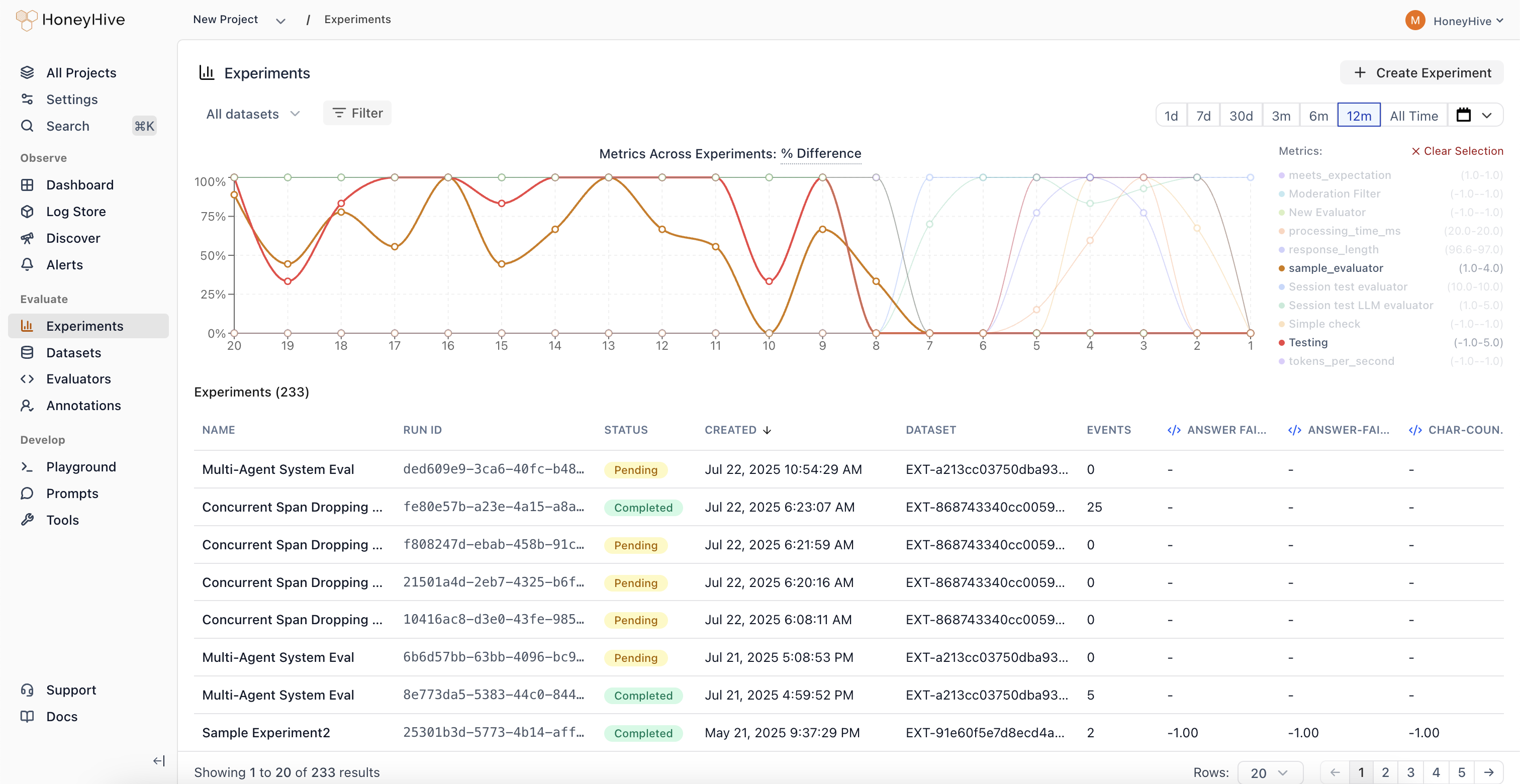
Cross-Experiment Comparison
View and compare metrics across 100+ experiments simultaneously. See results from experiments using different prompts, models, and retrieval parameters side-by-side.
Performance Regression Detection
Identify when changes negatively impact your application’s quality metrics. Metric trends make it easy to spot regressions at a glance.
Parameter Sweep Visualization
Track how sweeps across different configurations (prompts, models, retrieval parameters) impact performance over time.
Unified Analytics
Analyze experiment results without jumping between individual experiment pages. All your experiment data in one place for faster, data-driven decision making.
Annotation Queues
Automated trace collection and streamlined human evaluation workflows.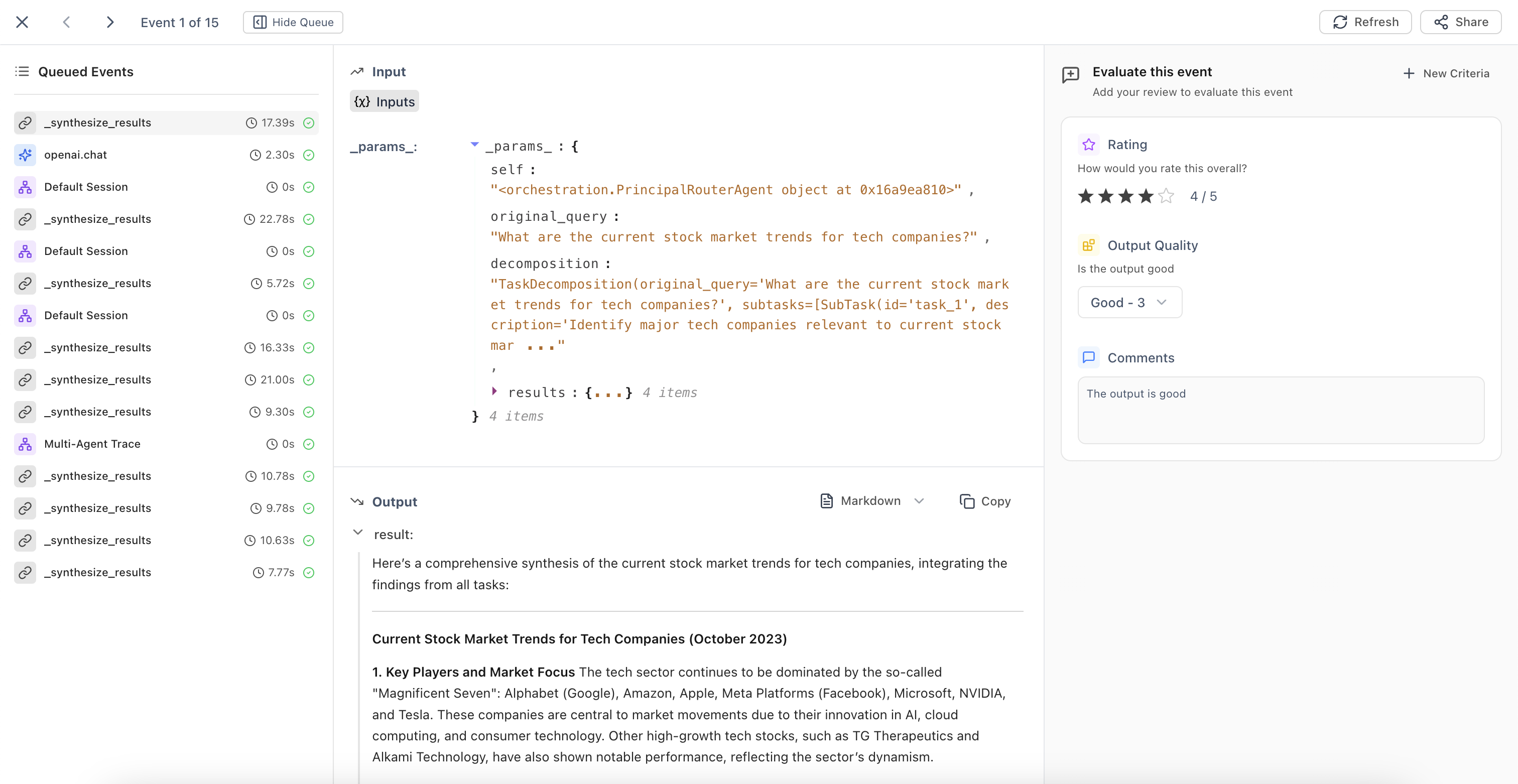
Automatic Queue Population
Configure filters to automatically add traces matching specific criteria to annotation queues. The system continuously runs in the background, identifying traces that need human review.
Streamlined Evaluation Interface
Domain experts can evaluate traces based on predefined criteria fields. Use ← → arrow keys for quick navigation between events during high-volume annotation tasks.
Queue Management
Build high-quality datasets and maintain consistent human oversight of your AI applications with organized evaluation workflows.
Improved Evaluators UX
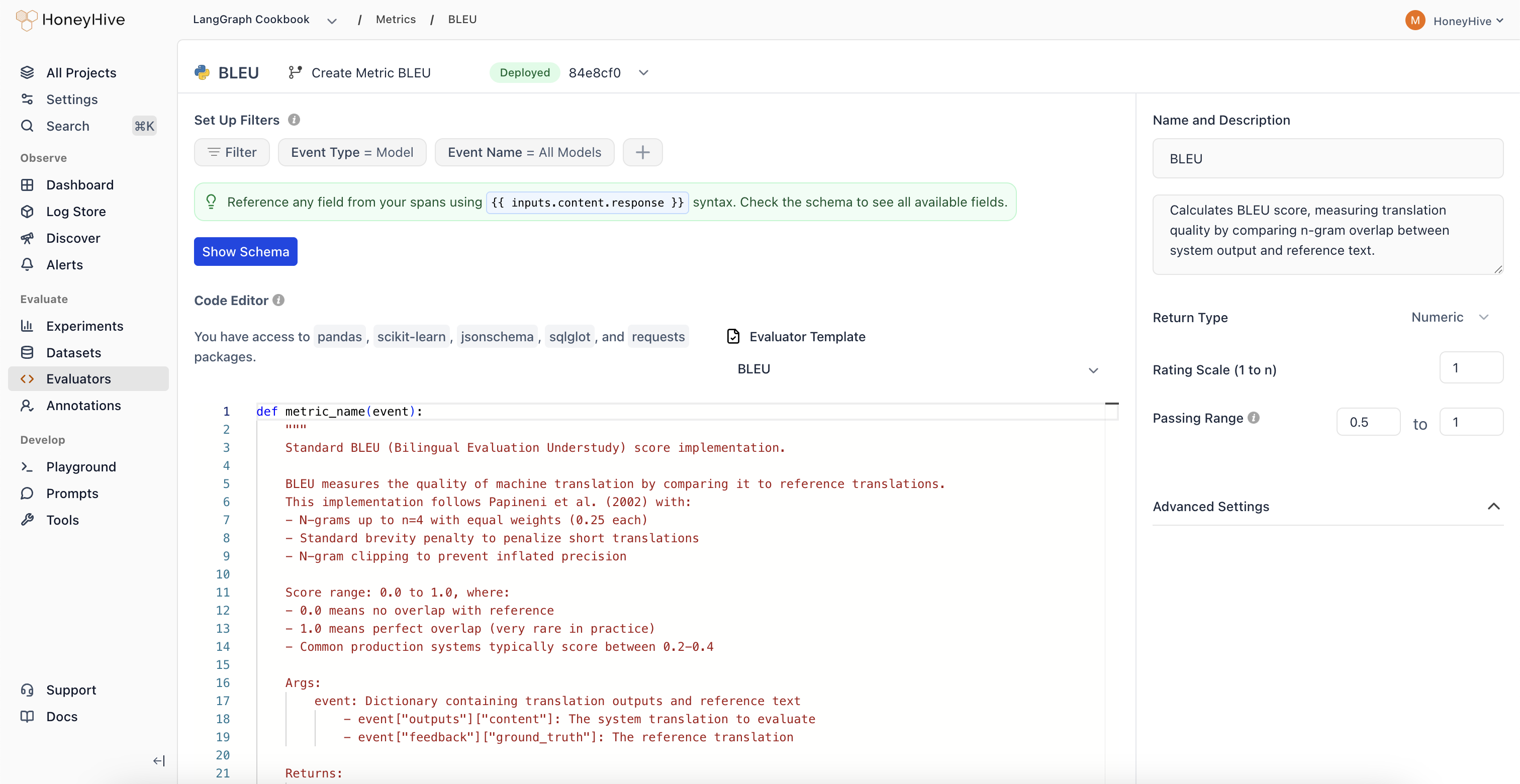
New Evaluator Templates
Expanded evaluator templates library with 11 new pre-built templates for common evaluation patterns.| Category | Evaluators |
|---|---|
| Agent Evaluation | • Chain-of-Thought Faithfulness • Plan Coverage • Trajectory Plan Faithfulness • Failure Recovery |
| Safety | • Policy Compliance • Harm Avoidance |
| RAG | • Context Coverage |
| Text Evaluation | • Tone Appropriateness |
| Translation | • Translation Fluency |
| Code Generation | • Compilation Success |
| Classification Metrics | • Precision/Recall/F1 Metrics |
September 2025
Core Platform
Improved Review Mode
Enhanced context indicators in Review Mode that clearly show which output type you’re evaluating.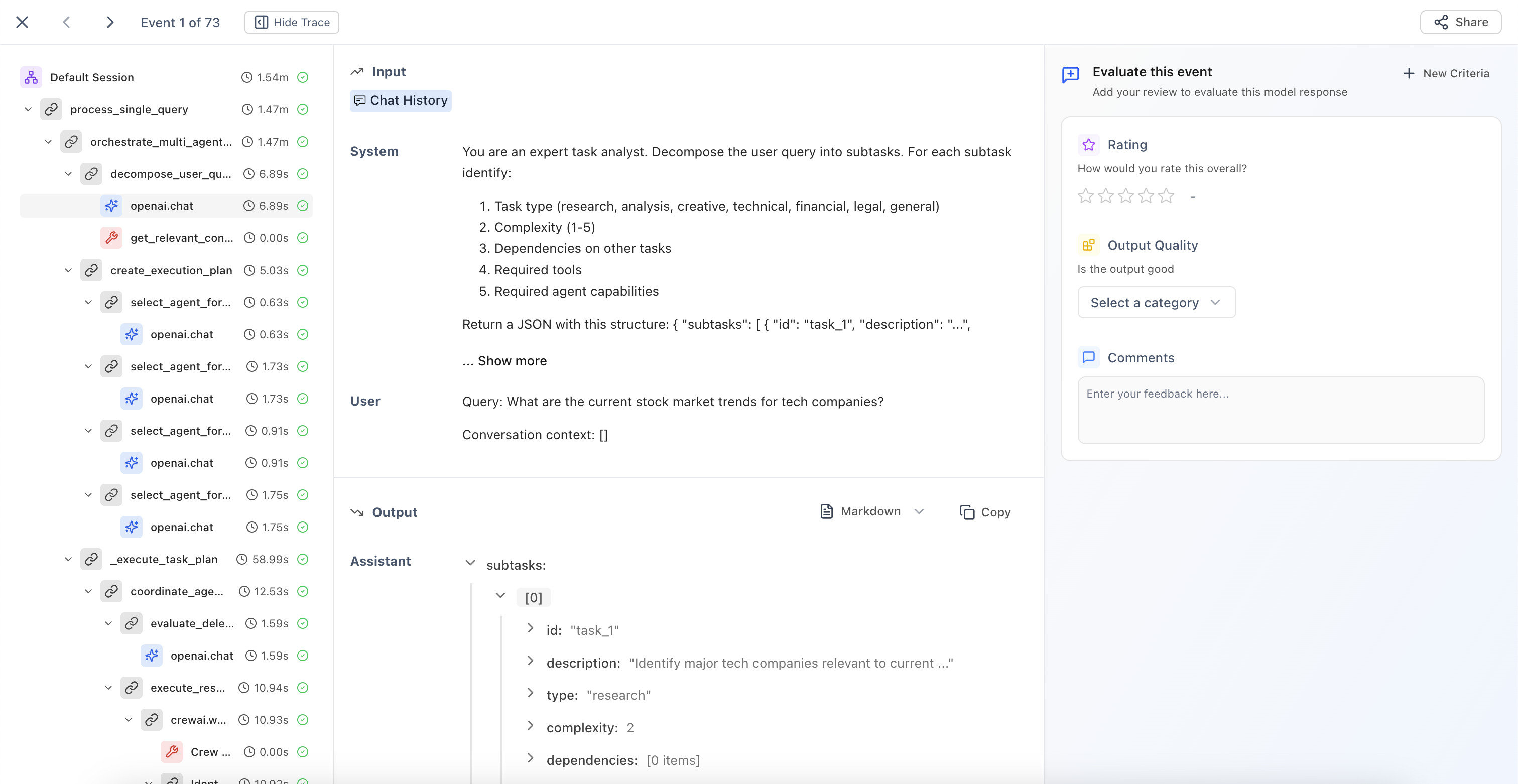
Model Outputs
Evaluate individual LLM responses with clear context about the model being reviewed.
Session Outputs
Review end-to-end agent interactions and complete conversation flows.
Tool Outputs
Assess function and API call results with full execution context.
Chain/Workflow Outputs
Analyze multi-step process results and complex execution paths.
Categorical Evaluators
New evaluator type that enables classification-based human evaluation with custom scoring.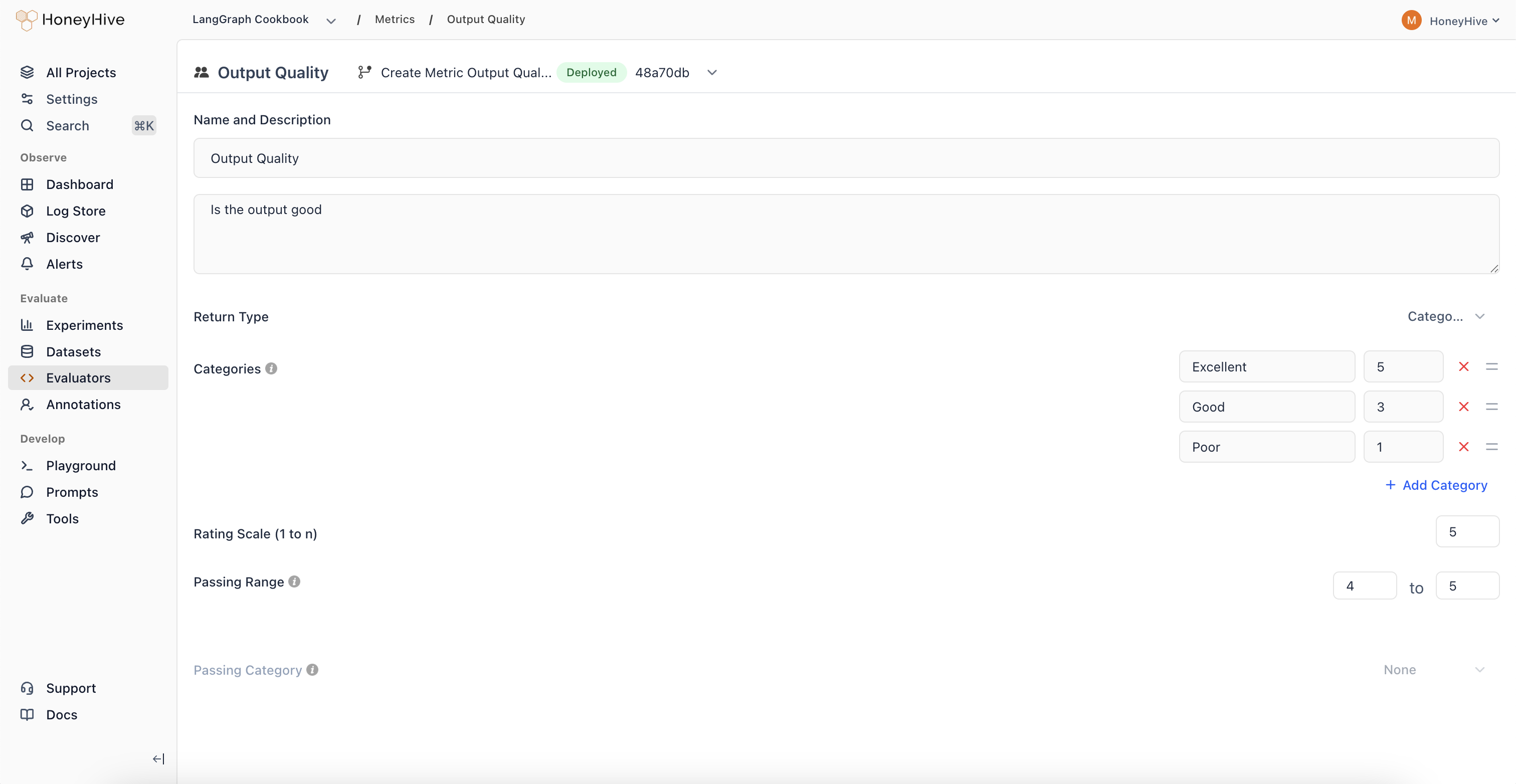
Pass/Fail Analysis
Create binary classifications with associated scores for clear go/no-go decisions.
Regression Detection
Track when outputs shift from high-scoring to low-scoring categories over time.
Multi-Class Evaluation
Define multiple categories representing different quality levels or response types.
August 2025
Core Platform
Thread View
New visualization mode that displays all LLM events and chat history in a unified, chronological timeline.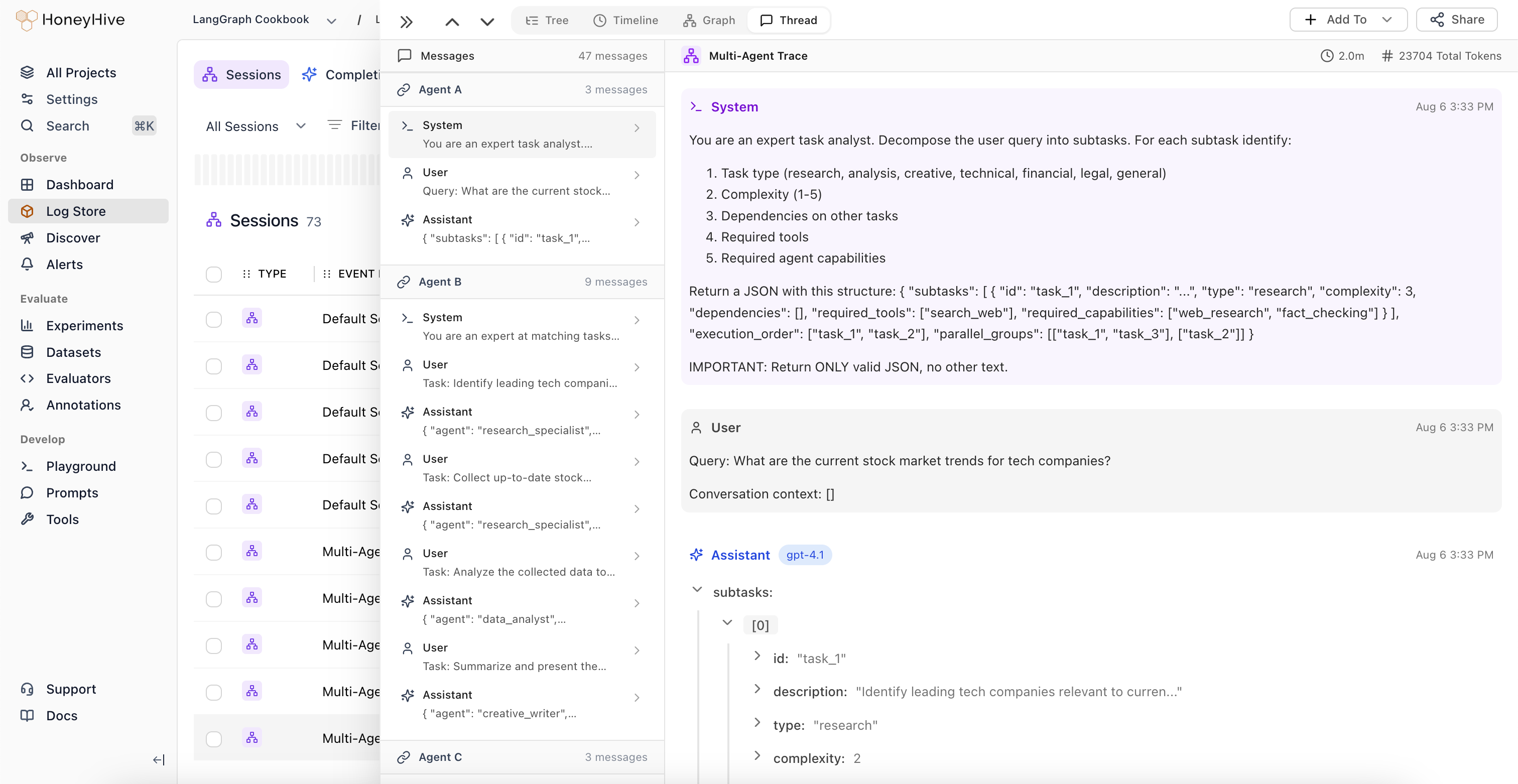
Unified Conversation View
View all LLM events alongside complete chat history in a single interface. Understand the full context of multi-turn conversations without navigating through nested spans.
Automatic Agent Handoff Detection
The system automatically identifies when control passes between different LLM workflows or agents, highlighting transition points in complex multi-agent systems.
Session-Level Feedback
Domain experts can provide feedback at the session level, which is automatically applied to the root span (session event) in the trace.
Improved Graph View
Major enhancements to Graph View with automatic node deduplication and new analytical features.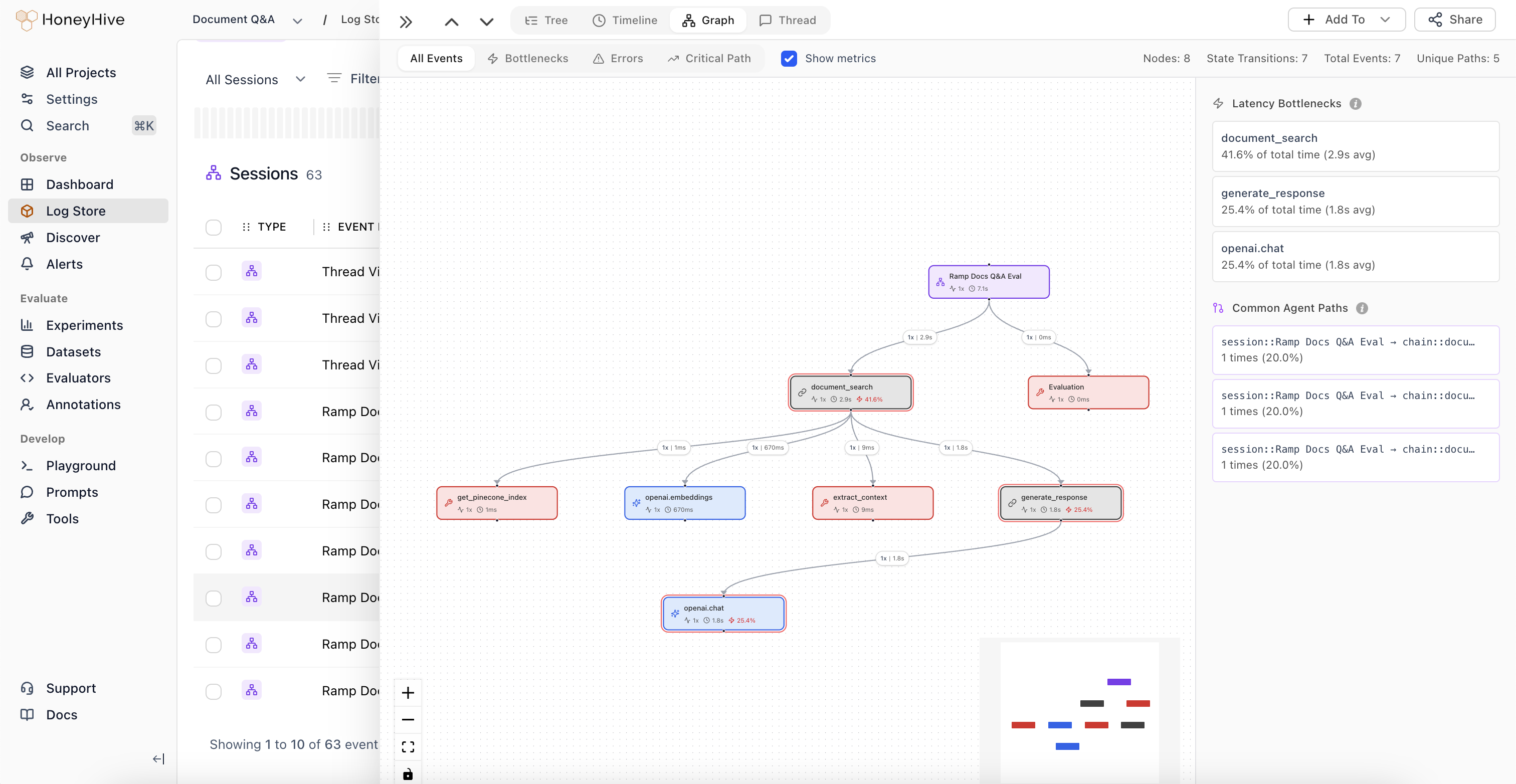
Automatic Node Deduplication
The graph now intelligently deduplicates nodes, simplifying visualization of complex agent trajectories.
Graph Statistics
View total number of nodes, state transitions, and structural complexity metrics for your agent workflows.
Weighted Edges
Edge thickness represents execution frequency, making common paths immediately visible.
Latency Bottlenecks
Identify which nodes are causing performance issues in your agent workflows.
Common Trajectories
Visualize the most frequent paths through your agent’s decision tree to understand typical execution patterns.
Introducing Alerts
Monitor key metrics and get notified when behavior changes in your AI applications.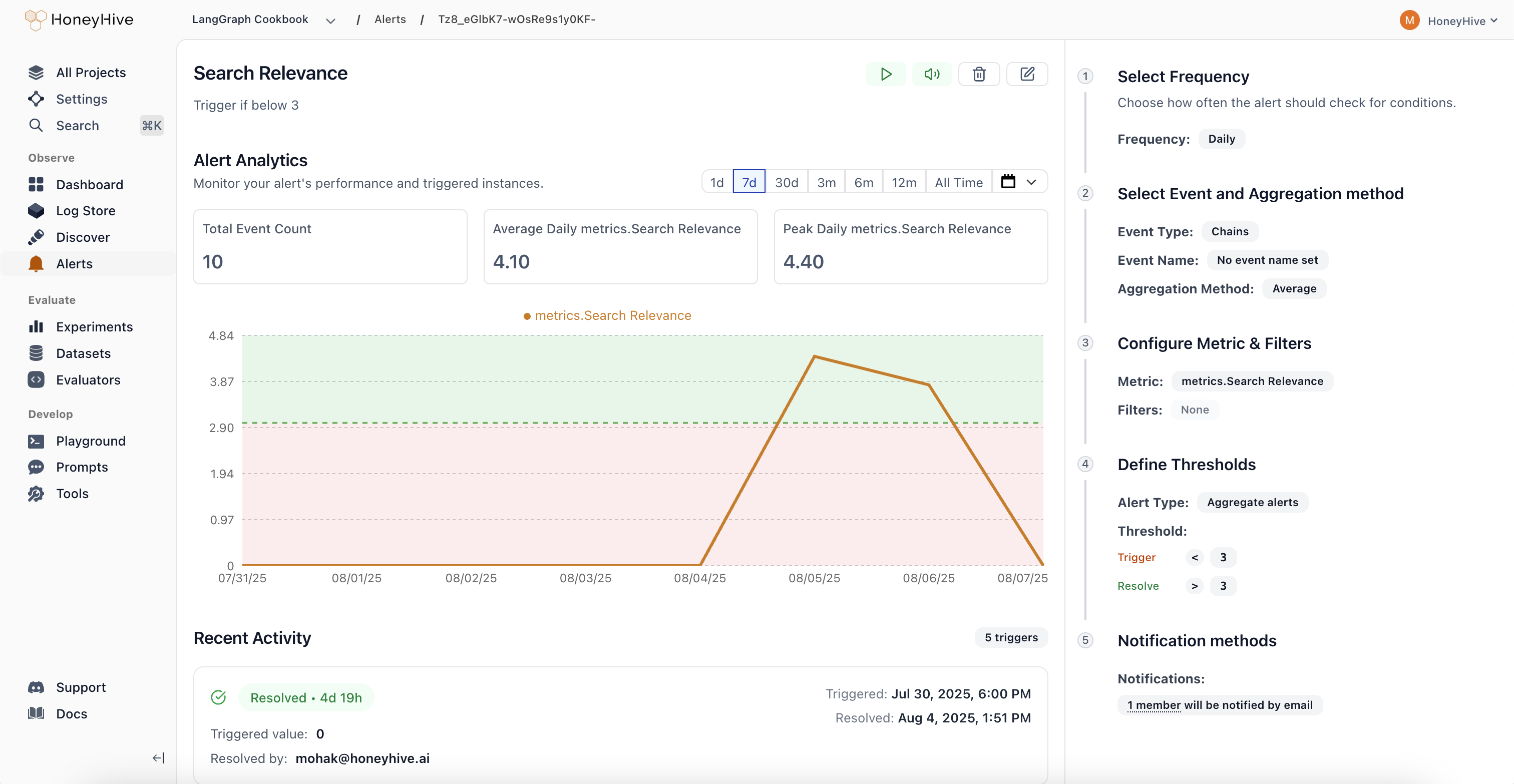
- Comprehensive Monitoring: Track performance metrics (latency, error rate), quality scores from evaluators, cost and usage patterns, plus any custom fields from your events or sessions. Get visibility into what matters most for your AI applications.
- Smart Alert Types: Aggregate Alerts trigger when metrics cross absolute thresholds, while Drift Alerts detect when current performance deviates from previous periods by a configurable percentage. Choose the right detection method for your use case.
- Flexible Scheduling: Configure alerts to run hourly, daily, weekly, or monthly based on your monitoring needs. Set custom evaluation windows to balance responsiveness with noise reduction.
- Streamlined Workflow: Real-time preview charts show exactly what your alert will monitor, guided configuration in the right panel walks you through setup, and a recent activity feed tracks alert history. Manage alert states (Active, Triggered, Resolved, Paused, Muted) directly from each alert’s detail page.
Evaluator Templates Gallery
Quick-start your evaluations with pre-built templates organized by use case: Agent Trajectory, Tool Selection, RAG, Summarization, Translation, Structured Output, Code Generation, Performance, Safety, and Traditional NLP.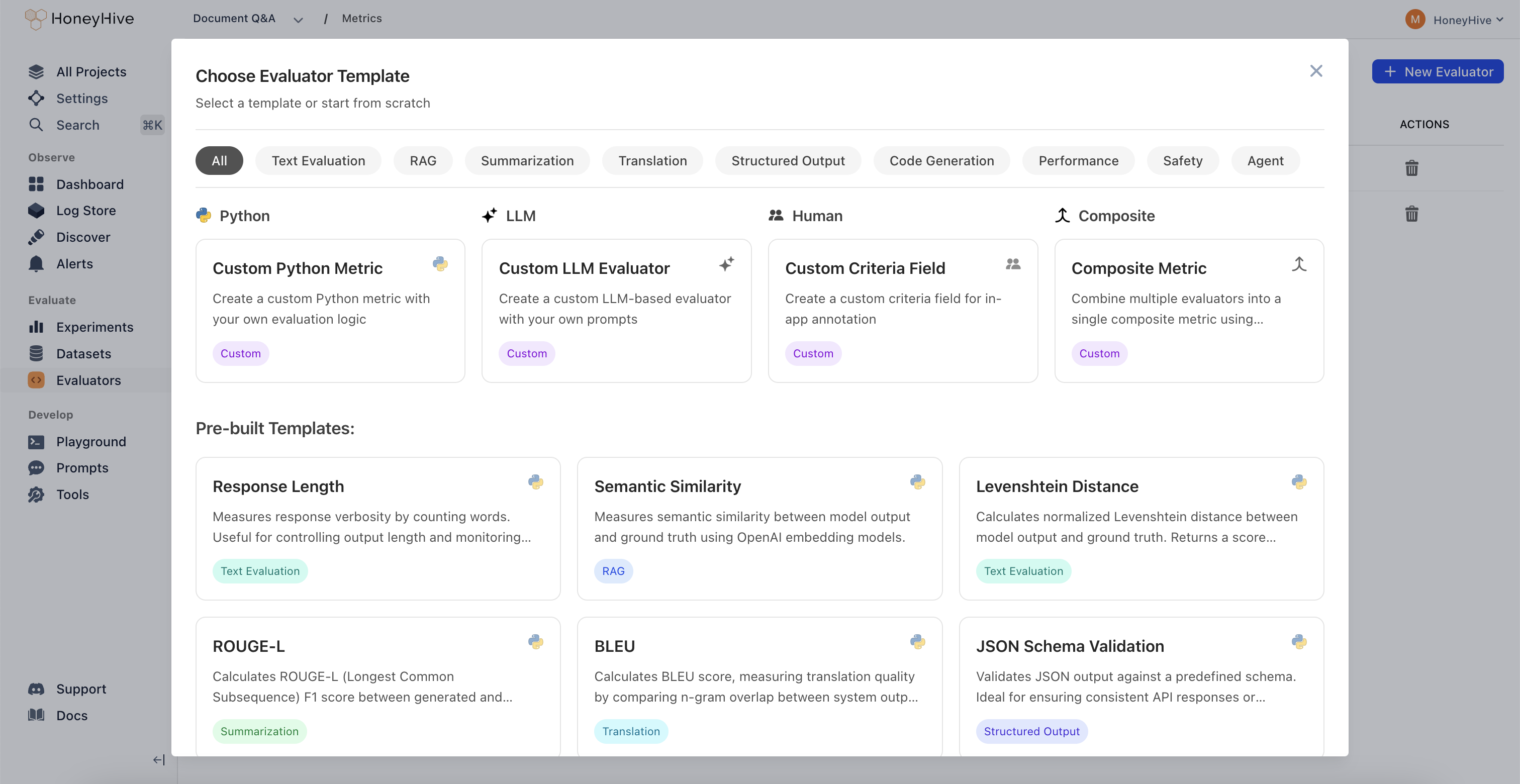
July 2025
Core Platform
New Trace Visualization Modes
-
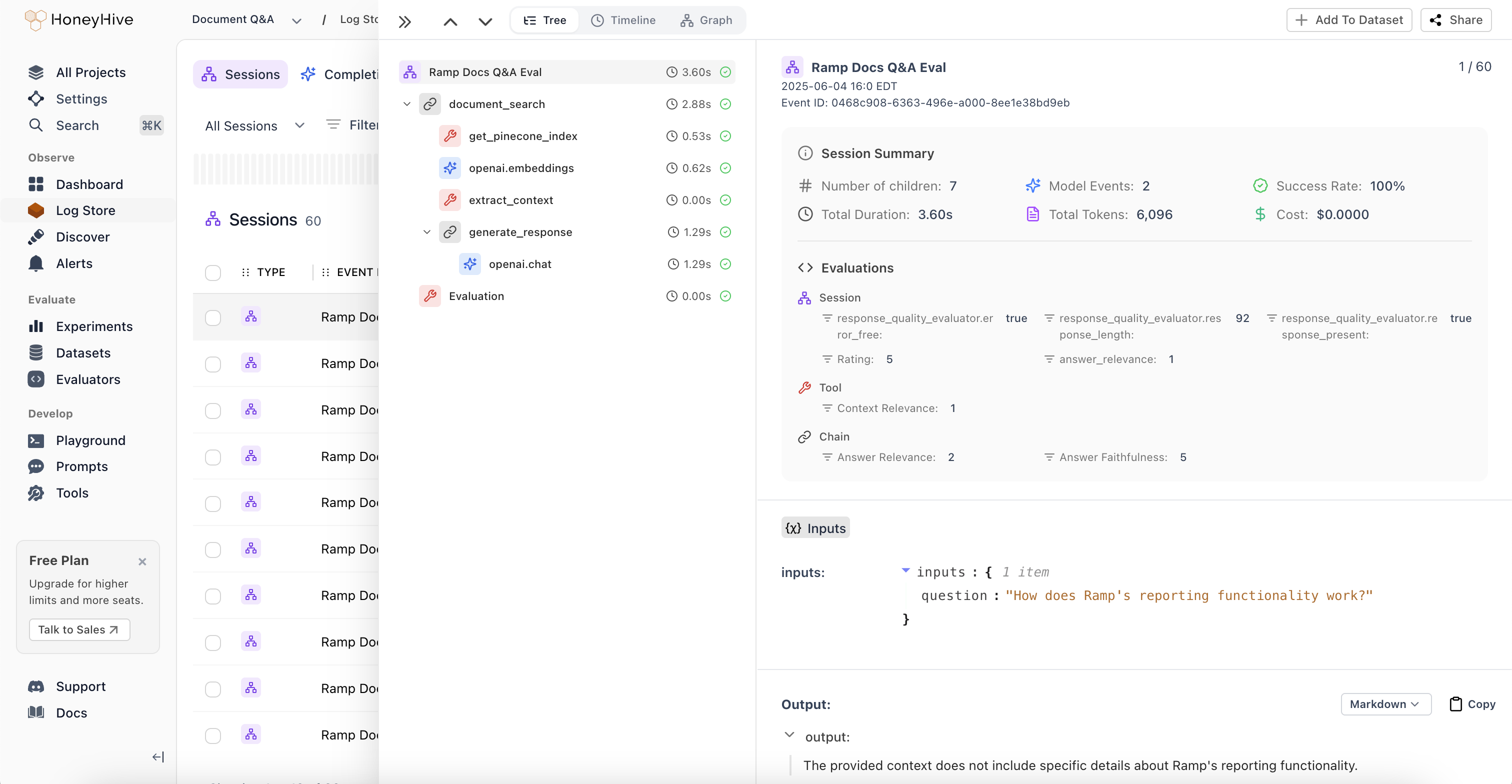
Session Summaries and New Tree View:
Unified view of metrics, evaluations, and feedback across all spans in an agent session. Get a comprehensive overview without jumping between individual spans to understand overall session performance.
-
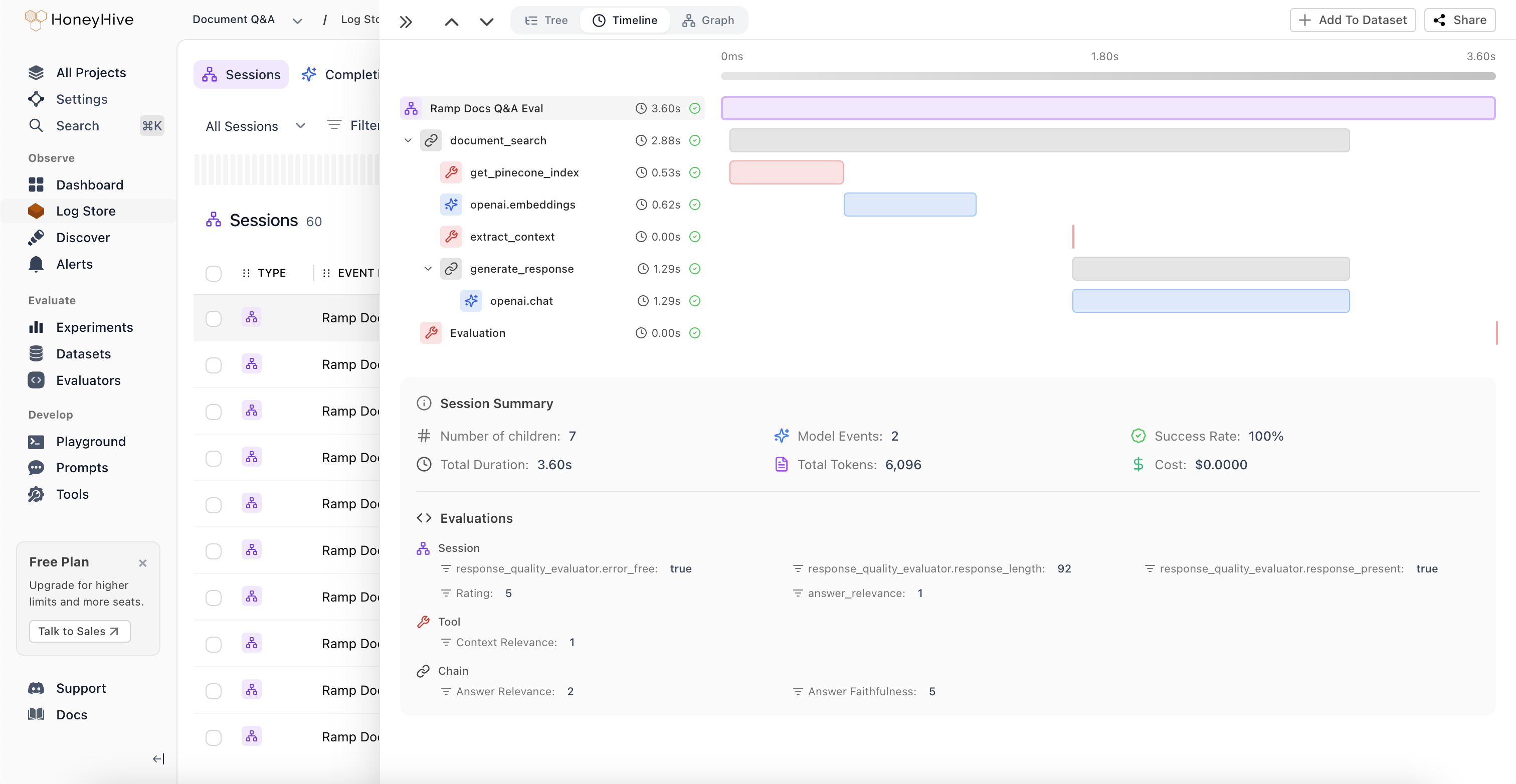
Timeline View:
Flamegraph visualization that identifies latency bottlenecks and shows the relationship between sequential and parallel operations in your agent workflows. Perfect for performance optimization and understanding execution flow.
-
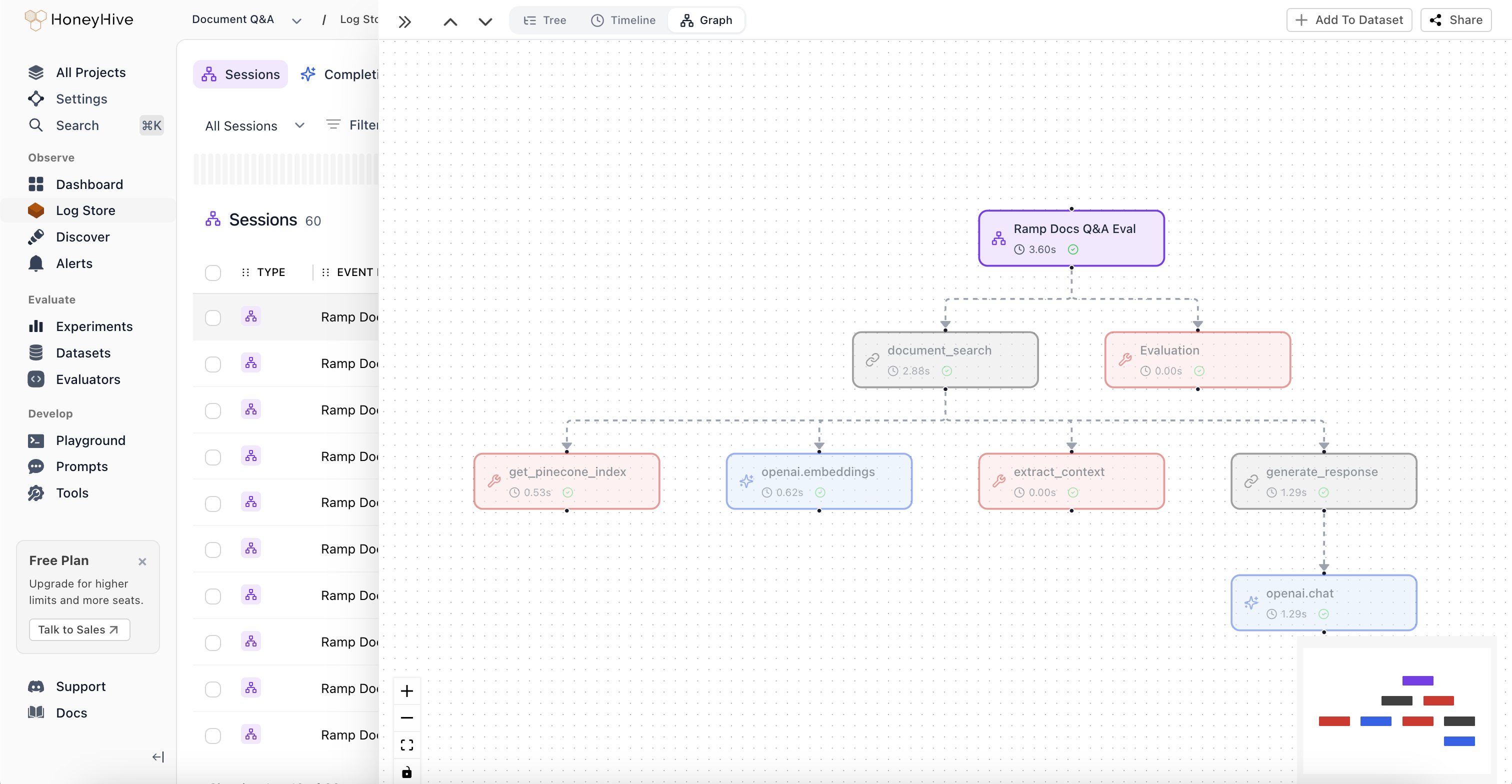
Graph View:
Visual representation of complex execution paths and decision points through multi-agent workflows. Quickly understand how your agents interact and make decisions at a glance.
Improved Log Store Analytics
Volume Charts: New mini-charts display request volume patterns over time directly in the sessions table, providing instant visibility into traffic trends and activity levels without needing to drill into individual sessions.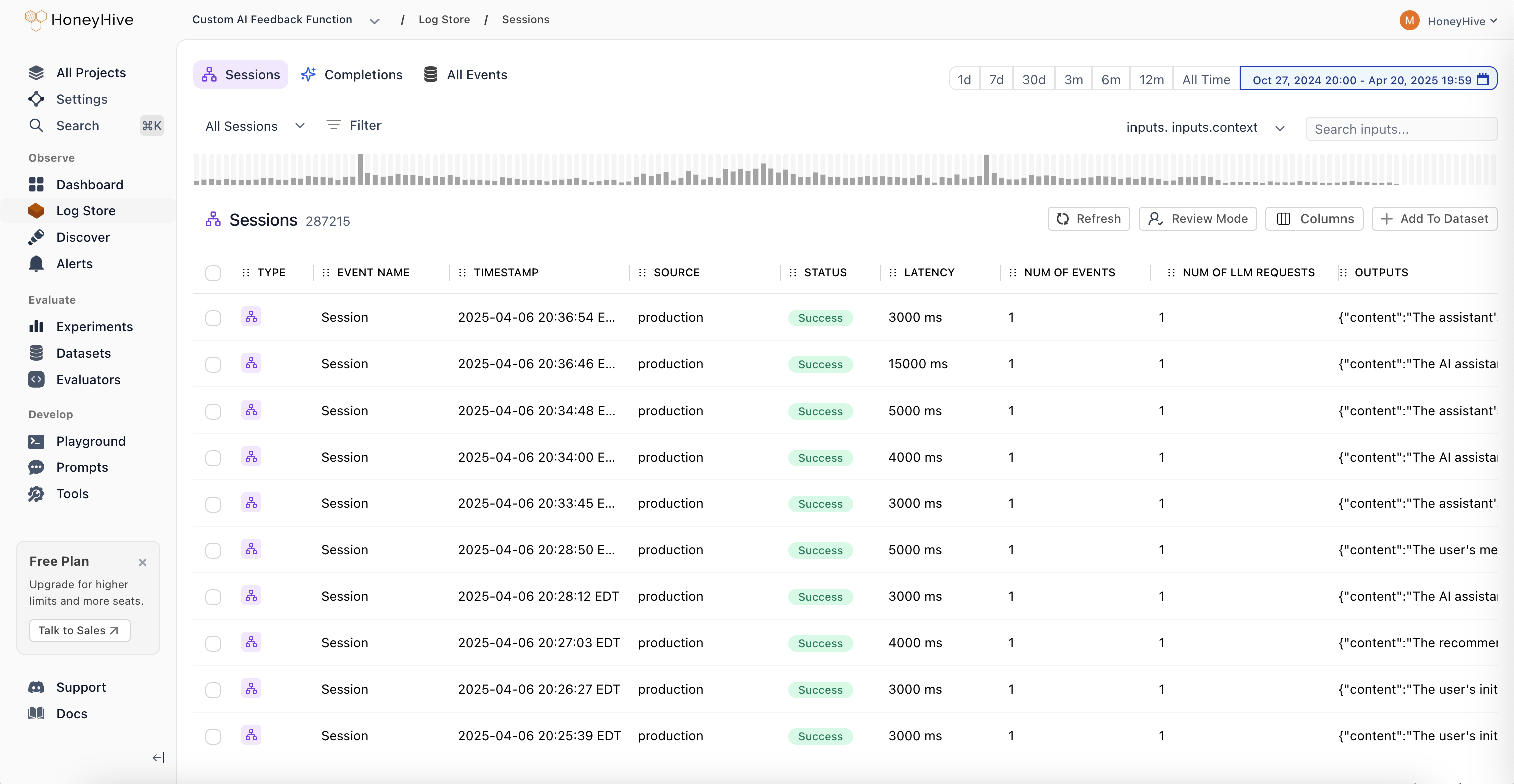
June 2025
Core Platform
Role-Based Access Control (RBAC)
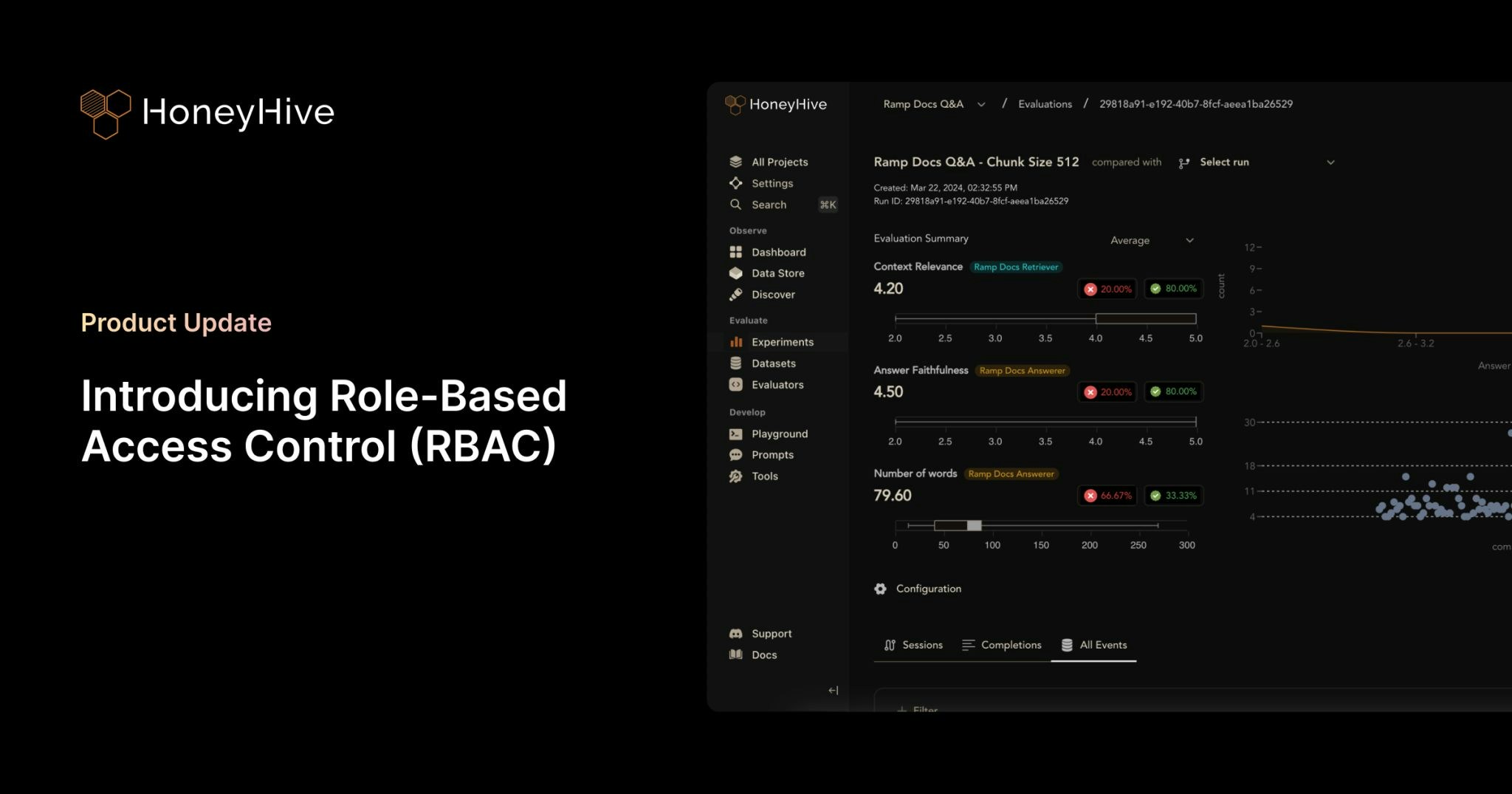
- Two-Tier Permission Structure: Granular permission management with organization and project-level controls. Organization Admins have full control across the entire organization, while Project Admins maintain complete control within specific projects. This creates clear boundaries between teams and prevents data leakage between business units.
- Enhanced API Key Security: Project-specific API key scoping ensures that teams can only access data within their designated projects. This provides better security isolation and compliance with industry regulations, especially critical for organizations in financial services, healthcare, and insurance.
- Flexible Team Management: Easy onboarding and role transitions with transparent permission hierarchy. Delegate administrative responsibilities without compromising security, and manage team member access as organizations evolve.
- Seamless Migration Process: Existing customers can migrate to RBAC with minimal disruption. All current users are automatically assigned Organization Admin roles, and project-specific API keys are available in Settings. Legacy API keys will remain functional until August 31st, 2025.
May 2025
Core Platform
- Added list of allowed characters for project names
Python SDK (Logger)
HoneyHive Logger (honeyhive-logger) released
- The logger sdk has
- No external dependencies
- A fully stateless design
- Optimized for
- Serverless environments
- Highly regulated environments with strict security requirements
TypeScript SDK (Logger)
HoneyHive Logger (@honeyhive/logger) released
- The logger sdk has
- No external dependencies
- A fully stateless design
- Optimized for
- Serverless environments
- Highly regulated environments with strict security requirements
Python SDK - Version [v0.2.49]
- Added type annotation to decorators and the evaluation harness
Documentation
- Added documentation for Python/Typescript Loggers
- Updated gemini integration documentation to use latest sdk (Python and TypeScript)
April 2025
Core Platform
Support for External Datasets in Experiments
You can now log experiments using external datasets with custom IDs for both datasets and datapoints. External dataset IDs will display with the “EXT-” prefix in the UI. This feature provides greater flexibility for teams working with custom datasets while maintaining full integration with our experiment tracking.- Bug fixes and improvements across various areas to enhance performance and stability.
- Bug fixes for playground & evaluator version controls.
Documentation
- Standardizes parameter names and clarified evaluation order in Experiments Quickstart and Python/TS SDK docs.
- Adds cookbook: Inspirational Quotes Recommender with Qdrant and OpenAI
- Adds an “Evaluating External Logs” tutorial.
- Updates Python and TypeScript SDK’s references and overall documentation to align with recent improvements and best practices.
- Adds Datasets Introduction Guide.
- Adds Server-side Evaluator Templates List documentation.
- Adds LangGraph integration documentation.
March 2025
Core Platform
Wide Mode
We’ve introduced a new Wide Mode option that allows users to hide the sidebar, providing:- Expanded workspace area for a more immersive viewing experience
- Distraction-free environment when focusing on complex tasks
- Better content visibility on smaller screens and split-window setups
- Toggle controls accessible via the header menu for easy switching
Improved Experiments Layout
Our redesigned comparison interface improves result analysis with:- Structured input visualization with collapsible sections
- Clear side-by-side metrics display for easier model comparison
- Improved performance statistics with visual rating indicators
Introducing Review Mode
A new way for domain experts to annotate traces with human feedback.With Review Mode, you can:- Tag traces with annotations from your Human Evaluators definitions
- Apply your custom criteria right in the UI
- Add comments when something interesting pops up
Experiments and Log Store - look for the “Review Mode” button.- Enhanced filter functionality: Added the ability to edit filters and improved schema discovery within filters.
- Fixed pagination issue for events table.
- Bug fixes and stability improvements for filtering functionality.
- Added support for
existsandnot existsoperators in filters. - Frontend styling improvements to enhance the user interface.
- Bug fixes and stability enhancements for a smoother user experience.
Python SDK - Version [v0.2.44]
- Improved error tracking for the tracer: Enhanced the capture of error messages for custom-decorated functions.
- Git context enrichment: Added support for capturing Git branch status in traces and experiments.
- Introduced the
disable_http_tracingparameter during tracer initialization to disable HTTP event tracing. - Fixed the
traceloopversion to 0.30.0 to resolve protobuf dependency conflicts.
Python SDK - Version [v0.2.36]
- Reduced package size for AWS lambda usage
- Removed Langchain dependency. For using Langchain callbacks, install Langchain separately
- Add lambda, core, and eval poetry installation groups
TypeScript SDK - Version [v1.0.33]
- Improved error tracking for the tracer: Enhanced the capture of error messages for traced functions.
- Git context enrichment: Added support for capturing Git branch status in traces and experiments.
- Introduced the
disableHttpTracingparameter during tracer initialization to disable HTTP event tracing.
TypeScript SDK - Version [v1.0.23]
- Reduced package size for AWS lambda usage
- Disabled CommonJS autotracing 3rd party packages: Anthropic, Bedrock, Pinecone, ChromaDB, Cohere, Langchain, LlamaIndex, OpenAI. Please use custom tracing for instrumenting Typescript.
- Refactor custom tracer for better initialization syntax and using typescript
Documentation
- Improved documentation for async function handling.
- Added integration documentation for model providers:
- Added a tutorial for running experiments with multi-step LLM applications with MongoDB and OpenAI.
- Adds Streamlit Cookbook for tracing model calls with collected user feedback on AI response.
- Standardized all JavaScript/TypeScript code examples to TypeScript across the documentation.
- Added troubleshooting guidance for SSL validation failures.
- Documented the
disable_http_tracing/disableHttpTracingparameter in the SDK Reference. - Removed references to
init_from_session_idin favor of usinginitwith thesession_idparameter. - Updated the observability tutorial/cookbook to use
enrichSessioninstead ofsetFeedback/setMetadata - Integrations - added CrewAI Integration documentation.
- Added schema documentation (now part of Enrichment Schema) to describe our schemas in detail including a list of reserved properties.
- Added Client-side Evaluators documentation to describe the use of client-side evaluators for both tracing and experiments
- Updated Custom Spans documentation to add reference to tracing methods
traceModel/traceTool/traceChain(TypeScript) - Integrations - added LanceDB Integration documentation
- Integrations - added Zilliz Integration documentation