

Set up an LLM provider
LLM evaluators call a model through an AI provider configured in your HoneyHive workspace. Configure at least one provider before creating an LLM evaluator.1
Open AI Providers settings
Go to Settings > Workspace > AI Providers.If you can view AI provider settings, you can also open this page from the LLM evaluator editor by clicking Configure AI Providers ↗ above the Provider dropdown.
2
Save provider credentials
Find the provider you want to use, click the pencil icon, enter the required credentials, and click Save. The provider’s status changes to Configured.See Supported providers for the required credentials for each provider.
3
Choose a provider and model
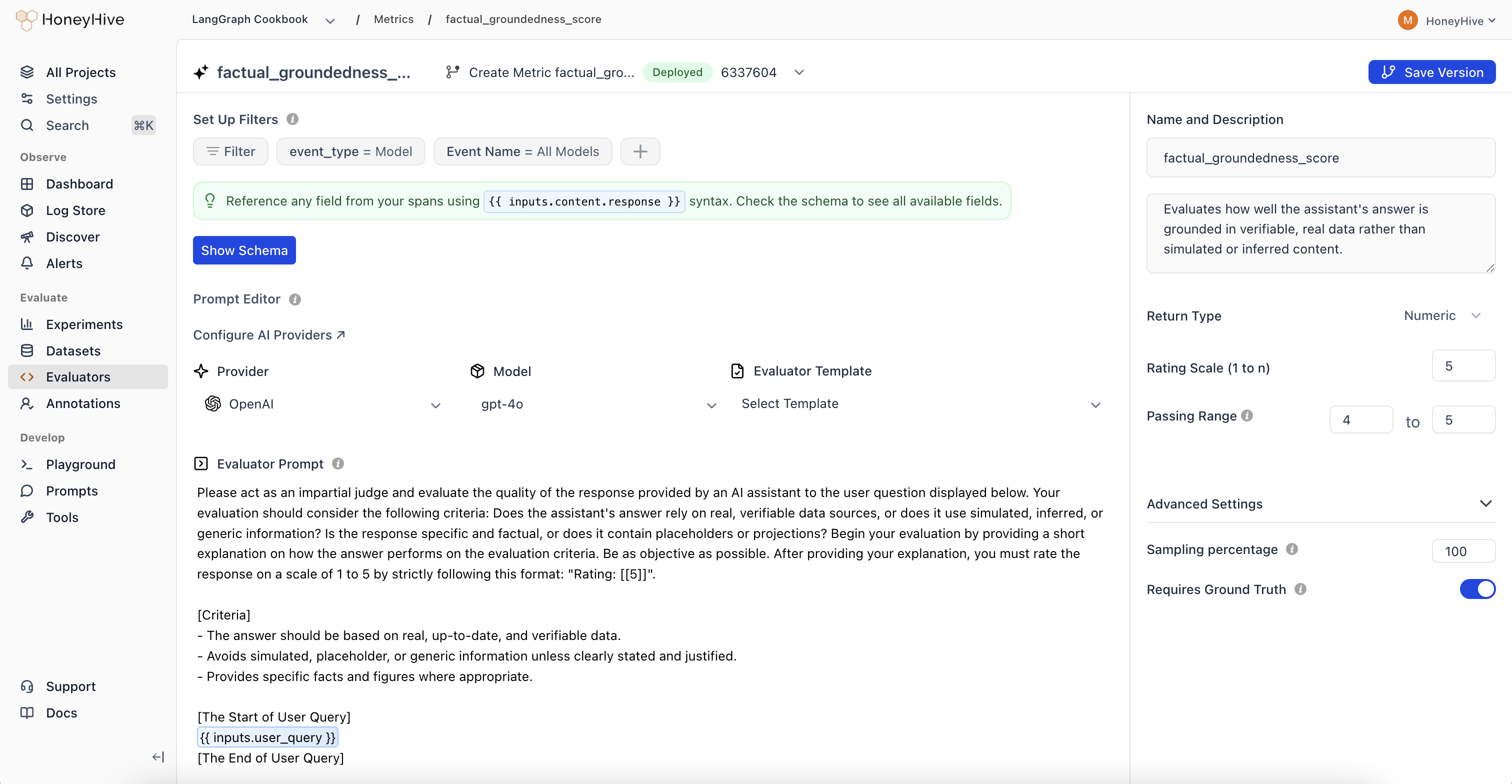
In the LLM evaluator editor, select the configured Provider and Model.
Creating an LLM Evaluator
- Navigate to the Evaluators tab in the HoneyHive console.
- Click
Add Evaluatorand selectLLM Evaluator. - Write the evaluator prompt, configure the return type and filters, and click
Create.
Event Schema
LLM evaluators operate on event objects from your traces. Use{{ }} syntax to reference event properties in your prompt.
A prompt that references
feedback.ground_truth anywhere in its template syntax, whether in a {{ }} expression or a {% %} statement, runs only on events that carry a ground truth value. Events without one record no score at all, rather than a failed score. If you add ground truth to an event later, the evaluator scores it then. Mentioning ground truth in the prose of your prompt has no effect on this.
For detailed event schema documentation and tracing setup, see Configuring Tracing for Server-Side Evaluators.
Evaluation Prompt
Define your evaluation prompt using the{{ }} syntax to inject event data:
Looking for ready-made examples? Check out our LLM Evaluator Templates.
Advanced Template Syntax
Beyond basic{{ field }} references, LLM evaluator prompts support Jinja2 conditionals, loops, and filters. This is most useful for multi-turn conversations and agent traces, where you often need to evaluate only user turns, assistant replies, or tool calls.
Score a subset of a conversation
A chat trace captures every role (system, user, assistant, tool). To judge user satisfaction, filter the conversation to user turns with selectattr. This surfaces signals like repeated questions, “that didn’t help”, or “thanks, that works” without sending the full transcript.
inputs.chat_history as a conversation array. Some integrations, including OpenAI and OpenAI Agents SDK, capture chat messages on individual model events while the root session event may not include a rolled-up inputs.chat_history by default. Confirm the field exists in Show Schema before using this pattern, and adapt the path if your event uses another array such as inputs.messages or outputs.chat_history. For online evaluation, target events that already contain the conversation array, or use session-level filters only when the session event has that array at evaluation time.
For ready-to-use versions of this and related multi-turn judges (frustration, resolution, tool trajectory, repetition loops, and more), see Conversation Evaluator Templates.
Adapt to varying event shapes
Conditionals and fallbacks let one prompt handle events that don’t always carry the same fields. This RAG faithfulness prompt includes context only when present and falls back gracefully when a field is missing:Common patterns
Loops and filters require an actual array field. Use Show Schema to confirm where conversation history is available for the event type your evaluator targets.
Configuration
Return Type
- Boolean: For true/false evaluations
- Numeric: For scores or ratings (e.g., 1-5)
- String: For categorical labels or text responses
Passing Range
Define the range of scores that indicate a passing evaluation. Useful for CI/CD pipelines and identifying failed test cases.Enabled
Toggle to run this evaluator on all traces that match your event filters.Sampling Percentage
Run your evaluator on a percentage of matching events to manage costs. New evaluators default to 10% sampling. Adjust based on event volume and cost budget - for example, set 25% to evaluate one in four matching events.Sampling applies to all traces that match your event filters. To evaluate only a subset of events, combine sampling with specific event filters.
Event Filters
Use Set Up Filters to specify which events trigger this evaluator. Filters are ANDed together - an event must match all filters to be evaluated.Preset Filters
Every evaluator includes two preset filters by default:- Event Type: Filter by
model,tool,chain, orsession - Event Name: Target a specific event name, or use “All” (e.g., “All Models”) to match any event of that type
Additional Filters
Click the + button to add filters on any event property. You can filter on any field available in your event schema, including nested properties using dot notation (e.g.,inputs.question, metadata.model, outputs.content).
Each filter consists of:
- Field: Any property from the event schema
- Operator: Depends on the field type (see below)
- Value: The value to compare against
Next Steps
Python Evaluators
Create code-based evaluators for programmatic checks
Evaluator Templates
Ready-to-use LLM and Python evaluator templates
Run Experiments
Use evaluators in offline experiments
Human Annotation
Set up human review workflows
Manage as Code
Check evaluators into your repo and apply them with the CLI
Use Portkey for LLM Evaluators
Route evaluator calls through Portkey to access 1,600+ models