
What You’ll Learn

By the end of this tutorial, you will learn how to:
  • Run an experiment with evaluate() on a test dataset
  • Score outputs automatically with a custom evaluator
  • View results in the HoneyHive dashboard
Time: ~5 minutes

Step 1: Setup

Install dependencies and configure your environment:
pip install "honeyhive>=1.0.0rc0" openai
Go to Settings > Project > API Keys and click Create API Key. Copy the key from the modal - it will only be shown once. Set your environment variables:
export HH_API_KEY="your-honeyhive-api-key"
export HH_PROJECT="my-project"
export OPENAI_API_KEY="your-openai-api-key"
from openai import OpenAI
from honeyhive import evaluate

client = OpenAI()
If you have existing code with HoneyHiveTracer.init(), you don’t need it here - evaluate() handles tracing automatically.

Step 2: Define Your Function

Write the function you want to evaluate. Here we’ll build an intent classifier:
def classify_intent(datapoint):
    text = datapoint["inputs"]["text"]
    response = client.chat.completions.create(
        model="gpt-4o-mini",
        messages=[{"role": "user", "content": f"""Classify this customer support message into ONE category:
- billing: payment issues, invoices, charges, refunds
- technical: bugs, errors, how to use features
- account: login, password, profile, settings
- general: other questions, feedback

Reply with ONLY the category name.

Message: {text}
Category:"""}],
        temperature=0
    )
    return {"intent": response.choices[0].message.content.strip().lower()}

Step 3: Create Your Dataset

Define test cases with inputs and expected outputs:
dataset = [
    {
        "inputs": {"text": "I was charged twice for my subscription this month."},
        "ground_truth": {"intent": "billing"}
    },
    {
        "inputs": {"text": "The export button isn't working. Getting error code 500."},
        "ground_truth": {"intent": "technical"}
    },
    {
        "inputs": {"text": "I forgot my password and the reset email never arrived."},
        "ground_truth": {"intent": "account"}
    },
    {
        "inputs": {"text": "Just wanted to say your support team was amazing. Thanks!"},
        "ground_truth": {"intent": "general"}
    },
]

Step 4: Create an Evaluator

Evaluators score your function’s outputs against ground truth:
def intent_match(outputs, inputs, ground_truth):
    """Check if the classified intent matches expected."""
    actual = outputs.get("intent", "").lower()
    expected = ground_truth.get("intent", "").lower()
    return 1.0 if actual == expected else 0.0
Evaluator signature: (outputs, inputs, ground_truth). Returns a score (typically 0.0 to 1.0).

Step 5: Run Your Experiment

Run the experiment with evaluate():
result = evaluate(
    function=classify_intent,
    dataset=dataset,
    evaluators=[intent_match],
    name="intent-classifier-v1"
)
You’ll see a results table printed to the console with scores for each datapoint.

Step 6: View Results in Dashboard

Go to app.honeyhive.ai and open Experiments to see your run, scores, and individual traces.
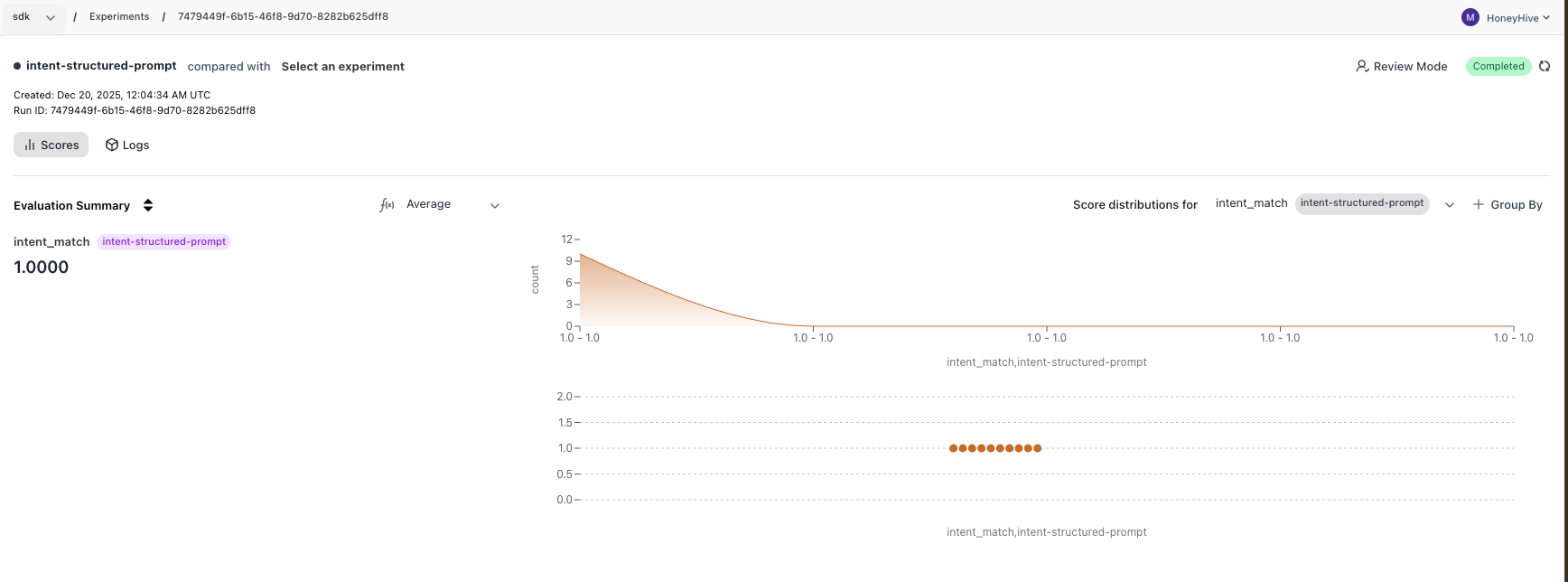
Experiment results showing intent classification accuracy

First, set your environment variables:
export HH_API_KEY="your-honeyhive-api-key"
export HH_PROJECT="my-project"
export OPENAI_API_KEY="your-openai-api-key"
from openai import OpenAI
from honeyhive import evaluate

client = OpenAI()

def classify_intent(datapoint):
    text = datapoint["inputs"]["text"]
    response = client.chat.completions.create(
        model="gpt-4o-mini",
        messages=[{"role": "user", "content": f"""Classify this customer support message into ONE category:
- billing: payment issues, invoices, charges, refunds
- technical: bugs, errors, how to use features
- account: login, password, profile, settings
- general: other questions, feedback

Reply with ONLY the category name.

Message: {text}
Category:"""}],
        temperature=0
    )
    return {"intent": response.choices[0].message.content.strip().lower()}

dataset = [
    {"inputs": {"text": "I was charged twice for my subscription this month."}, "ground_truth": {"intent": "billing"}},
    {"inputs": {"text": "The export button isn't working. Getting error code 500."}, "ground_truth": {"intent": "technical"}},
    {"inputs": {"text": "I forgot my password and the reset email never arrived."}, "ground_truth": {"intent": "account"}},
    {"inputs": {"text": "Just wanted to say your support team was amazing. Thanks!"}, "ground_truth": {"intent": "general"}},
]

def intent_match(outputs, inputs, ground_truth):
    return 1.0 if outputs.get("intent", "").lower() == ground_truth.get("intent", "").lower() else 0.0

result = evaluate(
    function=classify_intent,
    dataset=dataset,
    evaluators=[intent_match],
    name="intent-classifier-v1"
)

What You Learned

  • Define a function that receives a datapoint and returns outputs
  • Create a dataset with inputs and ground truths
  • Write an evaluator that scores outputs automatically
  • Run an experiment with evaluate() and view results in the dashboard

What’s Next?

Compare Experiments

Run a second experiment with a different prompt and compare results side-by-side

Evaluator Types

Code evaluators, LLM-as-judge, and human review

Managed Datasets

Version and manage datasets in HoneyHive

Server-Side Evaluators

Run evaluators on HoneyHive infrastructure