

- Installs Claude Code hooks automatically at the user level
- Merges pre-hook and post-hook data into single tool events with accurate duration
- Uses real tool names for event names (e.g.
tool.Bash,tool.Edit,tool.Grep) - Emits turn events (
turn.user,turn.agent) as model type withchat_history - Enriches tool events with thinking/reasoning context from the session transcript
- Uploads session artifacts via background loop (every 5s) to avoid hook timeouts
- Optionally emits lightweight
chain.commit_linkevents on post-commit - Retries failed exports every 5s via resilient event spooling
Quick Start
~/.honeyhive/daemon/ and installs Claude hooks in ~/.claude/settings.json.
Running in the background
stop sends SIGTERM to the running daemon via its PID file (~/.honeyhive/daemon/daemon.pid). Only one instance can run at a time - attempting to start a second prints an error and exits.
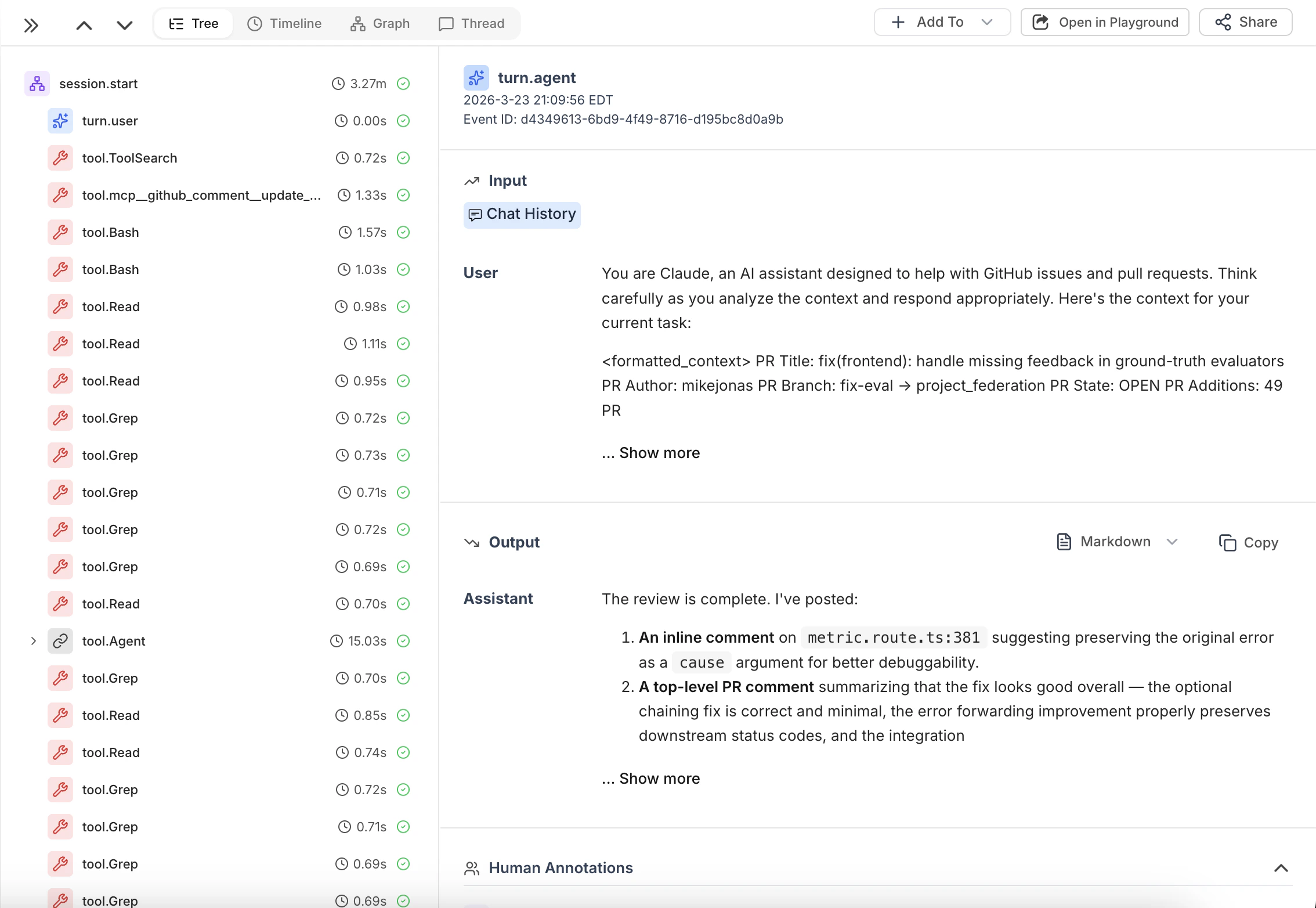
Events
Each Claude Code session produces a tree of events in HoneyHive:| Event name | Type | Description |
|---|---|---|
session.start | session | Root event. All other events are children of this. |
turn.user | model | User prompt. inputs.chat_history accumulates the full conversation so far; outputs.content is the new message. |
turn.agent | model | Assistant response. inputs.chat_history accumulates the full conversation so far; outputs.content is the new message. |
tool.{ToolName} | tool | Tool use (e.g. tool.Bash, tool.Edit, tool.Read, tool.Grep). Pre and post hooks are merged into a single event with start_time/end_time duration. |
session.end | chain | Marks session completion. |
chain.commit_link | chain | Git commit metadata (requires --repo). |
inputs.thinking when a reasoning block precedes the tool call in the transcript. Pre-hook events that never receive a matching post-hook are exported as orphans after 60s.
Session Artifacts
When a session ends (or goes idle), the daemon pushes two views of the conversation:session.start — conversation view
session.start — conversation view
session.start receives outputs.chat_history containing the user-facing conversation: the back-and-forth of user messages and assistant responses. This is what you’d see in the chat UI. Useful for reviewing what was said and evaluating response quality.session.end — trajectory view
session.end — trajectory view
session.end receives outputs.artifact containing the full session transcript: tool calls, reasoning/thinking blocks, and internal processing steps. This is the “behind the scenes” view of how the agent worked through the task.State Directory
All daemon state lives under~/.honeyhive/daemon/ (override with HH_DAEMON_HOME):
| File | Purpose |
|---|---|
state/config.json | Persisted daemon configuration |
state/sessions.json | Session index (transcript paths, timestamps, artifact status) |
state/pending_tools.json | Buffered pre-hook tool events awaiting their post-hook |
state/chat_histories.json | Accumulated chat history per session for turn events |
spool/events.jsonl | Retry queue for failed exports |
daemon.log | Timestamped daemon log |
daemon.pid | Process ID file |
CLI Reference
| Command | Description |
|---|---|
honeyhive-daemon run | Start the daemon, install hooks, and flush queued events. |
honeyhive-daemon stop | Stop the running daemon. |
honeyhive-daemon status | Show config and pending spool event count. |
honeyhive-daemon doctor | Check that hooks and config are correctly installed. |
run options
| Flag | Env var | Description |
|---|---|---|
--key | HH_API_KEY | HoneyHive API key (required). |
--url | HH_API_URL | HoneyHive base URL (default: https://api.honeyhive.ai). |
--project | HH_PROJECT | HoneyHive project name (default: repo/directory name). |
--repo PATH | Git repo to attach commit events to. | |
--ci | Enable CI mode. |