Google Agent Development Kit (ADK) is an open-source, code-first framework for building and deploying AI agents. ADK is model-agnostic and supports multi-agent orchestration, tools, and flexible deployment options.
HoneyHive integrates with ADK via the OpenInference instrumentor, automatically capturing agent runs, tool calls, and LLM interactions.
Quick Start
Add HoneyHive tracing in just 4 lines of code. Add this to your existing ADK app and all agent runs, tool calls, and model calls are automatically traced.
To see where to initialize the tracer for your environment, including AWS Lambda and long-running servers, see Tracer Initialization. pip install "honeyhive[openinference-google-adk]>=1.0.0rc0"
# Or install separately
pip install "honeyhive>=1.0.0rc0" openinference-instrumentation-google-adk google-adk
import os
from honeyhive import HoneyHiveTracer
from openinference.instrumentation.google_adk import GoogleADKInstrumentor

tracer = HoneyHiveTracer.init(
    api_key=os.getenv("HH_API_KEY"),
    project=os.getenv("HH_PROJECT"),
)
GoogleADKInstrumentor().instrument(tracer_provider=tracer.provider)

# Your existing ADK code works unchanged
Compatibility
| Requirement | Version |
|---|
| Python | 3.11+ |
| google-adk | 1.0.0+ |
What Gets Traced
The instrumentor automatically captures:
- Agent runs - Every agent invocation with inputs and outputs
- LLM calls - Model requests, responses, and token usage
- Tool calls - Each tool execution with arguments and results
No manual instrumentation required.
Example: Single Agent
import asyncio
from honeyhive import HoneyHiveTracer
from openinference.instrumentation.google_adk import GoogleADKInstrumentor
from google.adk.agents import Agent
from google.adk.runners import InMemoryRunner
from google.genai.types import Content, Part

tracer = HoneyHiveTracer.init(project="your-project")
GoogleADKInstrumentor().instrument(tracer_provider=tracer.provider)

def get_weather(city: str) -> dict:
    return {"report": f"Weather in {city}: 20°C, clear"}

agent = Agent(
    name="weather_agent",
    model="gemini-3-flash-preview",
    description="Answers weather questions.",
    instruction="Use get_weather to answer weather questions.",
    tools=[get_weather],
)

async def main():
    runner = InMemoryRunner(agent=agent, app_name="app")
    session_id = tracer.session_id  # Use HoneyHive session ID
    await runner.session_service.create_session(app_name="app", user_id="user", session_id=session_id)

    msg = Content(role="user", parts=[Part(text="What's the weather in Tokyo?")])
    async for event in runner.run_async(user_id="user", session_id=session_id, new_message=msg):
        if event.is_final_response():
            print(event.content.parts[0].text)

asyncio.run(main())
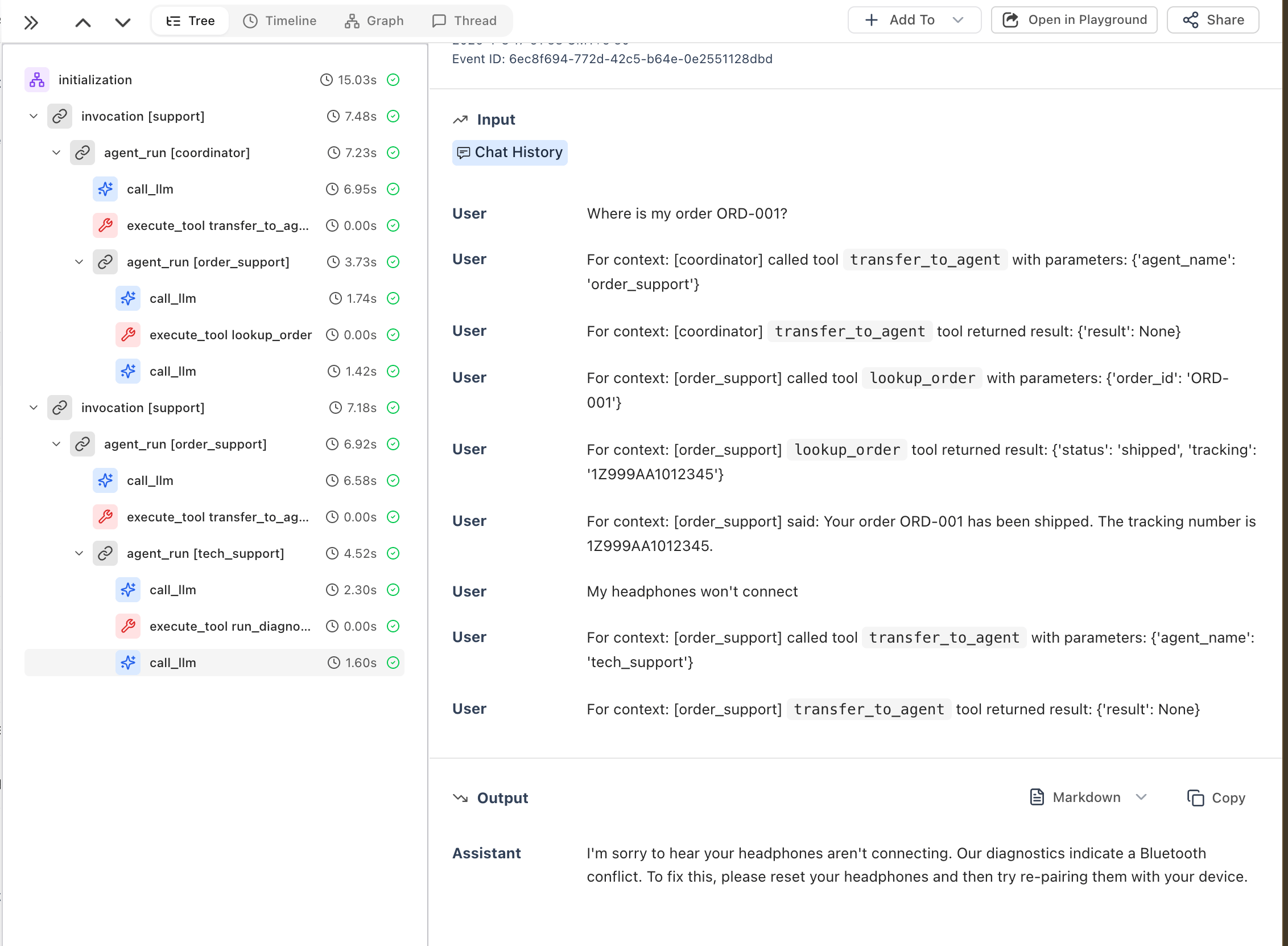
Example: Multi-Agent System
import asyncio
from honeyhive import HoneyHiveTracer
from openinference.instrumentation.google_adk import GoogleADKInstrumentor
from google.adk.agents import Agent
from google.adk.runners import InMemoryRunner
from google.genai.types import Content, Part

tracer = HoneyHiveTracer.init(project="your-project")
GoogleADKInstrumentor().instrument(tracer_provider=tracer.provider)

def lookup_order(order_id: str) -> dict:
    return {"status": "shipped", "tracking": "1Z999AA1012345"}

def run_diagnostic(issue_type: str) -> dict:
    return {"problem": "Bluetooth conflict", "solution": "Reset and re-pair"}

order_agent = Agent(
    name="order_support",
    model="gemini-3-flash-preview",
    description="Handles order inquiries.",
    instruction="Help with orders. Use lookup_order for status.",
    tools=[lookup_order],
)

tech_agent = Agent(
    name="tech_support",
    model="gemini-3-flash-preview",
    description="Handles technical issues.",
    instruction="Help with tech problems. Use run_diagnostic.",
    tools=[run_diagnostic],
)

coordinator = Agent(
    name="coordinator",
    model="gemini-3-flash-preview",
    description="Routes to specialists.",
    instruction="Route order questions to order_support, tech issues to tech_support.",
    sub_agents=[order_agent, tech_agent],
)

async def main():
    runner = InMemoryRunner(agent=coordinator, app_name="support")
    session_id = tracer.session_id  # Use HoneyHive session ID
    await runner.session_service.create_session(app_name="support", user_id="customer", session_id=session_id)

    for msg_text in ["Where is my order ORD-001?", "My headphones won't connect"]:
        msg = Content(role="user", parts=[Part(text=msg_text)])
        async for event in runner.run_async(user_id="customer", session_id=session_id, new_message=msg):
            if event.is_final_response():
                print(event.content.parts[0].text)

asyncio.run(main())
Troubleshooting
Traces not appearing
- Check environment variables - Ensure
HH_API_KEY and HH_PROJECT are set
- Pass the tracer provider - The instrumentor must receive
tracer_provider=tracer.provider:
from honeyhive import HoneyHiveTracer
from openinference.instrumentation.google_adk import GoogleADKInstrumentor

tracer = HoneyHiveTracer.init(project="your-project")

# ✅ Correct - pass tracer_provider
GoogleADKInstrumentor().instrument(tracer_provider=tracer.provider)

# ❌ Wrong - missing tracer_provider
GoogleADKInstrumentor().instrument()
- Initialize before creating agents - Call
instrument() before instantiating ADK agents
Resources