

October 27, 2025
Core Platform
Experiments Dashboard
Visualize metric trends across all your experiments in a single unified view.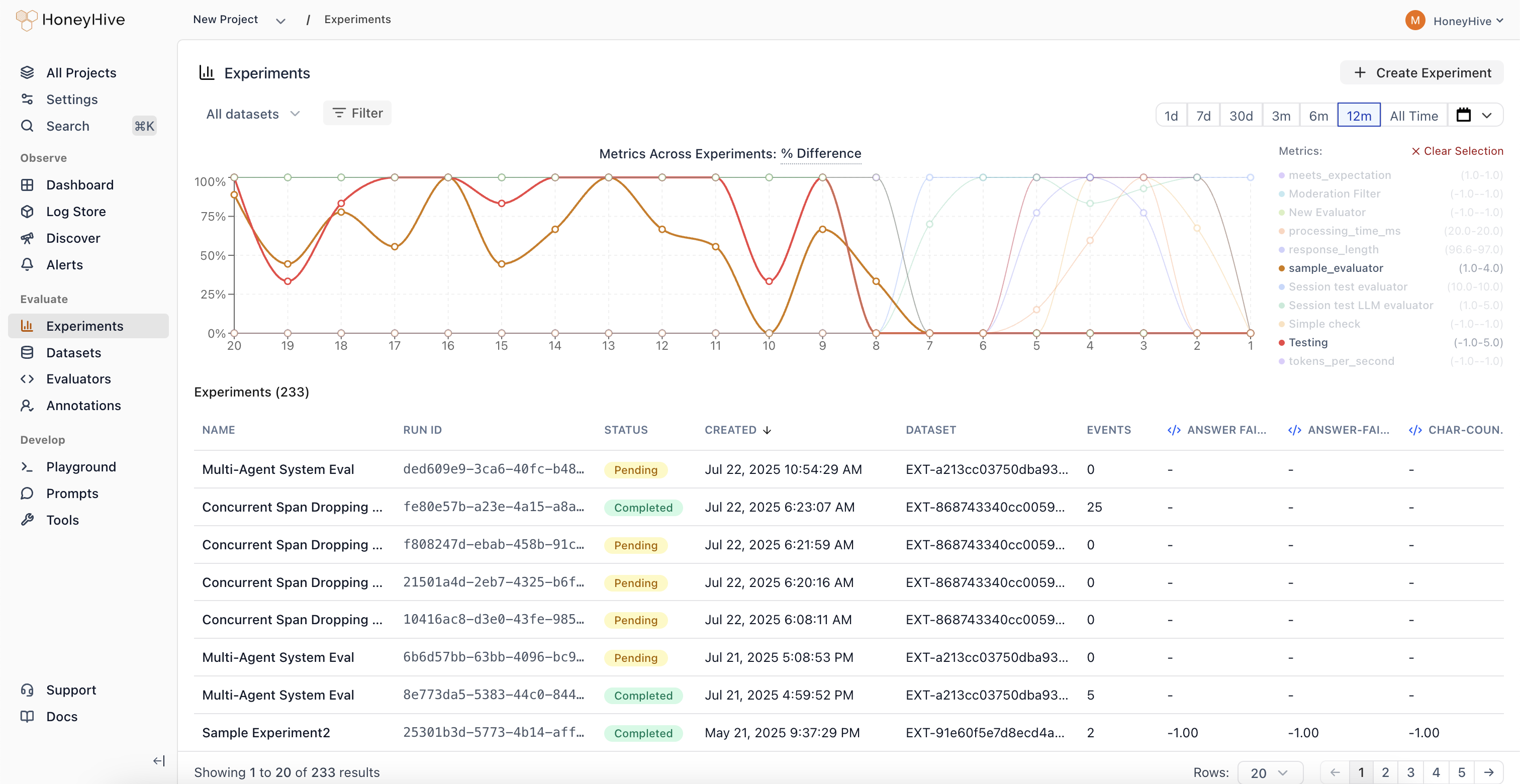
Cross-Experiment Comparison
View and compare metrics across 100+ experiments simultaneously. See results from experiments using different prompts, models, and retrieval parameters side-by-side.
Performance Regression Detection
Identify when changes negatively impact your application’s quality metrics. Metric trends make it easy to spot regressions at a glance.
Parameter Sweep Visualization
Track how sweeps across different configurations (prompts, models, retrieval parameters) impact performance over time.
Unified Analytics
Analyze experiment results without jumping between individual experiment pages. All your experiment data in one place for faster, data-driven decision making.
Annotation Queues
Automated trace collection and streamlined human evaluation workflows.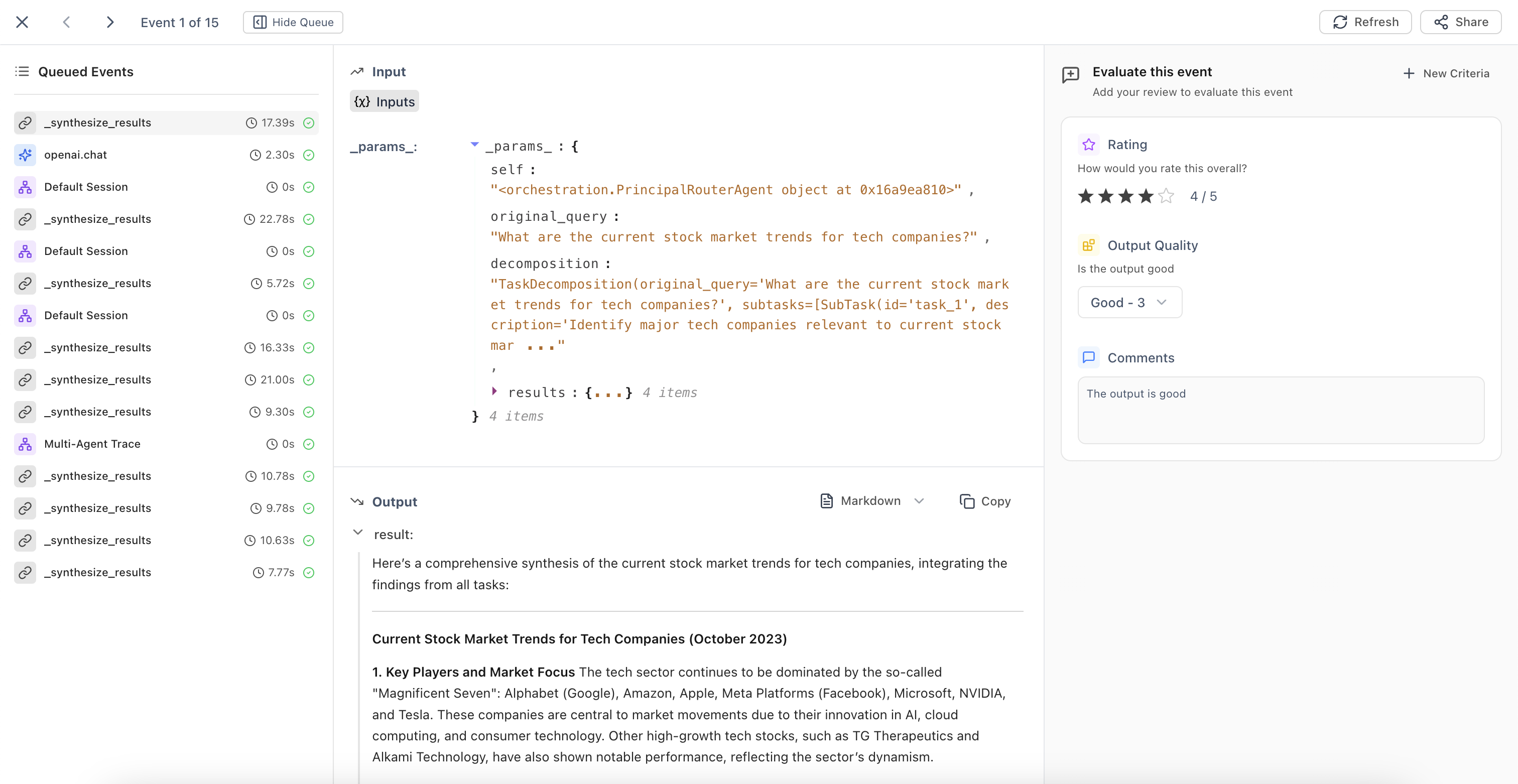
Automatic Queue Population
Configure filters to automatically add traces matching specific criteria to annotation queues. The system continuously runs in the background, identifying traces that need human review.
Streamlined Evaluation Interface
Domain experts can evaluate traces based on predefined criteria fields. Use ← → arrow keys for quick navigation between events during high-volume annotation tasks.
Queue Management
Build high-quality datasets and maintain consistent human oversight of your AI applications with organized evaluation workflows.
October 13, 2025
Core Platform
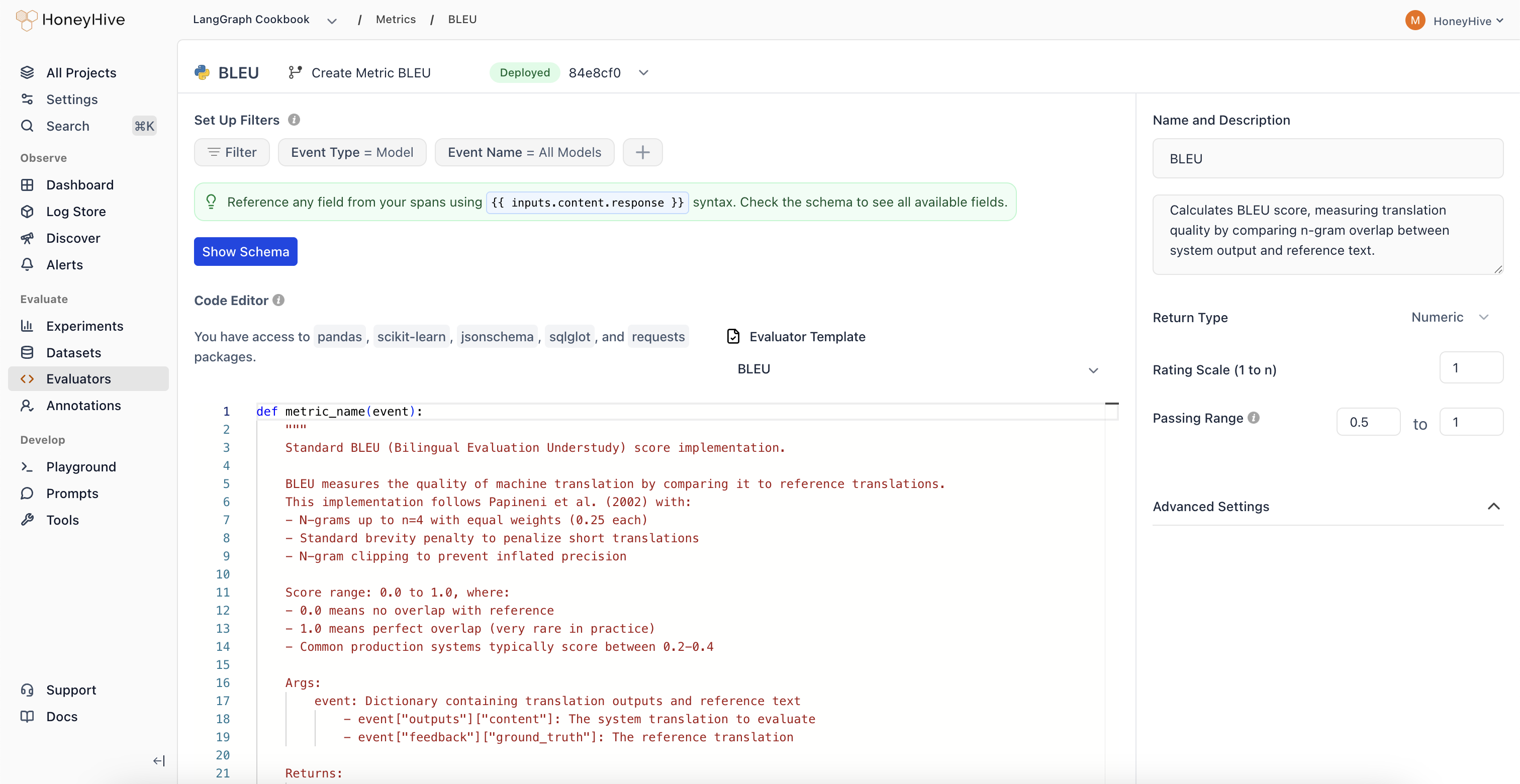
Improved Evaluators UX
October 06, 2025
Core Platform
New Evaluator Templates
Expanded evaluator templates library with 11 new pre-built templates for common evaluation patterns.| Category | Evaluators |
|---|---|
| Agent Evaluation | • Chain-of-Thought Faithfulness • Plan Coverage • Trajectory Plan Faithfulness • Failure Recovery |
| Safety | • Policy Compliance • Harm Avoidance |
| RAG | • Context Coverage |
| Text Evaluation | • Tone Appropriateness |
| Translation | • Translation Fluency |
| Code Generation | • Compilation Success |
| Classification Metrics | • Precision/Recall/F1 Metrics |
September 19, 2025
Core Platform
Improved Review Mode
Enhanced context indicators in Review Mode that clearly show which output type you’re evaluating.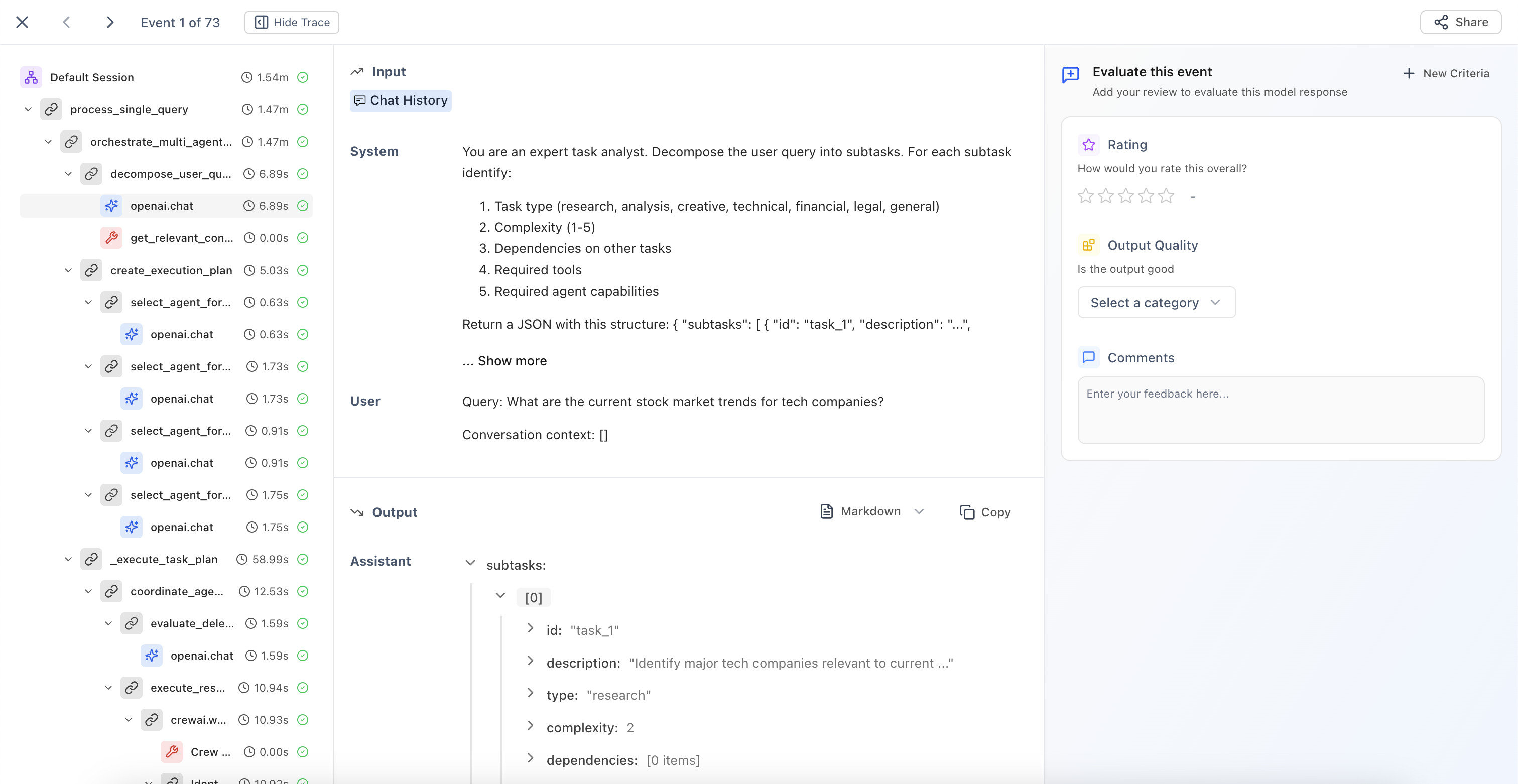
Model Outputs
Evaluate individual LLM responses with clear context about the model being reviewed.
Session Outputs
Review end-to-end agent interactions and complete conversation flows.
Tool Outputs
Assess function and API call results with full execution context.
Chain/Workflow Outputs
Analyze multi-step process results and complex execution paths.
September 05, 2025
Core Platform
Categorical Evaluators
New evaluator type that enables classification-based human evaluation with custom scoring.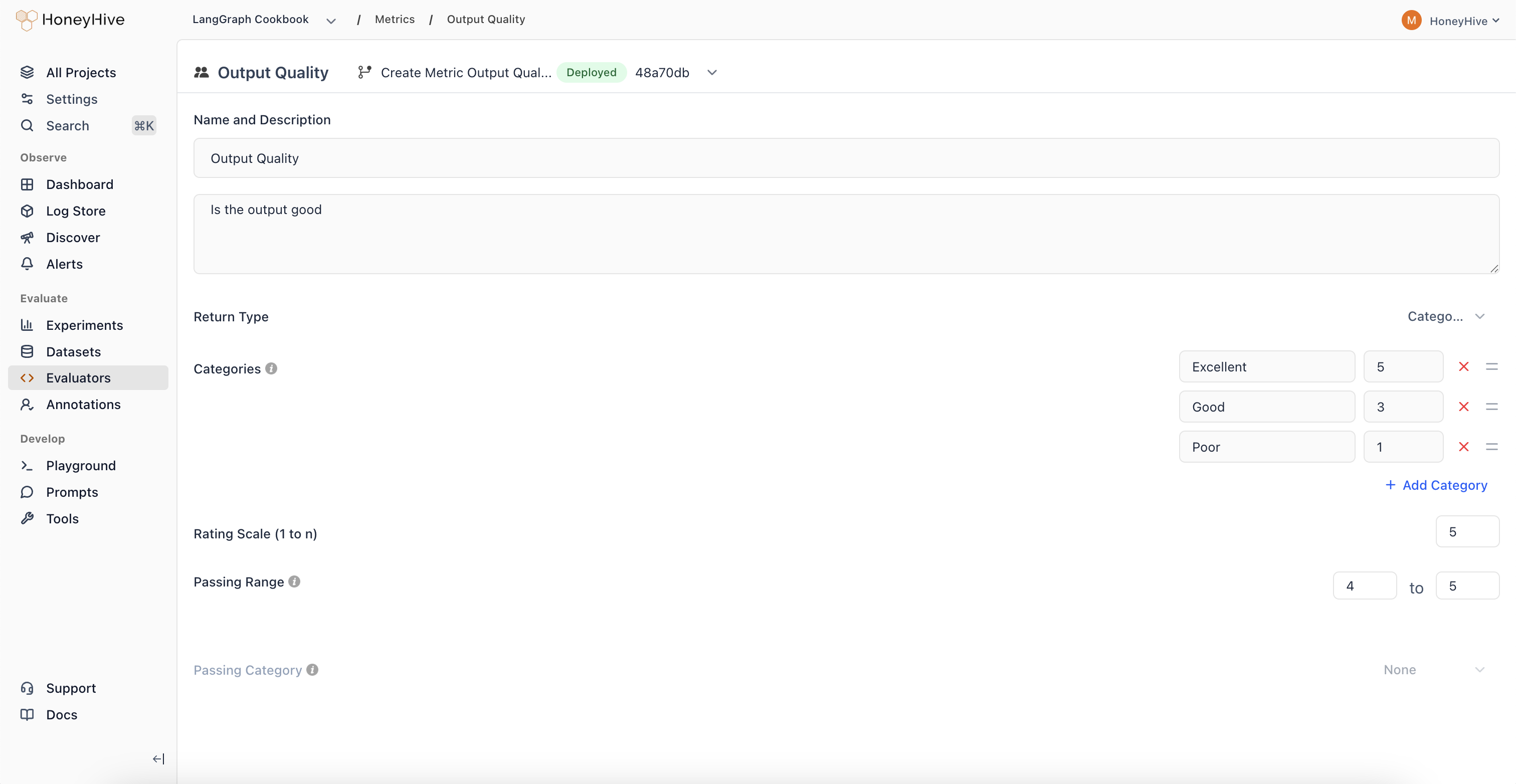
Pass/Fail Analysis
Create binary classifications with associated scores for clear go/no-go decisions.
Regression Detection
Track when outputs shift from high-scoring to low-scoring categories over time.
Multi-Class Evaluation
Define multiple categories representing different quality levels or response types.
August 22, 2025
Core Platform
Thread View
New visualization mode that displays all LLM events and chat history in a unified, chronological timeline.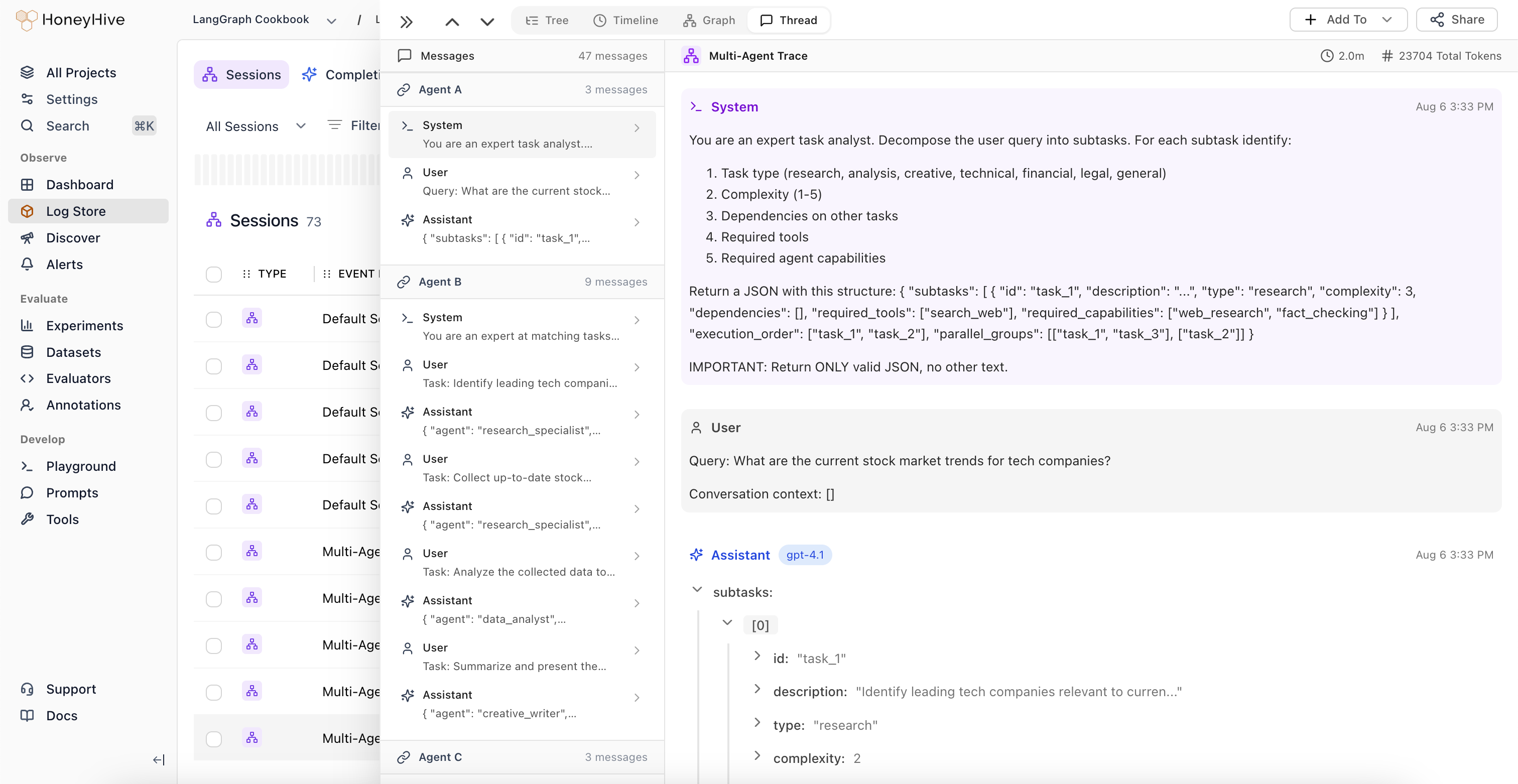
Unified Conversation View
View all LLM events alongside complete chat history in a single interface. Understand the full context of multi-turn conversations without navigating through nested spans.
Automatic Agent Handoff Detection
The system automatically identifies when control passes between different LLM workflows or agents, highlighting transition points in complex multi-agent systems.
Session-Level Feedback
Domain experts can provide feedback at the session level, which is automatically applied to the root span (session event) in the trace.
August 08, 2025
Core Platform
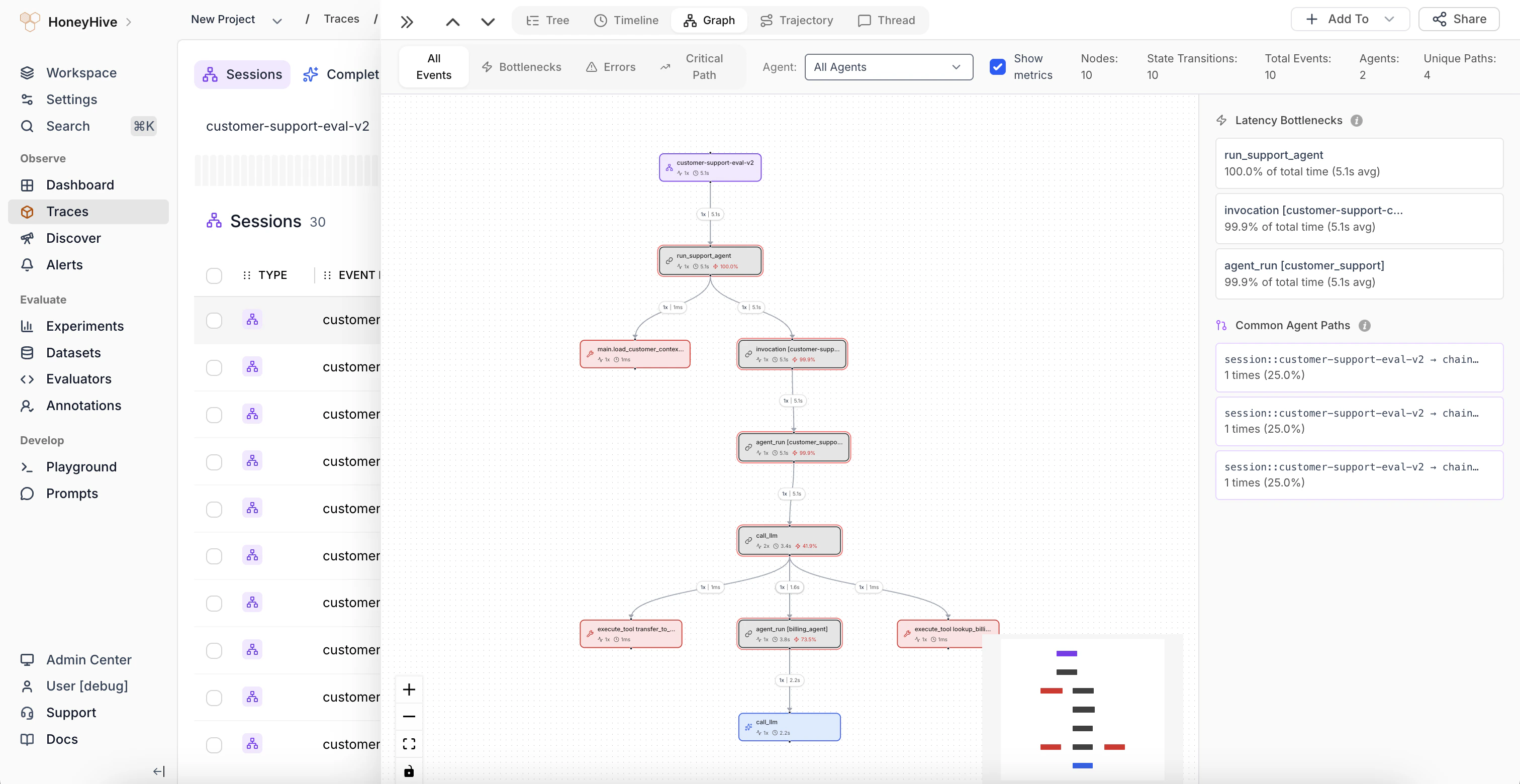
Improved Graph View
Major enhancements to Graph View with automatic node deduplication and new analytical features.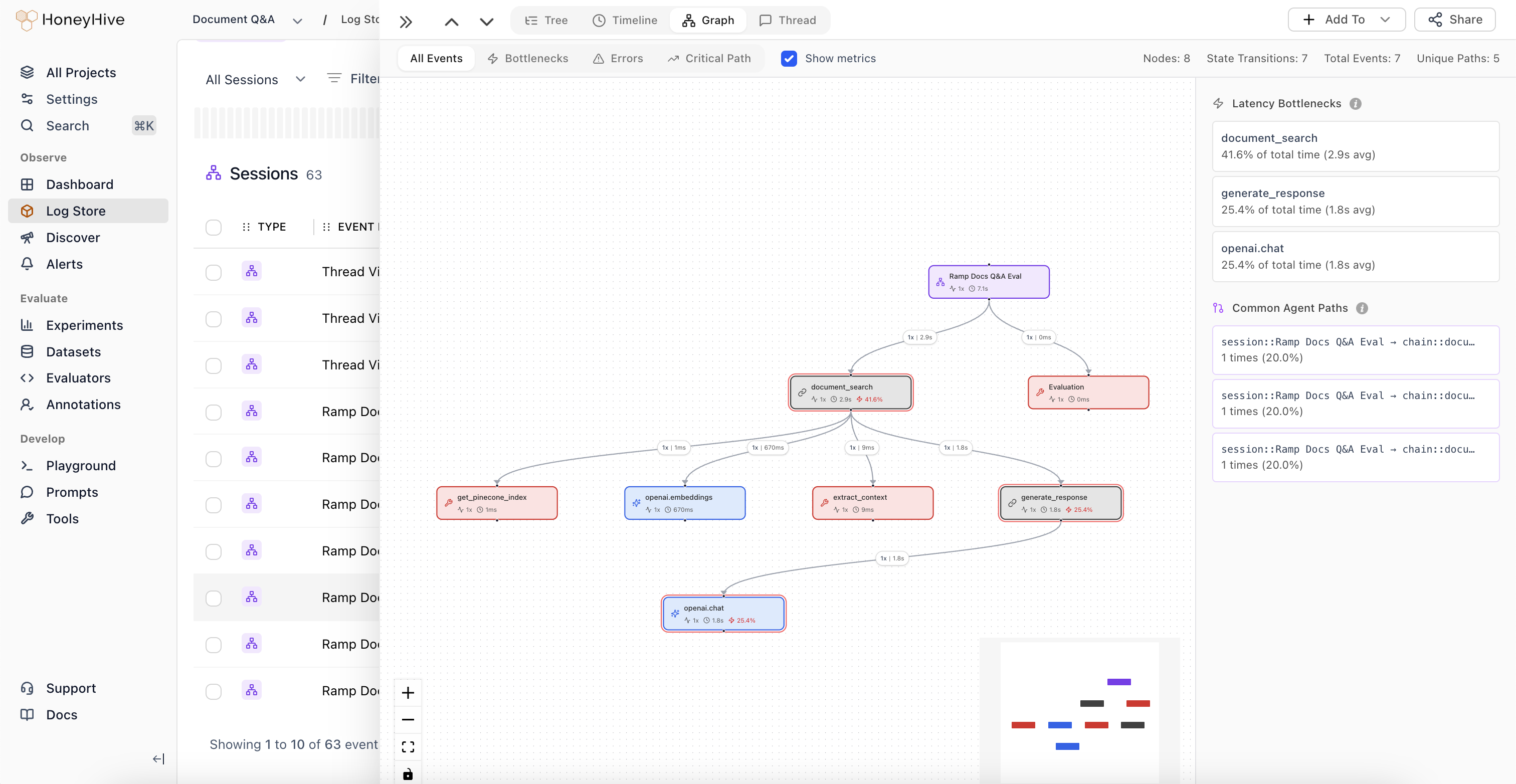
Automatic Node Deduplication
The graph now intelligently deduplicates nodes, simplifying visualization of complex agent trajectories.
Graph Statistics
View total number of nodes, state transitions, and structural complexity metrics for your agent workflows.
Weighted Edges
Edge thickness represents execution frequency, making common paths immediately visible.
Latency Bottlenecks
Identify which nodes are causing performance issues in your agent workflows.
Common Trajectories
Visualize the most frequent paths through your agent’s decision tree to understand typical execution patterns.
August 06, 2025
Core Platform
Introducing Alerts
Monitor key metrics and get notified when behavior changes in your AI applications.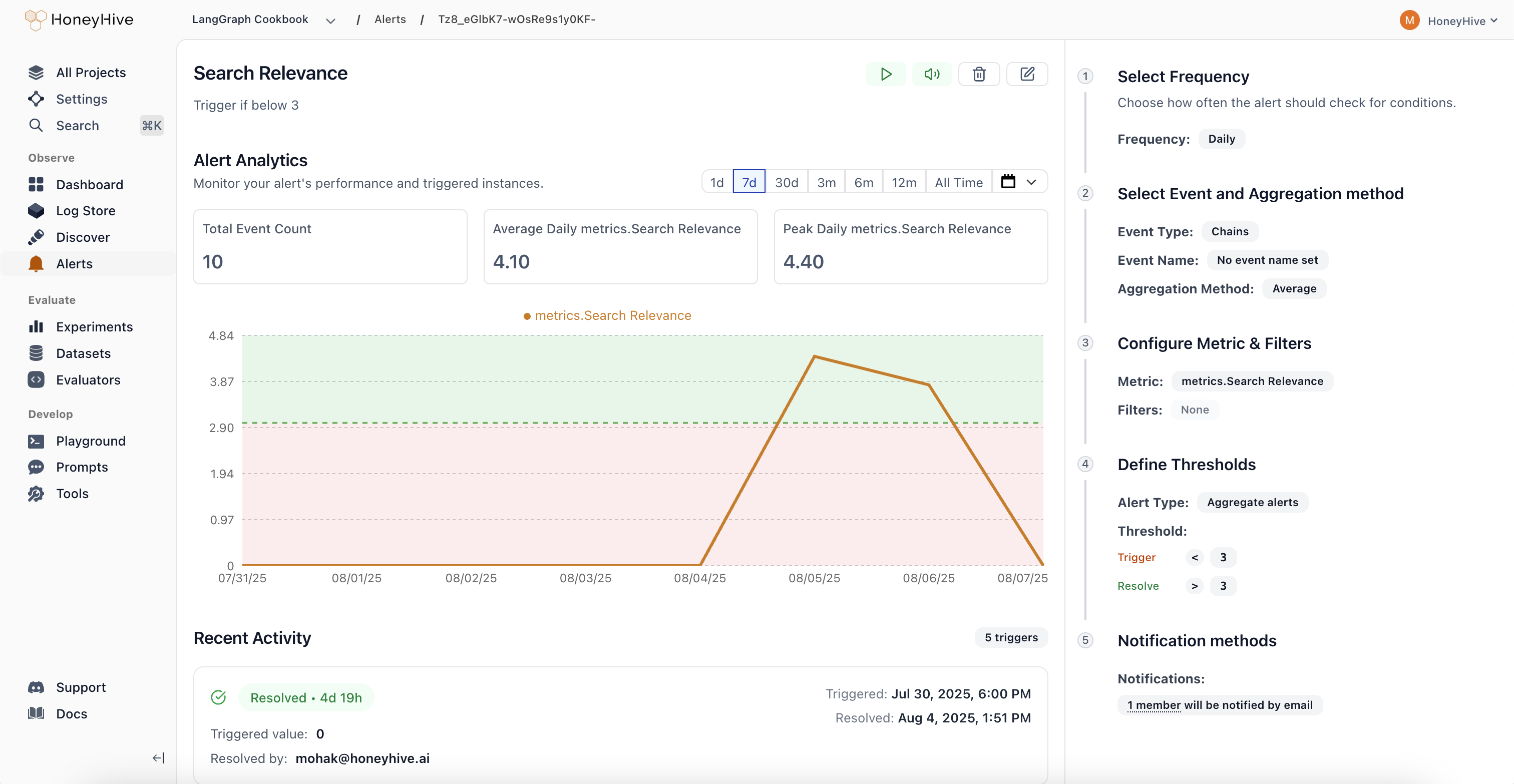
- Comprehensive Monitoring: Track performance metrics (latency, error rate), quality scores from evaluators, cost and usage patterns, plus any custom fields from your events or sessions. Get visibility into what matters most for your AI applications.
- Smart Alert Types: Aggregate Alerts trigger when metrics cross absolute thresholds, while Drift Alerts detect when current performance deviates from previous periods by a configurable percentage. Choose the right detection method for your use case.
- Flexible Scheduling: Configure alerts to run hourly, daily, weekly, or monthly based on your monitoring needs. Set custom evaluation windows to balance responsiveness with noise reduction.
- Streamlined Workflow: Real-time preview charts show exactly what your alert will monitor, guided configuration in the right panel walks you through setup, and a recent activity feed tracks alert history. Manage alert states (Active, Triggered, Resolved, Paused, Muted) directly from each alert’s detail page.
Evaluator Templates Gallery
Quick-start your evaluations with pre-built templates organized by use case: Agent Trajectory, Tool Selection, RAG, Summarization, Translation, Structured Output, Code Generation, Performance, Safety, and Traditional NLP.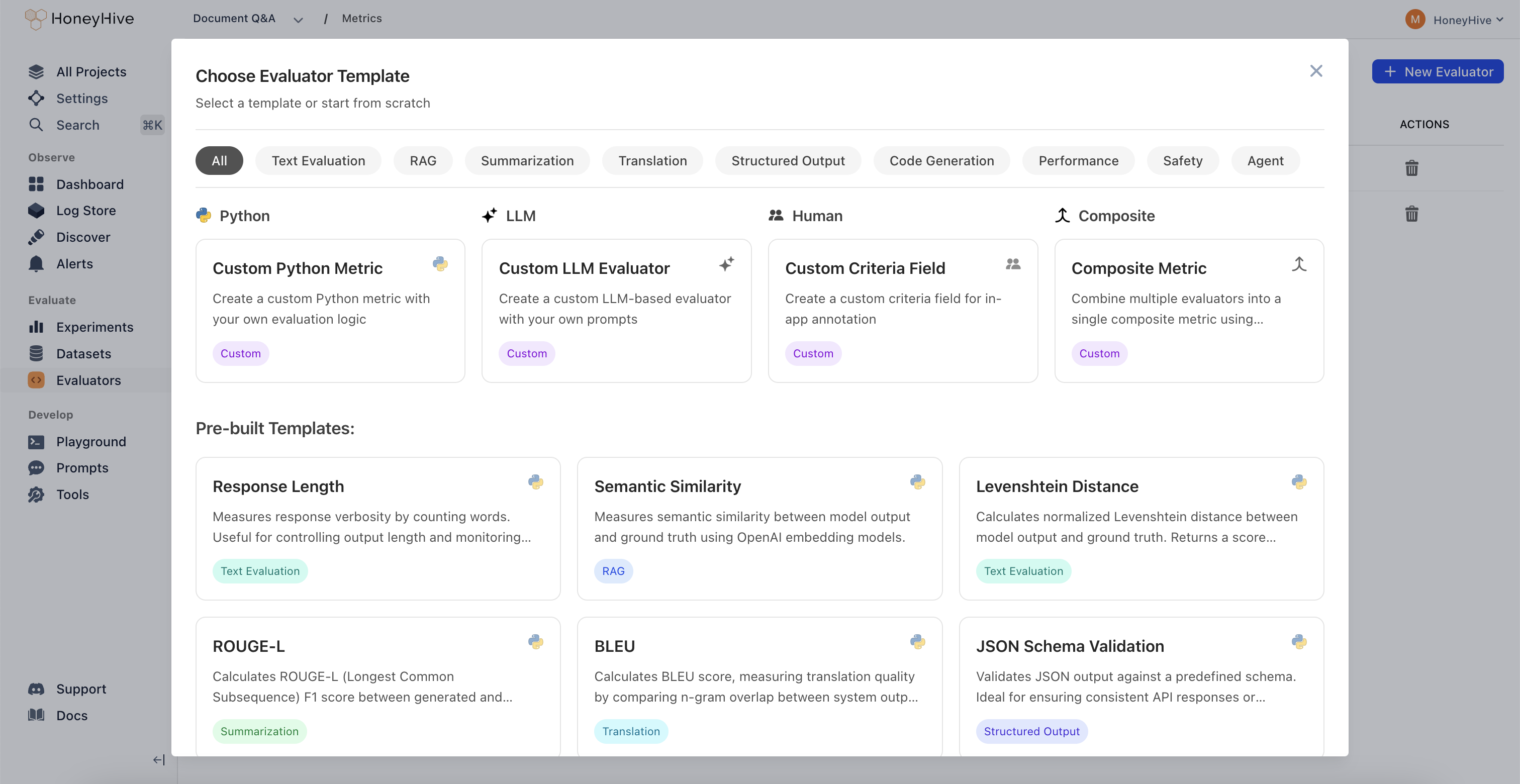
July 29, 2025
Core Platform
New Trace Visualization Modes
-
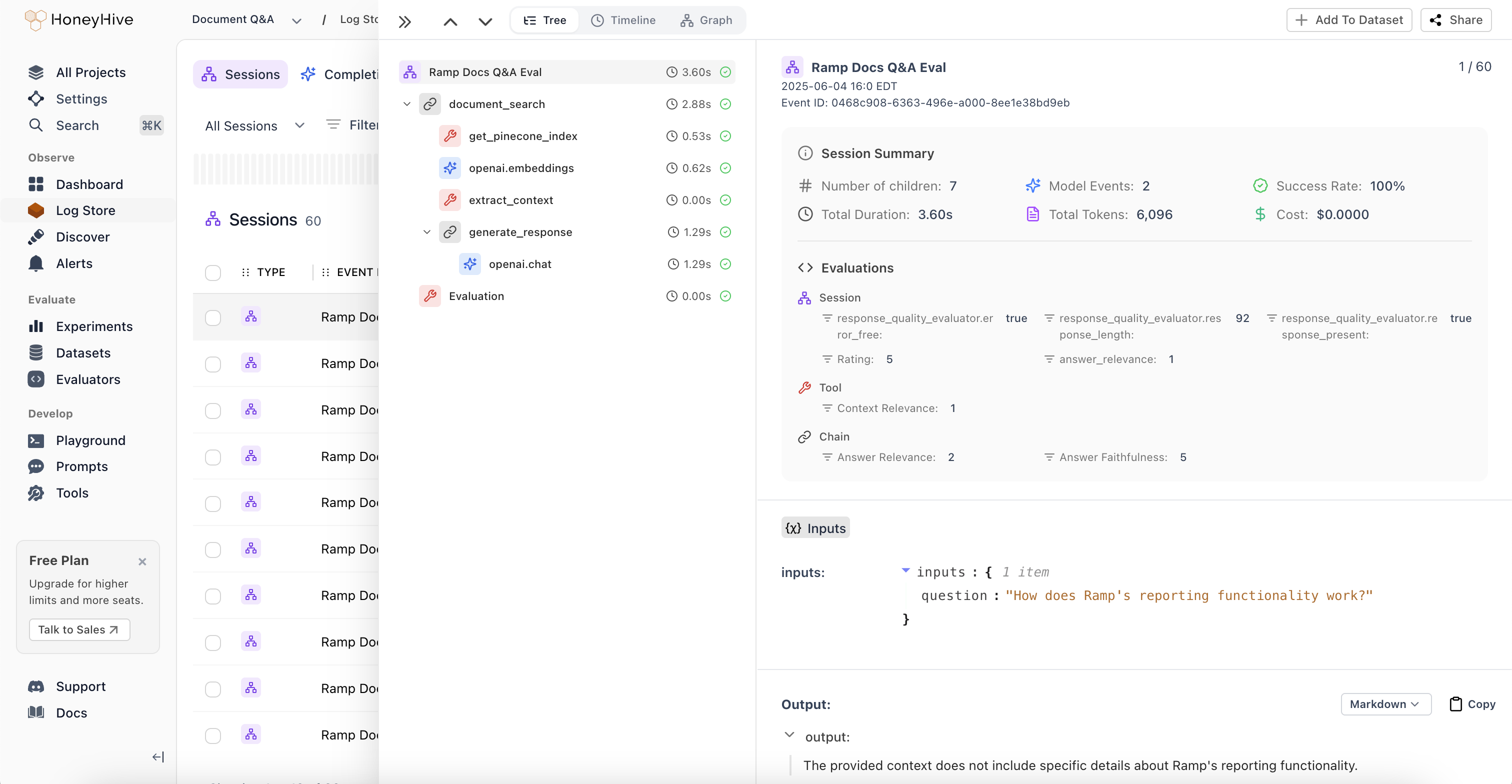
Session Summaries and New Tree View:
Unified view of metrics, evaluations, and feedback across all spans in an agent session. Get a comprehensive overview without jumping between individual spans to understand overall session performance.
-
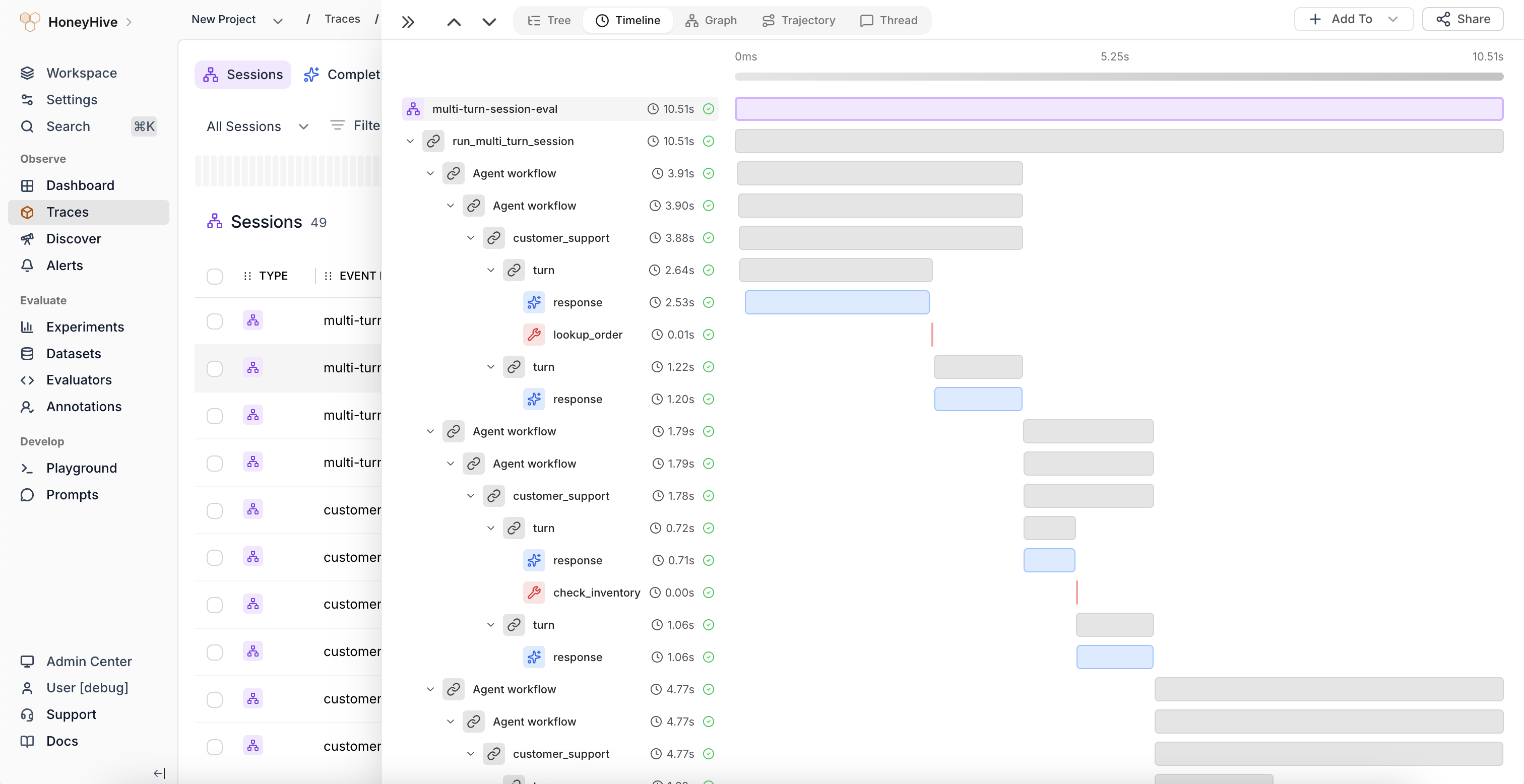
Timeline View:
Flamegraph visualization that identifies latency bottlenecks and shows the relationship between sequential and parallel operations in your agent workflows. Perfect for performance optimization and understanding execution flow.
-
Graph View:
Visual representation of complex execution paths and decision points through multi-agent workflows. Quickly understand how your agents interact and make decisions at a glance.
Improved Log Store Analytics
Volume Charts: New mini-charts display request volume patterns over time directly in the sessions table, providing instant visibility into traffic trends and activity levels without needing to drill into individual sessions.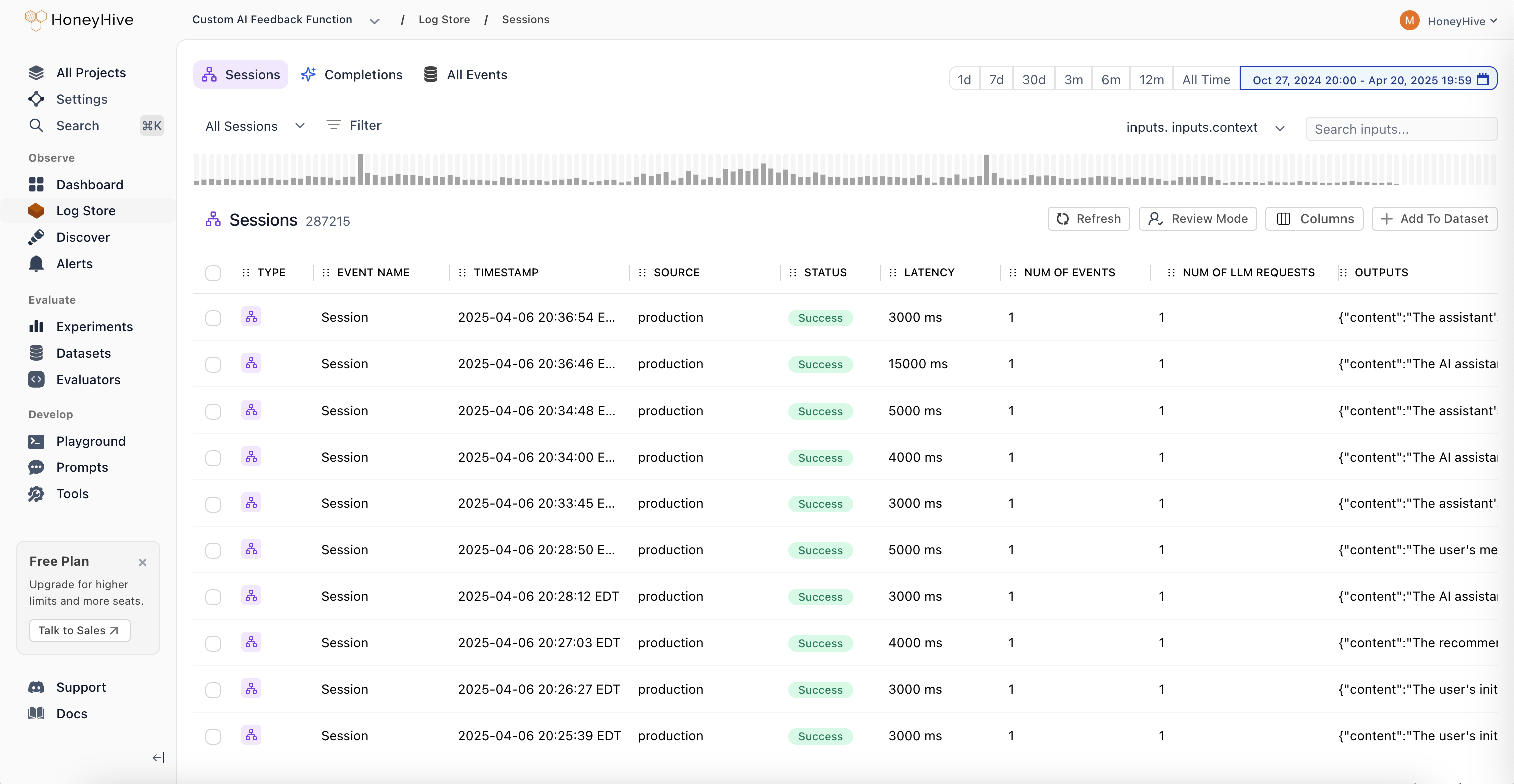
June 3, 2025
Core Platform
Role-Based Access Control (RBAC)
- Two-Tier Permission Structure: Granular permission management with organization and project-level controls. Organization Admins have full control across the entire organization, while Project Admins maintain complete control within specific projects. This creates clear boundaries between teams and prevents data leakage between business units.
- Enhanced API Key Security: Project-specific API key scoping ensures that teams can only access data within their designated projects. This provides better security isolation and compliance with industry regulations, especially critical for organizations in financial services, healthcare, and insurance.
- Flexible Team Management: Easy onboarding and role transitions with transparent permission hierarchy. Delegate administrative responsibilities without compromising security, and manage team member access as organizations evolve.
- Seamless Migration Process: Existing customers can migrate to RBAC with minimal disruption. All current users are automatically assigned Organization Admin roles, and project-specific API keys are available in Settings. Legacy API keys will remain functional until August 31st, 2025.
May 02, 2025
Python SDK (Logger)
HoneyHive Logger (honeyhive-logger) released
- The logger sdk has
- No external dependencies
- A fully stateless design
- Optimized for
- Serverless environments
- Highly regulated environments with strict security requirements
TypeScript SDK (Logger)
HoneyHive Logger (@honeyhive/logger) released
- The logger sdk has
- No external dependencies
- A fully stateless design
- Optimized for
- Serverless environments
- Highly regulated environments with strict security requirements
Python SDK - Version [v0.2.49]
- Added type annotation to decorators and the evaluation harness
Documentation
- Added documentation for Python/Typescript Loggers
- Updated gemini integration documentation to use latest sdk (Python and TypeScript)
April 25, 2025
Core Platform
Support for External Datasets in Experiments
You can now log experiments using external datasets with custom IDs for both datasets and datapoints. External dataset IDs will display with the “EXT-” prefix in the UI. This feature provides greater flexibility for teams working with custom datasets while maintaining full integration with our experiment tracking.Documentation
- Standardizes parameter names and clarified evaluation order in Experiments Quickstart and Python/TS SDK docs.
- Adds cookbook: Inspirational Quotes Recommender with Qdrant and OpenAI
April 11, 2025
Core Platform
- Bug fixes and improvements across various areas to enhance performance and stability.
Documentation
- Adds Evaluating External Logs tutorial.
- Updates Python and TypeScript SDK’s references and overall documentation to align with recent improvements and best practices.
April 4, 2025
Core Platform
- Bug fixes for playground & evaluator version controls.
Documentation
- Adds Datasets Introduction Guide.
- Adds Server-side Evaluator Templates List documentation.
- Adds LangGraph Integration documentation.
March 28, 2025
Core Platform
Wide Mode
We’ve introduced a new Wide Mode option that allows users to hide the sidebar, providing:- Expanded workspace area for a more immersive viewing experience
- Distraction-free environment when focusing on complex tasks
- Better content visibility on smaller screens and split-window setups
- Toggle controls accessible via the header menu for easy switching
Improved Experiments Layout
Our redesigned comparison interface improves result analysis with:- Structured input visualization with collapsible sections
- Clear side-by-side metrics display for easier model comparison
- Improved performance statistics with visual rating indicators
- Bug fixes and stability improvements for filtering functionality.
- Added support for
existsandnot existsoperators in filters. - Frontend styling improvements to enhance the user interface.
- Bug fixes and stability enhancements for a smoother user experience.
Documentation
- Improved documentation for async function handling.
- Added integration documentation for model providers:
- Tutorial for running experiments with multi-step LLM applications wit MongoDB and OpenAI.
- Adds Streamlit Cookbook for tracing model calls with collected user feedback on AI response.
March 21, 2025
Core Platform
- Enhanced filter functionality: Added the ability to edit filters and improved schema discovery within filters.
- Fixed pagination issue for events table.
Python SDK - Version [v0.2.44]
- Improved error tracking for the tracer: Enhanced the capture of error messages for custom-decorated functions.
- Git context enrichment: Added support for capturing Git branch status in traces and experiments.
- Introduced the
disable_http_tracingparameter during tracer initialization to disable HTTP event tracing. - Fixed the
traceloopversion to 0.30.0 to resolve protobuf dependency conflicts.
TypeScript SDK - Version [v1.0.33]
- Improved error tracking for the tracer: Enhanced the capture of error messages for traced functions.
- Git context enrichment: Added support for capturing Git branch status in traces and experiments.
- Introduced the
disableHttpTracingparameter during tracer initialization to disable HTTP event tracing.
Documentation
- Standardized all JavaScript/TypeScript code examples to TypeScript across the documentation.
- Added troubleshooting guidance for SSL validation failures.
- Documented the
disable_http_tracing/disableHttpTracingparameter in the SDK Reference. - Removed references to
init_from_session_idin favor of usinginitwith thesession_idparameter. - Updated the Observability Tutorial Documentation/Cookbook to use
enrichSessioninstead ofsetFeedback/setMetadata - Integrations - added CrewAI Integration documentation.
March 14, 2025
Core Platform
Introducing Review Mode
A new way for domain experts to annotate traces with human feedback.With Review Mode, you can:- Tag traces with annotations from your Human Evaluators definitions
- Apply your custom criteria right in the UI
- Add comments when something interesting pops up
Experiments and Log Store - look for the “Review Mode” button.Python SDK - Version [v0.2.36]
- Reduced package size for AWS lambda usage
- Removed Langchain dependency. For using Langchain callbacks, install Langchain separately
- Add lambda, core, and eval poetry installation groups
TypeScript SDK - Version [v1.0.23]
- Reduced package size for AWS lambda usage
- Disabled CommonJS autotracing 3rd party packages: Anthropic, Bedrock, Pinecone, ChromaDB, Cohere, Langchain, LlamaIndex, OpenAI. Please use custom tracing for instrumenting Typescript.
- Refactor custom tracer for better initialization syntax and using typescript
Documentation
- Added Schema Overview documentation to describe our schemas in detail including a list of reserved properties.
- Added Client-side Evaluators documentation to describe the use of client-side evaluators for both tracing and experiments
- Updated Custom Spans documentation to add reference to tracing methods
traceModel/traceTool/traceChain(TypeScript) - Integrations - added LanceDB Integration documentation
- Integrations - added Zilliz Integration documentation