

Understanding Sessions and Events
The base unit of data in HoneyHive is an event. HoneyHive uses a “wide-event” data model, where every event carries its full context in a single record: inputs, outputs, timing, metrics, metadata, feedback, and errors. Unlike the traditional three-pillar approach (separate stores for traces, logs, and metrics joined at query time), all data for a given operation lives on one record. There is no separate log or metrics pipeline to correlate. Events form a hierarchical tree: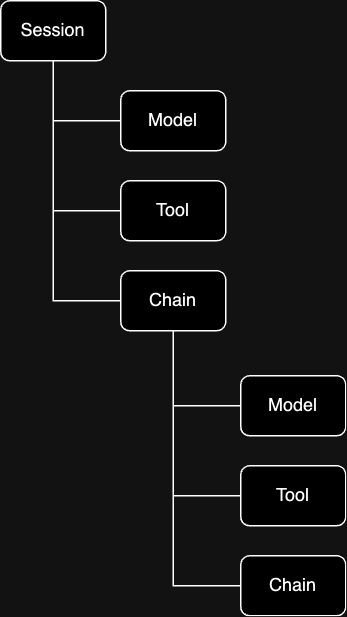
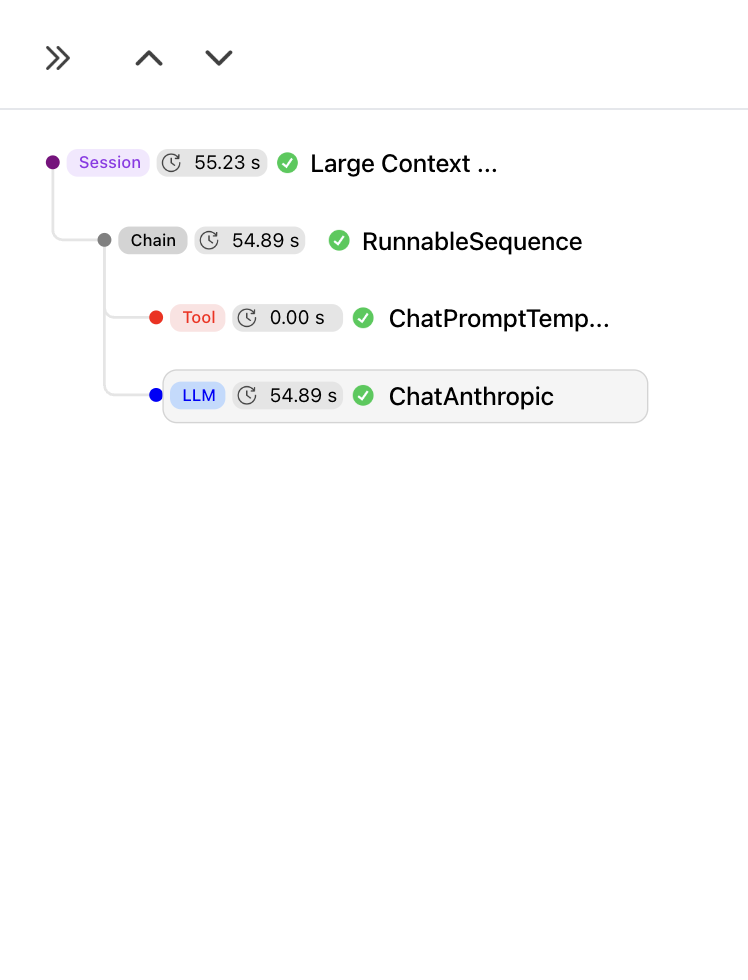
Sessions
The root of every tree is a session. A session is itself an event withevent_type: "session". It shares the same schema as every other event (inputs, outputs, metrics, etc.), but serves a specific role: it carries a session_id that all child events share to belong to the same trace.
Sessions can be single-turn or multi-turn. A single-turn session groups the events from one request. A multi-turn session groups events across an entire conversation. We chose “session” over “trace” for this reason: in traditional distributed tracing, one inbound request equals one trace, and correlating multiple requests into a conversation requires external tooling. In HoneyHive, a session is the correlation unit, and it handles both cases natively.
If you’re coming from APM tools (Datadog, Jaeger, etc.): a session is equivalent to a trace, and an event is equivalent to a span. If you’re coming from LangSmith or LangFuse: the concepts map to runs/traces/spans.
Events
Child events represent discrete operations. Each has anevent_type that determines what it represents:
event_type | What it represents | Examples |
|---|---|---|
model | An LLM API request | GPT-4 completion, Claude message |
tool | An external service or function call | Vector DB search, API call, database query |
chain | A logical grouping of child events | RAG pipeline, agent workflow, multi-step reasoning |
parent_id. A chain event can contain model and tool children, and chains can nest inside other chains. This lets you represent arbitrarily complex execution graphs.
Event Schema
All event types (including sessions) share the same schema:| Field | Description |
|---|---|
event_id | Unique identifier (UUID) |
session_id | Shared identifier that groups all events in the same trace |
parent_id | Links child to parent event (null for the session) |
event_type | "session", "model", "tool", or "chain" |
event_name | Human-readable operation name |
start_time / end_time | Timestamps |
duration_ms | Execution time in milliseconds |
inputs | Input data (messages, parameters) |
outputs | Output data (responses, results) |
config | Configuration (model hyperparameters, prompt template, version, git context) |
metadata | Custom key-value pairs |
metrics | Numeric measurements (latency, tokens, cost) |
feedback | User ratings, corrections |
error | Error details if failed |
Example Wide Event
Example Wide Event
Enriching Traces
Events are automatically populated with inputs, outputs, timing, and instrumentor-specific metadata. You can enrich any event with additional context:- Config: Model hyperparameters, prompt template, app version, git context, or any configuration that defines how the operation ran
- Metadata: Custom key-value pairs (user ID, environment, request ID, etc.)
- Metrics: Numeric scores from evaluators, custom KPIs, or business metrics
- Feedback: End-user ratings, corrections, or thumbs up/down signals
- User properties: User-level attributes (tier, tenant, country) for filtering and segmentation
Enriching Traces
How to add config, metadata, feedback, metrics, and user properties to events
OpenTelemetry Architecture
HoneyHive is built on OpenTelemetry (OTel). The SDK wraps an OTelTracerProvider and exports spans via OTLP.
This means:
- Any OTel-compatible instrumentor works with HoneyHive
- Traces follow W3C Trace Context and are portable to other backends
- You can export to HoneyHive and your existing backend simultaneously by adding multiple span processors
How HoneyHive Captures Data
When your application runs, data flows through several layers before reaching the HoneyHive dashboard. Your code calls an LLM provider as usual. The instrumentor (e.g. OpenAI instrumentor) intercepts that call, records the request and response as OTel span attributes, and the HoneyHive exporter sends them to the API via OTLP when each span completes.Handling sensitive data: Instrumentors capture full request and response payloads for your LLM calls, which can include PII (names, emails, phone numbers, and similar fields). Redact or mask sensitive values in your application code before data reaches the LLM call. For organizations with strict compliance requirements, HoneyHive also offers self-hosted deployments.
Semantic Conventions
HoneyHive uses the official OTel GenAI semantic conventions as its primary standard for AI-specific attributes:| Attribute | Description |
|---|---|
gen_ai.system | AI provider ("openai", "anthropic") |
gen_ai.model | Model identifier ("gpt-4", "claude-3-opus") |
gen_ai.usage.prompt_tokens | Input token count |
gen_ai.usage.completion_tokens | Output token count |
BYOI: Bring Your Own Instrumentor
The HoneyHive SDK itself has zero dependencies on AI libraries. Instrumentors (the packages that know how to trace OpenAI, Anthropic, etc.) are installed separately. This means the core SDK never conflicts with your application’s dependency versions, and you only install instrumentors for the providers you actually use. For setup, see the Quickstart or individual Integration Guides.Context Propagation
Within a single process, trace context flows automatically. Child events created inside a traced function are linked to their parent without any manual wiring. Across service boundaries, context propagates via W3Ctraceparent headers. The client injects trace context into outgoing HTTP headers; the server extracts it from incoming headers. All events on the server side then join the same session as the client.
The trace ID threads through every hop. In HoneyHive, all events from all services appear in a single session, giving you a unified view of the entire request.
For implementation details, see Distributed Tracing.
Multi-Instance Tracing
HoneyHive supports multiple tracer instances in a single application. Each instance maintains its own session context and configuration, and can target a different project. This is relevant for multi-tenant platforms, environment-based routing, A/B testing, or isolating traces from different agents in a multi-agent system. Each tracer instance has its own OTelTracerProvider and span processor pipeline. Instances do not share context.
For setup patterns, see Multi-Instance Tracing.
Sampling
High-volume applications can use sampling to control cost and overhead. HoneyHive traces asynchronously and batches span exports, so overhead is minimal, but at very high volumes you may want to selectively trace:- Always trace errors and high-priority requests
- Always trace premium or flagged users
- Sample a percentage of regular traffic