

Key characteristics of HoneyHive evaluators
HoneyHive provides a flexible and comprehensive evaluation framework that can be adapted to various needs and scenarios:Development Stages
- Offline Evaluation: Used during development and testing phases, including CI/CD pipelines and debugging sessions. You build test suites of curated scenarios (with or without ground truths) and run them via
evaluate(). Evaluators can be client-side (run in your code) or server-side (run on HoneyHive after trace ingestion). - Online Evaluation: Evaluators that run automatically on ingested traces to continuously monitor quality. When you enable a server-side evaluator and configure event filters, it runs on all matching traces — both production and experiment — without any code changes.
For an example of an offline evaluation with client-side evaluators, see how to run an experiment here.
Implementation Methods
Evaluators can be implemented using three primary methods:- Python Code Evaluators: Custom functions that programmatically assess outputs based on specific criteria, such as format validation, content checks, or metric calculations.
- LLM-Assisted Evaluators: Leverage language models to perform qualitative assessments, such as checking for coherence, relevance, or alignment with requirements.
- Domain Expert (Human) Evaluators: Enable subject matter experts to provide direct feedback and assessments through the HoneyHive platform.
Python and LLM evaluators can run client-side (as functions passed to
evaluate(), scored in your own code) or server-side (configured in HoneyHive). For experiments, the client-side path needs no server setup - see Client-Side Evaluators. Human evaluators are server-side only.Not sure where to start? Browse the Evaluator Templates gallery for ready-made Python, LLM, and multi-turn conversation evaluators you can copy and adapt.
Execution Environment
Evaluators can be run either locally (client-side) or remotely (server-side), each with its own set of advantages and use cases.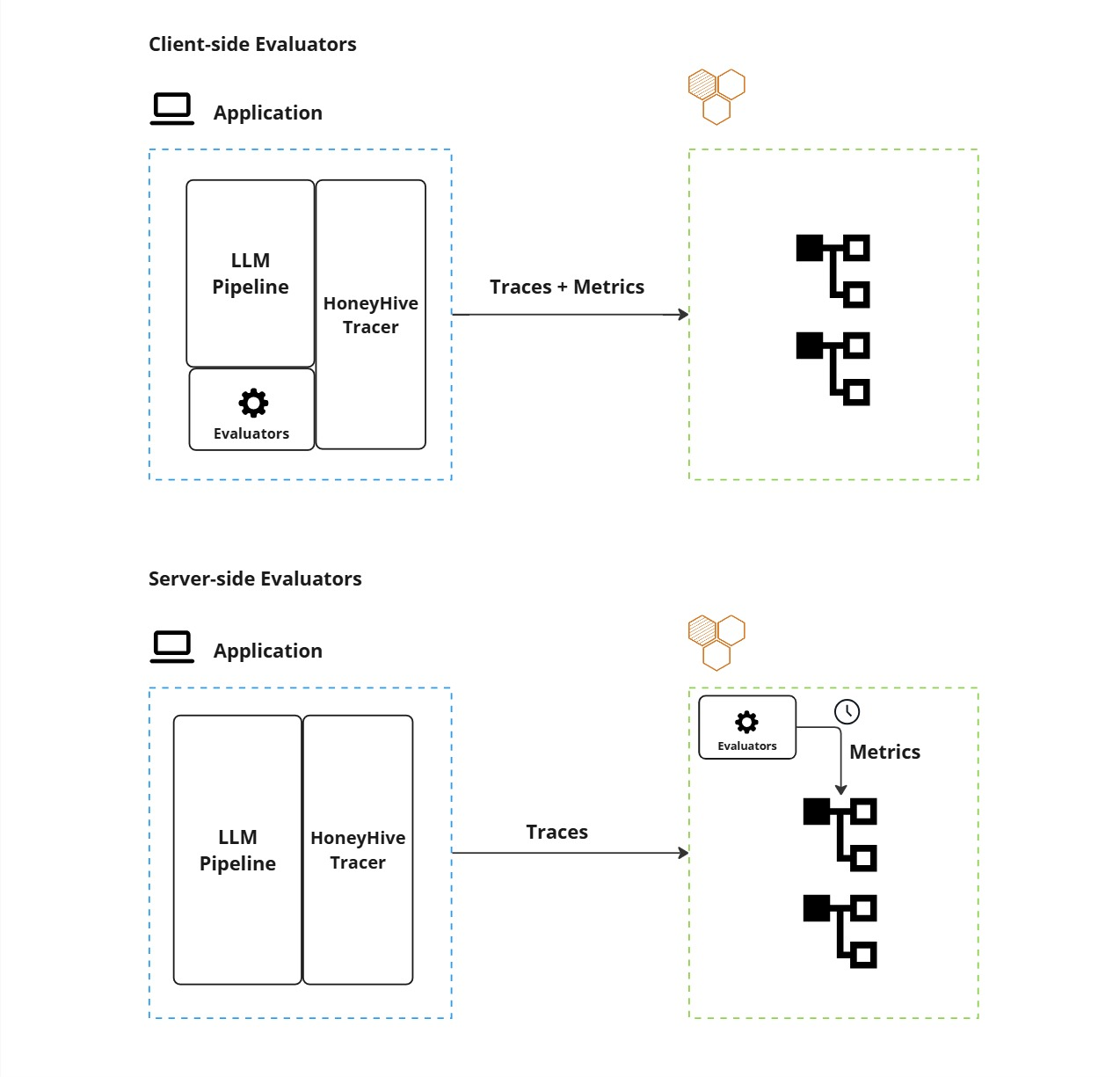
Comparison of Client-side and Server-side Evaluators
- Client-Side Execution: Evaluators run locally within your application environment, providing immediate feedback and integration with your existing infrastructure.
- Pros:
- Quick validations and guardrails
- Offline experiments and CI/CD pipelines
- Real-time format checks and PII detection
- Cons:
- Limited by local resources and lack centralized management.
- Pros:
See Client-side Evaluators for how to use client-side evaluators in both tracing and experiments scenarios.
- Server-Side Execution: Evaluators operate remotely on HoneyHive’s infrastructure.
- Pros:
- Asynchronous processing for resource-intensive tasks
- Centralized management and versioning
- Better scalability for large datasets
- Support for human evaluations and post-ingestion analysis
- Cons:
- Higher latency since results aren’t immediately available.
- Pros:
If you want to know more about how to set up server-side Python, LLM, or Human-based evaluators, please refer to the Python evaluator, LLM Evaluator, Human Annotation pages.
Evaluation Scope
HoneyHive provides flexible granularity in evaluation, allowing you to:- Assess entire end-to-end pipelines
- Evaluate individual steps within your application flow
- Monitor specific components such as model calls, tool usage, or chain execution
- Track and evaluate sessions that group multiple operations together
For code examples showing how to add metrics at different scopes, see Client-Side Evaluators and Custom Metrics.