

cursor-sdk-honeyhive cookbook to trace Cursor agent runs in HoneyHive. We plan to add first-class support through an instrumentor package soon.
One Cursor run becomes one HoneyHive session with the agent run, tool calls, and final assistant response.
Cursor’s TypeScript SDK is currently in public beta. Treat this cookbook workflow as experimental until package support is available.
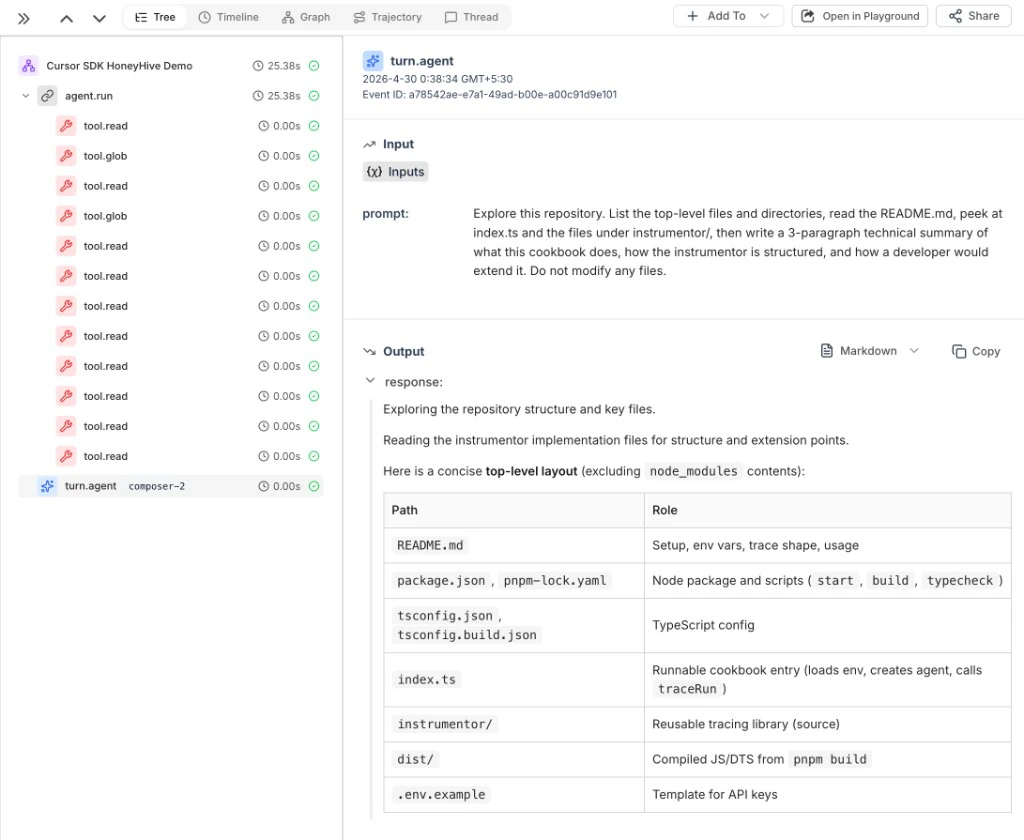
Example: Cursor SDK run trace showing the agent run, tool calls, and final assistant turn in HoneyHive
Quick Start
You need Node.js 20+, pnpm, a Cursor API key, and a HoneyHive API key..env:
Add Tracing
Wrap any CursorAgent with traceRun:
HH_PROJECT, HH_SOURCE, and HH_API_URL to customize the project label, source label, or API endpoint. Set HH_API_URL for self-hosted or dedicated HoneyHive deployments.
What Gets Traced
Each Cursor run appears in HoneyHive as:
The cookbook redacts common secret fields, truncates large payloads, and stores only the workspace folder name instead of the full local path.
Related
Cookbook source
Full runnable Cursor SDK tracing example
Enrich Your Traces
Add user IDs and custom metadata to Cursor SDK traces
Custom Spans
Create spans for business logic around agent calls
Tracing Quickstart
Get started with HoneyHive tracing