Forward Microsoft Copilot Studio agent telemetry to HoneyHive with an Azure Function trace forwarder
Microsoft Copilot Studio is a low-code platform for building copilots and agents on Azure. You don’t instrument the agent directly — it emits telemetry to Azure Application Insights, and an Azure Function forwards that telemetry to HoneyHive.
This integration requires honeyhive Python SDK 1.4.0 or later, which includes the honeyhive.adapters.copilot_studio adapter.
This guide uses an Event Hub for real-time forwarding. Batched export to Blob Storage also works, with a blob trigger in place of the Event Hub trigger.
The adapter converts AppEvents, AppRequests, and AppDependencies records into spans. AppTraces and similar records carry log signals rather than spans and are skipped; AppExceptions aren’t mapped yet. Each converted record becomes one span:
Copilot Studio event
HoneyHive event name
Captured as
BotMessageReceived
user_input
chain event, user message in inputs
BotMessageSend
agent_output
chain event, agent response in outputs
OnErrorLog
agent_error
chain event, error status and error.type
Other events (topics, generative answers, and so on)
agent_action
chain event
HoneyHive ingests every span as a chain event, and each Copilot Studio conversation shows up as a single session. The event name (user_input, agent_output, and so on) distinguishes each kind, with the message content captured in the event’s inputs and outputs.
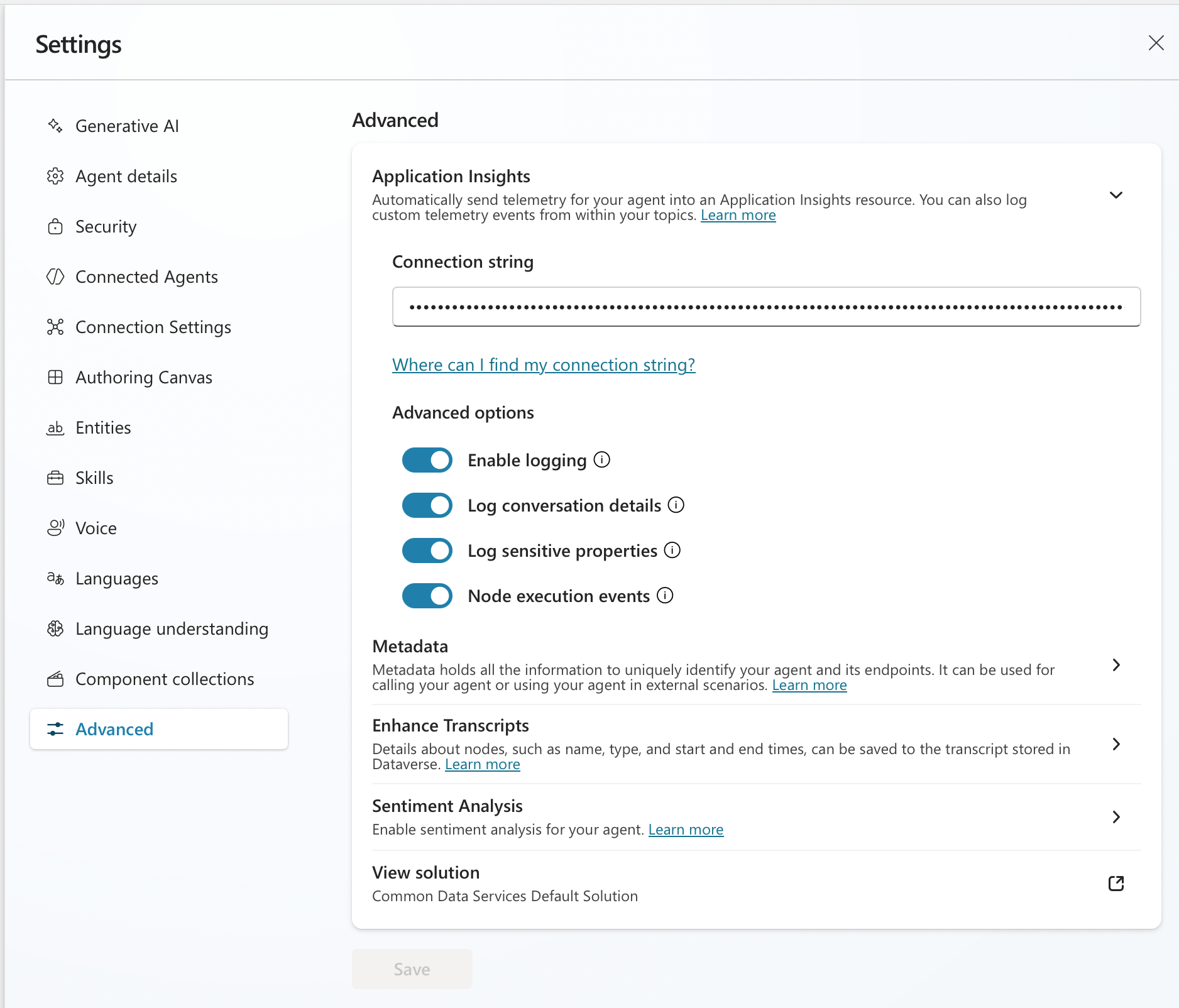
In Copilot Studio, open your agent and go to Settings > Advanced > Application Insights. Paste the connection string from your Application Insights resource, then enable:
Enable logging so incoming and outgoing messages and events are logged
Log conversation details so user ID, user name, and message text are captured
Copilot Studio Settings > Advanced > Application Insights, with the connection string set and logging options enabled
Message text drives HoneyHive inputs and outputs. Without Log conversation details, Copilot Studio logs events but omits message text, so spans arrive with empty inputs and outputs. Review your privacy requirements before enabling it, since it logs message content.
2
Provision Azure infrastructure
The quickest path is azd init with the official Event Hub Functions template, then replace the generated function_app.py with the forwarder code below:
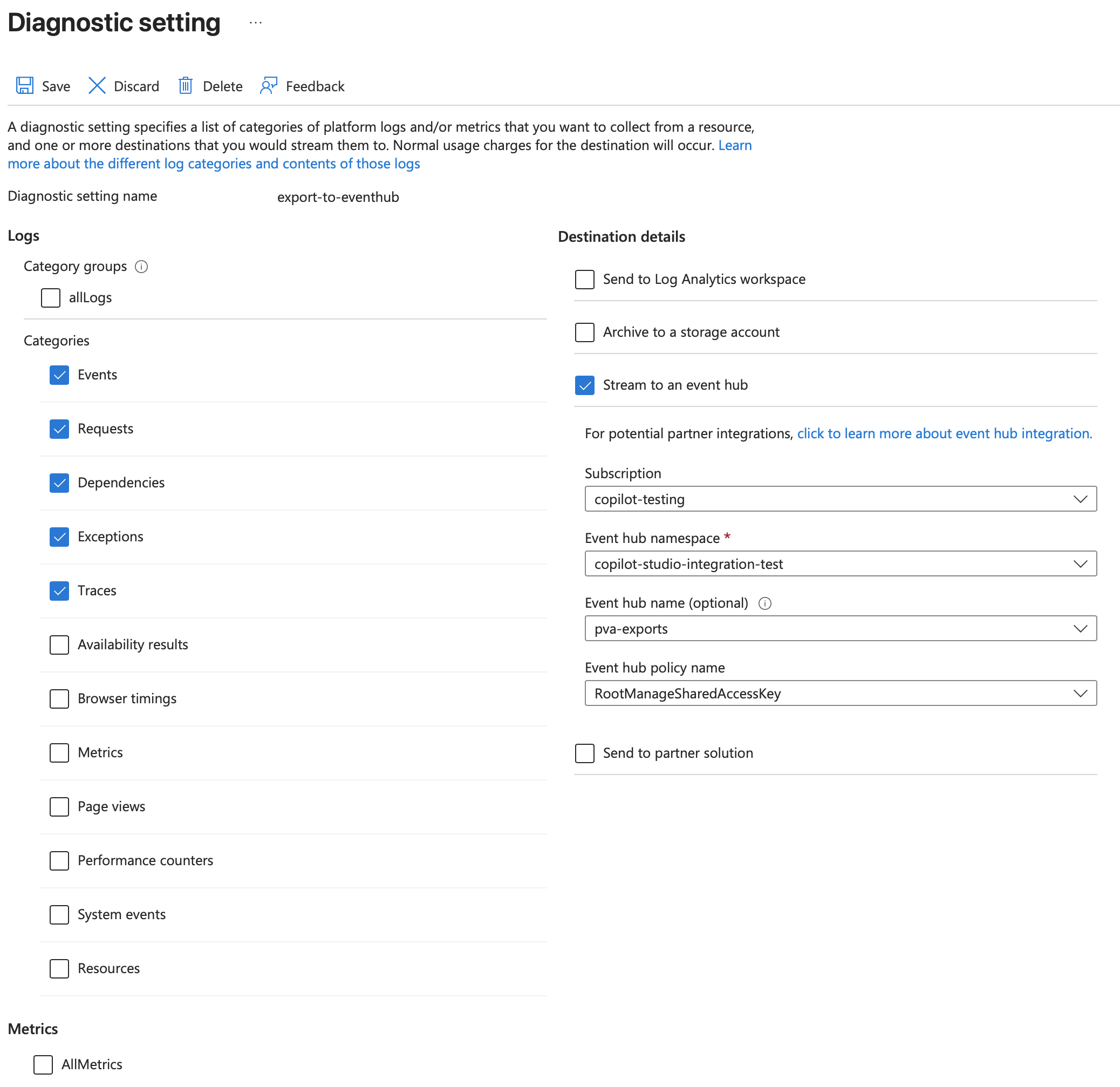
Set the destination to Stream to an event hub and select your Event Hub namespace and hub
Azure diagnostic setting streaming Events, Requests, and Dependencies to an Event Hub.
4
Forward records with the adapter
The Event Hub trigger unpacks each message’s records array, converts them to spans, and exports them:
import jsonimport azure.functions as funcfrom opentelemetry.exporter.otlp.proto.http.trace_exporter import OTLPSpanExporterfrom honeyhive.adapters.copilot_studio import copilot_studio_records_to_spansapp = func.FunctionApp()exporter = OTLPSpanExporter() # reads OTEL_EXPORTER_OTLP_* settings@app.function_name("forward_from_event_hub")@app.event_hub_message_trigger( arg_name="events", event_hub_name="%EVENT_HUB_NAME%", connection="EventHubConnection", consumer_group="%EVENT_HUB_CONSUMER_GROUP%", cardinality=func.Cardinality.MANY,)def forward_from_event_hub(events: list[func.EventHubEvent]) -> None: records: list[dict[str, object]] = [] for event in events: body = json.loads(event.get_body().decode("utf-8")) records.extend(body.get("records", [])) spans = copilot_studio_records_to_spans(records) if spans: exporter.export(spans)
copilot_studio_records_to_spans accepts Azure Monitor diagnostic-export records and returns OpenTelemetry ReadableSpan objects, handling trace and session correlation. For batched export, swap the Event Hub trigger for a blob trigger that reads the archived records and passes the same records list to the adapter.Add these dependencies to the project’s requirements.txt:
Your HoneyHive data plane host with the /opentelemetry path (for example https://api.dp1.us.honeyhive.ai/opentelemetry). The HTTP exporter appends /v1/traces
OTEL_EXPORTER_OTLP_HEADERS
authorization=Bearer <your-honeyhive-api-key>
Event Hub trigger:
Setting
Description
EventHubConnection
Connection string for the Event Hub namespace
EVENT_HUB_NAME
Name of the Event Hub receiving diagnostic exports
EVENT_HUB_CONSUMER_GROUP
Consumer group; defaults to $Default
6
Deploy
azd deploy
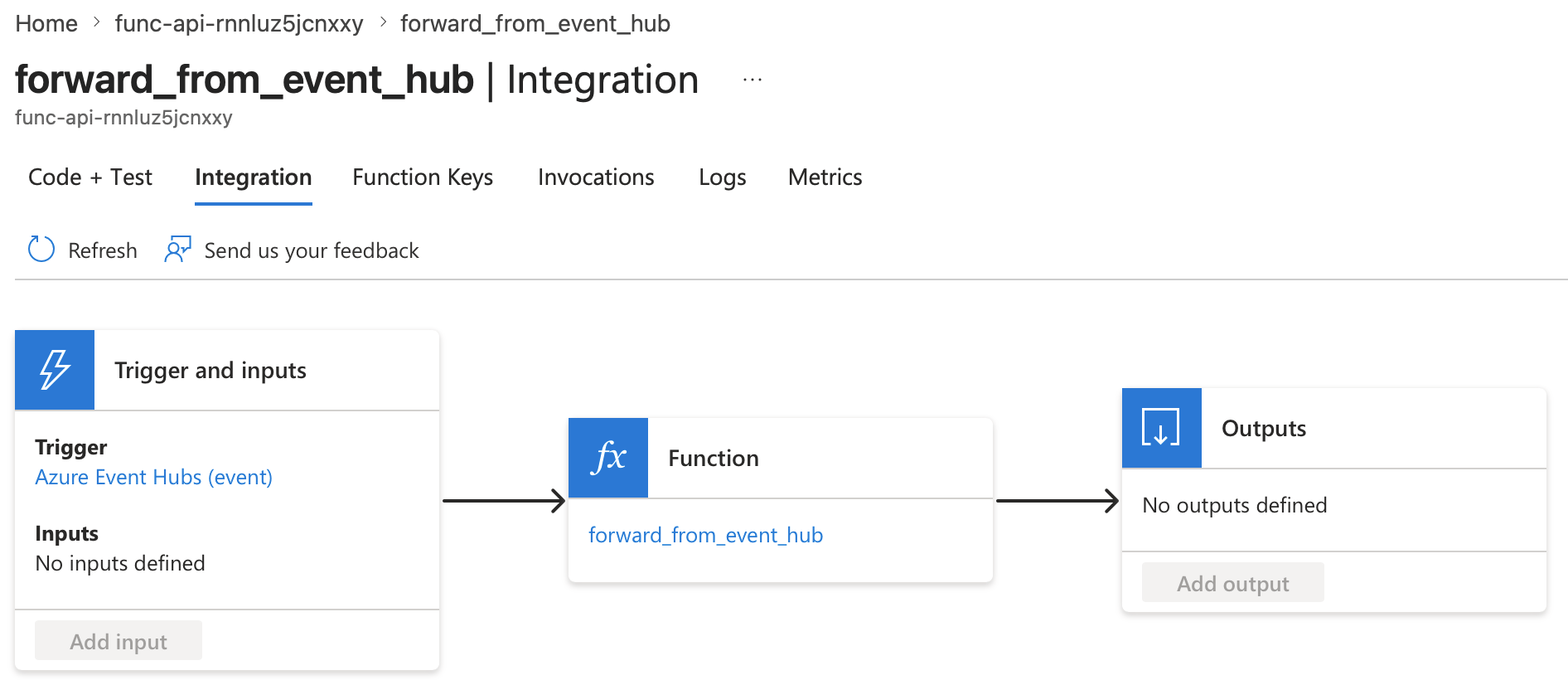
Once deployed, the function shows an Azure Event Hubs (event) trigger wired to your forwarder in the Function App’s Integration view.
The deployed forwarder function with its Azure Event Hubs trigger in the Function App Integration view.
Chat with your Copilot Studio agent (the test canvas works) so it emits telemetry to Application Insights and through the diagnostic export.
2
Check forwarded traces
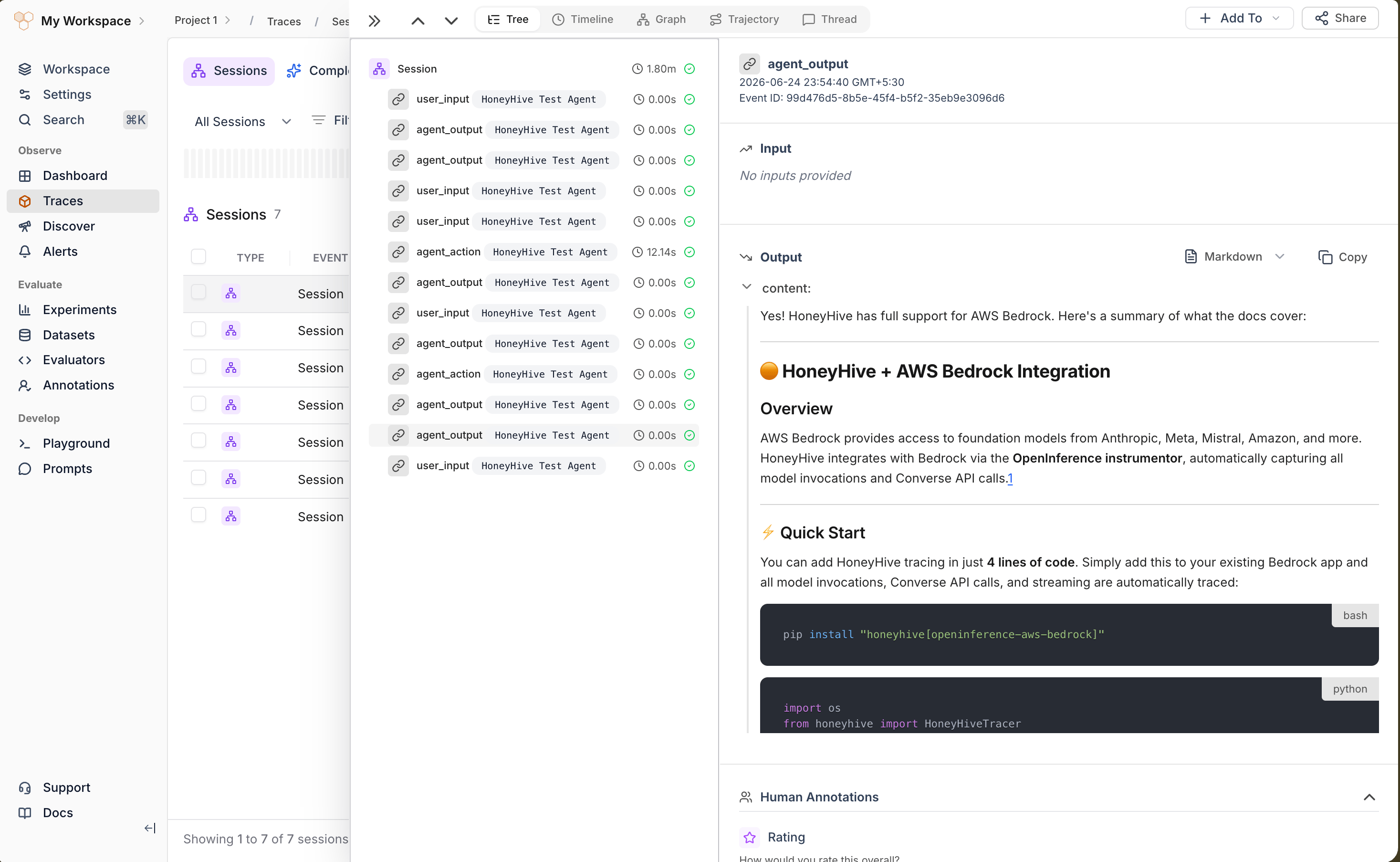
In Traces, search for your agent name. Each conversation appears as one session, with user_input, agent_output, and any agent_error spans carrying the message content as inputs and outputs.
A forwarded Copilot Studio session in HoneyHive Traces, with user_input, agent_output, and agent_action spans and the agent response in the output panel.
Confirm OTEL_EXPORTER_OTLP_ENDPOINT and the authorization=Bearer <your-honeyhive-api-key> header are set on the Function App, and that the API key matches the target project
Function runs but emits no spans
Confirm the diagnostic export includes AppEvents, AppRequests, and AppDependencies. Other categories carry log signals, not span data, and are skipped
Spans arrive with empty inputs/outputs
Enable Log conversation details in Copilot Studio (Settings > Advanced > Application Insights). Without it, message text is not logged, so BotMessageReceived / BotMessageSend spans have no content
Too many empty orchestration spans
Topic and root spans are dropped by default. If you set COPILOT_STUDIO_ADAPTER_KEEP_TOPIC_SPANS=1, unset it to hide them again
Event Hub trigger not firing
Verify EventHubConnection, EVENT_HUB_NAME, and the consumer group, and that the diagnostic setting streams to that hub