

Why Curate from Traces?
| Use Case | Example |
|---|---|
| Regression testing | Capture successful interactions as golden test cases |
| Edge case coverage | Find and preserve unusual inputs that caused issues |
| Domain-specific data | Build datasets from real customer queries |
| Fine-tuning | Curate high-quality examples for model training |
Curate Sessions
Add complete user interactions (sessions) to your dataset.Filter sessions
Go to Log Store → Sessions and apply filters to find relevant sessions. Common filters:
- Date range for recent production data
- Evaluator scores (e.g., low relevance scores)
- User feedback (thumbs down)
- Metadata fields (environment, user segment)
Select sessions
Check the sessions you want to add to your dataset. You can select multiple sessions at once.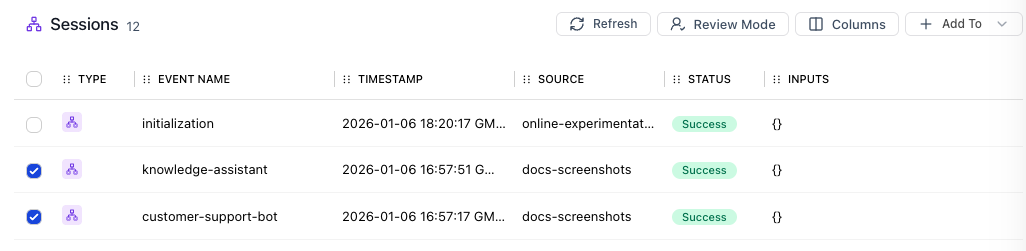
Curate Model Events
Add specific LLM calls (model events) rather than full sessions. Useful when your pipeline has multiple LLM calls and you want to evaluate a specific one.Filter model events
Filter by model name, token usage, latency, or evaluator scores to find relevant completions.
Curate Specific Spans
Add any span in your trace (tool calls, chain steps, etc.) to a dataset.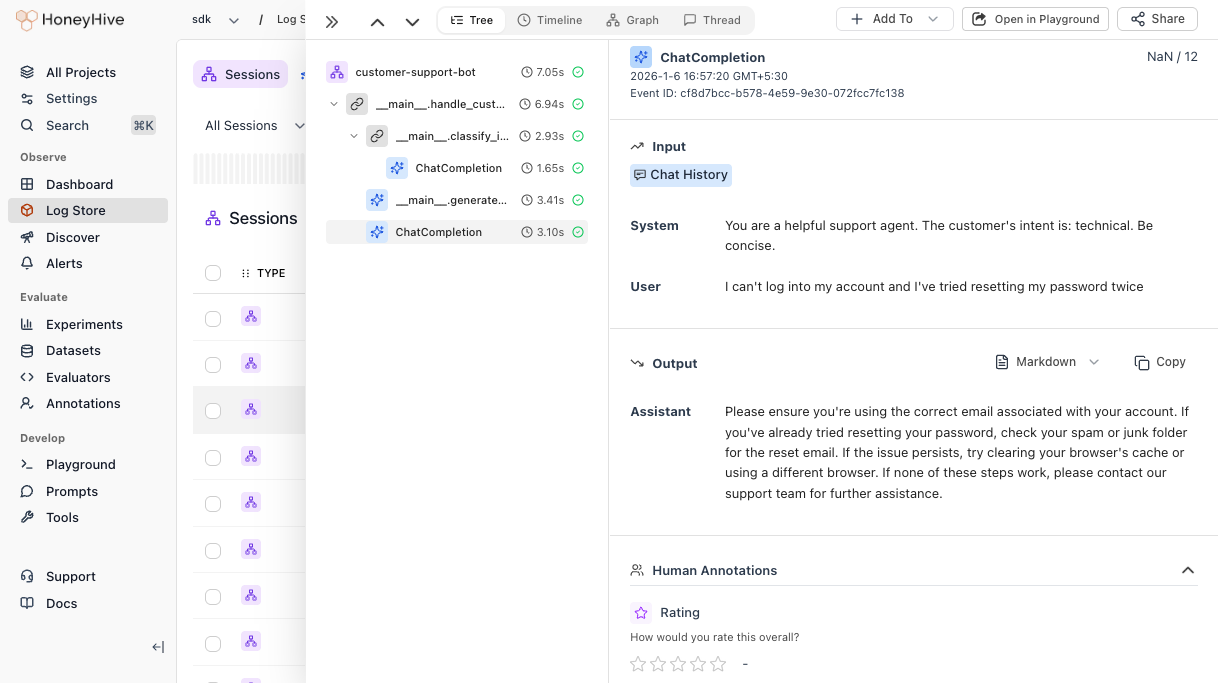
Select span
Click on the specific span you want to curate (e.g., a retrieval step, tool call, or chain).
Best Practices
| Do | Don’t |
|---|---|
| Filter by evaluator scores to find quality examples | Add traces without reviewing them first |
| Include diverse edge cases, not just happy paths | Curate only successful interactions |
| Review curated data periodically for relevance | Let datasets grow unbounded |
| Use descriptive dataset names with dates | Use generic names like “test-data” |