

- Sessions - Navigate between complete traces (end-to-end user interactions)
- Completions - Browse individual LLM requests across all traces
- All Events - View every span and event in your project
Debug LLM requests in Playground
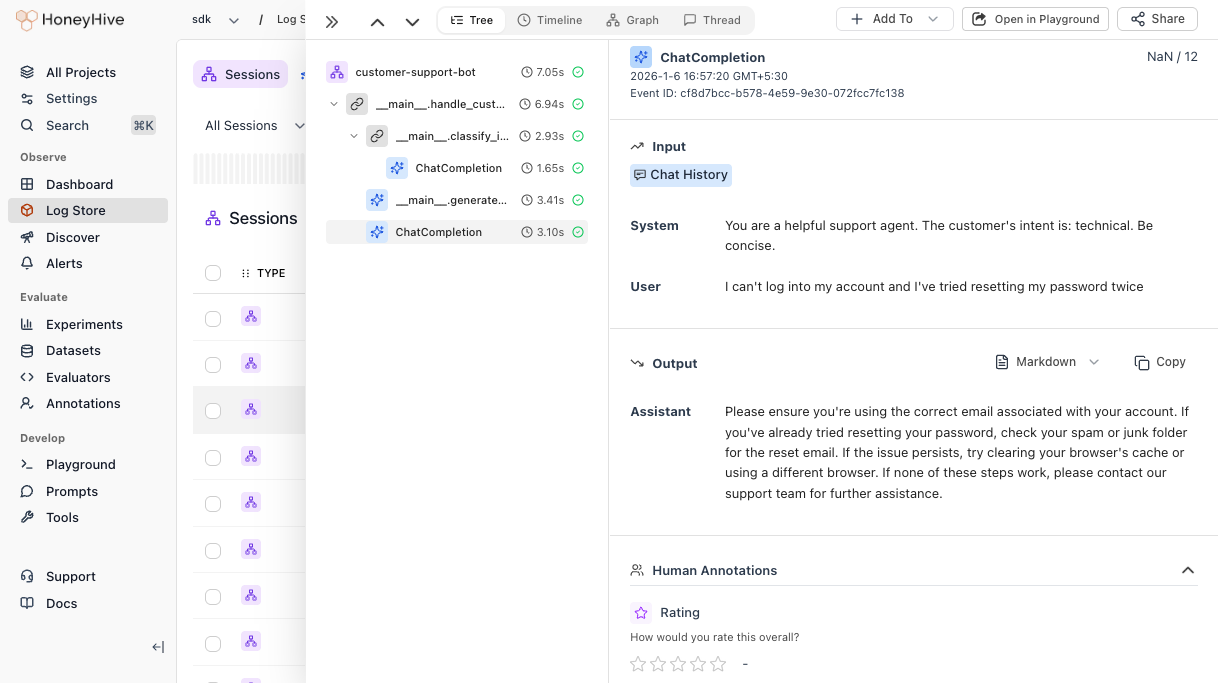
When an LLM output doesn’t look right, you can debug it by opening the model event in the Playground to iterate on your prompt.- Click on any session in the Log Store to open the trace detail view
- In the trace tree, click on the LLM completion you want to debug
- Click the Open in Playground button in the top right
Annotate outputs
For manual review workflows, see Annotation Queues to set up human evaluation criteria and organize events for review.Curate datasets
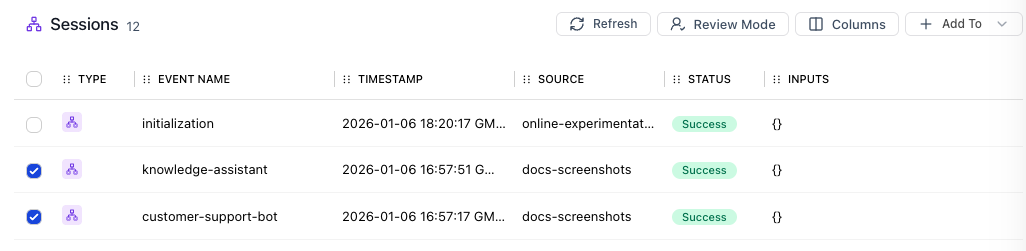
You can add any session, completion, or span to a dataset directly from the UI.- In the Log Store, use filters to find the events you want
- Select one or more rows using the checkboxes
- Click + Add To → Add to Dataset
- Select an existing dataset or create a new one
Share traces
Click the Share button in the top right of any trace to copy a shareable link. Anyone on your team with access to the project can view it.If you share a child event, the link takes viewers directly to that specific event within the trace.