

Reserved Session Fields
Token and cost tracking
HoneyHive automatically rolls up token counts from everymodel event in a session, and sums any cost values you attach to events.
Token counts are extracted from the LLM provider’s response (e.g. OpenAI’s
usage field). If a session contains multiple LLM calls (e.g. a chain or agent loop), all calls are summed at the session level.
To track cost, set metadata.cost on each child event, for example with enrich_span(metadata={"cost": 0.0021}) (see Enrich traces). The session-level metadata.cost is the sum of those values, so setting it on the session event itself has no effect. Sessions where no event carries a cost display no cost.
You can use these fields to filter, alert, and chart in the HoneyHive dashboard - for example, flagging sessions where cost > 0.10 or total_tokens > 10000.
Duration Calculation
Duration is calculated asmax(end_time) - min(start_time) across all events in the session. This works for both synchronous and asynchronous execution:
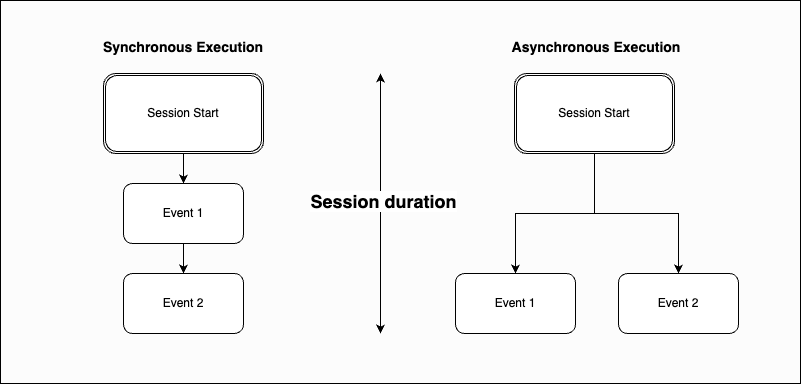
- Synchronous: Events chain sequentially (Session Start → Event 1 → Event 2)
- Asynchronous: Events branch in parallel from Session Start
duration on the session, that value is preserved.
Related
Alerts
Set up alerts based on session metrics
Charts
Visualize session metrics over time