

- The Conversation view (beta, shown by default) reconstructs the turns that actually happened: what the user said, what each agent replied, and the model, tool, and handoff steps in between.
- The Thread view lists every message in the session as a chat transcript, grouped by agent.
Conversation view
The Conversation view reads a session as a sequence of turns. Each user message is followed by a turn divider and the agent’s reply. The divider summarizes what happened in between, counting the model, tool, handoff, event, and error steps, along with the turn’s duration and token usage.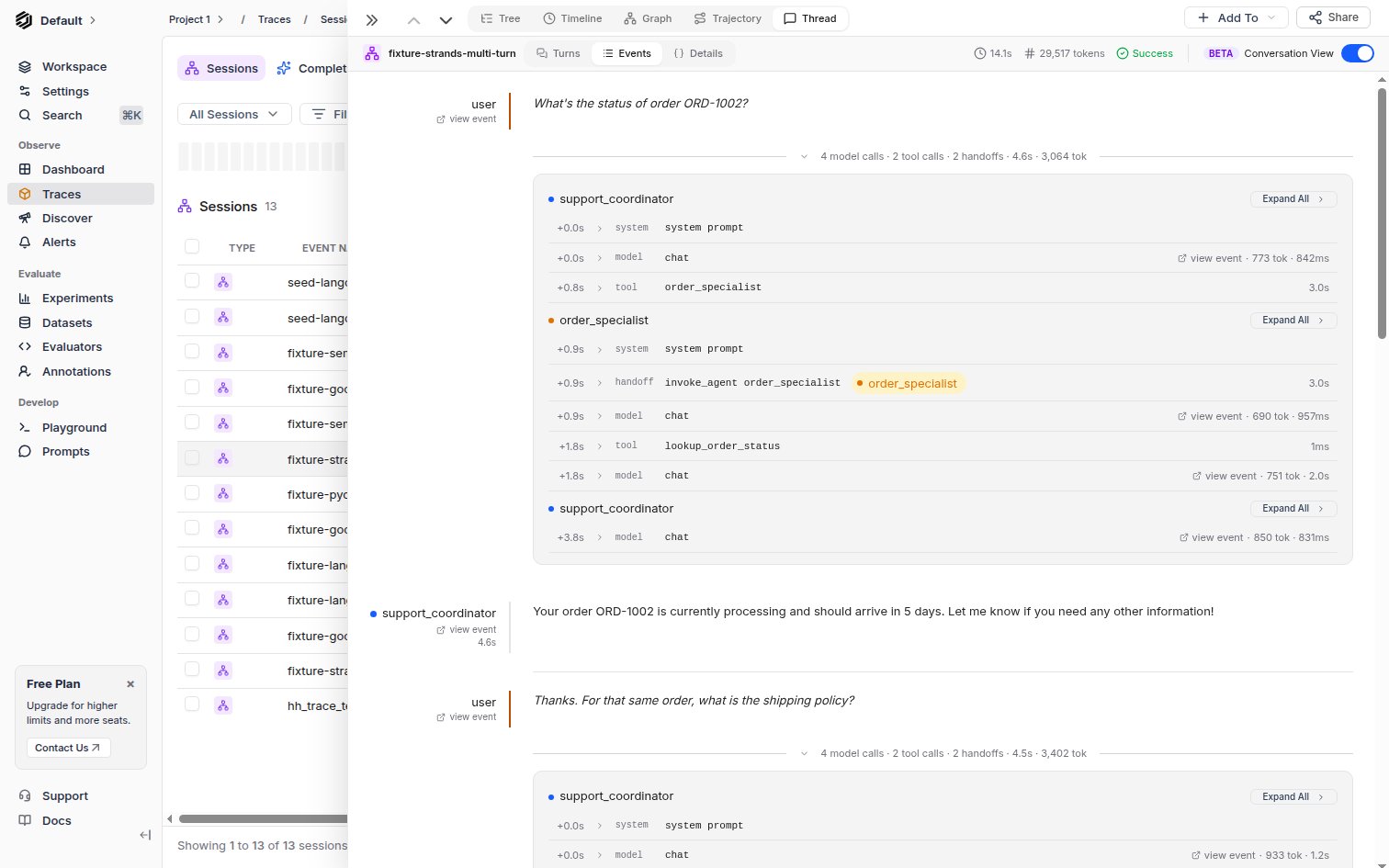
Conversation view at the Events level, showing a multi-agent support session with a handoff between agents
Levels of detail
The toolbar switches between three levels, each adding one more layer of disclosure:- Turns: only the user messages and agent replies, with a collapsed divider per turn.
- Events: expands each divider into the agents that acted, listing each step (system prompt, model call, tool call, handoff) with its offset, tokens, and latency.
- Details: additionally expands each step’s content.
Multi-agent sessions
Each agent keeps a distinct color throughout the conversation, and a handoff step names the agent that took over. This makes it easy to see which agent produced a reply and where control moved between agents.Header and evaluation
The drawer header shows the session’s duration, total tokens, and status. You can rate and comment on the session from the Evaluate this session panel at the bottom; the feedback is saved to the root session event, the same as in the Thread view. Click view event next to a message or step to open that event’s Tree view in the same drawer. If a session cannot be reconstructed as a conversation, the view says why instead of rendering empty. For help correcting the recorded events, see How to troubleshoot Conversation view.Thread view
The Thread view renders traces as a chat-style conversation, showing the back-and-forth between users, assistants, and tools in chronological order. It is especially useful when you want to read every message, including system prompts and tool results, in full.
Thread view showing a multi-agent conversation with system prompts, user messages, and tool calls
Reading the thread
The view is split into two panels:Message list (left)
Lists all messages grouped by agent or conversation turn. Each entry shows:- Role (System, User, Assistant, Tool)
- Preview of the message content
- Agent name and message count when multiple agents are involved
Message detail (right)
Shows the complete content of the selected message, including:- System prompts with full agent instructions
- User messages with input context
- Assistant responses with model output, function calls, and token usage
- Tool results with returned data
- Agent handoffs shown as visual indicators (e.g.,
customer_support -> technical_agent)
Multi-agent conversations
When a trace involves multiple agents, the Thread view groups messages by agent. The left panel shows each agent as a collapsible section with its message count. This makes it easy to follow how agents hand off conversations and what context each agent receives.When to use which
Use the Conversation view to:- Read a session as the turns a user experienced, then drill into one turn
- See at a glance how many model and tool calls each reply took, and how long
- Follow handoffs between agents by color
- Read every message in full, including system prompts and tool results
- Review what system prompts and context each agent received
- Verify that agent responses match the expected behavior for given inputs