

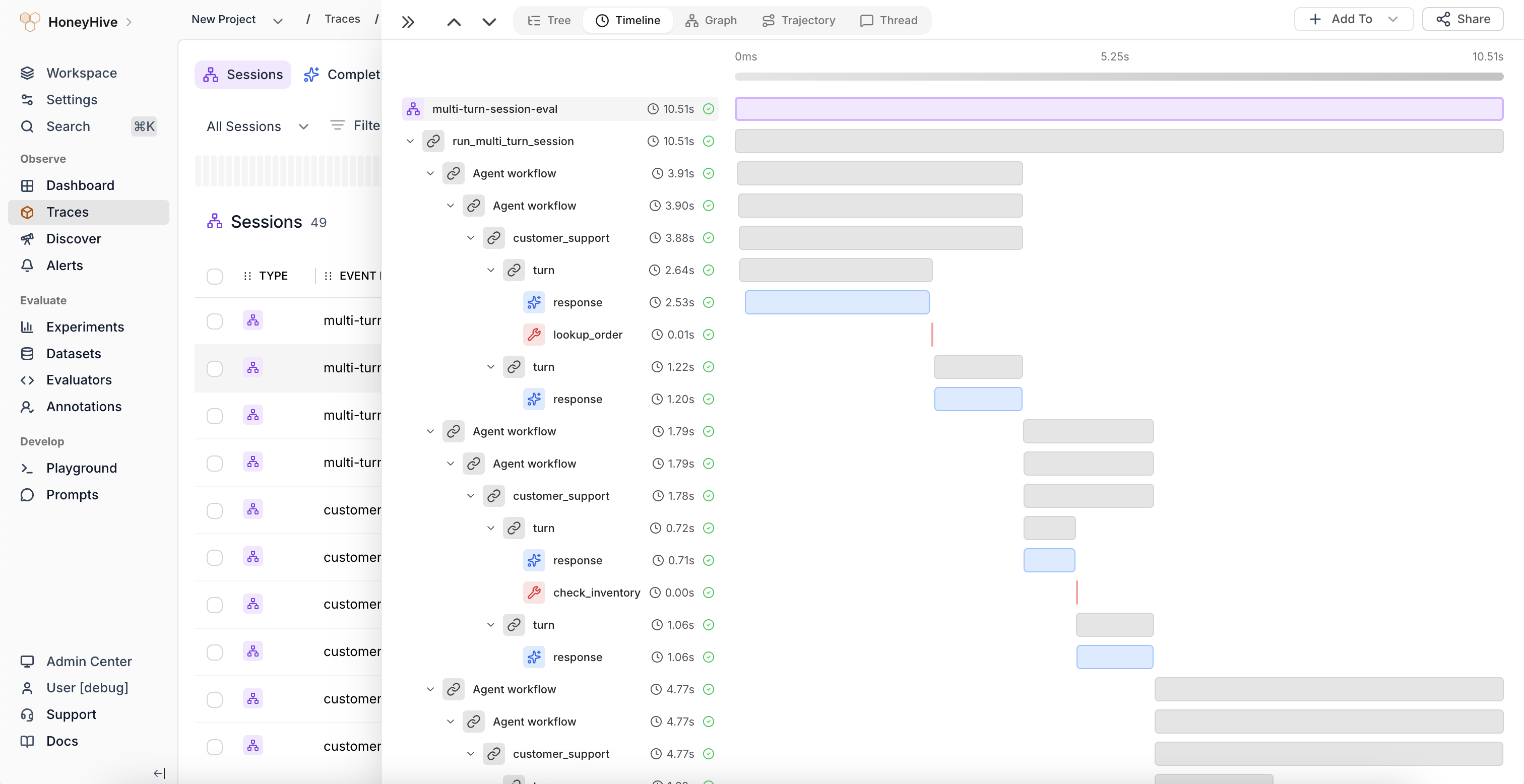
Timeline view showing span durations as horizontal bars with a time axis
Reading the timeline
- Each bar represents a span, with width proportional to its duration
- Bars are color-coded by event type (model, tool, chain)
- Nested spans appear indented under their parent, similar to the Tree view
- The time axis at the top shows absolute timing from trace start to finish
Identifying bottlenecks
Look for:- Long bars - spans that dominate the total trace duration
- Sequential bars - operations that could potentially run in parallel
- Gaps between bars - idle time between spans, which may indicate queuing or scheduling overhead
- Overlapping bars - concurrent operations (e.g., parallel LLM calls)
Session Summary
Below the timeline, the Session Summary shows aggregate stats including total duration, token count, cost, model event count, and success rate. The Evaluations section displays scores from automated evaluators.When to use
Use the Timeline view to:- Diagnose slow traces by finding the longest-running spans
- Understand the concurrency profile of your application
- Spot sequential bottlenecks that could be parallelized
- Compare relative durations across different span types