

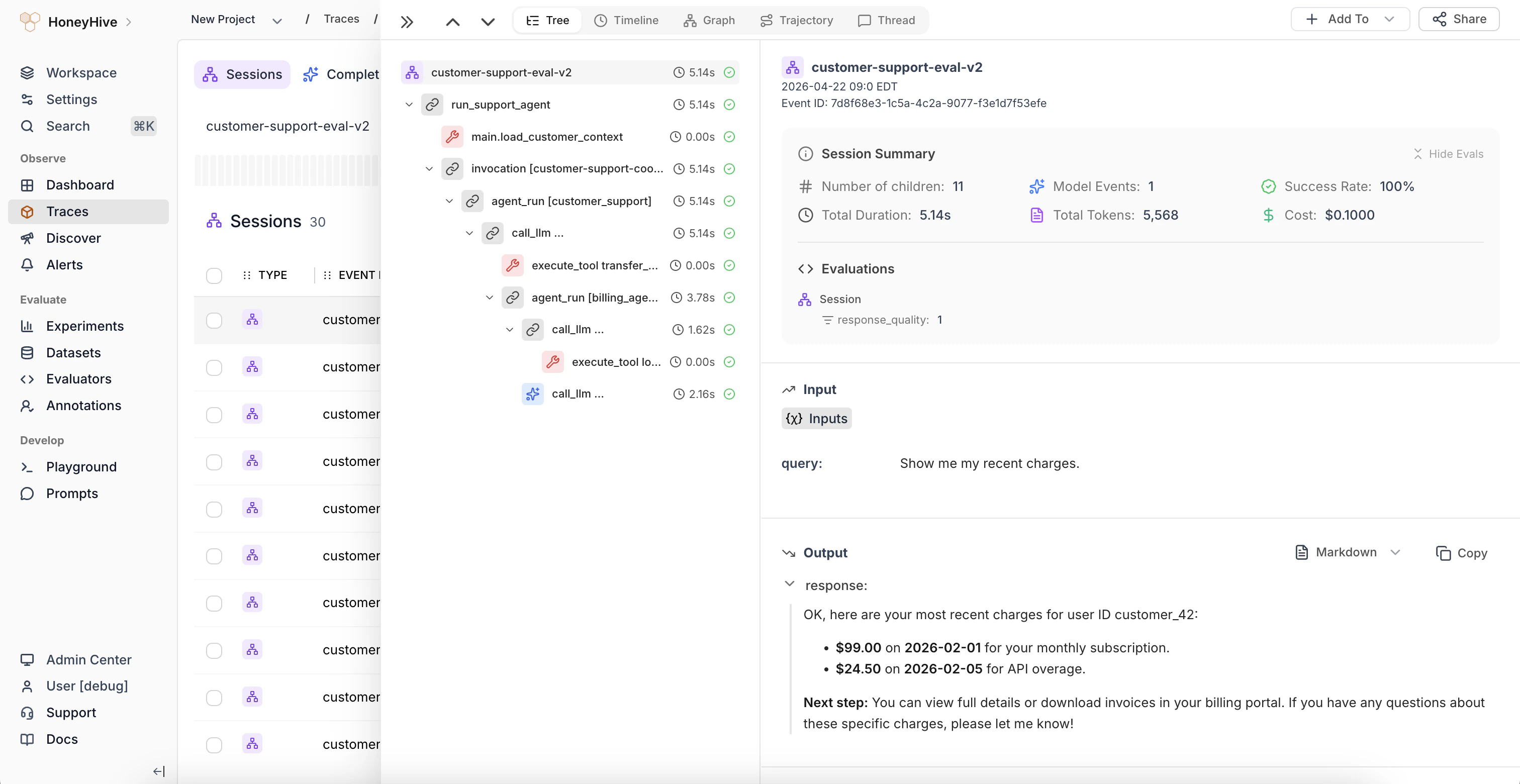
Tree view showing the span hierarchy, session summary, and event details
Reading the tree
Each row represents a single span (event). Indentation shows parent-child relationships - a child span is nested under the span that created it.- Icons indicate the event type: model, tool, or chain
- Duration is shown next to each span name
- Status indicators (green/red) show whether the span completed successfully
Session Summary
At the top of the right panel, the Session Summary shows aggregate stats for the entire trace:- Number of children - total span count
- Model Events - number of LLM calls
- Success Rate - percentage of spans that completed without errors
- Total Duration - end-to-end latency
- Total Tokens - combined token usage across all LLM calls
- Cost - sum of the
metadata.costvalues set on the session’s events
Evaluations
Below the summary, the Evaluations section displays scores from automated evaluators and human feedback. When the same evaluator runs on multiple child spans, results are grouped with count, average, min, and max. Click a grouped metric to expand per-span values.When to use
Use the Tree view to:- Understand the full execution flow of a request
- Find which specific span produced an unexpected output
- Check inputs and outputs at each step in the pipeline
- Review evaluation scores for individual spans